
In 2025, choosing the best smart light switches means considering compatibility with your smart home ecosystem, wiring requirements, and safety features. I recommend options like the Kasa Smart Switches, Tapo, and Leviton that support 2.4GHz Wi-Fi, offer easy installation, and work with Alexa, Google, or Apple. Many models also support scheduling and voice control, making your home smarter and more convenient. Keep exploring to find the perfect fit for your needs and home setup.
Key Takeaways
- Compatibility with major smart home platforms like Alexa, Google, Apple, and SmartThings ensures seamless integration.
- Supports remote control, scheduling, and automation features for enhanced home automation.
- Requires neutral wiring and single-pole setup; professional installation may be needed for complex wiring.
- Certifications such as UL and FCC guarantee safety, reliability, and compliance with electrical standards.
- Wi-Fi (2.4 GHz), Zigbee, or Z-Wave support offers flexible connectivity options for various home ecosystems.
Kasa Smart Light Switch HS200P3, Single Pole, 2.4GHz Wi-Fi, Pack of 1


If you’re looking for a reliable smart switch that simplifies remote lighting control, the Kasa Smart Light Switch HS200P3 is an excellent choice. It’s designed for single-pole setups and requires a neutral wire, making installation straightforward if you have the necessary wiring. Connecting via 2.4 GHz Wi-Fi, it’s compatible with Alexa and Google Assistant, allowing hands-free control. You can easily manage your lights, ceiling fans, or fixtures remotely through the Kasa or Tapo app. Plus, you can set schedules, timers, and even enable ‘away mode’ to enhance security. Trusted by millions, it’s a safe, convenient addition to any smart home.
Best For: homeowners seeking an easy-to-install, remote-controlled smart light switch compatible with Alexa and Google Assistant.
Pros:
- Easy app-guided installation with clear step-by-step instructions
- Compatible with 2.4 GHz Wi-Fi, Alexa, and Google Assistant for hands-free control
- Enables scheduling, timers, and away mode for automation and security
Cons:
- Requires neutral wire for installation, which may not be available in all homes
- Electrical knowledge recommended; professional installation advised for complex wiring
- Limited to single-pole setups; not suitable for multi-way or three-way switches
Kasa Smart Light Switch HS200, Single Pole, Wi-Fi Light Switch

The Kasa Smart Light Switch HS200 is an excellent choice for homeowners seeking an easy-to-install, reliable Wi-Fi switch that works seamlessly with voice assistants. It’s designed for single-pole setups and requires a neutral wire, making installation straightforward with the Kasa or Tapo app’s step-by-step guidance. Operating on 2.4 GHz Wi-Fi, it integrates smoothly with Amazon Alexa and Google Assistant, allowing hands-free control. With UL certification and trusted by over 4 million users, it offers secure operation. You can remotely monitor and schedule your lighting, enhancing convenience and security whether you’re home or away. Its compact design fits easily into standard wall plates.
Best For: homeowners seeking an easy-to-install, reliable Wi-Fi light switch that integrates seamlessly with voice assistants and enhances home security.
Pros:
- Easy app-guided installation suitable for DIY with neutral wire requirement
- Compatible with Amazon Alexa and Google Assistant for hands-free control
- Supports scheduling, timers, and ‘away mode’ for added convenience and security
Cons:
- Requires a neutral wire, which may not be available in all homes
- Limited to single-pole setups; not suitable for multi-way switches
- Operates only on 2.4 GHz Wi-Fi, not compatible with 5 GHz networks
Kasa Smart 2-Gang Wi-Fi Light Switch (HS200-2)

For those seeking a sleek, dual-control solution in their smart home, the Kasa Smart 2-Gang Wi-Fi Light Switch (HS200-2) stands out thanks to its ability to manage two separate circuits with a single, stylish design. It features a flush, modern look and is compatible with Alexa, Google Assistant, and Samsung SmartThings, allowing voice control. Installation is straightforward, requiring a neutral wire and no complex wiring. Using the Kasa or Tapo app, you can control lights remotely, set schedules, and enable security features like Away Mode. Certified by UL, it offers reliable, seamless control, enhancing both functionality and aesthetics in your home.
Best For: homeowners seeking a stylish, dual-control smart switch with easy installation, remote control, and compatibility with major voice assistants.
Pros:
- Controls two separate circuits with a sleek, flush design for modern aesthetics
- Compatible with Alexa, Google Assistant, and Samsung SmartThings for voice control
- Easy to install with app-guided instructions and no hub required
Cons:
- Requires neutral wire; may need professional installation if unfamiliar with wiring
- Only supports 2.4 GHz Wi-Fi networks, limiting compatibility in some setups
- Lacks advanced dimming or multi-color features, focusing solely on on/off control
TP-Link Tapo Smart Light Switch, 4-Pack

The TP-Link Tapo Smart Light Switch, 4-Pack, stands out for its easy app-guided installation and reliable performance, making it an excellent choice for those who want a straightforward setup without needing a hub. It requires neutral wiring and works with 2.4 GHz Wi-Fi, Alexa, and Google Home, ensuring seamless voice and remote control. The Tapo app guides you through setup with step-by-step instructions, and you can manage your lights from anywhere. Plus, features like scheduling, timers, and Away Mode boost security. Trusted by over 8 million users and UL certified, this pack offers safety, convenience, and affordability in a simple package.
Best For: homeowners and DIY enthusiasts seeking an easy-to-install, reliable smart switch to control lighting remotely and enhance home security.
Pros:
- Easy app-guided installation with clear step-by-step instructions
- Compatible with Alexa, Google Home, and 2.4 GHz Wi-Fi for seamless voice and remote control
- Includes scheduling, timers, and Away Mode for added convenience and security
Cons:
- Requires neutral wiring, which may not be available in all homes
- No hub needed but may need technical familiarity for electrical wiring setup
- Only compatible with 2.4 GHz Wi-Fi, not 5 GHz networks
Kasa Smart Dimmer Switch HS220P3, 3-Pack

If you’re looking for an easy way to upgrade your lighting with smart controls, the Kasa Smart Dimmer Switch HS220P3, 3-Pack offers a convenient solution. It’s compatible with Alexa and Google Home, so you can control your lights with just your voice. No hub is needed—just connect directly to your 2.4GHz Wi-Fi network. The setup is straightforward with the Kasa app’s step-by-step instructions. With dimming from 0% to 100%, you can create the perfect ambiance or schedule lights to turn on and off automatically. Plus, remote control from anywhere makes managing your home lighting effortless and smarter.
Best For: those seeking an easy, hub-free smart dimmer switch compatible with Alexa and Google Home for convenient voice and remote control.
Pros:
- Easy to install with app-guided setup and step-by-step instructions
- Compatible with Alexa and Google Home for hands-free voice control
- No hub required; connects directly to 2.4GHz Wi-Fi network
Cons:
- Requires neutral wire for installation, which may not be available in all homes
- Limited to single-pole wiring setups
- Dimming performance may vary depending on bulb compatibility
TP-Link Tapo Matter Smart Light Switch (2-Pack)

With support for the Matter protocol, the TP-Link Tapo Smart Light Switch (2-Pack) guarantees seamless compatibility across all major smart home platforms like Apple Home, Alexa, Google Home, and Samsung SmartThings. This means you can control your lights from any device or app without hassle. It offers local LAN communication, so it works even if your internet is down. Designed for standard wiring with a neutral wire, it supports scheduling and timers for automation. Easy to install with the Tapo app, it’s UL certified for safety and comes with a 2-year warranty. Plus, it’s compatible with voice commands, making your home smarter and more convenient.
Best For: homeowners seeking a reliable, easy-to-install smart light switch compatible with multiple smart home platforms and local control.
Pros:
- Supports Matter protocol for seamless compatibility with Apple Home, Alexa, Google, and Samsung SmartThings
- Enables local LAN communication, ensuring functionality even without internet access
- Easy app-guided installation with UL certification for safety and durability
Cons:
- Requires neutral wire and 2.4 GHz Wi-Fi, which may not be available in all homes
- Installation may require professional electrician assistance for those unfamiliar with electrical wiring
- Limited to single-pole wiring setups, not suitable for multi-way switches
Leviton Decora Smart Wi-Fi Switch (2nd Gen)

For anyone seeking a reliable and versatile smart switch, the Leviton Decora Smart Wi-Fi 2nd Gen stands out as a top choice. It supports up to 15A and 3/4 HP, making it suitable for lights, fans, and motors. The switch works with various loads like LED, CFL, incandescent, and fluorescent bulbs. It supports single pole and 3-way setups, even wire-free via the DAWSC switch. Operating on 2.4 GHz Wi-Fi without a hub, it offers remote control, scheduling, and voice commands through Google, Alexa, or Siri. Easy to install and compatible with other Decora devices, it truly enhances home automation and convenience.
Best For: homeowners seeking a reliable, easy-to-install smart switch to control lighting, fans, and motors without the need for a hub.
Pros:
- Supports up to 15A and 3/4 HP, suitable for a variety of loads including lights and appliances
- Compatible with multiple smart home platforms (Google Assistant, Alexa, Siri) and supports voice control
- Easy to install with guided setup via the My Leviton app and compatible with wired or wire-free 3-way configurations
Cons:
- Requires a neutral wire for installation, which may not be available in all homes
- Limited to 2.4 GHz Wi-Fi networks, not compatible with 5 GHz bands
- Firmware updates for Matter support are needed for full interoperability, which may require app updates and time
TREATLIFE Smart Light Switch 4 Pack
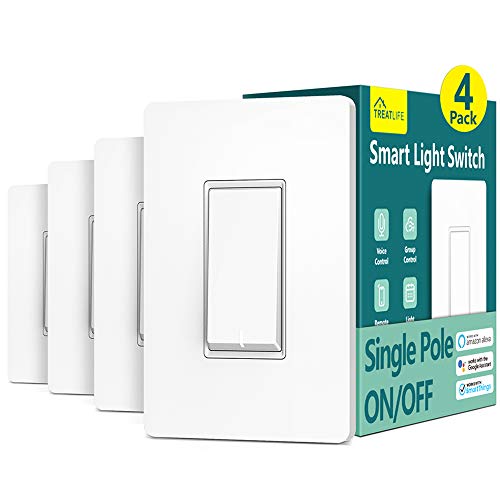
The TREATLIFE Smart Light Switch 4 Pack is an excellent choice for homeowners seeking reliable, easy-to-install smart switches that work seamlessly with popular voice assistants. Designed for single-pole circuits, it requires a neutral wire and supports only 2.4GHz WiFi, not 5GHz. It’s rated up to 1250W, with no dimming feature, but offers straightforward installation with clear instructions and included wall plates. It integrates smoothly with Amazon Alexa, Google Assistant, and SmartThings, allowing voice control. You can also manage your lights remotely via the Smart Life app, set schedules, monitor status, and automate lighting for security and energy savings.
Best For: homeowners seeking a reliable, easy-to-install smart switch compatible with voice assistants and capable of remote control and automation.
Pros:
- Seamless integration with Amazon Alexa, Google Assistant, and SmartThings for voice control
- Easy installation with clear instructions and included wall plates, suitable for single-pole circuits
- Supports scheduling, timers, and remote control via the Smart Life app for convenience and energy savings
Cons:
- Requires a neutral wire for installation, which may not be available in all homes
- Supports only 2.4GHz WiFi, not compatible with 5GHz networks
- No dimming functionality available, limiting lighting control options
TP-Link Tapo Matter Smart Light Switch

If you want a smart light switch that offers broad compatibility and reliable performance, the TP-Link Tapo S505 is an excellent choice. It’s UL-certified and designed for single-pole setups, making installation straightforward with neutral wiring and 2.4 GHz Wi-Fi. You can control lights remotely via the Tapo app, set schedules, and monitor status easily. Voice control is seamless through Amazon Alexa and Google Assistant, giving you hands-free operation. Thanks to Matter support, it works smoothly with all major smart home platforms like Apple Home and Samsung SmartThings, even if your internet goes down. It’s a versatile, safe, and convenient addition to any modern home.
Best For: homeowners seeking a reliable, versatile smart light switch compatible with multiple smart home platforms and easy to install.
Pros:
- Broad compatibility with all major smart home ecosystems thanks to Matter support
- UL-certified for safety and reliability
- Easy installation with step-by-step guidance via the Tapo app
Cons:
- Requires neutral wiring and 2.4 GHz Wi-Fi, which may not be available in all homes
- Limited to single-pole installations, not suitable for multi-way switches
- Might require professional installation if unfamiliar with electrical wiring
Kasa Smart Light Switch HS200-LA, Wi-Fi Compatible with Alexa and Google Home

The Kasa Smart Light Switch HS200-LA stands out as an excellent choice for homeowners seeking an easy-to-install, voice-compatible switch that doesn’t require a hub. I appreciate its straightforward setup through the Kasa app, with clear step-by-step guidance. It’s compatible with Alexa and Google Home, allowing me to control my lights hands-free—perfect when my hands are full or I’m entering a dark room. The switch requires a neutral wire and Wi-Fi, but remote control and scheduling features make it incredibly convenient. Plus, its UL certification guarantees safety and reliability. Overall, it’s a smart, user-friendly addition to any modern home.
Best For: homeowners seeking an easy-to-install, voice-compatible smart switch without the need for a hub, with remote control and scheduling capabilities.
Pros:
- Simple app-guided installation with clear instructions
- Compatible with Alexa and Google Assistant for hands-free control
- Remote access and scheduling features enhance convenience and security
Cons:
- Requires neutral wire and 2.4 GHz Wi-Fi, which may not be available in all homes
- No support for multi-way (3-way or more) switch configurations
- Limited to single-pole switching, restricting some wiring setups
Kasa Smart 3-Way Switch HS210 KIT, Wi-Fi Light Switch (2 Pack)

For homeowners seeking seamless control over multiple lighting points, the Kasa Smart 3-Way Switch HS210 KIT stands out as an excellent choice. This pack includes two switches compatible with both 3-way and single-pole setups, perfect for staircases or garages. It requires a neutral wire and operates on 2.4 GHz Wi-Fi, with easy app-guided installation via Kasa or Tapo apps. You can control your lights remotely or through voice commands with Alexa or Google Assistant. Plus, it offers scheduling, timers, and an ‘away mode’ for security. Trusted by millions, it’s a reliable, safe, and versatile smart switch that enhances your home’s convenience.
Best For: homeowners seeking a reliable, easy-to-install smart switch solution for controlling multiple lighting points from one or two locations.
Pros:
- Compatible with both 3-way and single-pole setups for versatile installation
- App-guided setup and remote control via Kasa or Tapo app for convenience
- Supports voice commands with Alexa and Google Assistant, plus scheduling and security features
Cons:
- Requires a neutral wire for installation, which may not be available in all homes
- Operates only on 2.4 GHz Wi-Fi, limiting compatibility with 5 GHz networks
- Professional electrician consultation recommended for complex wiring or unfamiliar users
Amazon Basics Smart Dimmer Switch, Single Pole

When looking to upgrade to smart lighting without adding extra hubs, the Amazon Basics Smart Dimmer Switch, Single Pole, stands out with its seamless Alexa compatibility. It operates on 2.4 GHz Wi-Fi, so no hub is needed, making setup straightforward. You can control your lights hands-free with voice commands or schedule routines via the Alexa app. Installation is simple, requiring neutral wiring, and an instructional video and manual are provided. Plus, you can control your lights remotely from anywhere. This switch offers an easy, reliable way to make your home smarter, all while maintaining a clean, minimalist look with its white design.
Best For: homeowners seeking an easy-to-install, hub-free smart lighting upgrade compatible exclusively with Alexa for hands-free voice control and scheduling.
Pros:
- No hub required, simplifying setup and reducing additional device costs
- Compatible exclusively with Alexa, enabling seamless voice control and routines
- Requires only neutral wiring and supports remote control via the Alexa app
Cons:
- Limited to Alexa ecosystem, not compatible with other smart home platforms
- Requires neutral wiring, which may not be available in all homes
- Only supports single pole installations, not suitable for multi-way switch setups
GHome Smart Wi-Fi Light Switch (4 Pack)

If you’re looking for an affordable and reliable way to upgrade multiple rooms at once, the GHome Smart Wi-Fi Light Switch (4 Pack) offers an excellent solution. Compatible with Alexa and Google Assistant, it lets you control your lights hands-free or remotely via the Smart Life app. You can schedule lights to turn on or off automatically, like at sunset or bedtime, boosting security and convenience. Installation is straightforward with a neutral wire and single-pole setup. Plus, you can group switches for simultaneous control. Certified by UL and FCC, this pack is perfect for upgrading your home’s lighting efficiently and affordably.
Best For: homeowners seeking an affordable, easy-to-install smart lighting solution to control multiple rooms remotely and automate lighting schedules.
Pros:
- Compatible with Alexa and Google Assistant for seamless voice control
- Supports scheduling and automation for enhanced security and convenience
- Easy single-pole installation requiring neutral wire, with group control options
Cons:
- Not suitable for 3-way switch setups
- Requires a neutral wire for installation
- Cannot be used with smart bulbs, only compatible with existing lighting fixtures
Kasa Smart Dimmer Switch HS220, Single Pole, 2.4GHz Wi-Fi Light Switch

The Kasa Smart Dimmer Switch HS220 stands out for those seeking easy, wireless control over their single-pole lighting, thanks to its reliable 2.4 GHz Wi-Fi connectivity. It’s compatible with Alexa, Google Home, Android, and iOS, and doesn’t require a hub, making installation straightforward. The switch needs a neutral wire and is designed for single-pole wiring only. Setup is simple with the Kasa or Tapo app, guiding you through each step. With voice control, scheduling, and dimming features, it offers customizable lighting and convenience. Plus, its UL certification guarantees safety and quality, making it a smart addition to any home.
Best For: those seeking a reliable, easy-to-install smart dimmer switch for single-pole lighting control with customizable brightness and voice integration.
Pros:
- Easy app-guided installation compatible with Kasa and Tapo apps
- No hub required, works seamlessly over 2.4 GHz Wi-Fi with Alexa and Google Assistant
- Features like dimming, scheduling, and Gentle Off for customized lighting and comfort
Cons:
- Requires a neutral wire for installation, limiting compatibility in some homes
- Designed for single-pole wiring only, not suitable for multi-way setups
- May require professional electrician assistance if unfamiliar with electrical wiring
Kasa Matter Smart Light Switch

Looking for a smart light switch that seamlessly integrates with multiple smart home platforms? The Kasa Matter Smart Light Switch supports the Matter standard, making it compatible with Apple Home, Amazon Alexa, Google Home, and Samsung SmartThings. It works smoothly via LAN control, even when offline, and requires a 2.4GHz Wi-Fi connection. With UL certification and a two-year warranty, it’s reliable and safe. You can control it with your voice through Siri, Alexa, or Google Assistant, or remotely via the app. Its advanced scheduling, timer functions, and “Away Mode” make managing your home lighting simple and secure.
Best For: smart homeowners seeking a reliable, cross-platform compatible light switch with advanced scheduling and voice control features.
Pros:
- Supports the widely adopted Matter standard for seamless integration across multiple smart home ecosystems.
- Enables remote control and monitoring via smartphone app, even when offline via LAN.
- Features easy installation with no complex wiring needed, compatible with standard single-pole switches.
Cons:
- Requires a neutral wire for installation, which may not be available in all homes.
- Needs a stable 2.4GHz Wi-Fi connection for optimal performance.
- Limited to standard wall plate size, which may not fit all decor styles or switch configurations.
Factors to Consider When Choosing Smart Light Switches

When selecting a smart light switch, I consider how well it fits into my existing smart home ecosystem and whether it’s compatible with my wiring setup. I also look at control options, installation complexity, and safety certifications to guarantee reliable and secure use. These factors help me choose a switch that’s easy to install, safe, and works seamlessly with my devices.
Compatibility With Ecosystems
Making certain your smart light switch works seamlessly with your existing home ecosystem is essential for a smooth smart home experience. I always check if the switch is compatible with platforms like Alexa, Google Home, Apple HomeKit, or Samsung SmartThings. It’s important that it supports the protocols your ecosystem uses, such as Zigbee, Z-Wave, or Wi-Fi, for reliable integration. I also verify if the switch offers features like voice control, scheduling, or remote access within my preferred ecosystem. If I use multiple systems, I look for multi-platform control options to keep everything connected. Finally, I review the manufacturer’s compatibility list and firmware updates to ensure ongoing support and smooth operation as my smart home evolves. Compatibility is the foundation of a truly integrated smart home.
Wiring Requirements and Compatibility
Choosing a smart light switch isn’t just about features; it also depends on whether the wiring in your home matches the switch’s requirements. First, check if your home has a neutral wire, which many switches need to function properly. Next, verify that the switch’s voltage (usually 100-120VAC) and amperage (up to 15A) align with your system. Compatibility with your smart home ecosystem, like Alexa or Google Assistant, is essential for seamless control. Also, determine if the switch supports single-pole or multi-way setups, matching your existing lighting configuration. Finally, ensure the switch’s Wi-Fi frequency (typically 2.4 GHz) matches your home network for a reliable connection. Taking these factors into account helps you pick a switch that works safely and efficiently.
Control Options and Features
Control options and features are vital factors that can considerably influence how you interact with your smart light switch daily. I look for switches that offer remote control via a smartphone app, so I can adjust lighting from anywhere. Voice command support through Alexa, Google Assistant, or Siri is a huge plus for hands-free convenience. I also consider scheduling, timers, and automation features to boost energy efficiency and security. The control methods matter too—whether physical toggle, app-based, or voice control—so I pick what fits my home automation style. Compatibility with my existing smart home ecosystem, especially protocols like Zigbee, Z-Wave, or Matter, is essential to guarantee seamless integration. These features help me customize my lighting experience and make my home smarter and more responsive.
Installation Complexity
When selecting a smart light switch, understanding your home’s wiring setup is crucial because it directly impacts installation complexity. First, check if your wiring includes a neutral wire, as many smart switches need it for proper operation. Next, consider whether the switch supports single-pole or 3-way configurations, since 3-way setups tend to be more complex to install. Also, examine the switch box to ensure it has enough space and compatible wiring for your chosen model. For more complicated wiring or multi-location setups, professional installation may be necessary. Finally, review the manufacturer’s instructions and compatibility requirements carefully to confirm the switch will work with your existing wiring system. Being thorough at this stage can save time and prevent surprises during installation.
Security and Safety Certifications
Ensuring your smart light switch has the proper security and safety certifications is vital for safe and reliable operation. I look for switches with UL certification, as it confirms they meet recognized safety standards and reduces electrical hazard risks. FCC certification is also important, as it indicates compliance with electromagnetic interference regulations and safe wireless operation. Additionally, I verify that the device offers safety features like built-in surge or overcurrent protection to prevent damage or hazards. It’s essential to confirm the switch complies with local electrical codes to guarantee proper installation and safe use. Lastly, I prefer products backed by manufacturer warranties and clear safety documentation, which provide peace of mind and assurance of proper handling of safety concerns.
Remote Access Capabilities
Have you considered how important it is for your smart light switch to offer reliable remote access? It’s vital that the switch supports control via a dedicated mobile app, so you can manage your lights from anywhere with an internet connection. Compatibility with your preferred voice assistant or smart home system ensures seamless remote voice control. Additionally, check if the switch provides scheduling and automation features accessible remotely—these enhance convenience and security. Reliable Wi-Fi connectivity, preferably on a 2.4 GHz network, is essential for consistent operation. Lastly, look for security certifications and encrypted data transmission to keep your remote access protected from unauthorized access. Ensuring these factors will give you peace of mind and full control over your smart lighting at all times.
Automation and Scheduling
Automation and scheduling are key features to look for in a smart light switch because they allow you to customize your lighting to fit your routine and preferences. I recommend choosing a switch that supports scheduling and timers so you can automate lights based on specific times or events. Make certain the app is user-friendly, enabling you to set multiple schedules for different times or scenarios throughout the day. Compatibility with voice assistants or automation platforms is also crucial, allowing you to trigger routines with a simple voice command. Additionally, remote control capability lets you adjust schedules from anywhere via your smartphone or connected device, providing convenience and energy savings. Prioritizing these features ensures your lighting adapts seamlessly to your lifestyle, making your home smarter and more efficient.
Frequently Asked Questions
How Secure Are Smart Switches Against Hacking Threats?
Smart switches are generally secure, but no device is completely invulnerable. I make sure to keep firmware updated, use strong passwords, and enable two-factor authentication whenever possible. I also connect them to a separate, protected network to reduce risks. While hacking threats are real, following these best practices helps me keep my smart home safer, giving me peace of mind.
Can Smart Switches Operate During Wi-Fi Outages?
Yes, some smart switches can operate during Wi-Fi outages, but it depends on their design. I recommend choosing switches with local control options like physical buttons or Bluetooth connectivity. These allow you to turn lights on or off even if your internet goes down. Keep in mind, however, that remote access and app control won’t work without Wi-Fi. So, pick a switch that balances smart features with reliable local operation.
Are Smart Switches Compatible With All Home Automation Systems?
Smart switches aren’t compatible with all home automation systems, but many are versatile enough to work with popular platforms like Alexa, Google Assistant, and Apple HomeKit. I recommend checking each switch’s specifications before buying, ensuring it supports your existing setup. If you’re using a less common system, look for switches that offer open standards or custom integrations, so you won’t be limited in your smart home experience.
What Is the Typical Installation Process for Smart Light Switches?
Imagine wrestling a tangled jungle of wires—sounds fun, right? I usually turn off the power, remove the old switch, and connect the new smart switch’s wires just like in the instructions. Then, I screw it back in, turn the power on, and sync it with my app. It’s pretty straightforward, but I recommend double-checking the wiring diagram to avoid turning your home into a lightning storm!
How Do Smart Switches Affect Energy Consumption and Savings?
Smart switches help reduce energy consumption by allowing me to automate lighting, ensuring I only use lights when needed. I can schedule lights to turn off automatically or dim them during the day, which saves energy and cuts costs. Plus, I get real-time usage data, so I can identify and adjust inefficient habits. Overall, they make my home more energy-efficient and help me save money on utility bills.
Conclusion
So, which smart switch will truly transform your home? With so many great options, the choice isn’t easy. Will a simple single pole do, or do you need advanced features like dimming or multi-gang control? Whatever you pick, one thing’s certain—your home’s about to get a whole lot smarter. But the real question is, are you ready to take that next step and access a new level of convenience? The future’s just a switch away.