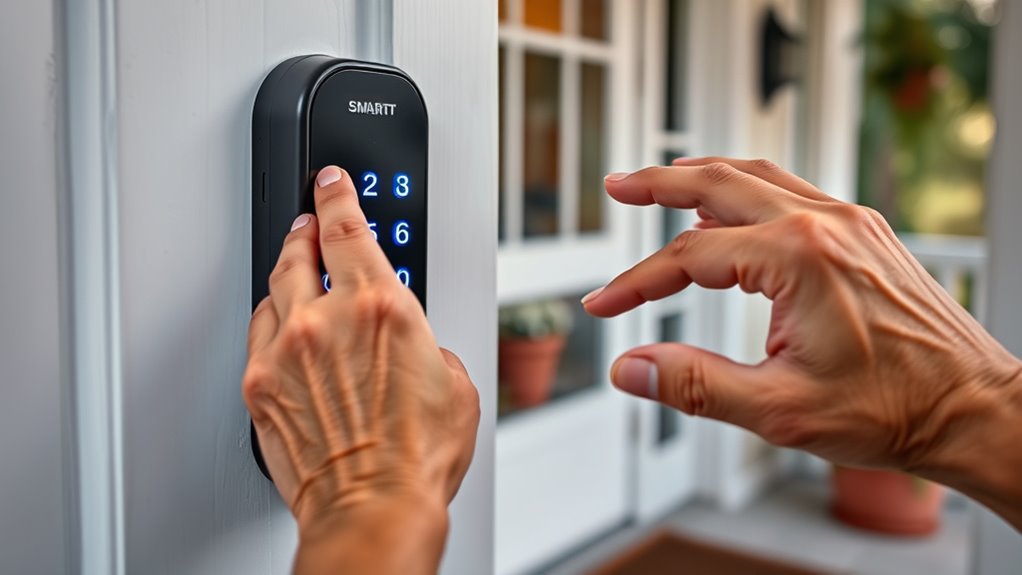

Finding the best smart door lock for seniors involves balancing ease of use, security, and reliability. The Tapo Smart Wi-Fi Deadbolt stands out as a top overall pick thanks to its tactile buttons and auto-lock feature, making it user-friendly for seniors. The Philips WiFi Keypad Door Lock offers keypad access and voice control, ideal for those who prefer keypad entry. Meanwhile, the eufy Security Video Smart Lock combines security with a built-in camera for added peace of mind. Each of these options highlights different strengths but also presents tradeoffs, such as price or installation complexity. Keep reading for a detailed breakdown to help you choose the best lock for your specific needs.

Turn quiet afternoons into listening time
- Thousands of audiobooks, podcasts and originals
- Listen on your phone, tablet or Echo — also offline
- Cancel anytime
Complete the kit


Key Takeaways
- The top-rated locks prioritize ease of use, with tactile buttons and simple interfaces making access straightforward for seniors.
- Built-in cameras and video features are common in higher-end models, providing extra security but often at a higher cost.
- Compatibility with voice assistants like Alexa and Google remains a key factor for hands-free control and convenience.
- Many locks combine multiple access methods—keypad, fingerprint, app control—to accommodate different preferences.
- Durability and weatherproofing are vital for outdoor installations, especially in variable climates.
| Tapo Smart Wi-Fi Deadbolt Door Lock – Keyless Tactile Buttons, Customized Access, Auto-Lock, IP54 Weatherproof, BHMA Grade 3, Compatible with Standard Door Sizes |  | Best Overall for Outdoor Durability and Customization | Battery Life: Up to 200 days in Wi-Fi mode, 300 days in Bluetooth mode | Power: 4xAA batteries included, USB-C port for emergency power | Weatherproof Rating: IP54 | VIEW ON AMAZON | See Our Full Breakdown |
| Philips WiFi Keypad Door Lock with Handle, Built-in WiFi, APP Remote Control, Voice & Fingerprint Unlock, Satin Nickel |  | Best for Ease of Remote Access and Voice Control | Connectivity: WiFi 2.4GHz | Material: Satin Nickel | Handle Set Included: Yes | VIEW ON AMAZON | See Our Full Breakdown |
| Philips WiFi Smart Lock with Front Door Handle Set, Built-in WiFi, APP Remote & Voice Control, Fingerprint Keyless Entry, Satin Nickel |  | Best for Stylish and Remote Access with Integrated Handle | Brand: PHILIPS | Recommended Uses For Product: Front Door, Backyard Door, Office Door, Rental Properties, Smart Home Automation | Number of Pieces: 1 | VIEW ON AMAZON | See Our Full Breakdown |
| myQ Secure View™ 3-in-1 Smart Lock with 2K HDR Video Doorbell Camera, Face Access, Fingerprint, PIN & App Control |  | Best for All-in-One Security with Video and Face Recognition | Design: 3-in-1 Smart Deadbolt, Video Doorbell, Camera | Video Resolution: 2K HDR | Night Vision: Color Night Vision | VIEW ON AMAZON | See Our Full Breakdown |
| Philips Wi-Fi Smart Deadbolt Lock for Front Door, Fingerprint Keyless Entry, Electronic Keypad, App Control, Auto Lock, Compatible with Alexa & Google |  | Best for Versatile Entry and Activity Monitoring | Brand: PHILIPS | Model Number: AK-AZFP-8RAL | UPC: 850081022251 | VIEW ON AMAZON | See Our Full Breakdown |
| eufy Security Video Smart Lock E330, 3-in-1 Camera, Doorbell, and Keyless Entry |  | Best All-in-One Security Device | Security Features: Fingerprint recognition, auto lock | Camera Resolution: 2K HD | Lens Aperture: f/1.6 | VIEW ON AMAZON | See Our Full Breakdown |
| myQ Secure View 3-in-1 Smart Lock Deadbolt, Video Doorbell & Camera with Face, Fingerprint & PIN Access |  | Best for Multi-Method Access & Remote Monitoring | Design: 3-in-1 Smart Lock, Video Doorbell, 2K HDR Camera | Entry Methods: Face Recognition, Fingerprint, PIN, App, Key | Video Quality: 2K HDR | VIEW ON AMAZON | See Our Full Breakdown |
| Philips Wi-Fi Smart Lock with Handle, Keyless Entry, Fingerprint, PIN, App Control, Auto Lock |  | Best Sleek Handle Design with Multiple Entry Options | Compatibility: Most standard doors | Locking Methods: App, Fingerprint, PIN, Keys, Voice | Fingerprint Speed: 0.3 seconds | VIEW ON AMAZON | See Our Full Breakdown |
| Philips Wi-Fi Smart Lock Keyless Entry Deadbolt for Front Door |  | Best for Traditional Security with Modern Features | Brand: PHILIPS | Model Number: DDL242X-1HW | Number of Pieces: 1 | VIEW ON AMAZON | See Our Full Breakdown |
| Philips Wi-Fi Smart Door Lock with Handle, Keyless Entry, Fingerprint, App Control, Auto-Lock, Keypad Deadbolt |  | Best for Fast Access and Multiple Modes | Brand: PHILIPS | Model Number: DDL220X-1HW-H-ID | Number of Pieces: 1 | VIEW ON AMAZON | See Our Full Breakdown |
| eufy Security FamiLock S3 Max with Palm Vein Recognition, Wi-Fi Keyless Entry Front Door Lock, 2K HDR Camera, 16GB Storage, BHMA 1 |  | Best Overall for Advanced Security and Seamless Integration | Palm Vein Recognition: 99.9% accuracy, recognition in 0.6 seconds | Camera: 2K HDR with f/1.6 lens | Wide-Angle View: 150° | VIEW ON AMAZON | See Our Full Breakdown |
| Philips Wi-Fi Smart Lock for Front Door with Handle and Keypad |  | Best for Easy DIY Installation and Multiple Access Options | Connectivity: Wi-Fi 2.4GHz | Power: 8 AA batteries (not included) | Cross Bores: 1-1/2″ or 2-1/8″ | VIEW ON AMAZON | See Our Full Breakdown |
| eufy Security Smart Lock C220, Fingerprint Keyless Entry Door Lock, Built-in Wi-Fi, App Remote Control, IP53 Waterproof, Nickel |  | Best for Long Battery Life and Weather Resistance | Battery Life: 8 months | Battery Type: 8 AA batteries | Waterproof Rating: IP53 | VIEW ON AMAZON | See Our Full Breakdown |
| Tapo Smart Wi-Fi Door Lock, Deadbolt with Keyless Entry and Fingerprint Recognition |  | Best for Long Battery Life and Fast Fingerprint Recognition | Access Methods: Fingerprint, keypad, Wi-Fi, Bluetooth, voice, backup keys | Battery Life: 1 year | Fingerprint Recognition Speed: 0.42 seconds | VIEW ON AMAZON | See Our Full Breakdown |
| Philips Wi-Fi Smart Lock with Handles, Keyless Entry Front Door Lock Set, App & Fingerprint Unlocking |  | Best for Multi-Method Access and Voice Compatibility | Includes: 2 lever handles, Wi-Fi smart lock | Connectivity: Wi-Fi 2.4GHz | Unlock Methods: Fingerprint, PIN, keys, app | VIEW ON AMAZON | See Our Full Breakdown |
More Details on Our Top Picks
Tapo Smart Wi-Fi Deadbolt Door Lock – Keyless Tactile Buttons, Customized Access, Auto-Lock, IP54 Weatherproof, BHMA Grade 3, Compatible with Standard Door Sizes
The Tapo DL100 stands out for its versatility in unlocking options—keypad, Bluetooth, and app control—making it ideal for seniors who value multiple methods of access without fumbling with keys. Compared with the Philips WiFi Keypad Door Lock, it offers more durable weatherproofing (IP54 vs. indoor-focused models), though it requires regular battery replacements that might be inconvenient for some users. Its customizable access codes are perfect for family members or caregivers, while real-time alerts improve security. A key tradeoff is the need to replace batteries every few months, which can be an extra step for seniors. Installation is straightforward on standard doors, but limited to specific sizes. This pick makes the most sense for outdoor use and those wanting flexible access options.
Pros:- Multiple unlocking options including keypad, Bluetooth, app, and backup keys
- Customizable access codes for family and caregivers
- Weatherproof and durable for outdoor use
- Real-time alerts and remote control via app
Cons:- Batteries require replacement every few months
- Installation limited to standard door sizes
- App setup can be complex for some users
Best for: Seniors who need a weatherproof, customizable lock with multiple entry methods and outdoor durability
Not ideal for: Those who prefer low-maintenance devices or have non-standard door sizes, as installation and battery management could pose challenges
- Battery Life:Up to 200 days in Wi-Fi mode, 300 days in Bluetooth mode
- Power:4xAA batteries included, USB-C port for emergency power
- Weatherproof Rating:IP54
- Certification:BHMA Grade 3
- Door Compatibility:Standard sizes 2-1/8” (54mm) and 1-1/2” (38mm)
Our verdict“This is an excellent choice for seniors who want a durable, flexible outdoor lock with customizable access and remote monitoring.”
Philips WiFi Keypad Door Lock with Handle, Built-in WiFi, APP Remote Control, Voice & Fingerprint Unlock, Satin Nickel
The Philips WiFi Keypad Door Lock offers a seamless combination of fingerprint, keypad, and app control, making it a strong contender for seniors comfortable with smartphone management. Its built-in WiFi allows direct remote access without hubs, unlike some competitors such as the myQ Secure View, which requires additional devices. The fast fingerprint recognition (0.3 seconds) and support for voice commands with Alexa and Google Assistant make everyday access straightforward. However, the need for 8 AA batteries and potential WiFi connectivity issues can be setbacks. Installation might require some technical know-how, and battery replacement is frequent. This lock suits tech-savvy seniors seeking a reliable, remote-managed door lock with quick access options.
Pros:- Remote control and monitoring via smartphone app
- Supports voice commands with Alexa and Google Assistant
- Fast fingerprint access in 0.3 seconds
- Versatile passcode options for multiple users
Cons:- Batteries are not included and need regular replacement
- Installation may require checking compatibility
- WiFi connection dependency for remote features
Best for: Tech-savvy seniors or caregivers who prioritize easy remote management and voice control
Not ideal for: Users uncomfortable with frequent battery changes or with non-standard door setups, due to installation and power needs
- Connectivity:WiFi 2.4GHz
- Material:Satin Nickel
- Handle Set Included:Yes
- Door Thickness Compatibility:1-3/8″ to 1-3/4″
- Batteries:8 AA alkaline batteries (not included)
Our verdict“This lock is ideal for seniors comfortable with smart tech who want reliable remote control and voice activation capabilities.”
Philips WiFi Smart Lock with Front Door Handle Set, Built-in WiFi, APP Remote & Voice Control, Fingerprint Keyless Entry, Satin Nickel
The Philips WiFi Smart Lock with Handle combines security with aesthetics, featuring a built-in WiFi connection for remote management and a sleek handle set that fits most front doors. Its fast fingerprint unlock (0.3 seconds) and support for voice commands make daily access simple for seniors. Compared with models like the Tapo DL100, it offers a more integrated design, reducing the need for separate hardware. However, it demands 8 AA batteries, which need regular replacement, and some users report occasional connectivity issues. Installation is straightforward on compatible doors, but hardware problems can occur. This device suits seniors seeking a stylish, all-in-one solution with remote and biometric entry.
Pros:- Easy remote control and management via WiFi
- Fast fingerprint unlocking
- Stylish handle set enhances curb appeal
- Supports voice commands with Alexa and Google Assistant
Cons:- Requires 8 AA batteries, which need regular replacement
- Occasional connectivity or hardware issues reported
- Installation may need compatibility checks
Best for: Seniors who want a stylish, integrated lock with remote control and biometric features
Not ideal for: Those who dislike frequent battery changes or have less reliable WiFi connections, as these issues can hinder usability
- Brand:PHILIPS
- Recommended Uses For Product:Front Door, Backyard Door, Office Door, Rental Properties, Smart Home Automation
- Number of Pieces:1
- Included Components:Door Handle Set, Latch Assembly, Mounting Screws & Hardware, User Manual
- Model Number:DDL240X-1HW-H
Our verdict“Ideal for seniors seeking a visually appealing, remote-controlled lock with biometric access, provided WiFi stability is maintained.”
myQ Secure View™ 3-in-1 Smart Lock with 2K HDR Video Doorbell Camera, Face Access, Fingerprint, PIN & App Control
The myQ Secure View™ offers an all-in-one security hub combining a smart deadbolt, 2K HDR video doorbell, and camera, making it ideal for seniors who want comprehensive home monitoring. Its face recognition and AI alerts provide added security, similar to the eufy Security FamiLock, but with integrated video. The high-resolution 2K HDR video and color night vision enhance visibility, and multiple entry methods—including face, fingerprint, PIN, and app—offer flexibility. Battery life extends from four to six months, and the rechargeable batteries are user-friendly. The main tradeoff involves a subscription for advanced AI detection, and the system requires additional accessories like a chime. This device suits seniors prioritizing security and surveillance in one package.
Pros:- Combines deadbolt, camera, and video doorbell in one device
- High-quality 2K HDR video with color night vision
- Multiple entry options including face, fingerprint, PIN, and app
- Long rechargeable battery life
Cons:- Subscription required for AI detection features
- Chime and extra batteries sold separately
- Installation may be complex for some users
Best for: Homeowners seeking a combined smart lock and security camera with facial recognition and remote access
Not ideal for: Those who prefer a simple lock without integrated video or are hesitant about subscription costs for AI features
- Design:3-in-1 Smart Deadbolt, Video Doorbell, Camera
- Video Resolution:2K HDR
- Night Vision:Color Night Vision
- Entry Methods:Face Recognition, Fingerprint, PIN, App Control, Key
- Battery Life:4-6 months
Our verdict“Best suited for seniors wanting a comprehensive security system with video monitoring and multiple access methods in a single device.”
Philips Wi-Fi Smart Deadbolt Lock for Front Door, Fingerprint Keyless Entry, Electronic Keypad, App Control, Auto Lock, Compatible with Alexa & Google
The Philips Wi-Fi Smart Deadbolt offers a well-rounded package with multiple unlocking options—fingerprint, keypad, app, voice, and key—making it particularly suitable for busy households or rentals. Its remote control and activity logs provide peace of mind, especially for seniors who want to track access. Compared to the Tapo DL100, it emphasizes activity tracking and seamless integration with voice assistants. However, it relies on 8 AA batteries which need regular replacement, and some users find the app setup to be less intuitive. Installation is straightforward on most standard doors, but WiFi stability can affect remote operation. This lock makes sense for those who value comprehensive access logs and versatile entry methods.
Pros:- Multiple unlocking methods including fingerprint, PIN, app, voice, and key
- Remote control and activity logs enhance security
- Easy installation on standard doors
- Compatible with Alexa and Google Assistant
Cons:- Requires 8 AA batteries, which need regular replacement
- App setup can be complex for some users
- WiFi connectivity issues may limit remote control
Best for: Seniors or caregivers needing detailed activity tracking and flexible unlocking options
Not ideal for: Users uncomfortable with frequent battery changes or those with inconsistent WiFi connections, as remote features depend on stable connectivity
- Brand:PHILIPS
- Model Number:AK-AZFP-8RAL
- UPC:850081022251
- Recommended Uses:front, back, garage, side doors
- Number of Pieces:1
Our verdict“This lock is best for seniors who want detailed access control and activity logs combined with versatile unlocking options.”
eufy Security Video Smart Lock E330, 3-in-1 Camera, Doorbell, and Keyless Entry
The eufy Security Video Smart Lock E330 stands out for combining a lock, camera, and doorbell into a single device, offering a comprehensive solution for seniors who prefer fewer gadgets. Its 2K HD camera with night vision provides clear visuals, especially useful for monitoring visitors remotely. Compared to standalone locks like the Philips Wi-Fi Smart Lock with Handle, this model offers integrated video but sacrifices some flexibility in camera features and storage options. The built-in 8GB storage is convenient but limited, potentially requiring a subscription for cloud backup, and there are privacy considerations with the integrated camera. Installation is straightforward, making it accessible for seniors or caregivers. This pick is ideal for those who want an all-in-one, easy-to-use security upgrade, but it may not suit users needing extensive camera storage or backup power options.
Pros:- All-in-one device combining lock, camera, and doorbell
- High-resolution 2K HD camera with night vision
- Easy installation and user-friendly controls
Cons:- Limited built-in storage may necessitate a cloud subscription
- No backup power source or battery life info
- Potential privacy concerns with the built-in camera
Best for: Seniors or families seeking a simple, integrated security solution with video monitoring.
Not ideal for: Tech-savvy users needing extensive customization or advanced camera storage options.
- Security Features:Fingerprint recognition, auto lock
- Camera Resolution:2K HD
- Lens Aperture:f/1.6
- Storage:8 GB built-in
- Connectivity:Wi-Fi
- Installation:Easy
Our verdict“This device suits users wanting a straightforward, multi-function security solution with video, but it may fall short on storage and privacy control for some.”
myQ Secure View 3-in-1 Smart Lock Deadbolt, Video Doorbell & Camera with Face, Fingerprint & PIN Access
The myQ Secure View 3-in-1 offers a versatile combination of a deadbolt, camera, and doorbell, making it well-suited for seniors who value multiple entry options and remote control. Its 2K HDR video with color night vision delivers crisp visuals, and the automatic face unlock adds convenience for users who may find manual entry difficult. Unlike the Philips Wi-Fi Smart Lock with Handle, which emphasizes sleek design and auto-lock, the myQ provides more comprehensive access methods—face, fingerprint, PIN, app, or key—covering a broad spectrum of needs. Setup can be complex, especially for less tech-savvy seniors, and a stable Wi-Fi connection is essential for optimal operation. It’s best for those comfortable with technology who want flexible, remote security management, but might overwhelm users seeking simplicity.
Pros:- Multiple entry options including face, fingerprint, PIN, app, and key
- 2K HDR video with color night vision
- Automatic face unlock for convenience
Cons:- Requires stable Wi-Fi for optimal performance
- Setup can be complex for less experienced users
Best for: Tech-savvy seniors or caregivers who want multiple unlocking options and remote access.
Not ideal for: Users uncomfortable with complex setup or with unstable Wi-Fi connections.
- Design:3-in-1 Smart Lock, Video Doorbell, 2K HDR Camera
- Entry Methods:Face Recognition, Fingerprint, PIN, App, Key
- Video Quality:2K HDR
- Night Vision:Color Night Vision
- Connectivity:App Control
- Additional Features:Motion Alerts, Doorbell Alerts, Auto Face Unlock
Our verdict“Ideal for those who prioritize flexible access methods and remote monitoring, but less suited for users seeking simplicity.”
Philips Wi-Fi Smart Lock with Handle, Keyless Entry, Fingerprint, PIN, App Control, Auto Lock
The Philips Wi-Fi Smart Lock with Handle combines style and functionality, making it a strong choice for seniors who want a familiar handle design with modern smart features. Its fast fingerprint recognition (0.3 seconds) and high accuracy (99.99%) streamline access, while multiple entry options—app, fingerprint, PIN, keys, or voice commands—offer flexibility. The auto-lock feature ensures security without requiring manual intervention, and remote control via the Philips app allows caregivers to monitor or unlock remotely. Compared to the eufy Security Video Smart Lock E330, which emphasizes video surveillance, this lock focuses on quick, secure access and aesthetic appeal. Installation might require some drilling, and power source details are vague, which could be a concern for long-term reliability. Best suited for users who value style and multiple access modes but don’t mind some installation effort.
Pros:- Fast fingerprint recognition in 0.3 seconds
- Multiple unlocking methods including app, PIN, voice, and keys
- Auto-lock feature adds convenience and security
Cons:- Requires installation that may involve drilling
- Power source details are not specified
Best for: Seniors who want a stylish, fast, and reliable lock with multiple unlocking options.
Not ideal for: Less tech-savvy users or those wanting an integrated camera solution.
- Compatibility:Most standard doors
- Locking Methods:App, Fingerprint, PIN, Keys, Voice
- Fingerprint Speed:0.3 seconds
- Accuracy:99.99%
- PIN Code Capacity:Up to 100
- Auto Lock Timer:30-180 seconds
Our verdict“A good pick for style-conscious users seeking quick, versatile access, but installation considerations may pose challenges.”
Philips Wi-Fi Smart Lock Keyless Entry Deadbolt for Front Door
The Philips Wi-Fi Smart Lock Deadbolt offers a familiar deadbolt style combined with modern keyless features, making it suitable for seniors who want a straightforward upgrade from traditional locks. Its multiple unlocking options—fingerprint, passcode, key, voice commands, and remote app—cover most needs, while auto-lock and tamper alarms enhance security. The built-in WiFi supports real-time monitoring, similar to the myQ Secure View, but with a more traditional deadbolt aesthetic. Setup may be more involved for users unfamiliar with smart locks, and higher cost could be a barrier. It’s best for those who prefer a classic deadbolt look with added smart features, but may be less appealing to users seeking minimal maintenance or simple setup.
Pros:- Multiple unlocking options including fingerprint and passcode
- Remote access and real-time monitoring via WiFi
- Auto-lock and tamper alarms enhance security
Cons:- Requires WiFi connection for full features
- Setup process can be complex
Best for: Seniors who want a familiar deadbolt appearance with modern smart features.
Not ideal for: Users seeking minimal features or those uncomfortable with WiFi setup.
- Brand:PHILIPS
- Model Number:DDL242X-1HW
- Number of Pieces:1
- Included Components:1 x door lock
- Wireless Connectivity:Wi-Fi
- Warranty:2 years
Our verdict“A solid choice for those wanting a traditional deadbolt with modern smart security, but setup complexity may be a concern.”
Philips Wi-Fi Smart Door Lock with Handle, Keyless Entry, Fingerprint, App Control, Auto-Lock, Keypad Deadbolt
The Philips Wi-Fi Smart Door Lock with Handle emphasizes quick, secure unlocking with a 0.3-second fingerprint recognition and multiple entry options, making it suitable for seniors who prioritize speed and convenience. Its auto-lock feature prevents accidental leaving doors unlocked, while the variety of modes—including app control, PIN, voice commands, and traditional keys—adds flexibility. Compared with the myQ Secure View, which offers video monitoring, this lock focuses purely on access speed and security. However, it relies on 8 AA batteries (not included), and its WiFi is limited to 2.4GHz, which could limit performance or compatibility. With mixed reviews, some users find it reliable, but others experience issues. This lock suits users who want a rapid, multi-mode lock with easy installation, provided they can manage battery replacements.
Pros:- Fast fingerprint recognition in 0.3 seconds
- Multiple unlocking options including app, PIN, voice, and keys
- Auto-lock feature with adjustable timer
Cons:- Requires 8 AA batteries not included
- Limited WiFi support to 2.4GHz
Best for: Seniors needing fast, multiple unlocking methods with auto-lock features.
Not ideal for: Users seeking integrated video or those concerned about battery dependency.
- Brand:PHILIPS
- Model Number:DDL220X-1HW-H-ID
- Number of Pieces:1
- Included Components:Mechanical Keys, Screws, Smart door lock, User Manual
- Wireless Connectivity:Wi-Fi (2.4GHz only)
- Battery Type:8 AA batteries (not included)
- Warranty:2 years
Our verdict“Best suited for users prioritizing quick access and multiple unlocking options with auto-lock, but battery management is necessary for ongoing use.”
eufy Security FamiLock S3 Max with Palm Vein Recognition, Wi-Fi Keyless Entry Front Door Lock, 2K HDR Camera, 16GB Storage, BHMA 1
This model stands out for its cutting-edge palm vein recognition technology, offering a level of biometric security that surpasses most fingerprint or keypad options. Compared with the eufy Security Smart Lock C220, it provides faster, more accurate biometric access with 99.9% recognition accuracy, making it ideal for users prioritizing security. The integrated 2K HDR camera with wide-angle view adds a valuable monitoring feature, although the camera stream isn’t supported via Matter, which could limit compatibility with some smart home setups. Its rear lock video screen allows quick monitoring without a phone, but setup complexity and the need for regular charging might be inconvenient for less tech-savvy seniors. Overall, this lock suits seniors seeking high security paired with home monitoring, though it requires some familiarity with smart tech.
Pros:- High-accuracy palm vein biometric unlocking
- Built-in 2K HDR camera with night vision
- Rear lock video screen for easy monitoring
- Seamless smart home integration
Cons:- Camera streaming not supported via Matter
- Requires regular charging or battery replacement
- Setup can be complex for non-technical users
Best for: Tech-savvy seniors or families prioritizing biometric security and integrated monitoring
Not ideal for: Seniors who prefer simple, non-technical locks or dislike frequent charging routines
- Palm Vein Recognition:99.9% accuracy, recognition in 0.6 seconds
- Camera:2K HDR with f/1.6 lens
- Wide-Angle View:150°
- Storage:16GB built-in
- Power Supply:Rechargeable battery + 4 AAA batteries (emergency)
- Compatibility:Matter, Apple Home, Google Home, Alexa, SmartThings
Our verdict“Best suited for tech-savvy seniors who want advanced biometric security combined with home monitoring features.”
Philips Wi-Fi Smart Lock for Front Door with Handle and Keypad
This lock makes a strong case for homeowners seeking straightforward installation combined with versatile unlocking methods. Its support for voice commands, keypad, physical key, and mobile app means users can choose the most comfortable method, especially beneficial for seniors who may struggle with one form of entry. Compared to the eufy Security C220, it offers more flexible unlocking options, including unlimited PIN codes and remote control via Wi-Fi, although its Wi-Fi is limited to 2.4GHz networks, which might affect connectivity stability. The installation process is generally simple, but some users without prior DIY experience may find it a bit challenging. Its auto-lock feature enhances security, but the need for 8 AA batteries (not included) and occasional setup adjustments are tradeoffs. Overall, this lock appeals to those wanting convenience and multiple access options without complex tech features.
Pros:- Supports multiple unlocking methods including voice, keypad, and app
- Easy DIY installation compatible with standard U.S. deadbolts
- Remote control and activity logs for added security
- Auto-lock feature for convenience
Cons:- Requires 8 AA batteries (not included)
- Wi-Fi limited to 2.4GHz networks
- Installation may be challenging for complete novices
Best for: Seniors or caregivers who prioritize ease of installation and flexible unlocking methods
Not ideal for: Users seeking advanced biometric security or integration with complex smart home systems
- Connectivity:Wi-Fi 2.4GHz
- Power:8 AA batteries (not included)
- Cross Bores:1-1/2″ or 2-1/8″
- Door Thickness:1-3/8″ to 2″
- Auto-Lock Timer:10 to 180 seconds
- Password Capacity:Up to 100
Our verdict“Ideal for those who want straightforward setup and multiple, flexible access options for everyday use.”
eufy Security Smart Lock C220, Fingerprint Keyless Entry Door Lock, Built-in Wi-Fi, App Remote Control, IP53 Waterproof, Nickel
The eufy Security Smart Lock C220 offers a balanced mix of biometric, app, keypad, and physical key options, making it versatile for users who want straightforward access with minimal fuss. Compared with the Philips Wi-Fi Smart Lock, it provides a longer battery life of 8 months, reducing the frequency of replacements, and boasts an IP53 waterproof rating, suitable for outdoor use in various weather conditions. Its simple installation process takes about 15 minutes, making it accessible for many seniors or caregivers. However, its reliance on Wi-Fi for remote control means that if the connection drops, remote features could be limited. Its fingerprint recognition is quick and reliable, but some users might find the fingerprint sensor less responsive under extreme weather conditions. Overall, this lock is perfect for seniors needing reliable, weather-resistant security with long-lasting batteries.
Pros:- Multiple unlocking options including fingerprint and app
- Long-lasting 8-month battery life
- Weather-resistant IP53 rating
- Quick 15-minute installation
Cons:- Battery life can vary with usage patterns
- Dependent on Wi-Fi for remote features
- Fingerprint sensor may be less responsive in cold or wet conditions
Best for: Seniors living in outdoor environments or those who prefer low-maintenance, weatherproof locks
Not ideal for: Users who want advanced biometric options like palm vein or facial recognition
- Battery Life:8 months
- Battery Type:8 AA batteries
- Waterproof Rating:IP53
- Operating Temperature:-22℉ to 158℉
- Installation Time:15 minutes
- Compatibility:Most standard US & CA deadbolts
Our verdict“Great for outdoor use with durable construction and long battery life, suited for weather-exposed doors.”
Tapo Smart Wi-Fi Door Lock, Deadbolt with Keyless Entry and Fingerprint Recognition
This lock excels with its combination of quick fingerprint access and extensive keyless options, making it a practical choice for seniors who value speed and convenience. Its ability to recognize fingerprints in just 0.42 seconds surpasses many competitors like the Philips Wi-Fi Smart Lock with Handle, providing a smooth experience for urgent entries. The lock supports multiple access methods—fingerprint, keypad, Wi-Fi, Bluetooth, voice, and backup keys—offering flexibility for different needs. Its rechargeable battery lasts approximately one year, reducing maintenance frequency, but it requires Wi-Fi for remote management, which could be a limitation if Wi-Fi is unstable. Some users might find the initial setup a bit complex, especially when managing multiple user codes. Overall, this is a solid pick for seniors who prioritize rapid entry and versatile access options.
Pros:- Fast fingerprint recognition in 0.42 seconds
- Long battery life of approximately one year
- Supports multiple access modes including keypad and voice
- Rechargeable via USB-C
Cons:- Requires Wi-Fi for remote control
- Setup can be complex for some users
- Battery replacement may be needed after a year
Best for: Seniors or caregivers needing quick, reliable fingerprint access with long battery life
Not ideal for: Those who prefer simpler, manual locks without smart features or who lack Wi-Fi stability
- Access Methods:Fingerprint, keypad, Wi-Fi, Bluetooth, voice, backup keys
- Battery Life:1 year
- Fingerprint Recognition Speed:0.42 seconds
- Fingerprint Storage:Up to 100
- Charging Port:USB-C
- BHMA Grade:2
Our verdict“Best for users seeking quick biometric access combined with a variety of entry options and long-lasting batteries.”
Philips Wi-Fi Smart Lock with Handles, Keyless Entry Front Door Lock Set, App & Fingerprint Unlocking
This set combines the familiar feel of handles with versatile access methods, making it appealing for seniors who want familiar operation combined with smart features. Its support for fingerprint, PIN, key, and app access, along with voice control via Alexa and Google Assistant, offers a comprehensive solution that accommodates different preferences. The auto-lock feature enhances security, and the remote management via Wi-Fi allows caregivers to oversee access easily. Compared to the eufy Security FamiLock S3 Max, it lacks advanced biometric options like palm vein but compensates with ease of use and compatibility with common voice assistants. A potential drawback is that it requires the door to be fully closed for auto-lock, and some features like timed PIN sharing depend on additional accessories sold separately. Overall, it suits seniors who want multiple, easy-to-use access methods with voice command support.
Pros:- Supports fingerprint, PIN, key, and app unlocking
- Remote management and activity monitoring via Wi-Fi
- Voice control compatibility with Alexa and Google Assistant
- Auto-lock feature for added security
Cons:- Auto-lock requires door to be fully closed
- Optional exterior screw may need drilling
- Some features need additional Philips Gateway
Best for: Seniors who enjoy voice control and multiple access options with familiar handle operation
Not ideal for: Users needing high-end biometric security or those uncomfortable with auto-lock limitations
- Includes:2 lever handles, Wi-Fi smart lock
- Connectivity:Wi-Fi 2.4GHz
- Unlock Methods:Fingerprint, PIN, keys, app
- Fingerprint Capacity:Up to 50 fingerprints
- Auto Lock:Yes
- Voice Control:Alexa, Google Assistant
Our verdict“Ideal for users who want flexible access, voice control, and auto-lock security with a handle-based design.”

How We Picked
The products in this roundup were selected based on their usability, security features, build quality, and overall reliability. Priority was given to locks that simplify access for seniors, such as tactile buttons or fingerprint recognition, while ensuring robust security. We also considered integration with smart home systems, ease of installation, and value for the price. Rankings reflect a balance between affordability, advanced features, and long-term dependability, with a focus on options suitable for senior users who value straightforward operation and peace of mind.Factors to Consider When Choosing Top Rated Smart Door Locks For Seniors
Choosing a smart door lock for seniors involves more than just features; it requires understanding how those features translate into daily convenience and security. Here are key factors to consider to find a lock that truly meets senior users’ needs, avoiding common pitfalls like overly complex controls or unreliable connectivity.Ease of Use and Accessibility
Look for locks with tactile buttons, large keypads, or fingerprint recognition to reduce frustration and increase independence. Avoid models with tiny controls or confusing interfaces that could pose challenges for users with limited dexterity or vision impairments. Features like auto-lock and voice control can also simplify daily routines, making the lock more accessible for seniors who may struggle with fine motor skills or memory issues.
Security and Reliability
Prioritize locks that offer strong encryption and multiple access methods, such as fingerprint, keypad, and app control, to prevent lockouts. Weatherproofing and sturdy construction are essential for outdoor models, especially in areas with harsh climates. Avoid cheap or untested models, as reliability is critical for safety; a lock that frequently jams or loses connectivity can undermine security and peace of mind.
Installation and Compatibility
Many locks are designed for DIY installation, but some may require professional setup, especially those with integrated cameras or complex wiring. Ensure the lock fits your door’s size and type; compatibility issues can lead to costly modifications. Consider whether the lock integrates easily with existing smart home systems if automation is desired, but also verify that setup instructions are clear and straightforward for less tech-savvy users.
Cost and Value
Higher-priced models often include advanced features like cameras or fingerprint access, but not all seniors need these extras. Balance the features you value most against your budget, keeping in mind that investing in a durable, easy-to-use lock can save money and frustration long-term. Beware of very cheap options that may lack reliability or security, leading to more frequent replacements or repairs.
Battery Life and Power Options
Long-lasting batteries and easy replacement are vital for ensuring the lock remains operational without frequent maintenance. Some models offer low-battery alerts or backup power options, which are especially helpful for seniors who may forget routine battery changes. Avoid locks that drain batteries quickly or have complicated power setups, as these can create inconveniences or security gaps.
Frequently Asked Questions
Are smart locks suitable for seniors with limited dexterity?
Yes, many smart locks designed for seniors feature tactile buttons, large keypads, or fingerprint sensors that accommodate limited dexterity. These features help simplify unlocking and locking, reducing frustration and increasing independence. It’s important to select a model with an intuitive interface and minimal steps for entry, ensuring the lock remains accessible and easy to operate over time.
How secure are smart locks against hacking or tampering?
Most reputable smart locks use encryption and secure protocols to protect against hacking. Features like two-factor authentication, tamper alarms, and automatic lockout after failed attempts add layers of security. However, it’s wise to keep firmware updated and choose models from trusted brands, as vulnerable or outdated systems can pose risks. Proper installation and regular security checks help maintain safety over the long term.
Can I install a smart lock myself, or do I need a professional?
Many smart locks are designed for straightforward DIY installation, often fitting standard door preparations. Clear instructions and few required tools make setup manageable for most homeowners. However, locks with integrated cameras or complex wiring, or those requiring modifications to your door, might need professional installation to ensure proper function and security. Assess your comfort with tools and technical setup before choosing a model.
What happens if the Wi-Fi connection drops?
Many smart locks include physical key backups or keypad entry options to prevent lockouts during connectivity issues. Some models store access codes locally or have offline modes, allowing operation without Wi-Fi. However, features like remote control or activity monitoring typically require an active internet connection, so it’s important to verify these backup options if consistent connectivity is a concern for your home environment.
Are smart locks compatible with existing door hardware?
Compatibility varies by model, but most smart locks are designed to fit standard doors and latch sizes. It’s important to check your door’s thickness, existing lock type, and whether the new lock will replace or integrate with current hardware. Some locks require additional adapters or modifications, so verifying compatibility beforehand can prevent surprises during installation and ensure the lock functions smoothly and securely.
Conclusion
For those seeking an all-around reliable and user-friendly option, the Tapo Smart Wi-Fi Deadbolt offers a great mix of simplicity and smart features suitable for most seniors. If budget constraints are significant, the Philips WiFi Keypad Door Lock provides excellent value with multiple access methods at a lower price point. For users prioritizing integrated security with video and advanced recognition, the eufy Security Video Smart Lock makes the most sense, despite its higher cost. Beginners or those less comfortable with tech will benefit from models with straightforward controls, while tech-savvy seniors might prefer feature-rich options with voice or app control. Ultimately, choosing the right lock depends on individual needs, security priorities, and comfort with technology.