Looking to boost your office productivity, I recommend checking out top mechanical keyboards like the Keychron K10, AULA F99, and Logitech K845, which offer great comfort, durability, and customizable features. Whether you prefer wireless connectivity or wired stability, these models support Mac, Windows, and multi-device switching. Their quality switches and sleek designs make typing smoother and quieter. Keep exploring to discover more options designed to enhance your work experience and suit your preferences.
Key Takeaways
- Look for keyboards with versatile connectivity options like Bluetooth and wired modes for seamless multi-device use.
- Prioritize models with quiet, tactile switches such as Gateron Yellow or Cherry MX Red to reduce office noise.
- Choose keyboards with ergonomic features like adjustable feet and inclined frames to enhance comfort during long work sessions.
- Opt for durable build quality with high-quality materials and spill-proof designs for long-term reliability.
- Consider compact layouts like 96% or TKL to maximize desk space without sacrificing essential keys.
Keychron K10 Full Size Mechanical Gaming Keyboard with Bluetooth and Wired Options
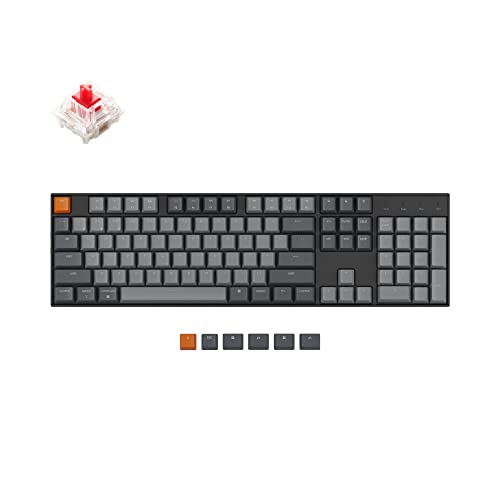

If you’re looking for a versatile keyboard that balances office productivity with light gaming or multimedia use, the Keychron K10 is an excellent choice. It’s a full-size, 104-key mechanical keyboard compatible with Mac and Windows, featuring dedicated multimedia keys, a Mac layout, and extra OS-specific keycaps. You can connect via Bluetooth to up to three devices or use the wired USB Type-C option. Equipped with reliable Brown switches, white backlighting, and adjustable feet for ergonomic comfort, the K10 offers durability, responsiveness, and convenience. Its long-lasting battery and versatile connectivity make it perfect for work, casual gaming, or media control.
Best For: users seeking a versatile, durable, and ergonomic full-size mechanical keyboard suitable for both office productivity and light gaming across Mac and Windows platforms.
Pros:
- Supports multi-device connectivity with Bluetooth 5.1 for up to three devices and wired USB Type-C mode.
- Features reliable Keychron Pro Brown switches with a 50 million keystroke lifespan for tactile responsiveness.
- Includes dedicated multimedia keys, Mac layout with extra OS-specific keycaps, and adjustable feet for ergonomic comfort.
Cons:
- White LED backlighting may be less customizable compared to RGB alternatives.
- Slightly heavier at 1.1 pounds, which may affect portability for some users.
- Limited to light gaming and multimedia use; not optimized for high-end gaming performance.
AULA F99 Wireless Mechanical Keyboard

The AULA F99 Wireless Mechanical Keyboard stands out for its versatile connectivity options, making it an ideal choice for professionals who need seamless multi-device support. It offers Bluetooth 5.0, 2.4GHz wireless, and USB wired modes, supporting up to five devices at once with easy switching via FN keys. Its hot-swappable PCB allows quick switch and keycap replacements, while pre-lubed linear switches deliver smooth, responsive typing. With macro customization, 16 RGB effects, and N-key rollover, it’s perfect for work and gaming. Its compact 99-key layout, combined with a sturdy gasket structure and long-lasting 8000mAh battery, makes it a versatile, durable, and space-saving option.
Best For: professionals, gamers, and students seeking a versatile, multi-device wireless mechanical keyboard with customizable features and space-saving design.
Pros:
- Supports seamless connection to up to five devices via Bluetooth 5.0, 2.4GHz wireless, or USB wired mode
- Hot-swappable switches and keycaps for easy customization and maintenance
- Long-lasting 8000mAh battery with multiple RGB lighting effects for an immersive experience
Cons:
- May be less portable due to its compact 99-key layout and built-in battery weight
- Requires some technical knowledge for switch and keycap replacement
- Limited to pre-lubed linear switches, which might not suit all typing preferences
Logitech K845 Mechanical Keyboard

The Logitech K845 Mechanical Keyboard stands out for office workers who need a reliable, full-size keyboard with a sleek design. Its modern, durable aluminum top case gives it a premium look, while the compact footprint saves space on your desk. With 104 keys, including a number pad and FN keys, it offers full functionality. You can choose between TTC Brown, Red, or Blue switches, customizing sound and tactile feedback to suit your preference. The white backlit keys, with five lighting patterns, ensure visibility in low light. Plus, its USB corded connection guarantees a stable, lag-free performance for both work and gaming.
Best For: office workers and productivity-focused users seeking a reliable, full-size mechanical keyboard with a sleek design and customizable features.
Pros:
- Durable aluminum top case offers a premium and modern look
- Full-size layout with 104 keys, including a number pad and FN keys for complete functionality
- White backlit keys with five lighting patterns enhance visibility and customization in low light
Cons:
- USB corded connection may limit portability compared to wireless options
- Switch choice affects sound level and tactile feedback, which might require testing for preference
- Compact footprint, while space-saving, might feel cramped for users with many desk accessories
Cherry KC 200 MX Mechanical Office Keyboard

Designed with durability and sleek aesthetics in mind, the Cherry KC 200 MX Mechanical Office Keyboard is an excellent choice for professionals seeking reliable performance. Its modern design features a sturdy metal plate frame that guarantees longevity, while integrated white LED indicators keep you informed of your status at a glance. Equipped with the latest MX2A switches, it offers smooth, responsive keystrokes with a service life exceeding 100 million keystrokes. Available in silent and tactile variants, it caters to different preferences, making it versatile for office environments. Whether for typing, gaming, or multitasking, this keyboard delivers durability, comfort, and a sleek look.
Best For: professionals and office workers seeking a durable, sleek, and responsive mechanical keyboard for typing, multitasking, and gaming in a quiet or tactile environment.
Pros:
- Modern, durable design with a sturdy metal plate frame
- Equipped with the latest MX2A switches for smooth and reliable keystrokes
- Integrated white LED indicators for easy status monitoring
Cons:
- Limited switch options may not suit all user preferences
- Slightly higher price point due to premium build and switches
- May require adjustment for users unfamiliar with mechanical keyboards
Logitech G413 SE Mechanical Gaming Keyboard

If you’re looking for a reliable mechanical keyboard that balances durability and performance, the Logitech G413 SE stands out as an excellent choice for office work. It features a sturdy full-size design with a sleek black-brushed aluminum top case, ensuring durability and minimal flex. The keyboard offers a tenkeyless option for space-saving setups. Its heat- and wear-resistant PBT keycaps maintain their appearance over time, while tactile mechanical switches provide precise, responsive keystrokes. With white LED backlighting and dedicated media controls, it’s both functional and stylish. Compatible with Windows and macOS, the G413 SE combines robustness with versatility, making it ideal for boosting productivity.
Best For: office workers and gamers seeking a durable, responsive mechanical keyboard with versatile features for productivity and entertainment.
Pros:
- Robust full-size and tenkeyless options with sleek aluminum design for durability
- Tactile mechanical switches and anti-ghosting for precise, reliable keystrokes during gaming and typing
- White LED backlighting and multimedia controls for enhanced usability and aesthetic appeal
Cons:
- Limited RGB lighting options, focusing on white backlighting only
- No dedicated wrist rest, which might affect comfort during extended use
- Compatible primarily with Windows and macOS, potentially limiting integration with other systems
Keychron C2 Wired Mechanical Keyboard for Mac and Windows

For users seeking a versatile, full-sized keyboard compatible with both Mac and Windows, the Keychron C2 Wired Mechanical Keyboard stands out as an excellent choice. It features 104 keys, retro-colored ABS keycaps, and includes extra keycaps for both operating systems. Designed with Mac in mind, it supports Siri and Cortana keys, with multimedia and function keys that simplify workflow. Its durable Keychron Brown switches offer tactile feedback, rated for up to 50 million keystrokes. The keyboard’s USB Type-C braided cable ensures a stable connection, while adjustable feet and an inclined frame provide ergonomic comfort. At 17.1 inches and 3.3 pounds, it combines portability with solid build quality.
Best For: users seeking a durable, full-sized mechanical keyboard compatible with both Mac and Windows for office work, light gaming, and everyday use.
Pros:
- Compatible with Mac and Windows, supporting Siri and Cortana keys.
- Durable Keychron Brown switches rated for up to 50 million keystrokes.
- Ergonomic design with adjustable feet and inclined frame for comfortable typing.
Cons:
- Non-backlit design may be less suitable for low-light environments.
- Full-size layout makes it less portable compared to compact keyboards.
- Retro ABS keycaps may wear faster with heavy use over time.
Keychron K10 Full Size Mechanical Gaming Keyboard for Mac and Windows

The Keychron K10 stands out as an excellent choice for office workers who need versatility and comfort, thanks to its seamless compatibility with both Mac and Windows systems. This full-size keyboard features 104 keys, RGB backlighting, and an aluminum frame, offering both durability and style. It supports Bluetooth 5.1 for wireless multitasking across devices and includes extra keycaps for Mac and Windows layouts. Powered by a 4000 mAh battery, it delivers up to 240 hours of use with backlight off. Its ergonomic design, with adjustable feet and a tilted frame, ensures comfort during long typing sessions, making it a versatile addition to any workspace.
Best For: office workers and multitaskers seeking a versatile, durable, and ergonomic full-size mechanical keyboard compatible with both Mac and Windows systems.
Pros:
- Seamless Bluetooth 5.1 connectivity supporting up to 3 devices for easy multitasking
- Durable aluminum frame combined with a 4000 mAh battery offering long-lasting use up to 240 hours with backlight off
- Ergonomic design with adjustable feet and inclined frame for comfortable long typing sessions
Cons:
- Num Lock functionality only available on Windows, limiting its use on Mac systems
- Slightly heavier weight (about 3.98 pounds) may affect portability
- RGB backlighting, while vibrant, may consume more battery life in wireless mode
AULA F99 Wireless Mechanical Keyboard with RGB Backlit

The AULA F99 Wireless Mechanical Keyboard with RGB Backlit stands out as an ideal choice for busy professionals and gaming enthusiasts alike, thanks to its tri-mode connectivity and seamless device switching. You can connect via Bluetooth 5.0, 2.4GHz wireless, or USB-C wired, supporting up to five devices simultaneously. Its hot-swappable PCB makes switch and keycap replacements easy, while pre-lubed linear switches ensure smooth, responsive typing. The keyboard features vibrant RGB lighting, macro customization, and a durable, compact 96% layout. With an 8000mAh battery and double-shot PBT keycaps, it’s designed for long-lasting performance, blending productivity with immersive aesthetics.
Best For: busy professionals and gaming enthusiasts seeking a versatile, durable, and customizable wireless mechanical keyboard with immersive RGB backlighting.
Pros:
- Supports tri-mode connectivity with seamless device switching and up to five device pairing
- Hot-swappable PCB allows easy switch and keycap replacements, plus macro customization and 16.8 million RGB effects
- Compact 96% layout with extended silicone padding and silencer layers for stability, reduced noise, and comfortable use
Cons:
- Hefty weight of 3.31 pounds may affect portability
- Limited to specific switch types compatible with the pre-lubed linear switches
- Slightly larger dimensions may require ample desk space for optimal placement
Cherry KC 200 MX Mechanical Office Keyboard
If you’re seeking a durable, stylish keyboard that combines modern design with reliable performance, the Cherry KC 200 MX Mechanical Office Keyboard is an excellent choice. Its sleek metal plate frame and bronze finish give it a professional look, perfect for any office setting. Equipped with Cherry’s new MX2A switches—available in silent red or tactile brown—you get smooth keystrokes and quiet operation, handling over 50 million or 100 million keystrokes respectively. With white LED indicators for status keys, it’s both functional and durable. Measuring just under 17 inches, it’s compact yet responsive, making it a solid upgrade for boosting productivity in 2025.
Best For: professionals seeking a durable, stylish mechanical keyboard with reliable performance for office work and gaming.
Pros:
- Modern design with a sleek metal plate frame and bronze finish, ideal for professional environments
- Equipped with Cherry’s new MX2A switches offering smooth keystrokes and quiet operation in red or tactile brown variants
- White LED indicators enhance visibility of status keys, combining functionality with aesthetics
Cons:
- Slightly larger footprint may not suit users with limited desk space
- Higher price point compared to membrane keyboards, which may be a consideration for budget-conscious buyers
- Availability is limited to specific retail channels, potentially affecting immediate purchase options
RK ROYAL KLUDGE S98 Mechanical Keyboard with Smart Display and Knob

For professionals seeking a versatile and customizable keyboard, the RK Royal Kludge S98 stands out with its smart display and intuitive control knob. This 96% wireless mechanical keyboard offers a top-mount design for superior tactile feedback and noise reduction, thanks to sound-absorbing foams and dampeners. Its double-shot PBT keycaps ensure durability and a premium feel. The hot-swappable PCB lets you easily change switches without soldering. The smart display shows custom GIFs, battery, and connection info, while the knob adjusts volume, brightness, RGB modes, and more. With multiple connection options—Bluetooth, 2.4Ghz wireless, and USB-C—it’s a flexible choice for office productivity.
Best For: professionals and gamers seeking a versatile, customizable wireless mechanical keyboard with advanced controls and noise reduction features.
Pros:
- Superior tactile feedback with top-mount design and sound-absorbing foams for quieter operation
- Easy switch customization with hot-swappable PCB without soldering
- Intuitive smart display and control knob for quick adjustments of volume, lighting, and connection modes
Cons:
- Slightly bulky at over 3 pounds, which may affect portability
- Limited availability of customization options beyond basic settings
- Higher price point compared to standard mechanical keyboards
CHERRY Stream Wired USB Mechanical Keyboard for Home and Office

Designed with quiet office environments in mind, the CHERRY Stream Wired USB Mechanical Keyboard stands out for its whisper-quiet keystrokes and essential multimedia controls. Its sleek, flat modern design emphasizes simplicity and functionality, making it perfect for home or corporate use. Built with high-quality materials, it features a durable SX scissor mechanism and abrasion-resistant key labels, ensuring long-lasting performance. The keyboard includes eight rubber pads for stability and a metal plate for torsional stiffness. With 10 dedicated office and multimedia keys, plus LED indicators for CAPS LOCK, NUM, and SCROLL, it offers a smooth, comfortable typing experience with reduced noise, ideal for focused work settings.
Best For: individuals seeking a sleek, quiet, and durable wired mechanical keyboard suitable for home or office environments.
Pros:
- Whisper-quiet keystrokes ideal for quiet workspaces
- High-quality SX scissor mechanism for precise and comfortable typing
- Durable construction with abrasion-resistant labels and metal plate for long-term use
Cons:
- Wired connection may limit portability compared to wireless options
- Flat modern design may not appeal to users preferring traditional keyboard shapes
- Limited to 10 dedicated multimedia and office keys, which may not suit advanced users
RK Royal Kludge F99 Wireless Mechanical Keyboard with Numpad, Tri-Mode Hot Swappable 95% 100-Key Gaming Keyboard (BT/2.4G/USB-C)

The RK Royal Kludge F99 Wireless Mechanical Keyboard stands out for its seamless tri-mode connectivity, making it ideal for anyone who needs to switch effortlessly between multiple devices. It supports 2.4GHz wireless, Bluetooth 5.0, and USB-C wired connections, allowing quick toggling without hassle. Its compact 96% design saves space while maintaining full functionality, including arrow keys and a numpad. The durable PBT keycaps resist shine and last long, while triple-layer sound dampening ensures quiet, smooth typing. With a massive 5000mAh battery, it offers up to 550 hours of use, perfect for long work sessions. Users can easily customize switches and lighting for a personalized experience.
Best For: users seeking a versatile, high-performance wireless mechanical keyboard with extensive customization options for both gaming and professional use.
Pros:
- Seamless tri-mode connectivity for easy switching between multiple devices and connections
- Compact 96% design maximizes desk space without sacrificing functionality like arrow keys and numpad
- Long-lasting 5000mAh battery with impressive usage hours and quick recharge capability
Cons:
- Might be heavier or larger than other compact keyboards due to added features and battery size
- Requires software for full customization, which may be an extra step for some users
- Limited to specific switch types compatible with hot-swappable PCB, potentially restricting certain switch choices
darkFlash Wireless Mechanical Keyboard and Mouse Combo (GK104) for Office

If you’re looking to streamline your workspace with reliable wireless connectivity, the darkFlash GK104 combo is an excellent choice. It features a full-size 106-key layout with high-quality mechanical switches that deliver smooth, quiet, and responsive keystrokes, perfect for long hours of office work. The wireless setup eliminates clutter, and the high-capacity batteries ensure months of uninterrupted use. The ergonomic optical mouse offers adjustable DPI settings for precision, and the entire set is compatible with Windows and Mac devices. Built for durability and versatility, this combo enhances productivity without sacrificing comfort or convenience.
Best For: professionals and office workers seeking a durable, wireless keyboard and mouse combo for long hours of comfortable, efficient work.
Pros:
- Wireless connectivity eliminates clutter and enhances workspace organization
- Mechanical red switches deliver smooth, quiet, and responsive keystrokes suitable for extended typing sessions
- High-capacity batteries provide months of uninterrupted use, reducing the need for frequent charging
Cons:
- May require initial setup and pairing with devices, which could be challenging for some users
- Limited to Windows and Mac compatibility, not designed for gaming consoles or other operating systems
- The full-size 106-key layout might be larger than necessary for users preferring compact setups
Newmen GM325Pro Mechanical Keyboard with Rainbow LED Backlit and Hot-Swap Metal Panel
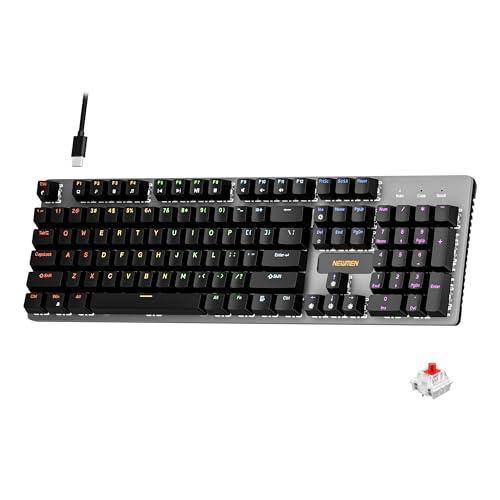
For office workers seeking a durable and customizable keyboard, the Newmen GM325Pro stands out with its hot-swap metal panel and rainbow LED side lighting. Its RGB side effects create vibrant visuals, perfect for low-light workspaces. The full-size metal top plate ensures rugged durability, while the sleek black ABS keycaps add style. Equipped with smooth, linear red switches, it delivers quick, quiet keystrokes, ideal for fast-paced tasks. The hot-swap feature makes switching switches easy, and the detachable USB cable offers portability. With customizable shortcuts and reliable performance, this keyboard balances aesthetics, durability, and functionality for office use.
Best For: office workers and gamers seeking a durable, customizable mechanical keyboard with vibrant RGB lighting and easy switch replacement.
Pros:
- Hot-swap metal panel allows easy switch customization and maintenance.
- Vibrant rainbow LED side lighting enhances low-light workspace and gaming setup.
- Full-size metal top plate provides excellent durability and stability for intense use.
Cons:
- Slightly heavier weight may reduce portability compared to plastic keyboards.
- The full-size design might take up more desk space, limiting compact setups.
- RGB lighting effects are limited to side illumination and may not be customizable for all users.
RisoPhy Mechanical Gaming Keyboard with RGB Backlit, Blue Switch, Spill-Resistant for PC and Mac
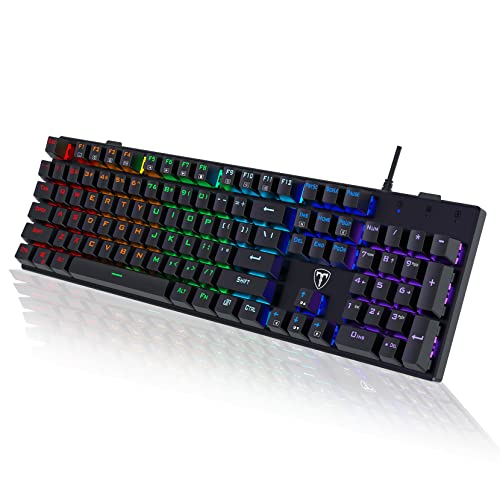
Designed with gamers and professionals in mind, the RisoPhy Mechanical Gaming Keyboard offers a perfect blend of responsiveness and durability, making it an ideal choice for boosting productivity in 2025. Its blue switches provide tactile feedback and quick response, ideal for typing and gaming alike. The keyboard features deep key travel, a spacious layout, and easy-to-clean keycaps, while its RGB backlighting with nine modes enhances visibility and aesthetics. Spill-resistant design with water flow channels protects against accidental spills. Plus, its adjustable slope, anti-ghosting, and compatibility with PC, Mac, and consoles ensure reliability and comfort during long work or gaming sessions.
Best For: gamers, programmers, and professionals seeking a durable, responsive, and customizable mechanical keyboard for long gaming or typing sessions.
Pros:
- Tactile blue switches with quick response and enjoyable click sound for precise typing and gaming.
- RGB backlit with multiple modes and brightness levels to enhance aesthetics and visibility in dark environments.
- Spill-resistant design with water flow channels and durable keycaps, ensuring longevity and protection against accidents.
Cons:
- Slightly heavier than membrane keyboards, which may affect portability.
- The clicky blue switches can be noisy, potentially distracting in shared workspaces.
- The full-size layout may be larger than necessary for users with limited desk space.
Factors to Consider When Choosing Mechanical Keyboards for Office

When choosing a mechanical keyboard for the office, I consider several key factors to make certain of comfort and efficiency. Things like switch type, noise level, and key layout can make a big difference in daily use. Additionally, I look at connectivity options and build quality to find a durable, suitable choice.
Switch Type Selection
Choosing the right mechanical switch depends on your priorities for noise, feedback, and typing feel. Tactile switches give a noticeable bump, helping improve accuracy without much noise, making them great for focused work. Linear switches offer smooth keystrokes with little resistance, ideal if you prefer quiet environments and fast typing. Clicky switches provide audible feedback with a click sound, which some find satisfying but may be disruptive in shared spaces. Durability is also key; most office-appropriate switches last over 50 million keystrokes, ensuring long-term reliability. Your choice should reflect your comfort and the office setting—whether you want subtle feedback, quiet performance, or satisfying click sounds. Balancing these factors helps you select a switch that enhances your productivity without causing distraction.
Noise Level Preferences
Selecting the right mechanical keyboard for an office setting often comes down to noise levels. If you work in a shared space or open office, quieter switches are essential to avoid disturbing colleagues. Linear switches like Cherry MX Red or Gateron Yellow produce minimal sound, making them ideal for silent operation. In contrast, tactile or clicky switches such as Cherry MX Blue or Kailh Box White generate more noise with audible feedback, which can be disruptive. Some keyboards incorporate sound-absorbing materials or dampening features that considerably reduce noise. When choosing, consider models with built-in noise-reduction features or switches rated for silent use. Prioritizing low-noise options ensures a productive environment while maintaining the tactile benefits of a mechanical keyboard.
Key Layout Options
The layout of a mechanical keyboard plays a crucial role in how comfortably and efficiently you can work. Full-size layouts include a dedicated number pad, which boosts productivity if you frequently enter data but makes the keyboard wider. Tenkeyless (TKL) models omit the number pad, offering a more compact design without sacrificing essential function keys, ideal for saving space. Compact layouts, like 75% or 96%, combine function and navigation keys, further reducing size and enhancing desk organization. Your choice depends on your work habits and space constraints—if you need quick number entry, go for full-size. If desk space is limited or you prefer a minimalist setup, TKL or compact options are better. Consider what keys you use most often to find the layout that fits your workflow best.
Connectivity Methods
When evaluating mechanical keyboards for office use, connectivity options are a key factor that can influence your overall experience. Wired USB connections offer the most reliable and low-latency performance, perfect for tasks that require precision. Bluetooth wireless connectivity provides a cable-free setup and can connect multiple devices—usually three to five at once—making switching between work and personal devices seamless. Some keyboards feature tri-mode connectivity, allowing you to switch effortlessly between wired, Bluetooth, and wireless modes, giving you maximum flexibility. Keep in mind that wireless options tend to consume more power and often need rechargeable batteries or power management features. Your choice of connection method should align with your workflow and preferences, ensuring you get both convenience and performance.
Build Quality Durability
Building a durable mechanical keyboard means paying close attention to the materials and construction quality. High-quality models often feature metal or reinforced plastic cases that resist wear and impact, ensuring longevity. Look for switches rated to withstand over 50 million keystrokes, which guarantees reliable performance over time. Premium materials like PBT keycaps and metal top plates are also essential, as they minimize keycap fading, cracking, and wear. A well-built keyboard includes stable, non-slip feet and a sturdy frame that prevents wobbling during extended use. Additionally, water-resistant and spill-proof designs with sealed internal components help protect against accidental liquid damage. Prioritizing these factors guarantees your keyboard remains resilient, functional, and ready for daily office tasks.
Backlighting Features
Backlighting features are essential for guaranteeing your keyboard remains functional and comfortable to use in low-light conditions. They improve key visibility, which enhances typing accuracy and reduces eye strain during late-night work sessions. Adjustable brightness levels allow you to customize illumination to match your environment and personal preference, preventing glare or distraction. RGB backlighting offers a broad spectrum of colors and effects, letting you personalize your setup and coordinate with other peripherals. Some keyboards support multiple lighting modes, like static, breathing, or reactive effects, adding a dynamic visual element to your workspace. Keep in mind, however, that extensive lighting options can impact battery life in wireless models. Balancing brightness and features ensures you enjoy clear visibility without sacrificing portability or power efficiency.
Ergonomic Design
Choosing an ergonomic mechanical keyboard involves evaluating features that promote comfort and reduce strain during long hours of typing. An ideal keyboard has adjustable feet and an inclined bottom frame to support a natural wrist position, minimizing fatigue. Split or tented designs help prevent wrist deviation, making extended use more comfortable. Proper key spacing and keycap height are essential to avoid finger fatigue and enable smooth, efficient keystrokes. Soft, sound-absorbing materials like silicone dampers or foam layers can lower typing noise and vibrations, adding to ergonomic comfort. Many ergonomic models also include wrist rests or curved key layouts to support proper hand and wrist alignment. These features work together to create a more comfortable typing experience, reducing the risk of repetitive strain injuries over time.
Compatibility Requirements
When selecting a mechanical keyboard for office use, verifying its compatibility with your computer’s operating system is crucial to guarantee smooth performance. Make sure it supports your system—Windows, macOS, or both—to avoid connectivity issues. Next, check the connectivity options like USB-C, USB-A, Bluetooth, or 2.4GHz wireless, ensuring they match your setup. Confirm the keyboard layout includes essential keys, such as function keys, multimedia controls, and a number pad, based on your tasks. Also, consider the switch type—tactile, linear, or silent—that suits your noise preferences and typing experience. Finally, look into compatibility with accessories or software, like macro programmability or shortcut customization, to maximize productivity and streamline your workflow.
Frequently Asked Questions
Are Mechanical Keyboards Suitable for All-Day Office Use?
Yes, mechanical keyboards are suitable for all-day office use. I find they offer great comfort and responsiveness, which helps reduce fatigue during long typing sessions. The variety of switch types allows me to choose a tactile or quieter option, making them versatile for different work environments. Plus, their durability means they last longer, saving money in the long run. Overall, I think they’re a solid choice for extended office work.
How Do Mechanical Keyboards Impact Typing Comfort and Ergonomics?
Did you know that 60% of office workers report improved comfort when switching to mechanical keyboards? I find that they really enhance typing ergonomics because of their responsive keys and customizable layouts. The tactile feedback reduces finger strain, making long hours more comfortable. Plus, many models offer ergonomic designs that promote better posture, helping prevent fatigue and discomfort during extended work sessions.
Can Mechanical Keyboards Reduce Typing Fatigue During Long Work Hours?
Yes, mechanical keyboards can reduce typing fatigue during long work hours. I find that their tactile feedback and customizable actuation points help me type more comfortably and efficiently. The keys require less force, which minimizes strain on my fingers and hands. Additionally, many models offer ergonomic designs and adjustable features that support better hand positioning, making extended typing sessions less tiring and more productive for me.
What Are the Maintenance Requirements for Office Mechanical Keyboards?
Maintenance for my office mechanical keyboard is pretty straightforward. I regularly dust it off with compressed air to keep debris out, and I wipe the keys with a slightly damp cloth. Every few months, I remove the keycaps to clean beneath them. I also check for any loose keys or switches and replace them if needed. With simple care, my keyboard stays in great shape and performs reliably.
Do Mechanical Keyboards Support Wireless Connectivity Reliably?
Imagine connecting a sleek, wireless mechanical keyboard that instantly responds as if tethered by invisible threads—that’s how reliable wireless connectivity can be. In my experience, most modern mechanical keyboards with Bluetooth or RF support offer stable, lag-free connections, especially in well-designed models. Of course, interference or distance can sometimes cause issues, but overall, I find wireless support in mechanical keyboards quite dependable for everyday office work.
Conclusion
Choosing the right mechanical keyboard can truly make a difference in your office setup. With so many options, it’s important to find one that fits your needs and boosts your productivity. Remember, a tool is only as good as how you use it—so don’t settle for less. Find the perfect match, and you’ll be set to hit the ground running. After all, a well-chosen keyboard can turn work into a breeze.