
For most seniors who want automatic fall detection with 24/7 professional monitoring, I would start with the Medical Alert System for Seniors Mini Device with Automatic Fall Detection, GPS Tracking, and Waterproof Pendant. The ADT On-The-Go is a strong alternative for buyers who prefer an established monitoring service, while the SecuLife SOS Wristband suits families who want alerts sent directly to relatives. The main tradeoff is between a monitoring center that can coordinate help and a family-alert device that puts more responsibility on caregivers. Wearable style, GPS coverage, two-way calling, and any required service plan also affect fit. Read on for the full comparison and guidance on choosing a device that matches the senior’s routines and support network.

Turn quiet afternoons into listening time
- Thousands of audiobooks, podcasts and originals
- Listen on your phone, tablet or Echo — also offline
- Cancel anytime
Complete the kit


Key Takeaways
- Monitoring and family notification are different response plans: the roundup includes professionally monitored options such as the ADT devices and Family First Alert pendant, alongside SecuLife models that send alerts directly to family.
- GPS matters most outside the home: mobile pendants and watches offer location features, while the ADT Medical Alert Plus is an in-home system suited to people who spend most of their time at home.
- Wearable form changes willingness to use the device: pendants are familiar and simple, while wristbands and watches may appeal to seniors who prefer a watch-like form but can involve more menus and setup.
- Optional detection is not the same as included detection: the Family First Alert pendant lists fall detection as optional, so buyers should confirm the selected service configuration before relying on that feature.
- No-monthly-fee positioning does not settle the value question: the Fall Detection Watch listing advertises no monthly fee, but buyers still need to verify how alerts reach responders and what support or connectivity costs apply.


| automatic fall detection devices for senior | Water resistance | Connectivity | Fall detection |
|---|---|---|---|
| Medical Alert System for Senio | Water-resistant | 4G LTE cellular; AT&T and Verizon networks | Optional; additional monthly cost |
| ADT On-The-Go Emergency Medica | IP57 | LTE cellular with GPS | Optional; additional cost |
| Fall Alert Device for Elderly | IP67 | 4G cellular | — |
| Fajocru Fall Detection Smart W | IP67, rated to 1 meter | 4G cellular | Automatic with SOS alerts |
| SecuLife SOS Wristband for Sen | IP67 | — | Automatic |
| ADT Medical Alert Plus In-Home | — | — | Automatic |
| Seculife Medical Alert Smartba | IP67 | — | — |
| Family First Alert Mini Medica | Water-resistant; suitable for shower wear | 4G LTE on AT&T and Verizon networks | Optional subscription add-on |
| Medical Alert System for Senio | Water-resistant; suitable for shower use | 4G LTE on Verizon and AT&T networks | Optional add-on |
| SecuLife Medical Alert Pendant | IP67 | 4G LTE cellular | Automatic |
| Fajocru Fall Detection Watch f | IP67 | 4G cellular | — |
More Details on Our Top Picks
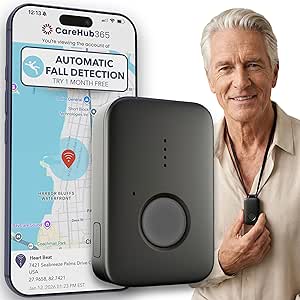
Medical Alert System for Seniors – Mini Device with Automatic Fall Detection, 24/7 Monitoring, GPS Tracking, Emergency Pendant Necklace, Waterproof (Black)
For a senior whose priority is reaching a trained responder, the Family First Alert MG Mini stands out from the direct-to-family SecuLife SOS Wristband by including 24/7 professional monitoring. Its compact pendant connects over nationwide AT&T and Verizon 4G LTE, while GPS can help locate the wearer away from home. Activation by QR code or phone call also keeps setup relatively simple for families. The key tradeoff is that automatic fall detection costs extra on top of the monitoring subscription, so buyers should account for both recurring charges. Its battery lasts up to five days per charge, longer than the SecuLife wristband’s stated one-day battery, but a pendant may be less appealing to someone who prefers a watch-style wearable. Choose it for monitored response, not for a no-fee family-only alert system.
Pros:- 24/7 monitoring by trained operators
- Nationwide 4G LTE coverage using AT&T and Verizon networks
- GPS tracking supports locating the wearer away from home
- Up to five days of battery life per charge
Cons:- Automatic fall detection adds a separate monthly charge
- Monitoring requires an ongoing subscription
- Pendant format may not suit seniors who prefer a wrist-worn device
Best for: Older adults who want a wearable pendant, GPS support, and trained operators available around the clock, with a caregiver able to manage the recurring subscription.
Not ideal for: Families seeking alerts sent only to relatives without a monitoring service, or buyers unwilling to pay an added monthly fee for fall detection.
- Brand:Family First Alert
- Model:MGMini-Black
- Connectivity:4G LTE cellular; AT&T and Verizon networks
- Coverage:Nationwide
- Fall detection:Optional; additional monthly cost
- GPS:Location tracking
- Water resistance:Water-resistant
- Battery life:Up to 5 days per charge
- Warranty:30 days
Our verdict“Choose the MG Mini if professional monitoring matters more than avoiding recurring fees or wearing a wristband.”
ADT On-The-Go Emergency Medical Alert for Seniors
The ADT On-The-Go is a mobile alert device for seniors who would rather carry one all-in-one unit than wear a pendant or wristband. It combines a one-button SOS, GPS, nationwide cellular service, and access to ADT’s 24/7 monitoring, making it a more direct fit for people who spend time away from home than a home-focused system such as the ADT Medical Alert Plus. Its IP57 water resistance offers some protection during everyday wear, though it is not described as fully waterproof like the IP67 Fajocru and SecuLife wristbands. Automatic fall detection is optional and adds a recurring cost; it also cannot promise detection of every fall. This is a better match for someone comfortable carrying a small device than for a senior who may leave it behind or wants a discreet wrist-worn sensor.
Pros:- All-in-one mobile device avoids a separate pendant or wristband
- 24/7 access to U.S.-based professional monitoring agents
- Built-in GPS and nationwide cellular service support use away from home
- IP57 water resistance and lightweight 1.76-ounce design
Cons:- Requires a monthly monitoring plan
- Automatic fall detection costs extra
- Carried-device format may be forgotten or misplaced more easily than a wearable
Best for: Seniors who regularly leave home, dislike necklaces and wristbands, and want GPS-enabled mobile coverage with professional monitoring.
Not ideal for: Wearers who need a device that stays on their body as a watch or wristband, or buyers who want fall detection without an added monthly charge.
- Brand:ADT
- Model:MD5
- Connectivity:LTE cellular with GPS
- Monitoring:24/7 professional monitoring
- Fall detection:Optional; additional cost
- Water resistance:IP57
- Dimensions:2.75 x 1.75 x 0.63 inches
- Weight:1.76 ounces
Our verdict“Pick ADT On-The-Go if a pendant-free mobile unit and professional response matter more than wrist-worn convenience.”
Fall Alert Device for Elderly, Automatic Fall Detection Smart Watch with 4G GPS Tracking, SOS Emergency Alert, HD Video Call and Caregiver App, IP67 Waterproof Senior Safety Watch
This smartwatch goes beyond the alert-first approach of the Family First Alert MG Mini: alongside automatic fall detection, it offers 4G GPS, geofencing, video calls, and two-way voice. Those communication tools may suit families who want a senior to reach caregivers directly and share location through an app, rather than relying primarily on a monitored response center. The 1.56-inch AMOLED touchscreen provides a visual interface, but its small size may be hard for some wearers to read, and the stated 5.12-ounce weight is substantial for a watch. There is also a practical calling caveat: the preinstalled data SIM supports app data, while direct calls require a separate SIM. Compared with the simpler Fajocru watch, this model highlights video calling and health tracking, but buyers should verify the calling setup before choosing it.
Pros:- Automatic fall detection can send SOS alerts to preset contacts
- Built-in GPS and geofencing support location monitoring
- Video calling and two-way voice add ways to contact caregivers
- IP67 rating and health-tracking features support everyday wear
Cons:- Direct calls require a separate SIM; the included SIM supports app data
- The 1.56-inch display may be difficult for some seniors to read
- At 5.12 ounces, the stated weight may feel bulky on the wrist
Best for: Families who want a wrist-worn fall alert with GPS, geofencing, video communication, and app-based caregiver features, and can handle SIM setup.
Not ideal for: Seniors who need a lightweight, easy-to-read watch or a ready-to-use direct-calling setup without arranging a separate SIM.
- Operating system:Android Wear 1.0
- Display:1.56-inch AMOLED
- Connectivity:4G cellular
- GPS:Built-in GPS with geofencing
- Water resistance:IP67
- Weight:5.12 ounces
- Band material:Rubber
- Case material:Plastic
- Calling:Video calls and two-way voice; separate SIM needed for direct calls
Our verdict“Choose this watch for its communication and caregiver tools if the wearer can manage its small display and separate voice-SIM setup.”
Fajocru Fall Detection Smart Watch for Seniors with GPS and SOS
The Fajocru Fall Detection Smart Watch makes the most sense for families focused on location oversight as well as fall alerts. Its GPS geofencing can help caregivers track a wearer and receive location-related alerts, a useful distinction from the ADT On-The-Go unit, which is positioned as a carried mobile alert device rather than a watch with a senior-focused touchscreen. The included data SIM offers one year of free data, but it does not support voice calls; buyers must supply a SIM for calling. That setup caveat matters if two-way contact is part of the safety plan. Its IP67 rating and magnetic charging are practical everyday touches, while the watch’s blood-pressure readings are described as reference values, not medical-grade measurements. Compared with the more feature-rich video-call watch in this lineup, Fajocru is a clearer fit when geofencing and straightforward watch use are the priority.
Pros:- Automatic fall detection sends SOS alerts to emergency contacts
- GPS tracking and geofencing support location oversight
- One year of included data service on the preinstalled SIM
- IP67 water resistance and magnetic charging suit daily use
Cons:- Included data-only SIM does not support voice calls
- Calling features require a user-provided SIM
- Blood-pressure readings are reference measurements, not medical-grade results
Best for: Caregivers of seniors at risk of wandering who want wrist-worn GPS geofencing, fall alerts, and app compatibility with iOS or Android.
Not ideal for: Families who expect voice calling to work out of the box, or anyone planning to rely on the watch’s blood-pressure reading for medical decisions.
- Connectivity:4G cellular
- Fall detection:Automatic with SOS alerts
- GPS:Real-time tracking with geofencing
- Water resistance:IP67, rated to 1 meter
- Operating system:Android Wear 1.0
- Charging:Magnetic cable
- Storage:1 GB
- SIM:Data-only SIM included with one year of free data; voice requires user-provided SIM
- Compatibility:iOS and Android smartphones
Our verdict“Pick Fajocru when caregiver geofencing and a wrist-worn alert are more important than ready-to-use voice calling.”
SecuLife SOS Wristband for Seniors with Fall Detection – Direct Alerts to Family, One-Button Simplicity, GPS Tracking, Geofencing, 2-Way Calling, Waterproof Medical Alert
Unlike the Family First Alert MG Mini and ADT On-The-Go, the SecuLife SOS Wristband sends alerts to preset family contacts rather than routing them through a call center. That makes it a strong option for households that want direct caregiver notifications, GPS tracking, geofencing, and two-way calling in one wrist-worn device. Its screen-free design may also be easier for a senior who finds smartwatch menus confusing. The tradeoff is that relatives take on the response role, so this is less suitable when no one can reliably receive and act on alerts. Battery life is stated as just one day, which means daily charging becomes part of the routine; the MG Mini lasts up to five days per charge. A monthly subscription is also required, so direct-to-family alerts do not mean a fee-free setup.
Pros:- Automatic fall detection sends alerts directly to preset family contacts
- GPS tracking and geofencing share location through a companion app
- Two-way calling is built into the wristband
- IP67 waterproof, screen-free design avoids smartwatch menus
Cons:- One-day battery life calls for daily charging
- A monthly subscription adds ongoing cost
- No call center is provided, so family members must receive and act on alerts
Best for: Seniors whose family members can monitor alerts and respond, especially those who prefer a simple, screen-free wristband over a smartwatch.
Not ideal for: People who need trained call-center responders, households without a reliably available caregiver, or wearers unlikely to charge a device every day.
- Brand:SecuLife
- Fall detection:Automatic
- Alerts:Direct to preset family contacts
- GPS:Real-time tracking with geofencing
- Calling:Two-way calling
- Water resistance:IP67
- Battery life:1 day
- Battery capacity:680 mAh
- Warranty:1 year
Our verdict“Choose SecuLife if family members can handle alerts and the wearer values a simple wristband over professional monitoring.”
ADT Medical Alert Plus In-Home Emergency Response System with Fall Detection
I rank the ADT Medical Alert Plus for seniors who spend most of their time at home and want a monitored base system rather than a device centered on family contacts. Its 24/7 professional monitoring and automatic fall detection can connect a user to trained responders, while a range of up to 600 feet gives room to move around the home and nearby areas. Unlike the SecuLife Medical Alert Pendant, which emphasizes GPS, geofencing, and direct family alerts, this ADT system adds home temperature alerts for conditions above 105°F or below 35°F. The tradeoff is flexibility: activation and a paid monitoring agreement are required, and quarterly billing may not suit every household. I’d choose it for a fixed home setup, not as an on-the-go alert device.
Pros:- 24/7 professional monitoring with automatic fall detection
- Up to 600 feet of range supports movement around the home
- Temperature alerts flag readings above 105°F or below 35°F
- Corded base system is suited to a consistent in-home setup
Cons:- Activation and a paid monitoring agreement are required
- Monitoring is billed quarterly
- In-home focus does not provide the GPS and geofencing described for the SecuLife pendant
Best for: Older adults who spend most of their time at home and want professional monitoring, room-to-room range, and temperature alerts.
Not ideal for: Seniors who need location tracking away from home or families who prefer alerts to go directly to relatives rather than a monitoring service.
- Monitoring:24/7 professional monitoring; subscription required
- Fall detection:Automatic
- Maximum range:Up to 600 feet
- Temperature alerts:Above 105°F or below 35°F
- Sensors:Accelerometer and thermistor
- Power source:Corded electric
- Compatible device:ADT Medical Alert Pendant
- Dimensions:7 x 6 x 2.75 inches
Our verdict“Choose the ADT system if professional fall response and home temperature alerts matter more than portable GPS coverage.”
Seculife Medical Alert Smartband for Seniors — Alerts Go Direct to Family, No Call Center | Auto Fall Detection, GPS Tracking, Heart Rate Monitor, 2-Way Calling, SOS Button, Waterproof Wearable
The Seculife Smartband is the strongest fit here for families who want fall alerts alongside location and health information in a wrist-worn device. When it detects a fall, or the wearer holds the SOS button for three seconds, it calls preselected contacts; its GPS and geofencing can also notify caregivers when the wearer enters or leaves a set area. Compared with the ADT Medical Alert Plus, this is designed for use beyond the home and puts family contacts at the center instead of relying on a professional monitoring model. The compromise is that its extra functions add complexity, and the listed battery capacity is 680 mAh with an average life of one day, so charging may become a daily task. A monthly subscription is required, too. I’d skip it for someone who wants a simple pendant and infrequent charging.
Pros:- Fall detection can trigger calls to preselected family contacts
- GPS tracking and geofencing support location checks and boundary alerts
- Two-way calling and automatic answering add a way to communicate through the wearable
- IP67 water resistance and heart-rate and blood-oxygen measurements add functions beyond a basic pendant
Cons:- Listed average battery life is one day, making frequent charging likely
- A monthly subscription is required for the service
- The touchscreen and multiple functions may be less straightforward than the SOS-only approach of the Family First Alert Mini Pendant
Best for: Families supporting an active senior who needs automatic fall alerts, GPS boundaries, and direct calls to chosen contacts.
Not ideal for: Wearers who prefer a simple alert button, do not want caregiver location tracking, or may struggle with daily charging and a touchscreen interface.
- Fall alerts:Automatic fall detection; SOS button held for three seconds triggers an emergency call
- Emergency contacts:Calls preselected contacts
- Location features:GPS tracking, geofencing, and one year of location history
- Calling:Two-way calling and automatic answering for approved contacts
- Water resistance:IP67
- Battery capacity:680 mAh
- Average battery life:1 day
- Display:2-inch touchscreen
- Compatibility:iOS and Android devices
Our verdict“Pick this smartband when family location oversight and direct contact matter more than a simple interface or longer charging intervals.”
Family First Alert Mini Medical Alert Pendant with 24/7 Monitoring and Optional Fall Detection
The Family First Alert Mini Pendant makes sense for someone who wants a small wearable that connects to a trained operator, rather than a smartwatch that routes alerts to relatives. Pressing its SOS button starts two-way communication over 4G LTE, and the pendant can use AT&T or Verizon networks. Fall detection is available, but it is an optional add-on; buyers need to confirm it is active if automatic detection is the reason for choosing this device. That makes the fall-safety setup less straightforward than the SecuLife Medical Alert Pendant, where automatic fall detection is listed as a core feature. This model’s up-to-five-day battery life and shower-suitable water resistance support regular wear, though the provided product information also recommends daily charging for use. Monitoring and the fall-detection add-on each require a subscription.
Pros:- SOS button connects to 24/7 monitoring and trained operators
- Two-way communication lets the wearer speak with the responder
- 4G LTE connectivity supports AT&T and Verizon networks
- Water-resistant design is suitable for shower wear
Cons:- Automatic fall detection requires an optional add-on subscription
- Monthly monitoring is required
- Daily charging is recommended despite the stated battery life of up to five days
Best for: Seniors who want a pendant and access to trained operators, with the option to add automatic fall detection.
Not ideal for: Buyers seeking fall detection included without an add-on, or a no-subscription device that alerts family directly.
- Connectivity:4G LTE on AT&T and Verizon networks
- Monitoring:24/7 monitoring with trained operators
- Fall detection:Optional subscription add-on
- Communication:Two-way
- Battery life:Up to 5 days per charge
- Water resistance:Water-resistant; suitable for shower wear
- Included accessories:Charging dock, two lanyards, belt clip, charging brick, and cord
- Warranty:30 days
Our verdict“Choose this pendant if operator-led response is the priority and you are willing to add fall detection to the monitoring plan.”
Medical Alert System for Seniors – Mini Device with Fall Detection, 24/7 Monitoring, GPS, SOS Pendant, Caregiver App, Waterproof, Rose Gold
This Family First Alert listing is best viewed as a caregiver-oriented version of the brand’s mini pendant: it pairs 24/7 operator monitoring with GPS and an app for family oversight. The SOS button provides a direct way to request help, while the water-resistant pendant can be worn in the shower and is rated for up to five days per charge. The key fall-detection caveat is easy to miss: automatic fall detection is an optional paid add-on, not a feature included by default. That puts it behind the SecuLife Medical Alert Pendant for shoppers who want fall detection specified as part of the device’s core offer, although both require a monthly service. The listed model number matches the other Family First Alert Mini Pendant, so this is not a clearly separate hardware choice based on the supplied details. I’d select it for the caregiver-app framing, after verifying the service configuration.
Pros:- 24/7 monitoring connects the wearer with trained operators
- GPS and caregiver app features support remote family oversight
- Water-resistant design is suitable for shower use
- Up to five days of stated battery life reduces charging frequency compared with the Seculife Smartband’s listed one-day average
Cons:- Fall detection is an optional add-on with an additional subscription
- Monthly service is required and cellular coverage depends on network availability
- The supplied model number matches the Family First Alert Mini Pendant, so the distinct hardware differences are unclear
Best for: Families who want a compact monitored pendant with GPS and caregiver app access, and are prepared to add fall detection separately.
Not ideal for: Shoppers who need automatic fall detection included by default or want to distinguish this listing from the Family First Alert Mini Pendant by hardware specifications.
- Model number:MGMini-Black
- Connectivity:4G LTE on Verizon and AT&T networks
- Monitoring:24/7 monitoring
- Fall detection:Optional add-on
- Location features:GPS and caregiver app
- Battery life:Up to 5 days per charge
- Water resistance:Water-resistant; suitable for shower use
- Included items:Pendant, charging dock, lanyards, and belt clip
- Warranty:30 days
Our verdict“Consider this listing for its caregiver-app and GPS emphasis, but confirm that the fall-detection add-on is included in your chosen service.”
SecuLife Medical Alert Pendant for Seniors with Auto Fall Detection, GPS Tracking, and 2-Way Calling
The SecuLife Medical Alert Pendant stands out for buyers who want automatic fall detection without routing every alert through a call center. It sends alerts to family contacts and combines that setup with GPS tracking, geofencing, and hands-free two-way calling over 4G LTE. Compared with the Family First Alert Mini Pendant, this model lists fall detection as a core feature rather than an optional add-on, though it still requires a monthly subscription. Its stated battery life of up to six days also exceeds the five-day figure given for the Family First Alert pendants, which may mean fewer charging interruptions. The tradeoff is that relatives take a more direct role in responding, so it is a weaker fit when a trained monitoring operator is the preferred first contact. The supplied details do not specify cellular carrier support.
Pros:- Automatic fall detection sends alerts to family contacts without a third-party call center
- GPS tracking and geofencing support location checks and boundary notifications
- Up to six days of battery life reduces charging frequency
- IP67 water resistance supports wear in the shower
Cons:- A mandatory monthly subscription is required
- Family contacts, rather than a call center, are the listed recipients of alerts
- The supplied specifications do not identify supported cellular carriers
Best for: Families who want automatic fall alerts sent directly to relatives, with GPS location and geofence monitoring for a senior who goes out alone.
Not ideal for: Seniors who need a professional monitoring center as the first point of contact or buyers unwilling to maintain a monthly service.
- Connectivity:4G LTE cellular
- Fall detection:Automatic
- Alert destination:Family contacts; no third-party call center
- Location features:Real-time GPS tracking and geofencing
- Calling:Hands-free two-way calling
- Battery life:Up to 6 days
- Battery capacity:1000 mAh
- Water resistance:IP67
- Compatibility:Android and iOS devices
Our verdict“Choose this pendant if relatives should receive fall alerts directly and can take responsibility for responding.”
Fajocru Fall Detection Watch for Seniors, GPS Tracker for Elderly with SOS Button, Real-Time Location Tracking, Two-Way Voice, Heart Rate & Step Counter, Medical Alert Watch, No Monthly Fee
This watch is a fit for families who want automatic fall alerts and location tools in a wrist-worn device, rather than a pendant connected to a monitoring center. Its listed features include GPS tracking, geofencing, an SOS button, and notifications to preset contacts, giving caregivers more ways to check on someone who lives independently or may wander. Compared with the SecuLife SOS Wristband, this model adds a touchscreen and advertised video calling, but its setup may demand more help from a caregiver.
The biggest qualification is connectivity: the preinstalled SIM provides one year of data service, but does not support voice calls. Buyers who want calling must supply a compatible voice-enabled SIM, so the watch is not ready to serve as a wrist phone straight out of the box. The product listing also does not specify fall-detection accuracy or monitoring-center coverage. Its IP67 rating suits rain and hand washing, but does not establish suitability for swimming.
Pros:- Advertises automatic fall alerts sent to preset emergency contacts
- GPS tracking and geofencing can help caregivers respond to location changes
- Large touchscreen and magnetic charging cable may be easier for some users than small buttons and plugs
- IP67 water resistance supports everyday exposure to rain and hand washing
Cons:- Preinstalled data-only SIM does not provide voice calling; a separate voice-enabled SIM is needed for calls
- The listing does not describe professional monitoring-center coverage or fall-detection accuracy
- A touchscreen, app setup, and cellular service requirements may be difficult for some seniors to manage
Best for: Families seeking GPS and geofence alerts alongside automatic fall notifications, who can help with setup and verify cellular coverage and SIM requirements.
Not ideal for: Seniors who need a professionally monitored response service, do not use a smartphone-linked caregiver app, or need voice calling without arranging a separate SIM.
- Connectivity:4G cellular
- Location:Built-in GPS with geofencing advertised
- Fall alerts:Automatic fall detection advertised; alerts sent to preset emergency contacts
- Communication:Two-way voice and video calling advertised; included SIM is data-only and does not support voice calls
- Water resistance:IP67
- Display and input:Touchscreen; large, high-contrast display described in listing
- Sensors and tracking:Heart-rate monitor, step counter, sleep monitor, blood pressure and blood oxygen features listed
- Battery charging:Magnetic charging cable
- Compatibility:Android and iOS smartphones
Our verdict“Choose this watch if caregiver location alerts matter as much as fall notifications and you are prepared to handle SIM and app setup.”
How We Picked
I ranked these automatic fall detection devices for seniors by how clearly each option supports a usable response after a fall, not by the number of features in its listing. I compared whether the device is intended for home or mobile use, whether it connects to a monitoring center or family members, and whether GPS, two-way calling, waterproofing, and a wearable SOS control support the senior’s likely routine. I also weighed ease of use: a device that is uncomfortable, hard to charge, or confusing to operate may not be worn consistently.
The ordering favors products with a clearly described combination of automatic fall detection, a practical way to reach help, and a form factor suited to daily use. Monitoring systems rank well for buyers seeking a staffed response; direct-to-family wearables rank better for households ready to manage alerts themselves. Watches with broad feature lists are lower when the listing leaves more questions about alert routing or service requirements. Features and service terms can vary by plan or configuration, so buyers should verify current details with the provider before purchase.
| automatic fall detection devices for senior | Fall detection | Water resistance |
|---|---|---|
| Medical Alert System for Senio | Optional; additional monthly cost | Water-resistant |
| ADT On-The-Go Emergency Medica | Optional; additional cost | IP57 |
| Fall Alert Device for Elderly | — | IP67 |
| Fajocru Fall Detection Smart W | Automatic with SOS alerts | IP67, rated to 1 meter |
| SecuLife SOS Wristband for Sen | Automatic | IP67 |
| ADT Medical Alert Plus In-Home | Automatic | — |
| Seculife Medical Alert Smartba | — | IP67 |
| Family First Alert Mini Medica | Optional subscription add-on | Water-resistant; suitable for shower wear |
| Medical Alert System for Senio | Optional add-on | Water-resistant; suitable for shower use |
| SecuLife Medical Alert Pendant | Automatic | IP67 |
| Fajocru Fall Detection Watch f | — | IP67 |
Factors to Consider When Choosing Automatic Fall Detection Devices For Seniors
Choosing a device is less about finding the longest feature list and more about matching its alert path, coverage, and wearing style to the senior’s daily life. These broader checks can help prevent a mismatch after setup.
Decide Who Should Receive the Alert
Start by choosing between a professional monitoring center and direct alerts to family or caregivers. A staffed service can contact the user and follow an escalation process, which may help when relatives cannot answer promptly. Family-alert devices can give relatives location and status information, but they depend on someone being available and prepared to act. Ask how the system handles an unanswered call, a false alarm, or an alert sent overnight. A common mistake is treating a caregiver app notification as equivalent to a staffed response; they are different support models. Match the alert route to the household’s real availability, not just its preferred level of involvement.
Match Coverage to Where the Senior Goes
Separate in-home coverage from protection outside the home before comparing models. An in-home base system may suit someone whose routines are mostly indoors, while a mobile pendant or watch is more relevant for errands, walks, and time away from home. GPS can help caregivers locate a wearer, but location features depend on the device having connectivity and adequate coverage. Check whether the service works in the places the senior actually visits, including elevators, rural areas, and buildings with weak signal. Do not assume that a device described as portable works everywhere. If the user often travels, ask about service boundaries and what happens when the device loses connection.
Treat Fall Detection as a Backup, Not a Guarantee
Automatic fall detection can help when a person cannot press an SOS button, but no wearable can identify every fall or distinguish every sudden movement perfectly. Ask the provider how the device responds when it detects a possible fall and whether the wearer can cancel an accidental alert. A manual button remains important for events the sensor does not detect, such as feeling faint before a fall or needing help without falling. Consider whether the wearer can comfortably reach and press that button. Before relying on a device, review its setup and alert process with the senior and caregivers. A device should complement a broader emergency plan rather than replace it.
Choose a Form the Senior Will Wear
A technically capable device offers little protection if it stays on a nightstand. Pendants may be straightforward for people already comfortable wearing one, while a wristband or watch can feel more familiar to someone who dislikes necklaces. Larger screens and extra functions can help some users but may add steps, charging needs, or confusion for others. Check comfort, clasp security, water exposure during bathing, and whether the controls can be used with reduced dexterity. Ask the senior to take part in choosing the form factor instead of selecting solely on a caregiver’s preference. A simple, consistently worn device is often a better match than a feature-heavy one that gets removed.
Check Service, Connectivity, and Ongoing Responsibilities
Look past the device description to understand what keeps the alert system working. Confirm whether professional monitoring, cellular connectivity, app access, or fall detection requires a separate plan or optional activation. For direct-to-family products, ask which phones receive alerts, whether more than one caregiver can be added, and who maintains the contact list. Check battery life and charging routines against the senior’s habits, since a device left uncharged cannot send a reliable alert. Clarify what support is available for setup and troubleshooting. A no-monthly-fee claim or a low-complexity setup should not be taken as proof that every emergency feature is included.
Build a Response Plan Before the First Alert
Before putting the device into everyday use, decide who will respond and what each person should do. Give caregivers clear roles for checking an alert, contacting the senior, and calling emergency services when needed. Test the device’s communication and location functions according to the provider’s instructions, and make sure the senior knows how to use the manual SOS control. Keep emergency contacts and relevant health information current where the service allows it. Avoid relying on a single caregiver who may be unreachable during work, sleep, or travel. A simple backup plan can matter as much as the device’s sensors when an alert arrives.
Frequently Asked Questions
Should I choose professional monitoring or alerts sent directly to family?
Choose professional monitoring if you want a staffed service to receive alerts and follow an established response process. Direct-to-family devices may fit a household with caregivers who can reliably answer calls or app notifications and coordinate help. Compare the escalation steps, not just the notification method: ask what happens if nobody responds and whether the device can call emergency services. Also consider whether the senior is comfortable speaking with a monitoring operator. The right choice depends on who can act consistently, including outside regular waking hours.
Can automatic fall detection replace pressing the SOS button?
No. Automatic detection is a backup for some falls, not a guarantee that every fall or medical emergency will trigger an alert. The wearer should still have an accessible SOS control for situations the sensor may not recognize. Ask how a detected event is handled, whether the user can cancel a false alert, and who is contacted next. If the senior may not be able to press a button, give extra weight to the alert-routing process and caregiver response plan. Follow the provider’s instructions for setup and use rather than treating the feature as a substitute for supervision or medical care.
Is a GPS watch better than a pendant for a senior who goes out alone?
A GPS watch may suit someone who likes wearing a watch and can manage its screen, charging, and controls. A pendant can be simpler for a wearer who wants a dedicated emergency device without extra watch functions. For either style, confirm that location sharing and two-way calling work with the service and in the areas the senior visits. Check whether the device needs a separate plan and how caregivers receive location updates. The best option is the one the senior will wear consistently and can use comfortably under stress.
What should I verify before choosing a device advertised as having no monthly fee?
Ask how the alert reaches help if there is no monitoring subscription. Confirm whether calls go to family, whether the device can contact emergency services, and whether cellular connectivity or app features involve any separate charges. Check which features are available without a plan and whether automatic fall alerts use the same route as manual SOS alerts. Also review who provides setup support and what happens if the device loses signal. A no-monthly-fee label describes one part of ownership; it does not by itself explain the full emergency response.
How do I know whether an in-home system or a mobile device is the better fit?
Think about where the senior spends time and where a fall could happen without help nearby. An in-home system may make sense when the person stays mainly at home and wants a dedicated home response setup. A mobile device is more relevant for someone who regularly leaves home and needs coverage or location sharing while out. Check whether an in-home system covers the spaces where the senior spends time, and whether a mobile option has usable service in their usual destinations. If routines vary, ask providers about coverage limits before choosing a single-device solution.
Conclusion
For a balanced mix of automatic fall detection, GPS, and 24/7 monitoring, my best-overall recommendation is the Medical Alert System for Seniors Mini Device with Automatic Fall Detection. For buyers who value an established monitored service, I would compare the ADT On-The-Go; for a home-centered setup, the ADT Medical Alert Plus is the more fitting ADT choice. The SecuLife SOS Wristband is my best fit for families who want direct alerts and are prepared to manage responses themselves, while the Fall Detection Watch advertised without a monthly fee may suit buyers prioritizing that arrangement after confirming its alert route and connectivity. For beginners, I would favor a straightforward pendant with a clearly explained monitoring process over a multi-function watch. If a senior spends much of the day away from home, prioritize mobile coverage and GPS; if they rarely leave, focus on a comfortable wearable and a dependable in-home response plan. Before deciding, verify the exact fall-detection option, service terms, and alert procedure for the chosen configuration.