
The best smart senior home devices make it easier to call for help, stay connected, and support everyday routines without adding needless complexity. For a strong all-around starting point, I’d look at the Nomo Smart Care Medical Alert System for its focus on alerts and fall detection; the JubileeTV Remote Care System stands out for family communication, while the Smart Caregiver Floor Mat Alarm offers a more targeted way to notify a caregiver when someone gets out of bed. The main tradeoff is between wearable, on-the-go coverage and simpler home-based alerts, along with differences in setup, connectivity, and ongoing service needs. No single device fits every senior or caregiver arrangement. Read on for the full breakdown and help matching a device to the way support is actually needed.

Turn quiet afternoons into listening time
- Thousands of audiobooks, podcasts and originals
- Listen on your phone, tablet or Echo — also offline
- Cancel anytime
Complete the kit


Key Takeaways
- The products serve different jobs: floor mats and call buttons notify a nearby caregiver, while GPS wearables are designed to help when the wearer is away from home.
- Fall detection is not the same as guaranteed rescue: check who receives an alert, whether two-way calling is available, and what connectivity or service the device needs.
- Family communication has its own category: JubileeTV and the SYMYNELEC camera focus on video contact, unlike a pager or a medical alert system built around urgent assistance.
- Simple hardware can be the better fit: a wireless pager or floor mat may avoid app and wearable setup, but depends on a caregiver being close enough to respond.
- Health tracking and emergency response are separate needs: the iHealth blood pressure monitor can support measurement routines, but it does not replace a call button or alert system.
| Smart Caregiver Wireless Floor Mat Alarm and Pager System, 24 x 48 Inches | 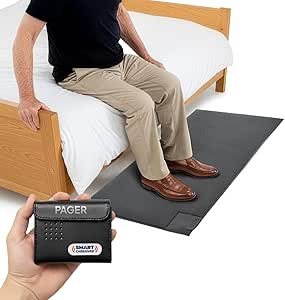 | Best for Bedside and Doorway Alerts | Brand: Smart Caregiver Corporation | Model: WPFM7-SYS | Mat dimensions: 48 x 24 x 0.5 inches | VIEW LATEST PRICE | See Our Full Breakdown |
| Medical Alert Pendant for Seniors, Alerts Go Direct to Family, No Call Center, Auto Fall Detection, GPS Tracking, 2-Way Calling, Water Resistant Necklace |  | Best for Mobile Family Check-Ins | Connectivity: 4G LTE cellular | Safety features: SOS button and automatic fall alerts | Location features: GPS tracking and geofence alerts | VIEW LATEST PRICE | See Our Full Breakdown |
| iHealth Track Smart Upper Arm Blood Pressure Monitor with Wide-Range Cuff |  | Best for At-Home Blood Pressure Tracking | Measurement type: Upper-arm blood pressure monitor | Cuff fit: 8.7–16.5 inches (22–42 cm) | On-device memory: Up to 99 readings | VIEW LATEST PRICE | See Our Full Breakdown |
| SecuLife SOS Wristband with Fall Detection, GPS Tracking, Geofencing, and Two-Way Calling |  | Best Screen-Free Wearable | Connectivity: Cellular | Fall alerts: Automatic fall detection | Location features: Real-time GPS tracking and geofencing | VIEW LATEST PRICE | See Our Full Breakdown |
| JoneR WiFi Caregiver Call Button with Voice and Two-Way Calls |  | Best for Subscription-Free Home Check-Ins | Power source: Corded electric | WiFi: 2.4 GHz only | Alert methods: Voice, tapping, button, and pull cord | VIEW LATEST PRICE | See Our Full Breakdown |
| SYMYNELEC Elderly Monitoring Camera with Screen and One-Touch Video Calling |  | Best for Simple Family Video Check-Ins | Use: Indoor | Screen: 2.8 inches | Video resolution: 1080p | VIEW LATEST PRICE | See Our Full Breakdown |
| Wireless Caregiver Pager with Call Button and Receiver |  | Best for Straightforward In-Home Help Calls | Included components: One call button and one receiver | Wireless range: Up to 1,500 feet | Ringtones: 58 | VIEW LATEST PRICE | See Our Full Breakdown |
| Fajocru Senior Safety Smartwatch with Fall Detection, 4G GPS, SOS, and Video Calling |  | Best for Mobile Safety Monitoring | Operating system: Android Wear 1.0 | Display: 1.56-inch AMOLED touchscreen | Connectivity: 4G cellular | VIEW LATEST PRICE | See Our Full Breakdown |
| Amazon Echo Dot (5th Gen) Smart Speaker, Charcoal |  | Best for Voice-First Everyday Assistance | Generation: 5th Gen | Dimensions: 3.9 x 3.9 x 3.5 inches | Weight: 10.7 ounces | VIEW LATEST PRICE | See Our Full Breakdown |
| Life Alert System – No Monthly Fee Caregiver Pager with App, 2.4 GHz Wi-Fi Receiver, Necklace & Bracelet |  | Best for Flexible Wearable Call Buttons | Included devices: Necklace-style button, wrist button, and plug-in receiver | Maximum range: Up to 656 feet (200 m) in open areas | Signal frequency: 433 MHz | VIEW LATEST PRICE | See Our Full Breakdown |
| Nomo Smart Care Medical Alert System with Fall Detection |  | Best for Whole-Home Coverage | Brand: Nomo Smart Care | Model: KIT1001R-01 | Included components: Smart Hub, two Satellite range extenders, wearable Tags | VIEW LATEST PRICE | See Our Full Breakdown |
| Daytech WiFi Caregiver Call Button – 2 Buttons, 1 Wrist Device, 1 Receiver |  | Best for Shared Caregiver Alerts | Manufacturer: Daytech | Model: CR02TY-CT02WR-WB06WH | Included devices: Two buttons, one wrist device, one receiver | VIEW LATEST PRICE | See Our Full Breakdown |
| JubileeTV Remote Care System for Seniors |  | Best for Remote Family Check-Ins | Brand and model: Caavo JubileeTV, model Centro | Connectivity: Bluetooth, infrared, Wi-Fi | Compatible devices: DVD/Blu-ray player, set-top box, streaming device, television | VIEW LATEST PRICE | See Our Full Breakdown |
| App-Controlled Medical Alert System for Seniors with Panic Buttons and Waterproof Wristband |  | Best No-Fee Basic Alert | Brand and model: PRNBRH CF106 | Included items: Two panic buttons, one wristband remote, one receiver with six-digit LED display | Wireless range: Up to 300 feet | VIEW LATEST PRICE | See Our Full Breakdown |
| Fajocru Fall Detection Smart Watch for Seniors with GPS Tracking and SOS Alert |  | Best for Mobile GPS Safety | Operating system: Android Wear 1.0 | Connectivity: 4G cellular | GPS: Built-in GPS with geofencing | VIEW LATEST PRICE | See Our Full Breakdown |
| smart senior home device | Connectivity |
|---|---|
| Smart Caregiver Wireless Floor | — |
| Medical Alert Pendant for Seni | 4G LTE cellular |
| iHealth Track Smart Upper Arm | Bluetooth 4.0 or later |
| SecuLife SOS Wristband with Fa | Cellular |
| JoneR WiFi Caregiver Call Butt | — |
| SYMYNELEC Elderly Monitoring C | 2.4GHz Wi-Fi |
| Wireless Caregiver Pager with | — |
| Fajocru Senior Safety Smartwat | 4G cellular |
| Amazon Echo Dot | — |
| Life Alert System | — |
| Nomo Smart Care Medical Alert | Wireless Wi-Fi |
| Daytech WiFi Caregiver Call Bu | — |
| JubileeTV Remote Care System f | Bluetooth, infrared, Wi-Fi |
| App-Controlled Medical Alert S | — |
| Fajocru Fall Detection Smart W | 4G cellular |
More Details on Our Top Picks
Smart Caregiver Wireless Floor Mat Alarm and Pager System, 24 x 48 Inches
I’d choose this system when the main concern is knowing that someone has gotten out of bed or approached an exit, rather than tracking them throughout the day. The 24 x 48-inch contact mat triggers an alert on the included pager, which can use sound or vibration; vibration may suit a caregiver who needs a quieter alert nearby. Its up-to-300-foot range gives more room to move around the home than a simple call button, though walls and layout can affect real-world coverage. Unlike the SecuLife SOS Pendant, it does not provide GPS, fall detection, or two-way calls. The tradeoff is focused coverage: it only alerts when the mat is stepped on, and expanding the system to other sensors requires separately purchased compatible devices.
Pros:- Audible and vibration alert options on the pager
- Large mat can be placed beside a bed or near an exit
- Pager range is listed as up to 300 feet
- Pager can monitor other compatible Smart Caregiver sensors
Cons:- Only detects a step on the mat, not falls or activity elsewhere
- Pager requires two AA batteries, which are not included
- Additional compatible call buttons and bed or chair sensors are sold separately
Best for: Caregivers who want an alert when a senior gets out of bed or approaches a monitored doorway, and can stay within pager range.
Not ideal for: Seniors who need a wearable alert while moving around the house or outdoors, or caregivers who need remote GPS tracking and voice communication.
- Brand:Smart Caregiver Corporation
- Model:WPFM7-SYS
- Mat dimensions:48 x 24 x 0.5 inches
- Maximum range:Up to 300 feet
- Alert options:Audible or vibration
- Audible alert level:70 dB
- Pager power:Two AA batteries, not included
- Warranty:1 year
Our verdict“Choose this for a focused bedside or exit alert; pick a wearable system such as the SecuLife SOS Pendant for mobile coverage and two-way contact.”
Medical Alert Pendant for Seniors, Alerts Go Direct to Family, No Call Center, Auto Fall Detection, GPS Tracking, 2-Way Calling, Water Resistant Necklace
This pendant is the stronger fit for a senior who leaves home and needs family to receive alerts directly, rather than relying on a call-center model. It combines an SOS button, automatic fall alerts, GPS tracking, geofencing, and two-way calling over 4G LTE, so a caregiver can get both an alert and a way to speak with the wearer. That makes it more useful beyond the home than the Smart Caregiver Floor Mat, which only detects someone stepping on a set spot. The tradeoffs are ongoing service and charging: the listing requires a monthly subscription, and battery estimates vary between up to six days and five days in the supplied details, depending on tracking. I’d confirm coverage and charging expectations before relying on it as a primary safety device.
Pros:- Combines SOS calling, automatic fall alerts, GPS, and geofence notifications
- Calls and alerts go to preselected family contacts
- Two-way voice communication with hands-free auto-answer
- IP67 water resistance and a display for time, battery, and signal
Cons:- Requires a monthly subscription for service
- Battery-life information varies in the supplied listing and requires regular charging
- Cellular features depend on network availability
Best for: Seniors who go out independently and families who want location alerts, fall detection, and direct voice contact without a call center.
Not ideal for: Households seeking a no-subscription device, users who may not wear or charge a pendant consistently, or caregivers who need a system that works without cellular coverage.
- Connectivity:4G LTE cellular
- Safety features:SOS button and automatic fall alerts
- Location features:GPS tracking and geofence alerts
- Calling:Two-way calling with hands-free auto-answer
- Water resistance:IP67
- Battery capacity:1000 mAh
- Battery life:Listed as up to 6 days; also stated as 5 days in product details
- Subscription:Required; listing states $20 per month
Our verdict“Pick this for a mobile senior whose family needs location and voice contact; choose the Smart Caregiver Floor Mat for a simpler, subscription-free alert at a fixed spot.”
iHealth Track Smart Upper Arm Blood Pressure Monitor with Wide-Range Cuff
For seniors monitoring blood pressure at home, I rank this above alert wearables because it serves a different, practical health routine: taking and keeping readings. Its large, color-coded display makes results easier to read at a glance, while two-button operation keeps measurement straightforward. The monitor stores up to 99 readings on the device; Bluetooth syncing to the iHealth app adds longer-term tracking for compatible phones. Compared with the SecuLife SOS Pendant, it is not an emergency-response device: it does not call family, detect falls, or locate the wearer. Its value depends on correct cuff placement and following the instructions, and app use requires a supported smartphone and Bluetooth. The wide-range cuff fits many adults, but users outside its stated arm-size range need another option.
Pros:- Large backlit display with oversized readings and color-coded guidance
- Two-button controls support a simple measurement routine
- Stores up to 99 readings on the monitor and syncs with the app
- Wide-range cuff fits upper arms measuring 8.7 to 16.5 inches
Cons:- Does not provide emergency calling, fall alerts, or location tracking
- Smartphone history requires a compatible phone and Bluetooth connection
- Readings depend on correct cuff fit and following the instructions
Best for: Seniors who need routine upper-arm blood pressure readings and want a large display plus optional smartphone tracking.
Not ideal for: Anyone seeking emergency alerts, fall detection, or a device for continuous monitoring, and users whose upper-arm circumference falls outside the cuff range.
- Measurement type:Upper-arm blood pressure monitor
- Cuff fit:8.7–16.5 inches (22–42 cm)
- On-device memory:Up to 99 readings
- Display:Large, multicolor backlit display
- Connectivity:Bluetooth 4.0 or later
- App compatibility:iOS 12.0 or later; Android 9.0 or later
- Power:Four AAA batteries included
- Warranty:12 months
Our verdict“Choose this for readable, repeatable blood pressure tracking at home; choose the SecuLife SOS Pendant if the priority is emergency communication and location safety.”
SecuLife SOS Wristband with Fall Detection, GPS Tracking, Geofencing, and Two-Way Calling
I’d shortlist this wristband for someone who is more likely to keep a simple band on than manage a pendant with a display. Its screen-free, one-button design keeps the main action direct, while cellular service supports automatic fall alerts, GPS tracking, geofencing, and two-way calls. Compared with the SecuLife Medical Alert Pendant, it offers a less display-focused format but broadly similar mobile safety functions. The biggest compromise is its listed one-day battery life, which calls for a reliable daily charging habit; that is a much tighter routine than the pendant’s stated multi-day estimate. It also requires a subscription, and IP67 resistance covers water exposure such as splashes and handwashing, not a reason to assume every water activity is suitable.
Pros:- One-button calling and automatic fall alerts
- GPS tracking with geofence alerts and location history
- Two-way calling with hands-free auto-answer
- Screen-free design with IP67 water resistance
Cons:- Listed battery life is only one day, so frequent charging is needed
- Requires a monthly subscription
- Cellular calling and tracking depend on network coverage
Best for: Seniors who prefer a discreet, screen-free wrist-worn alert and have a caregiver able to support daily charging and subscription setup.
Not ideal for: People who want multi-day battery life, a display for status information, or a safety device without recurring service costs.
- Connectivity:Cellular
- Fall alerts:Automatic fall detection
- Location features:Real-time GPS tracking and geofencing
- Location history:Up to 1 year
- Calling:Two-way voice calling with hands-free auto-answer
- Water resistance:IP67
- Battery:680 mAh; listed life is 1 day
- Subscription:Required; listing states $25 per month
Our verdict“Choose this wristband when a simple, screen-free wearable matters more than battery longevity; the SecuLife pendant is a better fit for users who prefer a display and longer stated runtime.”
JoneR WiFi Caregiver Call Button with Voice and Two-Way Calls
The JoneR is aimed at families who want a senior to request help at home without wearing a cellular alert device. A request can start with a button, pull cord, voice, or tapping, and the system sends app notifications to as many as four family members. Its two-way intercom gives relatives a way to respond, unlike the Smart Caregiver Floor Mat, which alerts a nearby pager but does not provide a conversation. There is no subscription fee, though that does not make it independent of infrastructure: it needs 2.4 GHz WiFi, power, app access, and family members who can act on notifications. It is best as an in-home call-for-help tool, not a replacement for GPS tracking or automatic fall detection.
Pros:- Multiple alert triggers, including voice, tapping, button, and pull cord
- App notifications can reach up to four family members
- Two-way intercom supports direct conversation
- No subscription fee and a two-year warranty
Cons:- Requires 2.4 GHz WiFi and electric power
- Alerts depend on app notifications and family members responding
- Does not provide GPS tracking or automatic fall detection
Best for: Families with reliable 2.4 GHz home WiFi who want a no-subscription way for a senior to request help and speak with relatives.
Not ideal for: Seniors who need protection outside the home, automatic fall detection, or a system that can summon help when family members are unavailable.
- Power source:Corded electric
- WiFi:2.4 GHz only
- Alert methods:Voice, tapping, button, and pull cord
- Control methods:App, push button, remote, and voice
- Communication:Two-way intercom
- Family notifications:Up to four family members
- Mounting:Wall mount or tabletop
- Warranty:2 years
Our verdict“Choose this for in-home, family-managed check-ins without a monthly service; choose the SecuLife SOS Pendant for mobile coverage and automatic fall alerts.”
SYMYNELEC Elderly Monitoring Camera with Screen and One-Touch Video Calling
The SYMYNELEC is a better fit for scheduled family check-ins than for emergency response: its 2.8-inch screen and one-touch video calling let a senior answer without handling a smartphone. That makes it more direct for conversation than the Amazon Echo Dot (5th Gen), which offers voice interaction but no built-in video screen. PTZ tracking, night vision, and sound alerts also help caregivers check a room when nobody answers. A physical privacy mode turns the lens away, while local recording avoids a required camera-feature subscription. The tradeoff is that it needs constant USB-C power and 2.4GHz Wi-Fi, and local recording requires a memory card that is not included. I would choose it for connection and room monitoring, not as a substitute for a call button or medical alert.
Pros:- One-touch video calling does not require the recipient to operate a smartphone.
- PTZ tracking and night vision help caregivers view more of a room in varied lighting.
- Physical privacy mode turns the camera lens away.
- Local recording is available without a required camera-feature subscription.
Cons:- A memory card for local recording is not included.
- Requires continuous plug-in power and 2.4GHz Wi-Fi.
- Indoor camera coverage cannot follow a senior outside the room.
Best for: Families who want an older adult to answer video calls with one touch and need a fixed indoor camera for occasional check-ins.
Not ideal for: Seniors who need a wearable emergency alert, or households without reliable 2.4GHz Wi-Fi and a nearby outlet.
- Use:Indoor
- Screen:2.8 inches
- Video resolution:1080p
- Connectivity:2.4GHz Wi-Fi
- Audio:Two-way audio
- Camera features:PTZ tracking, night vision, motion and sound alerts, physical privacy mode
- Recording:Local recording; supports memory cards up to 128GB, not included
- Power:Corded USB Type-C; 5 volts, 10 watts
- Dimensions and weight:3.38 x 3.22 x 6.53 inches; 0.35 kg
Our verdict“Choose this camera for accessible family video check-ins and indoor monitoring, but pair it with a separate alert system if emergency response is the priority.”
Wireless Caregiver Pager with Call Button and Receiver
This pager keeps the call for help simple: the senior presses a battery-powered button, and a caregiver hears an alert on the receiver. Compared with the TurboSense Life Alert System, it does not rely on app push notifications or Wi-Fi for the basic alert, which may suit a household that wants a direct receiver-based setup. Its stated 1,500-foot wireless range and expandable support for up to 30 call buttons can cover a larger home or allow buttons in several rooms. The tradeoff is that someone must be within hearing range of the receiver; it does not provide the mobile caregiver notifications described for TurboSense. There are also 58 ringtone choices and five volume levels, but the listed maximum of 120 dB may be too loud for some homes. The warranty duration is inconsistent across the supplied product details, so I would confirm it before buying.
Pros:- Receiver-based alerts do not require app notifications for the basic call.
- Stated wireless range reaches up to 1,500 feet.
- Expandable setup supports up to 30 call buttons and multiple receivers.
- IP55 water- and dust-resistant design suits everyday home use.
Cons:- The system depends on batteries, which need monitoring and replacement.
- A caregiver must be close enough to hear the receiver; mobile alerts are not specified.
- Product details list conflicting warranty durations.
Best for: Households seeking a simple button-and-receiver alert for a senior at home, especially when caregivers are usually on the same property.
Not ideal for: Caregivers who need phone notifications while away from the home, or buyers who want certainty about warranty coverage before purchase.
- Included components:One call button and one receiver
- Wireless range:Up to 1,500 feet
- Ringtones:58
- Volume:Five levels; maximum 120 dB
- Ingress protection:IP55
- Power:Battery powered; lithium battery
- Expandable capacity:Up to 30 call buttons and multiple receivers
- Operating temperature:-4°F to 140°F
- Warranty information:Description states 18 months; product details list 2 years
Our verdict“Pick this pager for a direct, expandable in-home alert system, but choose a connected option such as TurboSense if caregivers need notifications away from the receiver.”
Fajocru Senior Safety Smartwatch with Fall Detection, 4G GPS, SOS, and Video Calling
Unlike the SYMYNELEC camera, which watches one indoor space, this 4G smartwatch with built-in GPS is designed to keep caregivers connected when a senior is out and about. Automatic fall alerts, an SOS function, and geofencing can give families more ways to respond to a problem or check a location. It also supports video and voice communication through a caregiver app, plus activity and sleep tracking. That broader coverage comes with more setup: the included one-year data service is for app data, while direct cellular calls require a compatible SIM. The watch also tracks blood pressure, but those readings are described as reference measurements rather than a substitute for a dedicated monitor such as the iHealth Track Smart Upper Arm Blood Pressure Monitor. Its feature mix suits active seniors, though the plastic case, 5.12-ounce weight, and multiple functions may feel like more device than a simpler pager requires.
Pros:- Automatic fall detection and SOS alerts add wearable emergency options.
- Built-in GPS and geofencing help caregivers check location beyond the home.
- Supports video calls and voice messaging through a caregiver app.
- IP67-rated water resistance supports use in wet conditions.
Cons:- Direct cellular calls require a separate compatible SIM.
- Included one-year service covers app data, not necessarily every calling function.
- Blood pressure readings are reference measurements, and the watch weighs 5.12 ounces.
Best for: Families supporting an older adult who spends time away from home and needs GPS location sharing, SOS access, and fall alerts on a wearable.
Not ideal for: Seniors who want a lightweight, simple emergency button, or buyers expecting medical-grade blood pressure readings or direct calls without a compatible SIM.
- Operating system:Android Wear 1.0
- Display:1.56-inch AMOLED touchscreen
- Connectivity:4G cellular
- GPS:Built-in GPS with geofencing
- Water resistance:IP67
- Health features:Heart rate and blood pressure monitoring, sleep tracking, step count
- Included data service:One year; app data only
- Materials:Plastic case and rubber band
- Weight:5.12 ounces
Our verdict“Choose this watch for a senior who needs location-aware safety support outside the home, but not as a replacement for a dedicated blood pressure monitor.”
Amazon Echo Dot (5th Gen) Smart Speaker, Charcoal
The Echo Dot earns its place as a general-purpose voice assistant, not as a dedicated medical alert device. A senior can ask Alexa questions, set timers, play audiobooks or music, and control compatible smart-home devices without picking up a phone. Compared with the SYMYNELEC Elderly Monitoring Camera, it is better for hands-free household routines and audio, but it does not provide video check-ins or a camera view. Its compact 3.9-inch footprint and dual-band Wi-Fi make it easy to place in a bedroom or kitchen; Bluetooth and compatible Echo pairing add flexible listening options. The built-in eero extension may help some homes, but only with a compatible eero network and setup. I would not treat voice requests as a replacement for a dedicated call button or wearable SOS device, and some services or skills may require separate subscriptions.
Pros:- Voice requests can handle timers, questions, audio playback, and compatible smart-home controls.
- Supports Bluetooth and pairing with compatible Echo devices.
- Compact size fits easily on a bedside table or kitchen counter.
- Can extend coverage on a compatible eero network.
Cons:- It is not a dedicated emergency alert or fall-detection device.
- Some skills and services may require subscriptions or additional fees.
- Eero Built-in requires a compatible router, account linking, and setup in the eero app.
Best for: Seniors comfortable speaking to a voice assistant who want hands-free timers, audio, answers, and control of compatible home devices.
Not ideal for: Anyone needing fall detection, emergency response, video monitoring, or a device that works without Wi-Fi and an Alexa account.
- Generation:5th Gen
- Dimensions:3.9 x 3.9 x 3.5 inches
- Weight:10.7 ounces
- Audio:1.6-inch full-range driver; mono playback
- Audio bandwidth:62 Hz–19 kHz
- Wi-Fi:Dual-band 802.11a/b/g/n/ac, 2.4 and 5 GHz
- Smart-home compatibility:Wi-Fi, Bluetooth Low Energy Mesh, Matter
- Eero Built-in:Up to 1,000 sq. ft. with a compatible eero network
- Warranty:90-day limited warranty
Our verdict“Choose the Echo Dot for everyday voice-controlled convenience, but pair it with a purpose-built alert system for senior safety needs.”
Life Alert System – No Monthly Fee Caregiver Pager with App, 2.4 GHz Wi-Fi Receiver, Necklace & Bracelet
The TurboSense system gives a senior two ways to summon help: a waterproof necklace button and wrist button, both paired with a plug-in receiver and app notifications. That flexibility makes it a stronger wearable-alert choice than the STECHRO Wireless Caregiver Pager, which comes with one call button and a receiver but does not specify app push alerts. TurboSense’s 656-foot stated range can cover a multi-room home in open conditions, while the 2.4GHz Wi-Fi connection lets caregivers receive app notifications beyond the receiver’s immediate area. Basic alerts have no monthly fee, but phone calls and SMS may require paid app service, so the no-fee claim does not cover every notification method. Walls and interference can also reduce range. I would favor it when a senior may switch between a pendant and wrist button, while choosing STECHRO for its longer stated range and larger expandable button capacity.
Pros:- Includes both a necklace-style pendant button and a wrist button.
- Basic alerts do not require a monthly subscription.
- App push notifications can reach caregivers through a 2.4GHz Wi-Fi connection.
- Stated wireless range is up to 656 feet in open areas.
Cons:- Phone call and SMS alerts may require a paid app service.
- Walls, interference, and receiver placement can reduce the stated range.
- The supplied warranty information is limited to a 30-day voluntary return guarantee.
Best for: Families who want a senior to choose between a waterproof pendant and wrist button, with app push alerts for caregivers connected to home Wi-Fi.
Not ideal for: Buyers who require guaranteed phone-call or SMS alerts without extra service, or homes where Wi-Fi and signal conditions are unreliable.
- Included devices:Necklace-style button, wrist button, and plug-in receiver
- Maximum range:Up to 656 feet (200 m) in open areas
- Signal frequency:433 MHz
- Wi-Fi:2.4GHz Wi-Fi receiver
- Alert methods:Receiver alert and app push notification
- Water resistance:Pendant and wrist button described as waterproof
- Battery:One included lithium-ion battery
- Compatible devices:Smartphone
- Return information:30-day voluntary return guarantee
Our verdict“Choose TurboSense for the choice of pendant or wrist alert and app notifications, but verify the alert method and signal coverage that your household needs.”
Nomo Smart Care Medical Alert System with Fall Detection
Nomo is the strongest fit here for someone who needs a wearable alert system backed by coverage across several rooms. Its Smart Hub, two range-extending Satellites, and fall-detecting Tags make it more suited to a whole-home setup than the single-receiver Daytech call button. If a fall or panic button press occurs, the system can connect the user and caregivers through two-way voice communication, rather than relying only on an app notification. The tradeoff is ongoing service: the included 30-day monitoring trial does not remove the subscription requirement afterward. Nomo also depends on Wi-Fi and AC power, so it is a weaker choice for homes with unreliable internet or frequent outages. I’d choose it over PRNBRH’s no-fee basic alert system when monitored response and expanded coverage matter more than avoiding a recurring plan.
Pros:- Fall detection and panic buttons can alert caregivers.
- Two-way voice communication is available through the Smart Hub.
- Two Satellites extend coverage beyond a single central unit.
- Wireless setup does not require a landline.
Cons:- A monthly subscription applies after the 30-day monitoring trial.
- Requires Wi-Fi and AC power, with battery backup only noted for power.
- Wearable Tags and system coverage may not suit someone who wants a simple single-button alert.
Best for: Older adults who spend time in multiple rooms and want fall detection, two-way communication, and 24/7 monitoring after setup.
Not ideal for: People who want a no-subscription alert system or live where Wi-Fi and AC power are unreliable.
- Brand:Nomo Smart Care
- Model:KIT1001R-01
- Included components:Smart Hub, two Satellite range extenders, wearable Tags
- Connectivity:Wireless Wi-Fi
- Power:AC power with battery backup
- Alert type:Fall detection
- Monitoring trial:30 days
- Dimensions:10.6 x 4.75 x 7.1 inches
Our verdict“Choose Nomo for broader in-home coverage and monitored two-way support, but skip it if you want to avoid a recurring subscription.”
Daytech WiFi Caregiver Call Button – 2 Buttons, 1 Wrist Device, 1 Receiver
Daytech keeps the call process simple: the senior presses a wrist-worn or handheld button, while the plug-in receiver sounds an alert and the system sends notifications to phones. Its main advantage over PRNBRH’s app-controlled system is the two-button package and customizable receiver tones, which can make an alert easier to identify in a busy home. Shared notifications also suit families where more than one person checks in. This is a caregiver call system, not a fall-detection or monitored medical alert service, so it depends on the user being able to press a button. The receiver must stay near an outlet, and full functionality depends on internet access; offline use requires an additional upgrade. I’d favor Daytech over Nomo for a simpler family-notification setup, but not for someone who needs automatic fall alerts or emergency monitoring.
Pros:- Includes both a wrist-worn button and an additional handheld button.
- Can send alerts to an app and phone for shared caregiver awareness.
- Customizable ringtones and five volume levels help distinguish alerts.
- Lifetime service support is provided through Amazon.
Cons:- The receiver needs an outlet, limiting where it can be placed.
- Full functionality depends on internet connectivity; offline use requires an additional upgrade.
- No fall detection or professional monitoring is specified.
Best for: Families who want multiple relatives to receive Wi-Fi call alerts from a senior who can press a button.
Not ideal for: Older adults who may be unable to press a button during an emergency, or households seeking automatic fall detection or 24/7 monitoring.
- Manufacturer:Daytech
- Model:CR02TY-CT02WR-WB06WH
- Included devices:Two buttons, one wrist device, one receiver
- Notifications:Mobile app and phone
- Receiver:Plug-in receiver
- Battery:One 12V battery included
- Dimensions:4.8 x 4.1 x 3.6 inches
- Item weight:10.2 ounces
Our verdict“Daytech suits button-press users and families sharing notifications, but it is not a substitute for fall detection or monitored emergency response.”
JubileeTV Remote Care System for Seniors
JubileeTV takes a different route from the alert buttons in this roundup: it turns the television into a point for video calls, one-way check-ins, reminders, and caregiver updates. That makes it a better match for someone who already uses a TV regularly but may not keep a phone nearby. Caregivers can also control compatible TV devices remotely, while the large backlit voice remote is designed to make everyday use less fiddly. Compared with Nomo, JubileeTV is about connection and routine rather than fall detection or emergency monitoring; it should not be treated as a medical alert system. Setup also requires an HDMI-connected TV, Wi-Fi, and an existing cable, satellite, or streaming device. An active membership is required after setup, and availability is limited to the U.S., so it suits families who value remote engagement enough to accept those constraints.
Pros:- Supports video calls and one-way audio and video check-ins.
- Caregivers can control compatible TV devices remotely.
- Can display medication reminders, notes, photos, and videos on the TV.
- Includes a backlit voice remote intended for senior-friendly use.
Cons:- Requires an active membership after setup.
- Needs a TV with HDMI, Wi-Fi, and an existing cable, satellite, or streaming device.
- Available only in the U.S. and does not provide the fall-alert function offered by Nomo.
Best for: U.S. families who want to check in by video, send reminders to a senior’s TV, and help manage their TV setup remotely.
Not ideal for: People seeking fall detection, emergency response, or a system that works without a compatible TV, Wi-Fi, and an active membership.
- Brand and model:Caavo JubileeTV, model Centro
- Connectivity:Bluetooth, infrared, Wi-Fi
- Compatible devices:DVD/Blu-ray player, set-top box, streaming device, television
- Maximum supported devices:4
- Maximum range:10 meters
- Controller:Voice control; 34-button remote
- Requirements:TV with HDMI, Wi-Fi, and an existing cable, satellite, or streaming device
- Availability:U.S. only
Our verdict“Choose JubileeTV for TV-based family contact and reminders, not as a replacement for a medical alert system.”
App-Controlled Medical Alert System for Seniors with Panic Buttons and Waterproof Wristband
PRNBRH stands out for buyers who want a home alert device without a monthly charge for basic use. It includes two panic buttons, a wristband remote, and a receiver with a six-digit LED display, giving it a more complete button-and-receiver setup than Daytech’s single plug-in receiver package. The 300-foot wireless range can help the wearable or buttons reach the receiver across a typical home, while a loud alarm offers an immediate local alert. The wristband is waterproof, but the panic buttons and receiver are not described as water-resistant, so I would not treat the entire kit as shower-safe. App notifications are available, while SMS alerts require a subscription. Unlike Nomo, this system does not include fall detection or professional monitoring; it is best for someone who can summon help by pressing a button and wants to avoid routine service fees.
Pros:- Basic use has no monthly fee.
- Includes two panic buttons, a wristband remote, and an LED-display receiver.
- Wireless signal range is listed up to 300 feet.
- The wristband remote is waterproof for use while showering.
Cons:- Only supports 2.4 GHz Wi-Fi.
- SMS notifications require a subscription.
- Only the wrist-worn remote is waterproof, and automatic fall detection is not specified.
Best for: Older adults who can press a panic button and want a home receiver and app alerts without a monthly fee for basic use.
Not ideal for: People who need automatic fall detection, professional monitoring, or waterproof protection for every included device.
- Brand and model:PRNBRH CF106
- Included items:Two panic buttons, one wristband remote, one receiver with six-digit LED display
- Wireless range:Up to 300 feet
- Alarm volume:Up to 110 dB
- Wi-Fi:2.4 GHz only
- Water resistance:Wristband remote only
- Batteries:Two A batteries included
- Monthly fee:None for basic use; SMS notifications require a subscription
Our verdict“PRNBRH is a practical no-fee choice for press-button alerts, but not for users who need automatic fall detection or monitored response.”
Fajocru Fall Detection Smart Watch for Seniors with GPS Tracking and SOS Alert
Fajocru is the most mobile option in this group: unlike Nomo, which is built around a home hub, this 4G smartwatch combines GPS tracking, geofencing, fall alerts, and SOS for seniors who leave home independently. Its IP67 water-resistance rating and wrist-worn design keep the safety tools close at hand, while the included data-only SIM provides a year of data service. That SIM limitation matters: voice calls require a separate voice-enabled SIM, so buyers should not assume the watch supports ordinary calling out of the box. The product also lists blood pressure as a health metric but describes it as a reference measurement, so it should not replace a dedicated monitor such as the iHealth Track. I’d choose Fajocru over the home-focused alert systems for location awareness, but skip it if the priority is simple, verified calling or clinical-grade health readings.
Pros:- Combines fall alerts, SOS, GPS tracking, and geofencing.
- Works with Android and iOS smartphones.
- IP67 water resistance supports everyday wear, including exposure to water within its rated limits.
- Includes one year of data service through a preinstalled data-only SIM.
Cons:- The included data-only SIM does not support voice calls; a separate voice-enabled SIM is needed for calling.
- Blood pressure is described as a reference measurement, not a clinical reading.
- A wearable watch may be less suitable than a home hub for seniors who do not want to charge or manage another device.
Best for: Independently mobile seniors and caregivers who want GPS location, geofencing, and SOS alerts on a wearable device.
Not ideal for: People who want a ready-to-use voice-calling watch or medical-grade blood pressure readings from the device.
- Operating system:Android Wear 1.0
- Connectivity:4G cellular
- GPS:Built-in GPS with geofencing
- Water resistance:IP67; rated to 1 meter
- Safety and health features:Fall alert, SOS, heart rate, blood pressure and blood oxygen monitoring, step count, medication reminder, sedentary reminder
- Communication:Voice chat; included data-only SIM does not support voice calls
- Compatibility:Android and iOS smartphones
- Included service:One year of data service
Our verdict“Choose Fajocru for location-based safety beyond the home, provided the wearer accepts a separate SIM for voice calls and treats health readings cautiously.”
How We Picked
I ranked these devices by how clearly they address a senior’s day-to-day support needs: getting help quickly, reaching family or caregivers, tracking location when relevant, and supporting health routines. I also weighed ease of use, the fit between the device and its intended setting, and practical details such as whether it relies on Wi-Fi, GPS, a phone app, a receiver, or a wearable that must be charged and worn. A feature only helps when the older adult can use it and the right person can receive the alert.
The order gives priority to broader safety and communication coverage, then to products that solve narrower needs well. That is why connected medical alerts and care communication tools rank ahead of single-purpose measurement or room alerts, while simpler pagers remain compelling for households with a caregiver nearby. I treat product claims such as fall detection as features, not guarantees; buyers should confirm alert routing, service requirements, and compatibility before choosing.
Factors to Consider When Choosing Best Smart Senior Home Devices
Before choosing a device, I’d start with the support plan around it. A useful purchase is not just the gadget: it is the route from a missed step, fall, or request for help to a person who can respond.
Choose the alert path before the device
Ask who should receive an alert and what they can do when it arrives. A caregiver pager or call button can work well when someone is usually at home, but it does little if the recipient is out or cannot hear the receiver. A monitored or family-connected alert may reach someone farther away, though it can depend on a network, app, or service plan. Map the chain from button press to response, including a backup contact. A device with many alert features is a poor fit if notifications go to a phone nobody checks. Match the alert route to actual caregiver availability, not an ideal schedule.
Match coverage to where help may be needed
Home-only coverage and mobile coverage solve different problems. A floor mat can alert someone to movement beside a bed, while GPS-enabled wearables are intended to support users outside the home too. Buyers sometimes choose a mobile tracker when the main concern is a specific room, adding charging and wearing tasks without solving the core issue better. The reverse mistake is relying on a room-based receiver for someone who spends time alone outdoors. Think through the person’s regular routes, rooms, and times spent without company. Then confirm whether the device works in those places and what happens during a Wi-Fi or cellular outage.
Make daily use easier than the emergency
In a stressful moment, controls should be easy to recognize and operate. Look for a comfortable wearable, a clear button, and a method of communication the senior can hear and understand. Smartwatches and app-linked systems may offer more functions, but they also ask users or family members to manage charging, setup, permissions, and updates. A simpler pendant or call button can be a better choice for someone who dislikes screens. Ask the intended user to handle the device and charger before deciding, rather than assuming that a feature-rich interface will be intuitive. A device left on a table or discharged cannot provide the coverage its specifications suggest.
Check connectivity, service, and alert limits
Wi-Fi, cellular connectivity, Bluetooth, and app access affect whether a device can send an alert and who can receive it. Confirm whether the product needs a paid monitoring service, a compatible smartphone, or a stable home network; product names alone do not answer those questions. Also ask whether two-way calling reaches family directly or routes through another service. Fall detection can be useful, but no sensor can promise to identify every fall or distinguish every movement correctly. Treat manual SOS as an important backup, and make sure the wearer knows how to activate it. Before buying, read the current setup and service details for the exact model.
Separate health tracking from emergency response
A blood pressure monitor can help someone take readings as part of a care routine, but measurement is not the same as summoning help. If the priority is keeping family connected, a video calling system or smart speaker may fit better than another medical device. Households can benefit from several tools, but buying overlapping alerts without deciding who monitors each one can create confusion. Choose a primary way to request urgent help, then add devices that solve a distinct need. For health measurements, consider who will review the readings and how they will be shared with a clinician. Do not treat a connected reading as a diagnosis or a substitute for professional advice.
Plan for privacy and caregiver workload
Cameras and connected screens can make communication easier, but they also change how much of a person’s home life is visible to others. Discuss where a camera may be placed, who can access its feed, and when it should be turned off. Location tracking raises similar questions about consent and who can see a wearer’s movements. On the practical side, every added device brings setup, charging, troubleshooting, and alert management. A family member should take ownership of those tasks before the system is installed. A smaller setup that the senior accepts and someone maintains can serve better than a larger collection of features.
Frequently Asked Questions
Should I choose a medical alert device or a caregiver call button?
I’d choose based on where the senior spends time and who can respond. A caregiver call button or pager is suited to a home where someone nearby can hear and answer an alert. A medical alert wearable is a better direction when the person may be alone or away from home, especially if location tracking or two-way calling matters. Check whether the specific model contacts family directly or relies on a monitoring service. If care needs vary by location, keep one clear primary alert method and add a second device only for a separate gap.
Can fall detection replace pressing an SOS button?
No. Fall detection may trigger an alert when the wearer cannot press a button, but it should not be treated as certain to detect every fall. The device may also need to be worn, charged, and connected for alerts to reach someone. I’d check how the system handles a suspected fall, whether the wearer can speak with a recipient, and what happens if there is no response. A clearly reachable manual SOS control remains useful even when automatic detection is included. For serious safety concerns, discuss the plan with the senior and their care team.
Do I need Wi-Fi or a smartphone for these senior devices?
It depends on the device and the features you expect to use. Wi-Fi call buttons and connected cameras need a suitable home network, while app-based alerts often require a compatible phone and someone willing to manage notifications. GPS and cellular wearables may use mobile connectivity, but buyers should confirm coverage, service terms, and setup needs for the exact model. A receiver-based pager can be simpler at home, though it may not reach family when nobody is nearby. Check the installation requirements before purchase and test the alert path where the device will be used.
Is a camera or video-calling device a good substitute for a medical alert system?
Usually not: video communication helps family check in, but it may not provide the same emergency alert path as a medical alert device or call button. A senior may also be unable or unwilling to reach a screen during an urgent situation. Devices such as JubileeTV or the SYMYNELEC camera can support regular contact, especially when phone use is difficult. I’d pair one with a separate way to summon help if emergency response is a concern. Agree on camera access and privacy settings with the person using it.
What should I check before buying a device advertised with no monthly fee?
Confirm what “no monthly fee” covers and what functions remain available without a subscription. Some devices may still depend on Wi-Fi, an app, a phone, or a nearby receiver, and those requirements can limit alerts outside the home. Check whether the product contacts family directly, whether location or cellular features need a separate plan, and how alerts are handled if a contact does not answer. Also consider who will maintain the app and troubleshoot the system. Compare the whole support arrangement, not just the subscription claim.
Conclusion
For the broadest balance of safety-focused alerts, I’d start with the Nomo Smart Care Medical Alert System as my best overall pick, while confirming its alert and service details match the household. For best value in a home with a caregiver close by, the Wireless Caregiver Pager offers a simpler route to a nearby person; it is not a replacement for mobile coverage. The JubileeTV Remote Care System is my best premium choice for households prioritizing ongoing family communication, and the Amazon Echo Dot is a more approachable beginner option for basic voice interaction, not emergency monitoring. For a specific nighttime movement concern, choose the Smart Caregiver Floor Mat Alarm; for health readings, consider the iHealth Track blood pressure monitor. I’d make the final choice by naming who receives each alert and confirming that the senior can use the device comfortably.