Finding the right tablet for an elderly loved one involves balancing ease of use, screen size, performance, and affordability. The GrandPad stands out as the best overall choice for its simple interface and senior-friendly features. The Amazon Fire HD 8 offers excellent value with decent performance and a manageable size, making it ideal for many seniors. However, tradeoffs exist—more powerful models tend to be more complex, while budget options may lack features that enhance accessibility. Continue reading for a detailed breakdown of the best tablets designed with seniors in mind.
Complete the kit



Key Takeaways
- The best overall tablet combines simplicity with reliable performance, making it suitable for most seniors.
- Size and weight are critical—smaller or lightweight models reduce strain and improve handling.
- Built-in accessibility features like larger fonts, voice commands, and simplified interfaces significantly enhance usability.
- Higher price often correlates with better ease of use and durability, but budget options can still be effective.
- Performance matters less than ease of navigation; a slower device with a user-friendly interface may outperform a faster, more complex one.
| 11 inch Android 16 Tablet, 128GB ROM, 20GB RAM, 4G LTE, 5G WiFi, Octa-Core, 13MP Rear & 8MP Front Camera |  | Best Power and Storage for Multitasking | Display: 11 inch Incell HD (1280×800) | Processor: MTK8786 Octa-Core | RAM: 20GB (8GB physical + 12GB virtual) | VIEW ON AMAZON | See Our Full Breakdown |
| GrandPad Easy-to-Use Tablet & Phone for Seniors |  | Best for Simple, Safe Connectivity | Designed for: Seniors | Connectivity: Wi-Fi | Compatibility: Locked to specific plans, not compatible with all carriers | VIEW ON AMAZON | See Our Full Breakdown |
| Amazon Fire HD 10 Tablet, 10.1″ Full HD, Octa-Core, 3GB RAM, 32GB, Black | 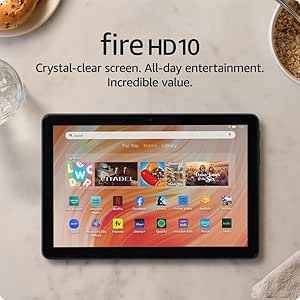 | Best for Visual Entertainment and Durability | Display: 10.1″ 1080p Full HD (1920 x 1200) | Processor: Octa-core | RAM: 3 GB | VIEW ON AMAZON | See Our Full Breakdown |
| Amazon Fire HD 8 Tablet (Newest Model), 8” HD Display, 3GB RAM, 32GB Storage, Black |  | Best for Compact and Budget-Friendly Use | Display: 8 inches HD | RAM: 3GB | Storage: 32GB | VIEW ON AMAZON | See Our Full Breakdown |
| Lenovo Tab One – Lightweight 8.7-inch HD Tablet with 4GB RAM, 64GB Storage, MediaTek Helio G85, and Folio Case |  | Best for Portability and Multimedia on the Go | Display: 8.7-inch HD | Battery Life: Up to 12.5 hours | Memory: 4 GB RAM | VIEW ON AMAZON | See Our Full Breakdown |
| Pix-Star Touch Easy-to-Use Tablet for Seniors, 10.1 Inch Screen, WiFi, Dual Cameras |  | Best for Simplicity and Communication | Screen Size: 10.1 inches | Storage Capacity: 32 GB | Connectivity: WiFi | VIEW ON AMAZON | See Our Full Breakdown |
| Samsung Galaxy Tab A11+ 6GB RAM, 128GB Storage, Gray |  | Best for Entertainment and Multitasking | RAM: 6GB | Storage: 128GB | Display: 11-inch | VIEW ON AMAZON | See Our Full Breakdown |
| Samsung Galaxy Tab A9+ Plus 11″ 64GB Android Tablet |  | Best for Family Use and Portability | Display: 11 inches | Storage: 64GB (expandable with microSD) | Refresh Rate: 90Hz | VIEW ON AMAZON | See Our Full Breakdown |
| Fire HD 8 Tablet (2022 Release), 8” HD Display, 32 GB, Black |  | Best Budget-Friendly Performance | Display: 8-inch HD | Storage: 32 GB | Processor: Hexa-core (30% faster) | VIEW ON AMAZON | See Our Full Breakdown |
| tablets for elderly | Display | Storage | RAM |
|---|---|---|---|
| 11 inch Android 16 Tablet | 11 inch Incell HD (1280×800) | 128GB internal, expandable up to 1TB | 20GB (8GB physical + 12GB virtual) |
| GrandPad Easy-to-Use Tablet & | — | — | — |
| Amazon Fire HD 10 Tablet | 10.1" 1080p Full HD (1920 x 1200) | 32 GB (available 24 GB) | 3 GB |
| Amazon Fire HD 8 Tablet | 8 inches HD | 32GB | 3GB |
| Lenovo Tab One | 8.7-inch HD | 64 GB | — |
| Pix-Star Touch Easy-to-Use Tab | — | — | — |
| Samsung Galaxy Tab A11+ 6GB RA | 11-inch | 128GB | 6GB |
| Samsung Galaxy Tab A9+ Plus 11 | 11 inches | 64GB (expandable with microSD) | — |
| Fire HD 8 Tablet | 8-inch HD | 32 GB | 2 GB |
More Details on Our Top Picks
11 inch Android 16 Tablet, 128GB ROM, 20GB RAM, 4G LTE, 5G WiFi, Octa-Core, 13MP Rear & 8MP Front Camera
This tablet stands out for its robust octa-core processor and exceptionally large storage, making it suitable for seniors who want to handle multiple apps, videos, and even work-related tasks without lag. Compared with the Amazon Fire HD 10, which offers a vibrant display but less processing power, this model provides a smoother experience for demanding activities. The 128GB storage, expandable to 1TB, ensures ample space for photos and documents—ideal for tech-savvy seniors or those who store a lot locally. However, the high specs come with a higher price and complexity, which might overwhelm less experienced users. The HD resolution, while sufficient, isn’t 4K, and virtual RAM features may require some familiarity with Android settings.
Pros:- Powerful octa-core processor supports smooth multitasking
- Large internal storage with expandability up to 1TB
- Long-lasting 7000mAh battery with fast charging
Cons:- High cost due to advanced specs
- Display resolution is HD, not 4K, limiting visual sharpness
Best for: Seniors who need a high-performance device for multitasking, media, and productivity
Not ideal for: Elderly users seeking simple, plug-and-play solutions or with limited technical skills
- Display:11 inch Incell HD (1280×800)
- Processor:MTK8786 Octa-Core
- RAM:20GB (8GB physical + 12GB virtual)
- Storage:128GB internal, expandable up to 1TB
- Battery:7000mAh
- Camera:13MP rear, 8MP front
Our verdict“This tablet is best suited for tech-savvy seniors who need serious performance and storage capacity.”
GrandPad Easy-to-Use Tablet & Phone for Seniors
The GrandPad excels in providing a secure, straightforward experience tailored for seniors who prioritize safety and ease of use. Its large icons and simplified interface make it easier to navigate than more complex Android tablets like the Lenovo Tab One. The dedicated network blocks spam and scams, adding peace of mind for family members and older users. However, this focus on simplicity means limited customization and functionality without an active plan, which can be a drawback for those wanting more control or flexibility. Compatibility is also restricted to specific plans, which might be inconvenient for some.
Pros:- Large icons and simple interface ease navigation
- Secure network blocks scams and spam
- Supports voice/video calls and photo sharing
Cons:- Limited features without an active plan
- Not compatible with all wireless carriers
Best for: Elderly users seeking a secure, easy-to-navigate device primarily for communication and entertainment
Not ideal for: Tech-savvy seniors wanting full customization or to use their existing carrier plans
- Designed for:Seniors
- Connectivity:Wi-Fi
- Compatibility:Locked to specific plans, not compatible with all carriers
- Plans:Basic, Premium, or Ultimate
- First month:Free
Our verdict“This device is ideal for seniors who want a safe, easy way to stay connected without technical complexity.”
Amazon Fire HD 10 Tablet, 10.1″ Full HD, Octa-Core, 3GB RAM, 32GB, Black
The Fire HD 10 offers a stunning 10.1-inch Full HD display, making it excellent for seniors who primarily want to watch videos, read, or browse comfortably. The octa-core processor and 3GB RAM ensure smoother streaming and app performance than the Fire HD 8, especially for media consumption. Its long 13-hour battery life and durable build add to its appeal. However, lacking Wi-Fi 6 support and limited app access—since it only supports Amazon’s Appstore—may hinder more tech-oriented use. This device is less suitable for those wanting extensive customization or a broader app ecosystem.
Pros:- Vivid 10.1-inch Full HD display for immersive viewing
- Long-lasting 13-hour battery life
- Durable design with strengthened glass
Cons:- Limited app selection due to Amazon Appstore only
- Wi-Fi 6 not supported, affecting future-proofing
Best for: Elderly users seeking a high-quality display and reliable media experience
Not ideal for: Users looking for a flexible app environment or who need Wi-Fi 6 connectivity
- Display:10.1″ 1080p Full HD (1920 x 1200)
- Processor:Octa-core
- RAM:3 GB
- Storage:32 GB (available 24 GB)
- Battery Life:Up to 13 hours
- Ports:USB-C, micro-SD, 3.5mm headphone
Our verdict“This tablet is perfect for seniors who prioritize media viewing and durability over extensive app customization.”
Amazon Fire HD 8 Tablet (Newest Model), 8” HD Display, 3GB RAM, 32GB Storage, Black
The Fire HD 8 strikes a balance between portability and entertainment, with an 8-inch HD display that’s comfortable for reading and streaming. Its 3GB RAM and 13-hour battery life make it a capable device for casual use, especially for seniors who prefer a smaller, lighter tablet. The expandable storage offers flexibility for media and apps. Still, the lack of Google Play Store support limits app choices, and some features require subscriptions, which could complicate use for less tech-savvy users. This model suits those who want a simple, affordable device for everyday activities.
Pros:- Compact, lightweight 8-inch HD display
- Long battery life up to 13 hours
- Expandable storage up to 1TB
Cons:- Limited app options without Google Play Store
- Some features require subscriptions or additional purchases
Best for: Budget-conscious seniors seeking a portable device for streaming, reading, and light browsing
Not ideal for: Advanced users needing full app access or Wi-Fi 6 connectivity
- Display:8 inches HD
- RAM:3GB
- Storage:32GB
- Battery Life:Up to 13 hours
- Expandable Storage:Up to 1TB
Our verdict“This device works well for seniors who want a simple, affordable tablet for entertainment and everyday tasks.”
Lenovo Tab One – Lightweight 8.7-inch HD Tablet with 4GB RAM, 64GB Storage, MediaTek Helio G85, and Folio Case
The Lenovo Tab One emphasizes portability with its compact 8.7-inch HD display and lightweight design, making it easy for seniors to carry and use anywhere. Its 4GB RAM and MediaTek Helio G85 processor deliver smooth performance for streaming, browsing, and light gaming, while the included folio case with stand adds convenience. The battery can last up to 12.5 hours, supporting extended use. However, the 60Hz refresh rate may make scrolling less smooth, and there’s no explicit mention of expandable storage, which could limit future media expansion. This pick suits active seniors who want a versatile, travel-friendly device.
Pros:- Lightweight and easy to handle
- Vibrant display with immersive sound
- Includes protective folio case with stand
Cons:- Limited to 60Hz refresh rate, affecting scrolling smoothness
- No clear info on expandable storage
Best for: Elderly users who prioritize portability for entertainment and learning on the move
Not ideal for: Those needing high-refresh-rate screens or extensive gaming performance
- Display:8.7-inch HD
- Battery Life:Up to 12.5 hours
- Memory:4 GB RAM
- Storage:64 GB
- Processor:MediaTek Helio G85
Our verdict“This tablet is ideal for active seniors who want a portable device for entertainment and casual use.”
Pix-Star Touch Easy-to-Use Tablet for Seniors, 10.1 Inch Screen, WiFi, Dual Cameras
This tablet stands out for its large 10.1-inch touchscreen paired with a straightforward user interface, making it particularly suitable for seniors who are new to technology or prefer a simplified experience. Unlike the Samsung Galaxy Tab A11+ which emphasizes entertainment and multitasking, the Pix-Star focuses on easy email, video calls, and photo sharing, thanks to its built-in cameras and pre-installed apps. However, its customer rating below 3 stars raises questions about reliability or user satisfaction, and its limited specs may disappoint users seeking more advanced features. Despite this, its dedicated design for seniors who prioritize communication makes it a good choice for first-time tablet users or those with limited tech experience.
Pros:- Large 10.1-inch touchscreen with simple interface
- Supports email, video calls, and social media
- Cameras for easy photo sharing and video conferencing
Cons:- Customer rating is below average at 2.8/5
- Limited detailed specifications and reviews
- Potentially higher price for basic features
Best for: Seniors and beginners who want a simple device for staying connected and sharing photos
Not ideal for: Tech-savvy users or seniors seeking high-performance entertainment or extensive app options
- Screen Size:10.1 inches
- Storage Capacity:32 GB
- Connectivity:WiFi
- Cameras:Front and rear
- Ports:USB-C
- Warranty:2 years
Our verdict“This tablet is best suited for seniors prioritizing straightforward communication over advanced features.”
Samsung Galaxy Tab A11+ 6GB RAM, 128GB Storage, Gray
Compared with the simpler Pix-Star, the Samsung Galaxy Tab A11+ offers a larger 11-inch display with vibrant visuals and smooth motion, thanks to its 90Hz refresh rate. Its 6GB of RAM and 128GB storage make it a responsive device capable of multitasking and handling media-rich applications, ideal for elderly users who enjoy streaming and reading. The quad speakers with Dolby Atmos provide immersive sound, but the lack of detailed information about included accessories or stylus support may limit its versatility. This model makes the most sense for seniors who want an all-in-one entertainment device that can double as a family hub, though it may be overkill for those seeking a simple communication tool or with limited tech needs.
Pros:- Large, bright 11-inch display with smooth motion
- Long-lasting battery with fast charging
- Rich audio experience with quad speakers and Dolby Atmos
Cons:- Limited storage expansion details provided
- No mention of included accessories or stylus
- Customer ratings and price are not specified
Best for: Tech-savvy seniors or family users who want a versatile tablet for media and multitasking
Not ideal for: Seniors looking solely for basic communication or with limited interest in entertainment features
- RAM:6GB
- Storage:128GB
- Display:11-inch
- Battery:Long-lasting with fast charging
- Front Camera:5 MP
- Color:Gray
Our verdict“This tablet is ideal for seniors who prioritize entertainment, multitasking, and high-quality audio in a large screen format.”
Samsung Galaxy Tab A9+ Plus 11″ 64GB Android Tablet
Compared to the Galaxy Tab A11+, the Galaxy A9+ Plus emphasizes portability and family-friendly features, with a slightly smaller 11-inch display and expandable storage up to 128GB via microSD. Its 90Hz refresh rate ensures smooth visuals, and quad speakers with Dolby Atmos deliver immersive sound, making it suitable for entertainment on the go. The inclusion of Kids Mode offers a safe environment for children, which could be a plus for seniors sharing the device with family members. However, the lack of specified battery life or stylus support might limit its use for longer sessions or note-taking. This pick makes the most sense for seniors who want a versatile, portable device for media and family sharing, but less so for those seeking a dedicated senior-friendly interface.
Pros:- Large display with smooth 90Hz refresh rate
- Expandable storage up to 128GB
- Kid-friendly features with safe learning environment
Cons:- Battery life not specified
- No mention of stylus support
- Price details are not provided
Best for: Seniors who want a portable, family-oriented device with expandable storage and kid-friendly features
Not ideal for: Seniors who prefer a simplified interface or do not require expandable storage
- Display:11 inches
- Storage:64GB (expandable with microSD)
- Refresh Rate:90Hz
- Speakers:Quad with Dolby Atmos
- Color:Silver
- Kids Mode:Yes
Our verdict“This tablet suits seniors who value portability, expandable storage, and family sharing features over simplicity.”
Fire HD 8 Tablet (2022 Release), 8” HD Display, 32 GB, Black
For those prioritizing affordability, the Fire HD 8 offers a surprisingly capable package. Its updated hexa-core processor provides faster performance than previous models, supporting streaming, video calls, and basic apps, similar to the Fire HD 10 but in a more compact form. While it lacks Google Play support, its access to Amazon’s Appstore and extensive content library makes it a practical choice for casual use. The 8-inch HD display and 13-hour battery life ensure it stays usable throughout the day without heavy charging. However, its durability claims and limited app ecosystem might disappoint users seeking a more versatile or high-resolution device. This tablet makes the most sense for budget-conscious seniors who want basic connectivity and media consumption without bells and whistles.
Pros:- Fast performance with updated hexa-core processor
- Long battery life up to 13 hours
- Expandable storage up to 1TB
Cons:- Google Play not supported, limiting app options
- Limited to Amazon’s Appstore for apps
- No high-resolution display beyond HD
Best for: Budget-conscious seniors who need a reliable device for streaming and calls
Not ideal for: Tech-savvy seniors or those seeking high-resolution displays or extensive app options
- Display:8-inch HD
- Storage:32 GB
- Processor:Hexa-core (30% faster)
- Battery Life:Up to 13 hours
- RAM:2 GB
- Durability:Twice as durable as Apple iPad mini (2021)
Our verdict“This tablet is well-suited for seniors on a budget who mainly want streaming, calling, and basic browsing capabilities.”
How We Picked
Our evaluation focused on factors that matter most to elderly users: ease of use, interface clarity, screen size, build quality, battery life, and value for money. We also considered the availability of accessibility features such as voice control and simplified menus. Devices were ranked based on how well they balance performance with simplicity, ensuring they cater to seniors who may not be tech-savvy. Cost was also a factor, but premium features were only prioritized if they genuinely improved usability for older adults. This approach ensures the list highlights options suitable for a wide range of needs and budgets.Factors to Consider When Choosing Tablets For Elderly
Choosing a tablet for elderly users requires understanding specific features that improve usability and comfort. Prioritizing screen size, interface simplicity, and durability helps in selecting a device that truly supports senior needs. It’s also important to avoid common pitfalls like overloading devices with unnecessary features or selecting models that are too complex to operate comfortably. Here are key factors to consider when making your choice.Screen Size and Display Quality
For seniors, screen size impacts readability and ease of interaction. Larger screens, such as 8 to 10 inches, reduce eye strain and make touch navigation easier. Higher display resolution improves clarity, especially for those with vision impairments. However, bigger screens often mean heavier devices, so finding a balance is essential. A quality display that minimizes glare and offers adjustable font sizes can significantly improve the user experience.
Ease of Use and Interface
The interface should be intuitive, with straightforward menus, large icons, and minimal clutter. Many tablets designed for seniors include simplified modes or dedicated accessibility options to enhance usability. Avoid devices that require complex setup or frequent adjustments; simplicity reduces frustration and supports independence. Voice control and customizable shortcuts are additional features that can make a big difference for users with limited dexterity or vision.
Build Quality and Durability
Since tablets for seniors are likely to be handled frequently and sometimes roughly, durability is vital. Devices with sturdy cases, rubberized edges, or drop-resistant features can prolong lifespan. Lightweight models reduce fatigue during extended use or when holding the device for longer periods. Consider also the availability of protective covers or cases that facilitate easier gripping and handling.
Performance and Battery Life
While high-end specs are less critical, a device should run smoothly without lag, especially for video calls or browsing. Adequate RAM and a responsive processor help prevent frustration. Battery life is equally important—long-lasting batteries reduce the need for frequent charging, which can be a hassle. Look for devices with at least 8-10 hours of active use for daily convenience.
Price and Value
Budget constraints are common, but it’s worth investing slightly more in a device that offers better accessibility and durability. Cheaper tablets may lack essential features like enlarged icons, voice control, or a sturdy build, which can diminish usability. Conversely, premium models often include dedicated tech support or extensive accessibility options that justify the higher price. Consider long-term value over initial cost to make a wise investment.
Frequently Asked Questions
How do I choose a tablet with the best accessibility features for an elderly person?
Accessibility features such as larger text options, voice commands, simplified interfaces, and hearing aid compatibility are essential for elderly users. Look for devices that offer dedicated accessibility modes or customizable settings, which can dramatically improve ease of use. It’s also helpful to select a device with a clear, bright display and adjustable font sizes, making content more readable. Checking reviews or specifications for these features before purchasing ensures the tablet aligns with your loved one’s needs.
Are there specific brands that are more senior-friendly?
Yes, some brands like GrandPad and Pix-Star focus exclusively on senior-friendly designs, offering simplified interfaces and dedicated customer support. Amazon’s Fire tablets are also popular due to their affordability and accessible features, especially if you customize settings. Samsung and Lenovo produce devices with customizable accessibility options and durable builds, making them suitable choices if you’re comfortable navigating more complex setups. Ultimately, the best brand depends on the user’s comfort level with technology and specific needs.
Should I prioritize performance or simplicity when choosing a tablet for my elderly parent?
For most seniors, simplicity should take precedence over raw performance. A device with slower specs that’s easy to operate will often be more satisfying than a fast but complicated tablet. Features like straightforward navigation, larger icons, and fewer pre-installed apps reduce confusion and frustration. If your loved one uses the tablet primarily for calls, browsing, or video chat, a basic but reliable device will serve better than a high-performance model that’s hard to manage.
How important is battery life, and what should I look for?
Battery life is crucial because it determines how often the device needs charging, which can be inconvenient for elderly users. Look for tablets offering at least 8-10 hours of active use on a single charge. Devices with longer battery life reduce interruptions and support more spontaneous usage, such as video calls or reading. Checking user reviews for real-world battery performance can help you select a device that won’t leave your loved one stranded without power.
What are some common mistakes to avoid when buying a tablet for an elderly person?
A common mistake is choosing a device that’s too complex or overwhelming, which discourages use. Another is neglecting durability; fragile devices can be costly over time. Failing to consider the user’s specific needs—like vision or dexterity challenges—can lead to dissatisfaction. It’s also tempting to focus only on price, but investing in a device with good accessibility features and support often provides better long-term value. Tailoring the choice to the user’s comfort level with technology makes a significant difference.
Conclusion
For a comprehensive, user-friendly experience, the GrandPad makes the best overall choice, especially for seniors who need straightforward operation and dedicated support. The Amazon Fire HD 8 offers excellent value for those on a budget or looking for a device they can customize easily. For those seeking a premium experience, the Samsung Galaxy Tab A11+ provides a balance of performance and accessibility. Beginners or less tech-savvy users will benefit from simplified options like GrandPad or Pix-Star, while more advanced users may prefer the flexibility of Lenovo or Samsung tablets. Ultimately, selecting the right device depends on individual needs, comfort with technology, and budget constraints.