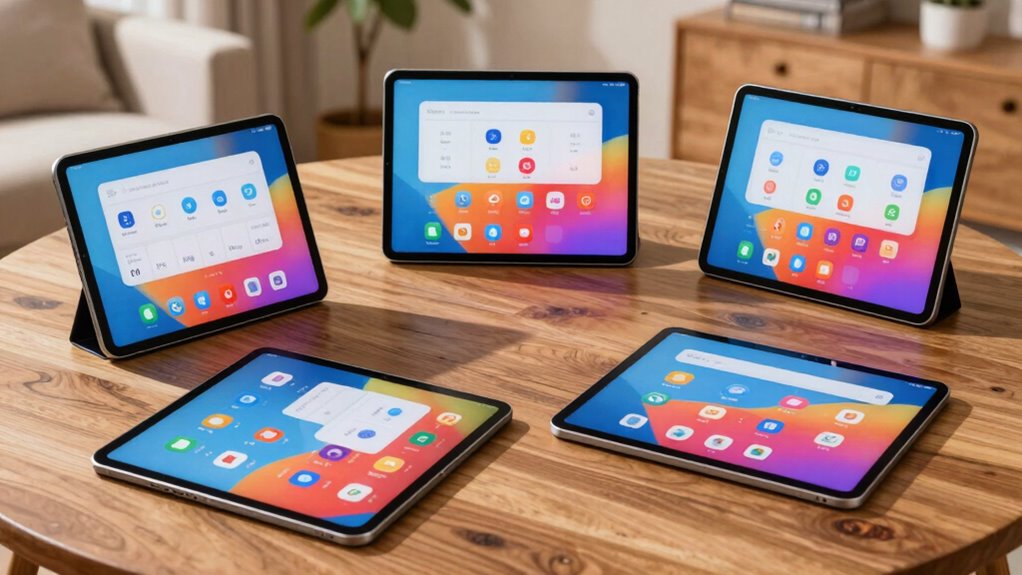

Choosing a large screen tablet for seniors involves balancing display size, ease of use, and portability. The 14-inch Android 15 Tablet stands out for its immersive visuals and 4G LTE connectivity, making it ideal for those who want a versatile device for both work and entertainment. Meanwhile, the 13-inch Android Tablets with keyboard options offer a great mix of productivity and viewing space, though they tend to be heavier and less portable. The MESWAO 15.6-inch Tablet provides an expansive display for multimedia, but its size may be cumbersome for everyday carry. Ultimately, the best choice depends on whether ease of handling, screen real estate, or multitasking capabilities are your priority.

Turn quiet afternoons into listening time
- Thousands of audiobooks, podcasts and originals
- Listen on your phone, tablet or Echo — also offline
- Cancel anytime
Complete the kit


Key Takeaways
- Large screens improve readability and reduce eye strain for seniors.
- Portability varies significantly; heavier tablets may be less convenient to carry around.
- Additional accessories like styluses, keyboards, and cases enhance usability but add bulk.
- Battery life is critical for all-day use, especially when mobility is important.
- OS updates and app support can impact long-term usability, especially with newer Android versions.


| large screen tablets for senior | Display | Processor | RAM | Battery |
|---|---|---|---|---|
| 14 inch Large Screen Android 1 | 14 inch IPS FHD (1920×1200) | Octa-core 2.0GHz T616 | 16GB | 10,000mAh |
| 13 Inch Android Tablet with Ke | 13.4-inch 1920×1200 IPS | Unisoc T615 Octa-Core | 16GB | 10,000mAh |
| 13 Inch Android 16 Tablet | 13.15-inch IPS, 1600×2240, 90Hz | 2.2GHz Octa-Core | 8GB (up to 18GB virtual) | 11,000mAh |
| 13 Inch Android Tablet with Ke | 13.4-inch 1920×1200 IPS | Unisoc T615 octa-core | 32GB (8GB + 24GB) | 10,000mAh |
| MESWAO 15.6 Inch Android 14 Ta | 15.6 inch IPS, 1920×1080 | MediaTek Helio G99 | 6GB | 12,000mAh |
More Details on Our Top Picks
14 inch Large Screen Android 15 Tablet with 16GB RAM, 256GB Storage, FHD Display, 4G LTE, Stand Case & Stylus
This 14-inch Android 15 tablet offers an impressive balance of size and capability. Its 1920×1200 FHD display provides clear, vibrant visuals, which are essential for seniors who value readability. The inclusion of 16GB RAM and 256GB storage supports multitasking and media storage smoothly. Its support for 4G LTE makes it ideal for seniors who need connectivity on the go. However, its weight of 2.2 pounds makes it less portable compared to smaller tablets, and there’s limited info on software support or updates. Still, for users who prioritize a large, high-quality display with versatile connectivity, this model is a strong contender.
Pros:- Large 14-inch FHD display for immersive visuals
- Supports 4G LTE for reliable connectivity anywhere
- Includes stylus and stand case for versatile use
- Long-lasting 10,000mAh battery
Cons:- Relatively heavy at 2.2 pounds, less ideal for carry-around use
- Limited information on software updates
- No mention of pre-installed apps or simplified UI
Best for: Seniors seeking a powerful, large-screen device for both work and entertainment, especially those who travel or need reliable mobile connectivity.
Not ideal for: Those who prefer lightweight, ultra-portable tablets or are concerned about device weight and bulk.
- Display:14 inch IPS FHD (1920×1200)
- Processor:Octa-core 2.0GHz T616
- RAM:16GB
- Storage:256GB ROM
- Battery:10,000mAh
- Charging:18W USB-C
- Connectivity:Wi-Fi, Bluetooth, 4G LTE
- Weight:2.2 lbs
- OS:Android 15
Our verdict“A well-rounded choice for those who want a large, powerful Android tablet with connectivity features, despite its weight.”
13 Inch Android Tablet with Keyboard, 16GB RAM, 256GB Storage, 2TB Expandable, 1920×1200 IPS Display, Gemini AI, 10000mAh Battery, 8-Core, Wi-Fi, GPS, Includes Case, Mouse, Stylus
This 13-inch Android tablet excels for seniors who need a device that combines a large display with productivity features. Its 1920×1200 IPS screen offers sharp visuals, and the inclusion of a keyboard and mouse transforms it into a portable workstation. Powered by an octa-core processor with Gemini AI, it handles multitasking and media streaming efficiently. Its expandable storage up to 2TB means ample space for documents and media. However, its weight and bulkiness may limit portability, and Android 16’s app compatibility could be a concern initially. This device is better suited for seniors who prioritize productivity and don’t mind a heavier, more complex device.
Pros:- Large 13.4-inch high-res display
- Powerful octa-core processor with Gemini AI
- Expandable storage up to 2TB
- Includes keyboard, mouse, stylus, and accessories
Cons:- Heavy and bulky, less portable
- Android 16 OS may have initial app compatibility issues
- No pressure sensitivity in stylus for drawing
Best for: Seniors who want a large screen for work, study, or media, and are comfortable with a slightly heavier device and more complex interface.
Not ideal for: Those seeking a lightweight, simple device for casual use or minimal handling.
- Display:13.4-inch 1920×1200 IPS
- Processor:Unisoc T615 Octa-Core
- RAM:16GB
- Storage:256GB internal + 2TB expandable
- Battery:10,000mAh
- Cameras:Rear 16MP, Front 8MP
- Connectivity:Wi-Fi 5G, Bluetooth 5.0, GPS
- Weight:Heavy (exact weight not specified)
- OS:Android 16
Our verdict“A versatile tablet for seniors focused on multitasking and productivity, with the tradeoff of increased weight and complexity.”
13 Inch Android 16 Tablet, 40GB+128GB+2TB Expand, 1600*2240 90Hz IPS Display, 11000mAh Battery, 2.2GHz Octa-Core, Wi-Fi & BT5.0, GPS, Large Screen with Case
This 13.15-inch Android 16 tablet offers a stunning 1600×2240 resolution with a 90Hz refresh rate, making visuals exceptionally crisp and smooth. Its powerful octa-core processor and 8GB RAM support multitasking, while the large expandable storage options ensure plenty of space for files and media. The impressive 11,000mAh battery guarantees long sessions without frequent charging. Yet, its internal storage might seem limited without expansion, and the device’s size and weight could be challenging for some seniors to handle comfortably. This model is best for those who prioritize display clarity and multimedia experience over portability.
Pros:- Large, high-res 1600×2240 IPS display
- Smooth 90Hz refresh rate
- Powerful octa-core processor with 8GB RAM
- Expandable storage up to 2TB
Cons:- Heavy and sizable, less portable
- Limited internal storage without expansion
- Some features may be complex for beginners
Best for: Seniors who want a high-resolution display for reading, viewing, or creative tasks and don’t mind a heavier device.
Not ideal for: Users seeking a lightweight or ultra-portable device with simple controls.
- Display:13.15-inch IPS, 1600×2240, 90Hz
- Processor:2.2GHz Octa-Core
- RAM:8GB (up to 18GB virtual)
- Storage:40GB + 128GB + 2TB expandable
- Battery:11,000mAh
- Cameras:13MP rear, 8MP front
- Connectivity:Wi-Fi 2.4GHz/5GHz, Bluetooth 5.0, GPS
- Weight:Heavy (exact weight not specified)
- OS:Android 16
Our verdict“A premium visual experience for seniors who value screen detail and multitasking, at the expense of extra weight.”
13 Inch Android Tablet with Keyboard, 32GB+256GB+2TB Expand, 1920×1200 IPS Display, Gemini AI, 10000mAh, 8-Core, Wi-Fi, GPS, with Case, Mouse, Stylus
This 13-inch Android tablet combines strong display performance with AI-enhanced features. Its 1920×1200 IPS display with a 90Hz refresh rate offers clear visuals, while the included keyboard, mouse, and stylus turn it into a flexible device for work or leisure. Powered by an 8-core processor with Gemini AI, it supports voice commands and system optimization, which can be especially helpful for seniors seeking assistive features. Its 256GB internal storage and 2TB expansion accommodate extensive files. The main tradeoff involves its weight and complexity, which might be overwhelming for seniors preferring simplicity. This pick suits tech-savvy users who want a multifunctional device.
Pros:- Large 13.4-inch display with split-screen multitasking
- AI-powered Gemini system for voice control and optimization
- Expandable storage up to 2TB
- Includes keyboard, mouse, stylus, and case
Cons:- Heavy when fully equipped
- May be too complex for seniors preferring minimal interfaces
- Android 16 OS may have initial app compatibility issues
Best for: Seniors who want a multifunctional device with AI support and are comfortable managing a heavier, feature-rich tablet.
Not ideal for: Those who prefer a lightweight, straightforward device without advanced AI features or extensive accessories.
- Display:13.4-inch 1920×1200 IPS
- Processor:Unisoc T615 octa-core
- RAM:32GB (8GB + 24GB)
- Internal Storage:256GB
- Expandable Storage:Up to 2TB via TF card
- Battery:10,000mAh
- Cameras:8 MP front, 16 MP rear
- Connectivity:Wi-Fi 5G, Bluetooth 5.0, GPS
- Weight:Heavy
- OS:Android 16
Our verdict“A highly capable and AI-integrated tablet for seniors who value versatility and smart features, with the caveat of added weight.”
MESWAO 15.6 Inch Android 14 Tablet, 6GB RAM, 128GB Storage, Support 1TB TF Card, 12000mAh Battery, IPS HD Display
The MESWAO 15.6-inch Android tablet offers an expansive, full HD IPS display perfect for seniors who enjoy media, reading, or light creative tasks. Its 12000mAh battery supports extended use, making it suitable for outdoor activities or long sessions without frequent charging. Powered by a Helio G99 processor and 6GB RAM, it handles basic multitasking adequately. The device supports a 1TB TF card for additional storage, but its size and weight may hinder portability, especially for those who want a device they can carry everywhere. This model makes sense for users prioritizing screen size and multimedia capabilities.
Pros:- Large 15.6-inch full HD IPS display
- Long-lasting 12000mAh battery
- Supports 1TB TF Card for expandable storage
- Good for media, reading, and light creative tasks
Cons:- Size and weight can be cumbersome for portable use
- Limited internal storage without expansion
- Features may be more suitable for media than complex multitasking
Best for: Seniors seeking a large screen for media consumption, reading, or light creative work, who are less concerned about portability.
Not ideal for: Those who need a compact or lightweight device for everyday portability or quick handling.
- Display:15.6 inch IPS, 1920×1080
- Processor:MediaTek Helio G99
- RAM:6GB
- Internal Storage:128GB
- Expandable Storage:Supports 1TB TF Card
- Battery:12,000mAh
- Camera:32MP rear
- Speakers:Quad stereo speakers
- Operating System:Android 14
Our verdict“A great choice for seniors wanting a large display for media and reading, with the tradeoff of less portability.”

How We Picked
Our selection process focused on devices that prioritize large, high-quality screens, ease of use, and durability, specifically tailored for seniors. We compared display size, processing power, battery life, and accessory options, emphasizing models that strike a balance between performance and simplicity. Devices with comprehensive bundles, including styluses and cases, were prioritized for their added convenience. We also considered user feedback and compatibility with common senior-friendly apps, ensuring each option offers real value for its intended audience.
| large screen tablets for senior | Connectivity | OS |
|---|---|---|
| 14 inch Large Screen Android 1 | Wi-Fi, Bluetooth, 4G LTE | Android 15 |
| 13 Inch Android Tablet with Ke | Wi-Fi 5G, Bluetooth 5.0, GPS | Android 16 |
| 13 Inch Android 16 Tablet | Wi-Fi 2.4GHz/5GHz, Bluetooth 5.0, GPS | Android 16 |
| 13 Inch Android Tablet with Ke | Wi-Fi 5G, Bluetooth 5.0, GPS | Android 16 |
| MESWAO 15.6 Inch Android 14 Ta | — | — |
Factors to Consider When Choosing Large Screen Tablets For Seniors
When selecting a large screen tablet for seniors, I focus on display size, ease of use, and durability. The right device should offer clear visuals, simple controls, and enough power for daily tasks. Accessories like styluses and cases can enhance usability, but too many add bulk. Battery life and connectivity are also key considerations for ongoing convenience. I’ve grouped guidance into categories to help match your specific needs.Display Size and Resolution
For seniors, a larger display reduces eye strain and makes reading easier. Look for screens 13 inches or bigger with high resolution (Full HD or higher) to ensure crisp text and images. Higher refresh rates, like 90Hz, can make scrolling smoother and more comfortable for extended use.
Ease of Use and Accessibility
Intuitive interfaces, straightforward settings, and customizable text size are vital. A device with simple navigation, minimal clutter, and assistive features like voice commands or magnification will be more accessible. Compatibility with senior-friendly apps is also important for long-term usability.
Portability and Weight
While larger screens are helpful, very heavy tablets can be cumbersome to carry or hold for extended periods. Balance screen size with weight, especially if the senior plans to use the device on the go. Accessories like stands or cases can also influence portability considerations.
Battery Life and Connectivity
Long-lasting batteries support all-day use without frequent recharging. For seniors who travel or spend time outdoors, LTE or 5G connectivity offers reliable internet access without dependence on Wi-Fi. Consider devices with robust battery capacity and support for cellular networks if mobility is a priority.
Frequently Asked Questions
What is the ideal screen size for seniors?
Most seniors benefit from screens between 13 and 15 inches, as these sizes balance readability with manageability. Larger displays reduce eye strain and make text easier to see, but extremely large devices may be less portable and harder to handle comfortably.
Is a stylus necessary for seniors?
A stylus can be helpful for seniors with limited dexterity or for engaging in handwriting, drawing, or navigation. However, many users find that a tablet with a responsive touchscreen and simple UI is sufficient without additional accessories.
How important is battery life in these tablets?
Battery life is critical for seniors who want to use their tablets throughout the day without interruptions. Devices with at least 8-12 hours of battery life support extended use during travel or outdoor activities.
Are expandable storage options necessary?
Expandable storage is useful if seniors plan to store many photos, videos, or documents. Devices supporting microSD cards up to 1-2TB provide flexibility, but internal storage of 128GB or more is also sufficient for most users.
Should I prioritize Android or other operating systems?
Android offers a wide range of devices with customizable features and affordability, making it suitable for many seniors. Consider the device’s user interface and support for senior-friendly apps rather than OS alone, as both Android and iOS can be made accessible with proper settings and accessories.
Conclusion
For seniors seeking a lightweight, straightforward device, the 14-inch Android 15 Tablet offers a powerful, large display with connectivity options, although its weight may be a concern. Those prioritizing productivity and multitasking might prefer the 13-inch Android Tablets with Keyboard, despite their bulk. For multimedia enthusiasts, the MESWAO 15.6-inch Tablet provides expansive visuals but sacrifices portability. Ultimately, the best choice depends on whether ease of handling, screen size, or multifunctionality is most important for your lifestyle.
Fall Picks
fall essentials
As an affiliate, we earn on qualifying purchases.