
For laptops under 500, my best overall pick is the Dell 15.6-Inch FHD Laptop, whose Core 3 processor, 8 GB of RAM, and 512 GB SSD give it the strongest listed everyday-work setup. The BiTECOOL 15.6-Inch FHD Laptop stands out for its 12 GB of RAM and fingerprint reader, while the HP 14-Inch Laptop with Intel N150 offers a compact Windows option for basic tasks. The main tradeoffs are processing headroom, limited memory on many models, and choosing between ChromeOS and Windows. Screen size and storage type also affect how comfortable each laptop will be for school, travel, and keeping files locally. Read on for the full breakdown and guidance on matching a laptop to your needs.

Turn quiet afternoons into listening time
- Thousands of audiobooks, podcasts and originals
- Listen on your phone, tablet or Echo — also offline
- Cancel anytime
Complete the kit


Key Takeaways
- The Dell is the strongest listed Windows configuration for multitasking, with a Core 3 100U processor, 8 GB of RAM, and a 512 GB SSD.
- The BiTECOOL pairs the roundup’s largest listed memory capacity, 12 GB, with a 256 GB SSD and a fingerprint reader; its brand and support details deserve extra checking.
- Several HP 14-inch Windows models share an N150 processor and 4 GB of RAM, so differences in storage, bundled software, and configuration matter more than the name alone.
- The Chromebook picks use ChromeOS, which suits browser-centered work but can limit compatibility with Windows-only apps and offline workflows.
- Among the listed 15.6-inch models, some specify Full HD while others do not; confirm the exact display resolution before choosing a larger screen for long study or work sessions.
| HP Chromebook 14 Laptop, Intel Celeron N4120, 4 GB RAM, 64 GB eMMC, 14-inch HD Display |  | Best for Battery Life | Processor: Intel Celeron N4120 quad-core | Memory: 4 GB RAM | Storage: 64 GB eMMC | VIEW ON AMAZON | See Our Full Breakdown |
| HP 14-Inch Laptop with Intel N150, 4GB DDR5 RAM, 128GB SSD, and Windows 11 |  | Best for Everyday Windows Basics | Processor: Intel N150, 4 cores, up to 4.4 GHz | Memory: 4 GB DDR5 | Storage: 128 GB SSD | VIEW ON AMAZON | See Our Full Breakdown |
| HP Stream 14-inch Laptop, Intel Processor N150, 4GB RAM, 128GB UFS with 1TB Docking Station, Windows 11 S, Green |  | Best for Bundled Storage | Processor: Intel Processor N150 | Memory: 4 GB DDR4 | Storage: 128 GB UFS plus 1 TB docking station | VIEW ON AMAZON | See Our Full Breakdown |
| 15.6″ FHD Laptop with Intel 5205U Processor, 6GB RAM, 128GB SSD (Expandable to 512GB) |  | Best for a Larger Full HD Workspace | Processor: Intel 5205U (Comet Lake) | Memory: 6 GB DDR3 | Storage: 128 GB SSD, expandable to 512 GB via TF card | VIEW ON AMAZON | See Our Full Breakdown |
| 15.6-Inch Laptop with Intel Celeron N4020, 4GB RAM, 128GB eMMC, and Windows 11 |  | Best for Full HD on a Fanless Design | Processor: Intel Celeron N4020 | Memory: 4 GB LPDDR4 | Storage: 128 GB eMMC; expandable up to 1 TB via TF card | VIEW ON AMAZON | See Our Full Breakdown |
| Amzboy 15.6-Inch Laptop, N4020 CPU, 4GB RAM, 128GB eMMC, Full HD Display, Windows 11 |  | Best Quiet Full HD Pick | Processor: N4020 CPU | Display: 15.6-inch LCD, 1920 × 1080, anti-glare | Memory: 4GB LPDDR4 | VIEW ON AMAZON | See Our Full Breakdown |
| HP 14-inch Laptop with Intel N150, 4GB RAM, 128GB Storage, Windows 11, and Microsoft 365 |  | Best for School and Carrying | Processor: Intel N150, 4 cores, up to 3.6 GHz | Memory: 4GB LPDDR5-4800 | Storage: 128GB UFS | VIEW ON AMAZON | See Our Full Breakdown |
| HP 2026 Everyday Slim 14″ Laptop with Intel N150, 128GB SSD, Microsoft 365, Copilot AI, and Windows 11 |  | Best for Cloud-First Everyday Work | Processor: Intel N150, 4 cores, up to 3.6 GHz | Graphics: Intel Graphics | Memory: 4GB | VIEW ON AMAZON | See Our Full Breakdown |
| S7HI 15.6-Inch Laptop, Full HD, 6GB RAM, 128GB Storage |  | Best for a Larger Full HD Screen | Display: 15.6-inch LCD, 1920 × 1080, 60 Hz | Processor: Intel 5205U, 1.9 GHz base frequency | Memory: 6GB RAM | VIEW ON AMAZON | See Our Full Breakdown |
| Acer Aspire 3 A315-24P-R7VH 15.6-inch Full HD Laptop | 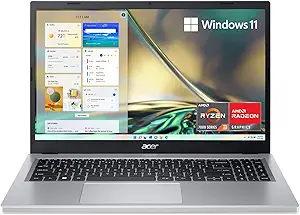 | Best Performance Pick | Model: A315-24P-R7VH | Display: 15.6-inch Full HD IPS, 16:9 | Processor: AMD Ryzen 3 7320U quad-core | VIEW ON AMAZON | See Our Full Breakdown |
| Dell 15.6-Inch FHD Laptop with Intel Core 3 100U, 8 GB RAM, 512 GB SSD, and Windows 11 Home |  | Best Overall Windows Pick | Display: 15.6-inch FHD, anti-glare | Processor: Intel Core 3 100U | Memory: 8 GB RAM | VIEW ON AMAZON | See Our Full Breakdown |
| ASUS 15″ FHD IPS Chromebook, Intel Processor Up to 2.80GHz, 4GB DDR4, 128GB Storage, HDMI, WiFi, Chrome OS, Pastel Silver (Renewed) |  | Best Renewed Chromebook for a Big Screen | Display: 15-inch FHD IPS | Processor: Intel processor, up to 2.80 GHz | Memory: 4 GB DDR4 | VIEW ON AMAZON | See Our Full Breakdown |
| 15.6 Inch Windows 11 Laptop with Intel Celeron N4020, 4GB RAM, 128GB Storage |  | Best Lightweight Windows Laptop | Display: 15.6-inch FHD IPS, 1920 × 1080 | Processor: Intel Celeron N4020 | Memory: 4 GB DDR4 | VIEW ON AMAZON | See Our Full Breakdown |
| HP 14″ HD Chromebook Laptop for Students |  | Best for Simple Student Computing | Display: 14-inch HD anti-glare, 1366 × 768 | Processor: Intel Celeron N4120 | Memory: 4 GB LPDDR4x | VIEW ON AMAZON | See Our Full Breakdown |
| BiTECOOL 15.6-Inch FHD Laptop, Intel N95, 12GB LPDDR5 RAM, 256GB SSD, Fingerprint Reader |  | Best for More Memory | Display: 15.6-inch FHD IPS, up to 300 nits | Processor: Intel N95, Alder Lake-N | Memory: 12 GB LPDDR5, 4800 MHz | VIEW ON AMAZON | See Our Full Breakdown |
| laptops under 500 | Processor | Memory | Storage | Display |
|---|---|---|---|---|
| HP Chromebook 14 Laptop | Intel Celeron N4120 quad-core | 4 GB RAM | 64 GB eMMC | 14-inch HD (1366 x 768), anti-glare |
| HP 14-Inch Laptop with Intel N | Intel N150, 4 cores, up to 4.4 GHz | 4 GB DDR5 | 128 GB SSD | 14-inch HD, anti-glare, 250 nits |
| HP Stream 14-inch Laptop | Intel Processor N150 | 4 GB DDR4 | 128 GB UFS plus 1 TB docking station | 14-inch, 1366 x 768, 60 Hz |
| 15.6" FHD Laptop with Intel 52 | Intel 5205U (Comet Lake) | 6 GB DDR3 | 128 GB SSD, expandable to 512 GB via TF card | 15.6-inch Full HD (1920 x 1080) |
| 15.6-Inch Laptop with Intel Ce | Intel Celeron N4020 | 4 GB LPDDR4 | 128 GB eMMC; expandable up to 1 TB via TF card | 15.6-inch Full HD (1920 x 1080), anti-glare |
| Amzboy 15.6-Inch Laptop | N4020 CPU | 4GB LPDDR4 | 128GB eMMC | 15.6-inch LCD, 1920 × 1080, anti-glare |
| HP 14-inch Laptop with Intel N | Intel N150, 4 cores, up to 3.6 GHz | 4GB LPDDR5-4800 | 128GB UFS | 14-inch HD (1366 × 768), anti-glare, 250 nits |
| HP 2026 Everyday Slim 14" Lapt | Intel N150, 4 cores, up to 3.6 GHz | 4GB | 128GB SSD plus 1TB OneDrive cloud storage | 14-inch HD (1366 × 768), micro-edge, anti-glare |
| S7HI 15.6-Inch Laptop | Intel 5205U, 1.9 GHz base frequency | 6GB RAM | 128GB SSD; supports up to 512GB expansion | 15.6-inch LCD, 1920 × 1080, 60 Hz |
| Acer Aspire 3 A315-24P-R7VH 15 | AMD Ryzen 3 7320U quad-core | 8GB LPDDR5 onboard | 128GB NVMe SSD | 15.6-inch Full HD IPS, 16:9 |
| Dell 15.6-Inch FHD Laptop with | Intel Core 3 100U | 8 GB RAM | 512 GB SSD | 15.6-inch FHD, anti-glare |
| ASUS 15" FHD IPS Chromebook | Intel processor, up to 2.80 GHz | 4 GB DDR4 | 128 GB | 15-inch FHD IPS |
| 15.6 Inch Windows 11 Laptop wi | Intel Celeron N4020 | 4 GB DDR4 | 128 GB eMMC | 15.6-inch FHD IPS, 1920 × 1080 |
| HP 14" HD Chromebook Laptop fo | Intel Celeron N4120 | 4 GB LPDDR4x | 64 GB eMMC | 14-inch HD anti-glare, 1366 × 768 |
| BiTECOOL 15.6-Inch FHD Laptop | Intel N95, Alder Lake-N | 12 GB LPDDR5, 4800 MHz | 256 GB SATA3 SSD | 15.6-inch FHD IPS, up to 300 nits |
More Details on Our Top Picks
HP Chromebook 14 Laptop, Intel Celeron N4120, 4 GB RAM, 64 GB eMMC, 14-inch HD Display
For buyers whose day is mostly browser tabs, online classes, and Google apps, this Chromebook stands out for its up to 14 hours of battery life and simple Chrome OS setup. Its 14-inch anti-glare screen is easier to carry than the 15.6-inch panels on the 15.6-Inch Laptop with Intel Celeron N4020, though the tradeoff is a smaller, lower-resolution workspace. Chrome OS can run Android apps, but the 64 GB eMMC storage and 4 GB of memory leave little room for large offline libraries or heavy multitasking. I’d choose this over the Windows N4020 model for a school day away from an outlet; buyers who need Windows software or more built-in storage should look elsewhere.
Pros:- Up to 14 hours of stated battery life
- 14-inch anti-glare display in a portable format
- Chrome OS supports Android apps from Google Play
- Fast charging reaches about 50% in approximately 45 minutes
Cons:- 1366 x 768 resolution gives less workspace detail than the Full HD alternatives
- 64 GB eMMC storage is restrictive for offline files
- 4 GB RAM limits demanding multitasking
Best for: Students and commuters who mainly use web apps and want a compact laptop for long stretches away from an outlet
Not ideal for: Buyers who need Windows-only software, many demanding apps open at once, or substantial offline storage
- Processor:Intel Celeron N4120 quad-core
- Memory:4 GB RAM
- Storage:64 GB eMMC
- Display:14-inch HD (1366 x 768), anti-glare
- Operating system:Chrome OS
- Battery life:Up to 14 hours
- Wireless:802.11ac Wi-Fi and Bluetooth
Our verdict“Choose this Chromebook for portable web-based schoolwork and long battery life, provided Chrome OS and limited storage fit your routine.”
HP 14-Inch Laptop with Intel N150, 4GB DDR5 RAM, 128GB SSD, and Windows 11
This HP makes the most sense for buyers who need Windows 11 for school or basic office tasks but still want a light 14-inch machine. Its 128 GB SSD gives it more storage than the HP Chromebook 14, while the included year of Microsoft 365 adds familiar document tools. The 4 GB of memory is the main limit: a few everyday apps should be manageable, but lots of browser tabs and larger programs can quickly crowd it. The HD screen also gives less room for spreadsheets than the Full HD display on the 15.6-inch Laptop with Intel 5205U. I’d favor this HP for portability and Windows compatibility, but buyers who regularly multitask should seek more memory.
Pros:- Windows 11 supports common desktop software
- 128 GB SSD offers more built-in storage than the HP Chromebook 14
- USB-C, two USB-A ports, and HDMI cover common accessories
- Light 3.24-pound design and anti-glare screen suit travel
Cons:- 4 GB RAM can constrain multitasking
- HD resolution provides less workspace than Full HD alternatives
- 720p webcam is basic for frequent video calls
Best for: Students and mobile users who need Windows and Microsoft 365 for documents, browsing, and light school or office work
Not ideal for: People who keep many browser tabs open or run memory-heavy creative and productivity apps
- Processor:Intel N150, 4 cores, up to 4.4 GHz
- Memory:4 GB DDR5
- Storage:128 GB SSD
- Display:14-inch HD, anti-glare, 250 nits
- Operating system:Windows 11
- Ports:1 USB-C, 2 USB-A, HDMI, headphone/mic combo
- Weight:3.24 lbs
- Included software:One year of Microsoft 365
Our verdict“Pick this HP for a portable Windows laptop for documents and everyday browsing, but avoid it if you need smooth heavy multitasking.”
HP Stream 14-inch Laptop, Intel Processor N150, 4GB RAM, 128GB UFS with 1TB Docking Station, Windows 11 S, Green
The Stream’s defining feature is the bundle: a 1 TB docking station and 32 GB microSD card accompany its 128 GB of onboard UFS storage. That gives file-heavy students more room than the HP 14-Inch Laptop with Intel N150, whose listing includes 128 GB SSD storage but no comparable storage accessory. The tradeoff is that the extra capacity comes in a separate accessory, while the Stream itself still has just 4 GB RAM and an HD screen. Windows 11 S also narrows the software choices compared with the standard Windows 11 HP. Its Wi-Fi 6 and Bluetooth 5.4 are useful newer wireless features, but I’d choose it for bundled file capacity rather than a more capable everyday workload.
Pros:- Includes a 1 TB docking station and 32 GB microSD card
- Wi-Fi 6 and Bluetooth 5.4
- USB-C, two USB-A ports, HDMI, and a media card reader
- One-year Microsoft 365 subscription included
Cons:- 4 GB RAM can limit multitasking
- 1366 x 768 display is less sharp and spacious than Full HD options
- Windows 11 S restricts app installation choices
Best for: Students who want a basic Windows laptop with bundled storage accessories for documents, downloads, and media
Not ideal for: Buyers who need Full HD detail, substantial multitasking headroom, or unrestricted Windows app installation
- Processor:Intel Processor N150
- Memory:4 GB DDR4
- Storage:128 GB UFS plus 1 TB docking station
- Display:14-inch, 1366 x 768, 60 Hz
- Operating system:Windows 11 S
- Wireless:Wi-Fi 6 and Bluetooth 5.4
- Ports:USB-C, 2 USB-A, HDMI, media card reader, headphone/mic combo
- Weight:3.24 lbs
Our verdict“Choose the Stream if bundled storage accessories matter more than display sharpness or multitasking capacity.”
15.6″ FHD Laptop with Intel 5205U Processor, 6GB RAM, 128GB SSD (Expandable to 512GB)
If spreadsheets, split-screen reading, or video lessons feel cramped on a 14-inch HD panel, this laptop offers a 15.6-inch Full HD display and 6 GB of RAM. That gives it more screen space and a little more memory than the HP 14-Inch Laptop with Intel N150, though neither is built for demanding workloads. The older Intel 5205U processor and DDR3 memory make this a basic-use machine, and the stated storage expansion is via TF card rather than a larger internal drive. At 3.6 pounds, it remains carryable but is less compact than the HP options. I’d pick it for a larger on-screen workspace and broad port selection, while frequent travelers may prefer the smaller 14-inch models.
Pros:- 15.6-inch Full HD resolution provides more workspace than the 14-inch HD models
- 6 GB RAM exceeds the 4 GB in the HP N150 options
- Three USB 3.0 ports, Type-C, HDMI, and TF card reader
- Storage can expand up to 512 GB via TF card
Cons:- Intel 5205U is an entry-level processor for basic tasks
- 6 GB DDR3 RAM is limited and listed as non-expandable
- 128 GB base SSD leaves little room for a large local library
Best for: Home users and students who want a large Full HD screen for documents, online classes, and side-by-side windows
Not ideal for: People who need a modern high-performance processor, extensive multitasking, or a particularly compact travel laptop
- Processor:Intel 5205U (Comet Lake)
- Memory:6 GB DDR3
- Storage:128 GB SSD, expandable to 512 GB via TF card
- Display:15.6-inch Full HD (1920 x 1080)
- Operating system:Windows 11
- Ports:3 USB 3.0, Type-C, HDMI, TF card reader, 3.5 mm audio
- Weight:3.6 lbs
- Battery:38 Wh
Our verdict“Choose this model for a larger Full HD workspace and useful ports, as long as your workload stays light.”
15.6-Inch Laptop with Intel Celeron N4020, 4GB RAM, 128GB eMMC, and Windows 11
This N4020 model pairs a 15.6-inch Full HD anti-glare screen with a fanless design, making it a straightforward fit for quiet study spaces and basic browsing. Compared with the HP 14-Inch Laptop with Intel N150, it offers a larger, sharper display and more USB-C connectivity, but its Celeron N4020 and 4 GB of RAM are better suited to modest workloads. The 128 GB eMMC storage is also limited, though a TF card can add capacity; that is less convenient than having more built-in storage. Two USB-C ports support charging, data, and dual-monitor output according to the supplied details. I’d choose it for a larger quiet screen and flexible connections, but not for busy multitasking or heavier software.
Pros:- 15.6-inch Full HD anti-glare display
- Fanless design avoids fan noise
- Two USB-C ports support charging, data transfer, and dual-monitor output
- TF card slot supports storage expansion up to 1 TB
Cons:- 4 GB RAM limits heavier multitasking
- 128 GB eMMC storage is modest and slower in class than an SSD
- Celeron N4020 is intended for basic computing
Best for: Students and home users who want a quiet, large-screen laptop for browsing, email, and document editing
Not ideal for: Buyers who need fast multitasking, substantial built-in storage, or strong performance for demanding applications
- Processor:Intel Celeron N4020
- Memory:4 GB LPDDR4
- Storage:128 GB eMMC; expandable up to 1 TB via TF card
- Display:15.6-inch Full HD (1920 x 1080), anti-glare
- Operating system:Windows 11 Home
- Ports:2 USB-C, 2 USB 3.2 Gen 1, 3.5 mm audio
- Battery:38 Wh
- Design:Fanless
Our verdict“Pick this laptop for quiet everyday tasks on a large Full HD screen, provided its modest memory and processor match your needs.”
Amzboy 15.6-Inch Laptop, N4020 CPU, 4GB RAM, 128GB eMMC, Full HD Display, Windows 11
The Amzboy earns its place for buyers who want a large Full HD screen and quiet operation in a basic Windows laptop. Its anti-glare 15.6-inch display gives documents and video more room than the 14-inch HP N150 models, and the fanless design avoids fan noise during light tasks. At 3.3 pounds, it remains manageable to carry, while USB-C PD charging and microSD expansion add useful flexibility.
The tradeoff is limited headroom: 4GB of RAM and 128GB of eMMC storage suit browsing and simple schoolwork, but leave little room for heavy multitasking or a large offline library. Compared with the Acer Aspire 3, it has a larger built-in screen but a much less capable processor and less memory. I’d choose it for quiet, everyday use, not demanding workloads.
Pros:- 15.6-inch anti-glare Full HD display offers more workspace than the HD HP 14-inch models
- Fanless design keeps light work quiet
- MicroSD slot supports storage expansion up to 1TB
- 45W USB-C PD charging and dual USB-C ports add charging and connection flexibility
Cons:- 4GB RAM can constrain multitasking
- 128GB eMMC storage is limited for offline files and media
- N4020 processor is a basic fit for light tasks, not demanding workloads
Best for: Students or travelers who want a quiet Windows laptop with a roomy Full HD screen for browsing, documents, and streaming
Not ideal for: People who keep many apps or large media libraries open locally, because 4GB RAM and 128GB eMMC leave limited capacity
- Processor:N4020 CPU
- Display:15.6-inch LCD, 1920 × 1080, anti-glare
- Memory:4GB LPDDR4
- Storage:128GB eMMC
- Expandable storage:Up to 1TB via microSD/TF card
- Operating system:Windows 11
- Weight:3.3 lbs
- Ports:Dual USB-C and USB 3.2
Our verdict“Choose the Amzboy for quiet everyday tasks and a Full HD screen; pick the Acer Aspire 3 if you need more performance and memory.”
HP 14-inch Laptop with Intel N150, 4GB RAM, 128GB Storage, Windows 11, and Microsoft 365
This HP is a straightforward choice for students who carry a laptop between classes and mainly use a browser, documents, and video calls. Its 3.24-pound frame, Wi-Fi 6, and ports for USB-C, USB-A, HDMI, and SD cards make it easier to fit into a school routine than the larger Amzboy or S7HI. The included year of Microsoft 365 Personal also gives office-focused buyers a ready starting point.
The 14-inch screen keeps the body compact, but its 1366 × 768 resolution shows less detail than the Full HD screens on those 15.6-inch alternatives. Battery life is rated up to 7.5 hours of mixed use, so the longer video-playback figure should not be read as a full day of varied work. Like the HP Everyday Slim, this model has only 4GB of RAM, which can pinch when several demanding tabs and apps are open.
Pros:- Light 3.24-pound design suits daily commutes
- Wi-Fi 6 and a useful mix of USB-C, USB-A, HDMI, and SD card connections
- One-year Microsoft 365 Personal subscription is included
- Rated for up to 7.5 hours of mixed use
Cons:- HD resolution is less detailed than the Full HD Amzboy and S7HI displays
- 4GB RAM may limit demanding multitasking
- 128GB UFS storage leaves limited room for large offline collections
Best for: Students who need a light Windows laptop for class notes, web research, video calls, and Microsoft 365 documents
Not ideal for: Buyers who need a sharp display for long work sessions or routinely run many apps at once, given the HD panel and 4GB RAM
- Processor:Intel N150, 4 cores, up to 3.6 GHz
- Memory:4GB LPDDR5-4800
- Storage:128GB UFS
- Display:14-inch HD (1366 × 768), anti-glare, 250 nits
- Operating system:Windows 11 Home
- Wireless:Wi-Fi 6, Bluetooth 5.4
- Battery life:Up to 11 hours video playback; up to 7.5 hours mixed use
- Included software:One-year Microsoft 365 Personal subscription
Our verdict“Pick this HP for portable classwork and included Microsoft 365, while the Amzboy is a better fit if screen resolution matters more.”
HP 2026 Everyday Slim 14″ Laptop with Intel N150, 128GB SSD, Microsoft 365, Copilot AI, and Windows 11
The HP Everyday Slim is aimed at buyers whose documents and photos already live online. It pairs a 128GB SSD with 1TB of OneDrive cloud storage, Wi-Fi 6, an SD card reader, and a year of Microsoft 365, giving a cloud-first student or home user a convenient setup for everyday files. At 3.24 pounds, it matches the portability of the other 14-inch HP while offering a stated battery life of up to 11.5 hours.
Its Intel N150 is suited to browsing and office tasks, but the 4GB of RAM is a real constraint if you expect to keep many apps open. The HD display also has less detail than the Amzboy and S7HI Full HD panels, and the keyboard is not backlit. Compared with the other HP N150 in this batch, the cloud storage bundle is the key distinction; buyers who work mostly offline may get more practical value from a larger local drive.
Pros:- Includes 1TB OneDrive cloud storage and a one-year Microsoft 365 subscription
- Light 3.24-pound build and up to 11.5 hours of rated battery life
- USB-C, HDMI, and SD card reader support common school and home connections
- 720p webcam with dual array microphones is suited to video calls
Cons:- 4GB RAM may constrain multitasking
- HD 1366 × 768 screen is less detailed than the Full HD Amzboy or S7HI
- Non-backlit keyboard is less convenient in dim rooms
Best for: Cloud-first students and home users who want a portable Windows laptop for web work, documents, and video calls
Not ideal for: People who need substantial local storage, a Full HD screen, or frequent multitasking with several apps
- Processor:Intel N150, 4 cores, up to 3.6 GHz
- Graphics:Intel Graphics
- Memory:4GB
- Storage:128GB SSD plus 1TB OneDrive cloud storage
- Display:14-inch HD (1366 × 768), micro-edge, anti-glare
- Operating system:Windows 11 Home 64-bit
- Wireless:Wi-Fi 6, Bluetooth 5.4
- Battery life:Up to 11.5 hours
- Weight:3.24 lbs
Our verdict“Choose this HP if OneDrive and Microsoft 365 fit your workflow; the Amzboy is the stronger match for a sharper built-in screen.”
S7HI 15.6-Inch Laptop, Full HD, 6GB RAM, 128GB Storage
The S7HI suits buyers who want a 15.6-inch Full HD display and a little more memory than the 4GB Amzboy. That extra RAM may help with a modest number of browser tabs and basic apps, while the SSD and expansion slot provide a path to add storage. Its USB-C, HDMI, and SD card reader also cover common peripherals without relying on adapters.
It remains an entry-level system: the Intel 5205U is specified at a 1.9 GHz base frequency, and the supplied details do not establish how it will handle heavier workloads. Its 6GB RAM is still modest beside the Acer Aspire 3’s 8GB, and its rated battery life is up to eight hours. Compared with the Amzboy, the S7HI offers more RAM and an SSD, while the Amzboy adds fanless operation and USB-C PD charging. Buyers should weigh those differences against the S7HI’s older connectivity standards.
Pros:- 15.6-inch Full HD display provides a sharper, roomier workspace than the HD HP 14-inch models
- 6GB RAM exceeds the 4GB in the Amzboy and HP N150 laptops
- 128GB SSD with expansion support up to 512GB
- USB-C, HDMI, and SD card reader support common accessories
Cons:- 6GB RAM remains limited compared with the Acer Aspire 3’s 8GB
- Intel 5205U processor is specified only with a 1.9 GHz base frequency
- Wi-Fi 5 and Bluetooth 4.2 are older than the HP models’ wireless specifications
Best for: Home users who prefer a larger Full HD screen and want more than 4GB RAM for basic browsing and document work
Not ideal for: People who need dependable performance for demanding apps, modern wireless standards, or extensive multitasking
- Display:15.6-inch LCD, 1920 × 1080, 60 Hz
- Processor:Intel 5205U, 1.9 GHz base frequency
- Memory:6GB RAM
- Storage:128GB SSD; supports up to 512GB expansion
- Operating system:Windows 11
- Connectivity:Wi-Fi 5, Bluetooth 4.2, USB-C, HDMI, SD card reader
- Battery life:Up to 8 hours
- Weight:3.6 lbs
Our verdict“Choose the S7HI for a large Full HD screen and 6GB RAM on basic tasks, but look to the Acer Aspire 3 for stronger listed hardware.”
Acer Aspire 3 A315-24P-R7VH 15.6-inch Full HD Laptop
The Acer Aspire 3 is the most capable choice in this batch for buyers who want a Windows laptop that can handle more than light browsing. Its Ryzen 3 7320U quad-core processor and 8GB of LPDDR5 memory give it a stronger starting point for juggling everyday apps than the 4GB Amzboy and HP models or the S7HI’s 6GB. The 15.6-inch Full HD IPS display also combines a large workspace with sharper detail than either 14-inch HP.
The tradeoff is a short 128GB NVMe SSD, which may fill quickly if you save lots of files or media. Memory is onboard, so the listed configuration offers no stated upgrade path. Compared with the S7HI, the Acer has stronger listed processing and memory, but the S7HI explicitly includes storage expansion support. I’d favor the Acer for broader everyday capability, provided its limited storage fits your habits.
Pros:- Ryzen 3 7320U quad-core processor is the strongest listed CPU in this batch
- 8GB LPDDR5 memory exceeds the 4GB and 6GB alternatives here
- 15.6-inch Full HD IPS display offers a sharp, spacious workspace
- Camera and audio noise reduction features support clearer video calls
Cons:- 128GB NVMe SSD may fill quickly with large files and media
- Onboard memory has no stated upgrade path
- No battery-life figure is provided in the product data
Best for: Buyers who want a more capable under-500 Windows laptop for school, office tasks, and moderate everyday multitasking
Not ideal for: Users who need expandable memory or ample built-in space for a large collection of games, video, or offline files
- Model:A315-24P-R7VH
- Display:15.6-inch Full HD IPS, 16:9
- Processor:AMD Ryzen 3 7320U quad-core
- Graphics:AMD Radeon Graphics
- Memory:8GB LPDDR5 onboard
- Storage:128GB NVMe SSD
- Operating system:Windows 11 Home
- Wireless:Wi-Fi 6
Our verdict“Choose the Acer Aspire 3 for the strongest listed everyday performance in this group, if 128GB of storage is enough for you.”
Dell 15.6-Inch FHD Laptop with Intel Core 3 100U, 8 GB RAM, 512 GB SSD, and Windows 11 Home
For buyers who want a familiar Windows laptop for school, office tasks, and streaming, this Dell offers the strongest all-around mix in this group. Its Core 3 100U, 8 GB of RAM, and 512 GB SSD give it more room for everyday multitasking and files than the 4 GB, 128 GB Windows 11 model with the Celeron N4020. The 15.6-inch FHD anti-glare screen and numeric keypad also suit long document sessions and spreadsheet work. The tradeoff is a 4.2-pound chassis and memory that may constrain heavier workloads. Compared with the BiTECOOL, the Dell has more storage and a stated onsite service term, while BiTECOOL offers 12 GB RAM and a fingerprint reader. I’d choose Dell for general Windows use, not demanding creative work.
Pros:- Core 3 100U and 8 GB RAM suit everyday productivity
- 512 GB SSD provides more local storage than the 128 GB and 256 GB options here
- 15.6-inch FHD anti-glare display and numeric keypad support document work
- Includes one-year onsite service
Cons:- 4.2-pound weight is less convenient to carry than the lighter Celeron N4020 laptop
- 8 GB RAM may constrain demanding multitasking
- No optical drive
Best for: Students and home-office users who need Windows, a numeric keypad, and ample local storage for everyday files.
Not ideal for: Frequent travelers who prioritize a lightweight laptop, or users who need memory for demanding editing and multitasking.
- Display:15.6-inch FHD, anti-glare
- Processor:Intel Core 3 100U
- Memory:8 GB RAM
- Storage:512 GB SSD
- Operating system:Windows 11 Home
- Graphics:Integrated Intel UHD Graphics
- Weight:4.2 pounds
- Camera:Front-facing HD camera
- Warranty:1-year onsite service
Our verdict“Choose the Dell for a well-rounded Windows laptop with roomy storage and a full-size work layout, provided you do not need a lightweight or high-performance machine.”
ASUS 15″ FHD IPS Chromebook, Intel Processor Up to 2.80GHz, 4GB DDR4, 128GB Storage, HDMI, WiFi, Chrome OS, Pastel Silver (Renewed)
This ASUS fits buyers who want a large, sharp Chromebook display for browser-based lessons, video, and cloud documents. Its 15-inch FHD IPS panel offers more screen detail and viewing flexibility than the HP 14-inch HD Chromebook, which is easier to carry but has a lower-resolution display. The ASUS also includes HDMI, USB-C, and USB-A, so connecting an external screen or common peripherals is straightforward. Its 4 GB of RAM is better matched to a modest number of browser tabs than heavy multitasking, and the 128 GB storage figure does not change the limits of Chrome OS for offline apps and files. Because this is renewed, its condition and remaining lifespan may be less predictable than a new device. I’d pick it for a desk-based Chromebook setup, not maximum portability or workload headroom.
Pros:- 15-inch FHD IPS display provides more detail than the HP 14-inch HD Chromebook
- HDMI, USB-C, and USB-A support common accessories and external displays
- Chrome OS suits browser-centered school and home tasks
- 128 GB storage offers more listed capacity than the 64 GB HP Chromebook
Cons:- 4 GB RAM limits heavy multitasking
- Renewed condition can mean more uncertainty about wear and durability
- Chrome OS may not support required Windows software
Best for: Students and home users who mainly work in Chrome, want a large FHD screen, and can accept a renewed device.
Not ideal for: Buyers who need Windows applications, dependable new-device condition, or lots of simultaneous demanding browser tasks.
- Display:15-inch FHD IPS
- Processor:Intel processor, up to 2.80 GHz
- Memory:4 GB DDR4
- Storage:128 GB
- Operating system:Chrome OS
- Graphics:Intel UHD Graphics
- Ports:USB-C, USB-A, HDMI, headphone/microphone combo jack
- Connectivity:Wi-Fi and Bluetooth
- Condition:Renewed
Our verdict“Pick this renewed ASUS if a roomy FHD Chromebook screen matters more than new-device condition or multitasking capacity.”
15.6 Inch Windows 11 Laptop with Intel Celeron N4020, 4GB RAM, 128GB Storage
Among the Windows choices here, this model favors portability and screen quality over speed or storage capacity. At about 3.3 pounds, it is lighter than the Dell 15.6-inch laptop, and its 15.6-inch FHD IPS display gives students room to read documents and split basic tasks across the screen. Windows 11 and the Celeron N4020 cover browsing, writing, and online learning, but 4 GB of RAM and 128 GB eMMC leave little headroom for heavy multitasking or a large offline library. The Dell is a stronger fit for users who want more memory and SSD capacity; this laptop is the more portable choice on paper. Its TF card slot can help expand file storage, though it does not address the modest processor and memory. I’d keep workloads light and expectations practical.
Pros:- Approximately 3.3-pound weight is easier to carry than the Dell 15.6-inch laptop
- FHD IPS display offers more detail than the HP 14-inch HD Chromebook
- Windows 11 supports Windows-based school and office software
- TF card slot provides an option to expand storage
Cons:- 4 GB RAM is restrictive for multitasking
- 128 GB eMMC fills quickly with larger files and applications
- Celeron N4020 is suited to basic tasks rather than intensive workloads
Best for: Students who need Windows for basic coursework and want a full-size FHD screen in a comparatively light laptop.
Not ideal for: Users who keep many applications open, store large media libraries locally, or need fast performance for intensive work.
- Display:15.6-inch FHD IPS, 1920 × 1080
- Processor:Intel Celeron N4020
- Memory:4 GB DDR4
- Storage:128 GB eMMC
- Operating system:Windows 11
- Battery:38 Wh
- Ports:2× USB 3.2 Gen 1, 2× USB-C, TF card slot
- Weight:Approximately 3.3 pounds
Our verdict“Choose this model for a light Windows laptop with a sharp full-size display, as long as your apps and multitasking needs stay modest.”
HP 14″ HD Chromebook Laptop for Students
This HP is a practical fit for students whose routine is mostly web research, online assignments, and video calls. Its 14-inch anti-glare screen and 3.35-pound weight make it more portable than the 15-inch ASUS Chromebook, while Chrome OS keeps the setup oriented around browser and cloud tools. HP lists up to 14 hours of battery life, which may help students get through a school day away from an outlet, though actual runtime depends on use. The main compromise is the 1366 × 768 resolution and 64 GB eMMC: text and videos are less detailed than on the ASUS FHD IPS display, and offline storage is tight. Like the ASUS, it has 4 GB RAM, so neither is suited to intensive multitasking. I’d favor this HP for a lighter school bag, not a large-screen study setup.
Pros:- 3.35-pound weight suits carrying between classes
- Listed battery life of up to 14 hours supports extended use away from outlets
- Anti-glare display is suited to everyday indoor use
- USB-A, USB-C, HDMI, and headphone ports cover common connections
Cons:- HD resolution is less detailed than the ASUS 15-inch FHD IPS Chromebook
- 64 GB eMMC leaves limited room for offline files
- 4 GB RAM and Celeron processor are not suited to intensive multitasking
Best for: Students who use web-based school tools, value portability and long listed battery life, and store most work online.
Not ideal for: Learners who need a detailed FHD screen, lots of local file storage, or Windows-only apps.
- Display:14-inch HD anti-glare, 1366 × 768
- Processor:Intel Celeron N4120
- Memory:4 GB LPDDR4x
- Storage:64 GB eMMC
- Operating system:Chrome OS
- Graphics:Intel UHD Graphics 600
- Battery life:Up to 14 hours
- Ports:2× USB 3.0 Type-A, USB 3.0 Type-C, HDMI, headphone jack
- Weight:3.35 pounds
Our verdict“Pick this HP for portable, browser-based schoolwork and its listed long battery life if HD resolution and limited local storage fit your needs.”
BiTECOOL 15.6-Inch FHD Laptop, Intel N95, 12GB LPDDR5 RAM, 256GB SSD, Fingerprint Reader
The BiTECOOL stands out for buyers who want more memory for everyday multitasking without stepping up to a more demanding workload. Its 12 GB LPDDR5 RAM exceeds the Dell’s 8 GB and the 4 GB configurations elsewhere in this batch, making several routine apps or browser tabs a more comfortable fit. A 15.6-inch FHD IPS display, numeric keypad, and fingerprint reader round out a work-focused setup. The 256 GB SSD is faster storage than the eMMC in the Celeron N4020 Windows laptop, but it offers half the Dell’s listed capacity. Its Intel N95 is aimed at light tasks, so extra memory does not make it a strong choice for demanding editing or games. I’d choose it over the Dell when memory and quick login matter more than storage capacity and the Dell’s stated onsite service.
Pros:- 12 GB LPDDR5 memory exceeds the Dell’s 8 GB and the 4 GB models in this group
- 256 GB SSD offers solid-state storage for everyday files and apps
- FHD IPS display and full-size numeric keypad suit office tasks
- Fingerprint reader supports quick sign-in
Cons:- 256 GB storage is less than the Dell’s 512 GB SSD
- Intel N95 is intended for everyday tasks and light workloads
- Coverage is limited to manufacturing hardware defects for two years
Best for: Home-office users who keep several everyday apps open and want a fingerprint reader and numeric keypad.
Not ideal for: People who need large local storage, demanding creative performance, or a laptop with a stated onsite service plan.
- Display:15.6-inch FHD IPS, up to 300 nits
- Processor:Intel N95, Alder Lake-N
- Memory:12 GB LPDDR5, 4800 MHz
- Storage:256 GB SATA3 SSD
- Wireless:Dual-band Wi-Fi 5, Bluetooth 5.0
- Security:Fingerprint reader
- Keyboard:Full-size keyboard with numeric keypad
- Coverage:2 years for manufacturing hardware defects
Our verdict“Choose the BiTECOOL if extra memory and fingerprint login matter more to you than the Dell’s larger SSD and stated onsite service.”

How We Picked
I ranked these laptops by how well their listed specifications match common everyday needs: web browsing, schoolwork, video calls, document editing, and storing files. Processor and memory headroom mattered because they shape how smoothly a laptop handles several open tabs or apps, while storage capacity and type affect file space and responsiveness. I also weighed screen size and stated resolution, operating system, and practical extras such as upgradeable storage or a fingerprint reader. The Dell leads on its listed processor, memory, and SSD capacity; the BiTECOOL follows with a strong memory and storage combination, while simpler Windows and Chromebook models rank lower when their listed memory or storage points to narrower workloads. Product names and listings do not establish real-world speed, battery life, build quality, support, or included software terms, so I treat those as points for buyers to verify rather than proven advantages.
| laptops under 500 | Operating system |
|---|---|
| HP Chromebook 14 Laptop | Chrome OS |
| HP 14-Inch Laptop with Intel N | Windows 11 |
| HP Stream 14-inch Laptop | Windows 11 S |
| 15.6" FHD Laptop with Intel 52 | Windows 11 |
| 15.6-Inch Laptop with Intel Ce | Windows 11 Home |
| Amzboy 15.6-Inch Laptop | Windows 11 |
| HP 14-inch Laptop with Intel N | Windows 11 Home |
| HP 2026 Everyday Slim 14" Lapt | Windows 11 Home 64-bit |
| S7HI 15.6-Inch Laptop | Windows 11 |
| Acer Aspire 3 A315-24P-R7VH 15 | Windows 11 Home |
| Dell 15.6-Inch FHD Laptop with | Windows 11 Home |
| ASUS 15" FHD IPS Chromebook | Chrome OS |
| 15.6 Inch Windows 11 Laptop wi | Windows 11 |
| HP 14" HD Chromebook Laptop fo | Chrome OS |
| BiTECOOL 15.6-Inch FHD Laptop | — |
Factors to Consider When Choosing Laptops Under 500
Before choosing, I would match the laptop to the work it must handle and check details that product titles often leave unclear. These decisions matter across the category, especially when several listings advertise similar processor names or storage capacities.
Choose the operating system around your apps
Start with the programs you already rely on, not the laptop’s bundled software. ChromeOS can be a straightforward fit for browser-based schoolwork, email, streaming, and cloud documents. Windows is usually the more flexible choice when you need desktop applications, specific peripherals, or a familiar file workflow. Check whether your essential tools work in a browser, have an offline mode, or require a Windows installation. Also check whether school or workplace systems impose device requirements. Picking the wrong platform can matter more than a modest difference in processor speed.
Treat 4 GB of RAM as a workload limit
Memory affects how many tabs and applications can stay open comfortably, so consider your habits rather than relying on a processor label. A 4 GB configuration may be adequate for light browsing and a small number of simple tasks, but heavy tab use or video calls alongside documents can feel restrictive. Look for at least 8 GB when you regularly multitask, and check whether memory is upgradeable before counting on a future fix. Some thin laptops have memory soldered to the board, which makes the listed capacity permanent. A larger SSD cannot make up for too little RAM.
Check the display resolution, not only its size
A 15.6-inch screen gives documents and split windows more room, but size alone does not tell you how sharp the image will look. Confirm that a listing explicitly states Full HD, usually 1920 by 1080, if you want more workspace and clearer text. HD panels can be serviceable for basic tasks, though they show less content at once and may look less crisp at laptop viewing distance. Screen finish, brightness, and viewing angles also shape comfort, yet those details are often missing from short product titles. When a display specification is absent, check the manufacturer’s exact configuration before buying.
Compare storage type and upgrade paths
Storage capacity determines how much room you have for downloads, photos, and offline files, while storage type affects everyday responsiveness. An SSD is generally a better fit for quick starts and app loading than eMMC or unspecified storage, though the exact drive and system still matter. Cloud-first users can work with less local space, but large media libraries and offline projects need more. Treat claims about expandable storage as something to verify for the exact model, including the supported drive size and whether opening the laptop affects service coverage. Bundled docks or cloud services should not be counted as built-in laptop storage.
Verify the exact configuration and included software
Retail listings can group several configurations under one product page, so confirm the processor, memory, storage, display, and operating system shown at checkout. Similar names do not guarantee identical parts, and a title may omit a key detail such as screen resolution. Bundled Microsoft 365 or other software may be a trial or subscription with terms that differ by seller. Check the activation period, renewal cost, and whether the license transfers if you replace the laptop. For refurbished or renewed models, also inspect the stated condition, return window, and warranty coverage.
Pay for headroom you will use
Spending more within your budget makes sense when it buys a concrete improvement: more RAM for multitasking, a faster processor for heavier apps, or a larger SSD for local files. It makes less sense to pay extra for an AI label or software bundle if your daily tasks are basic and you will not use those features. Think about how long you want to keep the machine, since a configuration that only handles today’s light workload may feel cramped as apps and browser tabs grow. Also compare warranty and return terms, which can matter more than a minor specification bump from an unfamiliar seller. A clear match between workload and hardware is a better guide than the longest feature list.
Frequently Asked Questions
Is 4 GB of RAM enough for schoolwork and video calls?
It can handle light assignments, web research, and occasional calls, especially if you keep the number of open tabs low. Using a call, a browser with many tabs, and a document at the same time can strain a 4 GB system. For a student who multitasks or wants to keep a laptop for several years, I would favor a configuration with at least 8 GB of RAM when available. Check whether the memory can be upgraded; many compact models cannot be expanded later. A school’s required apps and exam software should also guide the choice.
Should I choose a Chromebook or a Windows laptop for everyday use?
Choose a Chromebook if your work mostly happens in a browser and your files live in cloud storage. Windows is a safer match for desktop programs, specialized school or work software, and some older peripherals. Before deciding, list the apps you need and check their offline support, since browser access alone may not cover every task. A Chromebook can still be useful offline, but its app options and file workflows differ from Windows. The right choice depends more on software compatibility than on screen size.
Does a Full HD screen matter on a 15.6-inch laptop?
Full HD gives you more visible workspace and sharper text than a typical HD panel at the same screen size. That can make side-by-side documents and long reading sessions more comfortable. It does not guarantee good brightness, color, or viewing angles, so check those details if display quality is a priority. If the listing only says 15.6 inches, do not assume the resolution. Confirm the exact display configuration before ordering.
Can a 128 GB laptop hold all my files?
It can work if you mainly use web apps and keep documents or photos in cloud storage. System files and installed apps take some of that capacity, leaving less room for personal files than the headline number suggests. People who save videos, large photo libraries, games, or offline course material should look for a larger SSD or a verified expansion option. An external drive can help with archives, though it is less convenient for files you need every day. Check the storage type as well as capacity, since an SSD and eMMC are different configurations.
What should I verify before buying a laptop from an unfamiliar brand or a renewed listing?
Confirm the exact processor, memory, display resolution, storage type, and operating system, since marketplace titles can be incomplete or inconsistent. Check the seller’s return window and the warranty provider, then read what the warranty covers and how service is handled. For renewed devices, look for a clear condition grade and details about included chargers or other accessories. Search for manufacturer support information and available drivers for the exact model number. If those details are hard to verify, a familiar brand with a clear support path may be the lower-hassle choice.
Conclusion
For the strongest listed everyday Windows setup, I recommend the Dell 15.6-Inch FHD Laptop as best overall, thanks to its Core 3 processor, 8 GB of RAM, and 512 GB SSD. The HP 14-Inch Laptop with Intel N150 is a sensible value choice for basic tasks in a smaller Windows format, provided 4 GB of memory fits your workload. For a best premium pick within this group, the BiTECOOL 15.6-Inch FHD Laptop offers 12 GB of RAM, a 256 GB SSD, and a fingerprint reader, though I would verify seller support and exact specifications. Beginners who mainly browse, stream, and write documents may prefer one of the HP Chromebooks for a simpler browser-centered setup. For a larger Full HD Chromebook screen, consider the ASUS 15-inch IPS Chromebook after checking its renewed condition and warranty. Match the operating system and memory to your actual workload, and the right pick becomes clearer.
Cold & flu season Picks
humidifiers
As an affiliate, we earn on qualifying purchases.