For families who want to check in by video, the Kasa EC70 is my best overall pick: its pan-and-tilt view and two-way audio suit everyday room monitoring. The SensForge 2.5K stands out for sharper video and included local storage, while the SYMYNELEC offers a screen and one-touch video calling for households that prefer a dedicated device. The main choice is between flexible app-connected cameras and purpose-built monitors with simpler caregiver or senior controls. Wi-Fi, privacy, storage, and how comfortably the person being monitored can use the system all affect the fit. Read on for the full comparison and advice on choosing the right setup.

Turn quiet afternoons into listening time
- Thousands of audiobooks, podcasts and originals
- Listen on your phone, tablet or Echo — also offline
- Cancel anytime
Complete the kit


Key Takeaways
- The lineup splits into two useful groups: app-connected cameras such as the Kasa EC70 and Tapo C100 offer flexible video checks, while dedicated monitors such as SYMYNELEC and Smart Caregiver focus on caregiver-to-senior communication.
- Pan-and-tilt coverage matters more than resolution in many rooms: models like the Kasa EC70, INFIYA, and Tapo 2K two-pack can follow activity across a wider area, while fixed-view cameras need careful placement.
- Video access comes with setup and privacy tradeoffs: most smart cameras depend on Wi-Fi and an app, while the no-Wi-Fi elderly monitors avoid that dependency but may have more limited remote access.
- Storage changes the ongoing experience: SensForge includes a 64GB SD card and advertises no subscription, while other models offer cloud and/or SD options whose exact terms should be checked before buying.
- A call button or one-touch video call can be more useful than extra image detail: dedicated options such as SYMYNELEC and CallToU prioritize an easy way to start contact, a distinct need from passive room monitoring.




| home monitoring cameras for senior | Night vision | Connectivity | Storage | Power |
|---|---|---|---|---|
| Kasa 1080p Indoor Pan/Tilt Wir | — | 2.4 GHz Wi-Fi | MicroSD up to 256 GB; card sold separately | Wired |
| Cinnado 2K Home Security Camer | 940 nm infrared lights | 2.4 GHz Wi-Fi | SD cards up to 128 GB and cloud storage with 30-day trial | Wired indoor camera |
| Elderly Monitor with Camera an | Infrared | Wireless Bluetooth; no Wi-Fi required | — | — |
| Tapo 1080P Indoor Security Cam | Full-color, up to 30 ft | — | MicroSD up to 512 GB and cloud options | Wired |
| INFIYA 2K Indoor Camera with 3 | Infrared | 2.4 GHz Wi-Fi | Cloud and MicroSD up to 128 GB | — |
| SensForge 2.5K Indoor Pan-Tilt | — | — | — | — |
| Elderly Monitor with Camera an | — | 2.4GHz FHSS; no Wi-Fi required | — | — |
| Blink Mini Pan-Tilt Camera | Infrared | — | — | Plug-in |
| SYMYNELEC Elderly Monitoring C | — | — | Up to 128GB memory card; not included | 5 volts, 10 watts |
| Smart Caregiver Video Monitor | — | Wireless; no Wi-Fi | — | Rechargeable camera and monitor |
| CallToU 2-Way Talk Baby and El | Infrared | — | — | — |
| Tapo 2K Pan Tilt Security Came | Yes | 2.4GHz Wi-Fi | MicroSD up to 512 GB or cloud storage via Tapo Care | — |
| Anona 4K UHD Indoor Security C | — | — | MicroSD up to 512 GB or cloud storage | 5V, 10W |
| Two-Way Video Camera | Yes | — | — | — |
More Details on Our Top Picks
Kasa 1080p Indoor Pan/Tilt Wired Security Camera, Baby & Pet Monitor, EC70
The Kasa EC70 suits families who want a movable view of a room and motion or sound alerts, without relying on cloud storage. Its 1080p video and pan-and-tilt controls can help a caregiver check more than one part of a room from the app, while a MicroSD card stores footage locally. Compared with the Cinnado 2K Home Security Camera, it has lower resolution and less specified coverage, but its local-storage setup avoids a cloud trial as the main recording option. It also fits homes already using Kasa smart devices. The tradeoff is that it needs Wi-Fi and a separately purchased card, and this is a camera-first setup rather than a dedicated senior care monitor with a call button or medication reminders.
Pros:- 1080p video with pan-and-tilt viewing
- Local MicroSD recording without a required subscription
- Motion and sound detection alerts
- Smart Actions and integration with other Kasa devices
Cons:- MicroSD card is sold separately
- Requires a 2.4 GHz Wi-Fi connection
- Does not include senior-specific care features such as an emergency call button
Best for: Caregivers who want app-based room checks, motion and sound alerts, and local recording through a MicroSD card.
Not ideal for: Families who need a dedicated emergency call button, medication reminders, or camera access without Wi-Fi.
- Resolution:1080p Full HD
- Connectivity:2.4 GHz Wi-Fi
- Storage:MicroSD up to 256 GB; card sold separately
- Camera movement:Pan and tilt
- Detection:Motion and sound
- Smart features:Smart Actions and Kasa integrations
- Power:Wired
Our verdict“Choose the Kasa EC70 for straightforward app-based video checks and local recording if your home has Wi-Fi and you do not need dedicated care controls.”
Cinnado 2K Home Security Camera – Indoor WiFi Camera with 360° Motion Detection, Two-Way Audio, Cloud & SD Storage, Compatible with Alexa & Google Home
When video detail and room coverage are the main goals, the Cinnado offers more than the 1080p Kasa EC70: it records at 2K and turns through a stated 360° range. That wider view can reduce blind spots when a caregiver wants to check a room remotely, and two-way audio allows a brief conversation through the camera. Infrared night vision supports checks in low light. Compared with the INFIYA 2K Indoor Camera, Cinnado lists similar resolution and broad movement but does not specify intelligent tracking; its appeal is simpler all-around viewing with SD and cloud storage options. It is still a wired, Wi-Fi camera, not a dedicated care monitor. The SD card is extra, only 2.4 GHz Wi-Fi is supported, and the listed cloud access begins with a 30-day trial.
Pros:- 2K video for more detail than 1080p models such as the Kasa EC70
- 360° pan-and-tilt coverage
- Two-way audio for speaking through the camera
- Supports SD card and cloud storage
Cons:- Requires wired power and a separately purchased SD card
- Does not support 5 GHz Wi-Fi
- Cloud storage is offered with a 30-day trial, so ongoing availability may depend on the service plan
Best for: Caregivers who prioritize detailed video, broad room coverage, and two-way conversations through a smartphone app.
Not ideal for: Households without reliable 2.4 GHz Wi-Fi or anyone seeking a cordless monitor with a physical call button.
- Resolution:2K
- Field of view:360° pan-and-tilt coverage
- Night vision:940 nm infrared lights
- Storage:SD cards up to 128 GB and cloud storage with 30-day trial
- Connectivity:2.4 GHz Wi-Fi
- Audio:Two-way audio
- Compatibility:Alexa and Google Assistant
- Power:Wired indoor camera
Our verdict“Pick the Cinnado if wide, detailed app video and two-way audio matter more than cordless operation or dedicated senior care controls.”
Elderly Monitor with Camera and Audio, Two-Way Talk, Call Button, Med Reminder, Night Vision, No WiFi
This monitor is the most care-focused option in this group: emergency call buttons and medication reminders address needs that a general Wi-Fi camera such as the Tapo C100 does not. It also offers two-way audio, infrared night vision, temperature monitoring, and remote pan, tilt, and zoom. Its Bluetooth connection without Wi-Fi may appeal to households that want a separate, local monitor rather than an app-connected camera, though it also limits internet-based remote access. Compared with the camera-first Tapo, this model gives caregivers more direct care functions but less flexibility for checking in from anywhere. The listed 27-hour monitoring time may suit periodic use, yet setup and placement are manual, and the indoor-only plastic unit needs to be positioned within its wireless range.
Pros:- Emergency call buttons and medication reminders
- No Wi-Fi connection required
- Remote pan, tilt, and 4× zoom
- Infrared night vision and temperature monitoring
Cons:- No internet-based remote access
- Indoor use only, with manual setup and placement
- Plastic tabletop or wall-mounted design may require careful positioning for coverage
Best for: Families who want a local senior care monitor with a call button, medication reminders, and two-way audio.
Not ideal for: Caregivers who need to check live video over the internet while away from the monitor’s local connection.
- Battery capacity:3500 mAh
- Monitoring time:Up to 27 hours, as described
- Night vision:Infrared
- Camera movement:355° pan, 90° tilt, 4× zoom
- Connectivity:Wireless Bluetooth; no Wi-Fi required
- Controls:Push button
- Mounting:Tabletop or wall mount
- Use:Indoor
Our verdict“Choose this model over the Tapo C100 if direct senior care functions and a local connection matter more than internet-based video access.”
Tapo 1080P Indoor Security Camera, Baby Monitor, Dog Camera, Wired, C100
The Tapo C100 makes sense for caregivers who want a stationary room camera with two-way audio, customizable alarms, and local storage. Its 1080p video is a practical fit for checking on someone in a familiar space, while the listed full-color night vision can make after-dark footage easier to interpret than infrared-only views on the Cinnado or INFIYA. Unlike the pan-and-tilt Kasa EC70, the C100’s supplied details do not list camera movement, so it is better for monitoring a chosen area than searching around a room remotely. The product description mentions indoor use, though its specs also list IP65 weather resistance; I would treat placement as something to verify against the exact unit and setup. It needs wired power, and Google Assistant streaming is limited to Chromecast and Nest.
Pros:- 1080p video for routine room checks
- Two-way audio and customizable alarms
- MicroSD and cloud storage options
- Listed full-color night vision up to 30 feet
Cons:- Wired power limits placement
- Camera movement is not specified in the supplied product data
- Google Assistant streaming is limited to Chromecast and Nest
Best for: Caregivers who want a fixed-view camera with two-way audio, customizable alerts, and local or cloud storage options.
Not ideal for: Households that need remote pan-and-tilt control or unrestricted Google Assistant streaming.
- Resolution:1080p
- Power:Wired
- Storage:MicroSD up to 512 GB and cloud options
- Night vision:Full-color, up to 30 ft
- Audio:Two-way
- Weather resistance:IP65 listed in product specs
- Compatibility:Amazon Alexa and Google Assistant
Our verdict“Choose the Tapo C100 for a fixed-view video monitor with two-way audio and night viewing, but pick the Kasa EC70 if remote camera movement is a priority.”
INFIYA 2K Indoor Camera with 360° PTZ & Intelligent Tracking, Two-Way Talk, Night Vision, Compatible with Alexa/Google Home
The INFIYA 2K is the strongest fit here for caregivers who want the camera to follow movement: its intelligent tracking adds an active layer to the broad 355° pan range. That may help keep a moving person in view, while 1296p video, infrared night vision, and two-way talk support routine checks and brief conversations. Compared with the Cinnado 2K Home Security Camera, INFIYA specifically lists tracking, but its storage options and Wi-Fi limits are similar: MicroSD tops out at 128 GB, the card is not included, and cloud storage is a paid option after any trial. This is still a general indoor camera, not a dedicated emergency monitor. Its wired power and 2.4 GHz-only connection also make placement dependent on an outlet and compatible Wi-Fi.
Pros:- 1296p video with 355° pan coverage
- Intelligent tracking can follow movement
- Two-way talk and instant call feature
- Ceiling, wall, or surface mounting options
Cons:- Requires wired power and 2.4 GHz Wi-Fi
- MicroSD card is not included and supports up to 128 GB
- Cloud storage is a paid option after the trial period
Best for: Caregivers who want app-based video that can track movement across a room and support two-way talk.
Not ideal for: Households seeking cordless monitoring, a dedicated call button, or support for 5 GHz Wi-Fi.
- Resolution:1296p (2304 × 1296)
- Pan range:355°
- Viewing angle:95°
- Night vision:Infrared
- Audio:Two-way talk
- Detection:Motion detection and intelligent tracking
- Storage:Cloud and MicroSD up to 128 GB
- Connectivity:2.4 GHz Wi-Fi
- Power and mounting:Wired; ceiling, wall, or surface mount
Our verdict“Pick the INFIYA over the Cinnado if movement tracking is your priority, provided wired power and 2.4 GHz Wi-Fi suit the room.”
SensForge 2.5K Indoor Pan-Tilt Security Camera
I’d rank the SensForge for families who want a broad, detailed view of a senior’s indoor space and are comfortable checking it through an app. Its 2.5K video and 360° pan-and-tilt coverage give it an edge over the HD Blink Mini Pan-Tilt when checking activity across a room. Human and pet detection can help make alerts more relevant, while the included 64GB card supports local recording without a required subscription. Two-way talk also lets family members speak through the camera. The tradeoff is that this is a Wi-Fi-dependent camera, not a dedicated monitor with its own screen like the SYMYNELEC. App availability is limited to the US and Canada, and indoor placement is required.
Pros:- 2.5K video provides more detail than the HD Blink Mini Pan-Tilt.
- 360° horizontal and 90° vertical movement covers a broad indoor area.
- Included 64GB SD card enables local recording without a required subscription.
- Human, pet, and motion detection can make alerts more targeted.
Cons:- Full functionality depends on a Wi-Fi connection.
- App availability is limited to the US and Canada.
- Indoor use only.
Best for: Families in the US or Canada who want detailed app-based video, room-wide viewing, and local recording without a required subscription.
Not ideal for: Caregivers who need a standalone monitor without Wi-Fi, or families outside the app’s stated US and Canada availability.
- Resolution:2.5K
- Pan-tilt range:360° horizontal, 90° vertical
- Wi-Fi:Dual-band 2.4GHz and 5GHz
- Included storage:64GB SD card
- Detection:Human, pet, and motion
- Two-way audio:Yes
- Subscription required:No
Our verdict“Choose the SensForge if detailed, wide-angle video and local recording matter more than a dedicated screen or Wi-Fi-free monitoring.”
Elderly Monitor with Camera and Audio, Two-Way Talk, No Wi-Fi
For a household that wants a direct local link, this dedicated monitor has a clear advantage over app cameras such as the SensForge: it does not require Wi-Fi. The portable 2.8-inch display gives a caregiver a nearby video and audio feed, while the camera’s 355° horizontal rotation can cover most of a room. SOS, medication reminders, and environmental monitoring add care-focused tools that general security cameras like the Blink Mini Pan-Tilt do not list. The range is stated as up to 500 feet indoors and 1,000 feet outdoors, though walls and layout can affect practical reach. Its small screen may be harder to view than a phone or tablet, and the local connection does not provide internet-based remote access.
Pros:- Operates over 2.4GHz FHSS without Wi-Fi.
- Portable 2.8-inch display provides a dedicated local viewing screen.
- SOS button and medication reminders are tailored to senior care.
- Camera rotates 355° horizontally and 90° vertically.
Cons:- Local connection does not provide internet-based remote access.
- The 2.8-inch screen may feel cramped for extended viewing.
- Setup and feature use may take some familiarity.
Best for: Caregivers who want a self-contained video and audio monitor at home without relying on a Wi-Fi network.
Not ideal for: Families who need to check in from outside the home or prefer a larger screen for viewing video.
- Display:2.8 inches
- Camera resolution:720P HD
- Camera rotation:355° horizontal, 90° vertical
- Connectivity:2.4GHz FHSS; no Wi-Fi required
- Battery capacity:2000mAh
- Listed range:Up to 1,000 ft outdoors / 500 ft indoors
- Care features:SOS, medication reminders, white noise, environmental monitoring
- Weight:16 ounces
Our verdict“Pick this monitor for local, Wi-Fi-free video and care reminders, provided remote app access is not a requirement.”
Blink Mini Pan-Tilt Camera
The Blink Mini Pan-Tilt is a straightforward fit for families already using Alexa who want to pull up a live indoor view by voice. Its 360° pan-and-tilt coverage, HD video, infrared night vision, and two-way audio cover basic remote check-ins. Compared with the SensForge, Blink offers a familiar Alexa connection but lists HD video rather than 2.5K and does not include an SD card in the supplied kit. It is also less tailored to senior care than the dedicated no-Wi-Fi monitors, which include their own screens and care-oriented controls. Blink’s plug-in power avoids uncertainty about battery runtime, but it limits placement to spots near an outlet. Cloud storage requires a subscription after the trial, so check the recording arrangement before relying on it.
Pros:- 360° pan-and-tilt viewing helps cover more of a room.
- Infrared night vision supports viewing in low light.
- Alexa compatibility enables voice-controlled live streaming.
- Plug-in power means it does not depend on battery runtime.
Cons:- HD video is less detailed than the SensForge’s 2.5K video.
- Cloud storage requires a subscription after the trial.
- Indoor use and outlet access limit placement.
Best for: Alexa households seeking a simple indoor camera for live video check-ins and two-way conversations.
Not ideal for: Caregivers who want a dedicated monitor screen, Wi-Fi-free operation, or included local recording storage.
- Video quality:HD
- Coverage:360°
- Night vision:Infrared
- Audio:Two-way
- Compatibility:Alexa
- Power:Plug-in
- Included:One camera, pan-tilt mount, USB cable, power adapter
Our verdict“Choose Blink for Alexa-enabled live check-ins if HD video and subscription-based cloud recording fit your setup.”
SYMYNELEC Elderly Monitoring Camera with Screen and One-Touch Video Calling
The SYMYNELEC stands out for turning a camera check-in into a direct call: its 2.8-inch screen and one-touch video calling can make contact feel more approachable than asking a senior to handle a phone app. It also lists alerts for falls and distress, privacy controls, and scheduled auto on/off, features that make it more care-oriented than the general-purpose Blink Mini Pan-Tilt. For recording, it supports a memory card up to 128GB, but the card is not included. The camera uses 2.4GHz Wi-Fi and constant plug-in power, so it is not a self-contained alternative to the no-Wi-Fi Elderly Monitor. Its listed night vision range is 26 feet, and the camera is intended for indoor rooms rather than damp or outdoor areas.
Pros:- One-touch video calling pairs with a built-in 2.8-inch screen.
- Listed fall and distress alerts focus on senior monitoring.
- Privacy mode and scheduled auto on/off give control over camera availability.
- Supports local recording to a memory card up to 128GB.
Cons:- Requires constant plug-in power.
- Memory card is not included.
- 2.4GHz Wi-Fi is required, unlike the standalone no-Wi-Fi monitor.
Best for: Families who want a simple, screen-based video calling option for a senior and value privacy scheduling.
Not ideal for: Caregivers who need a Wi-Fi-free system, battery-powered placement, or recording media included in the box.
- Screen size:2.8 inches
- Video resolution:1080P
- Night vision range:26 feet
- Wi-Fi:2.4GHz
- Storage:Up to 128GB memory card; not included
- Power:5 volts, 10 watts
- Control:App and push button
- Dimensions:3.38 x 3.22 x 6.53 inches
Our verdict“Choose the SYMYNELEC for screen-based video calls and privacy scheduling if Wi-Fi and a nearby outlet are available.”
Smart Caregiver Video Monitor for Elderly and Caregivers
This Smart Caregiver monitor is the portable, Wi-Fi-free option for caregivers who want a dedicated screen and camera they can reposition around the home. Its secure local connection, infrared night vision, and two-way audio cover basic day-and-night check-ins without depending on internet service. The caregiver call buttons give the system a care-specific purpose, although automatic alerts require additional Smart Caregiver products. Compared with the Elderly Monitor with Camera and Audio, this model also avoids Wi-Fi but its supplied details do not list the same medication reminders or stated transmission range. The 2.8-inch display is convenient to carry, though small for sustained viewing. It suits indoor use only, and local connectivity means caregivers cannot check the feed remotely over the internet.
Pros:- Works without Wi-Fi for local monitoring.
- Rechargeable camera and monitor support flexible placement.
- Infrared night vision supports low-light viewing.
- Caregiver call buttons provide a direct way to request assistance.
Cons:- Internet-based remote access is not available.
- Automatic alerts require additional Smart Caregiver products.
- The 2.8-inch display is small for prolonged viewing.
Best for: Caregivers who want a rechargeable, portable local monitor with a call button for indoor check-ins.
Not ideal for: Families who need internet-based remote viewing or automatic alerts without adding compatible Smart Caregiver products.
- Display size:2.8 inches
- Video resolution:720p
- Focus:Auto focus
- Zoom:Digital zoom
- Connectivity:Wireless; no Wi-Fi
- Power:Rechargeable camera and monitor
- Mount:Surface mount
- Supported use:Indoor
Our verdict“Pick this monitor for portable, Wi-Fi-free indoor check-ins if local viewing and caregiver call buttons meet your needs.”
CallToU 2-Way Talk Baby and Elderly Monitor with Camera, Night Vision, and SOS Button
I’d choose the CallToU when a caregiver wants a direct video link without relying on home Wi-Fi or an app. Its 2.4GHz FHSS connection, portable receiver, and one-touch SOS button suit room checks and quick calls for help, while infrared night vision keeps the view useful after dark. Compared with the Wi-Fi-based Tapo 2K Pan Tilt Security Camera, CallToU gives up remote app access and higher-resolution video in exchange for a simpler, private connection. The 2.8-inch screen is easy to carry but can make details harder to see, and the listed 2.4GHz connection may limit range. Pick it for nearby, in-home caregiving; skip it if relatives need to check in from outside the home.
Pros:- Operates over a private 2.4GHz FHSS connection without Wi-Fi
- Two-way audio and infrared night vision support day and night room checks
- SOS button provides a direct way to request assistance
- Portable 2.8-inch receiver supports monitoring while moving around the home
Cons:- No Wi-Fi or app access for caregivers checking in remotely
- Small display can make video details difficult to see
- 2.4GHz connection may have range limitations
Best for: Caregivers who want a portable monitor with video, two-way talk, and an SOS button without Wi-Fi
Not ideal for: Families who need remote app access, a large display, or coverage across a large home
- Connection:2.4GHz FHSS
- Display:2.8-inch screen
- Camera resolution:720P
- Night vision:Infrared
- Zoom:4x
- Two-way audio:Yes
- Additional features:Temperature sensor, SOS button, and daily alerts
Our verdict“Choose CallToU for portable, Wi-Fi-free video checks and an SOS button when caregivers are nearby.”
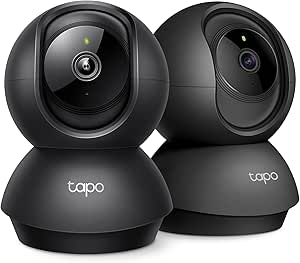
Tapo 2K Pan Tilt Security Camera for Baby Monitor, Dog Camera (2-Pack)
For caregivers who want to scan a room remotely, I’d put the Tapo 2K Pan Tilt ahead of fixed-view cameras. Its 360° horizontal and 114° vertical movement can follow activity across more of a room, and 2K video gives a clearer view than the Full HD footage listed for the Two-Way Video Camera, Dual-Band. Motion, person, and baby-cry detection can send alerts, while two-way audio supports a quick check-in. The tradeoff is that this camera depends on 2.4GHz Wi-Fi, so its app-based remote access is only useful with a working connection. Local microSD storage is available, but the card is not included; cloud storage is another option. Choose Tapo for adjustable video coverage and flexible storage, and skip it if you want a standalone monitor like the CallToU.
Pros:- 2K video provides more detail than the listed Full HD camera in this batch
- 360° horizontal and 114° vertical pan and tilt can cover a room from one camera
- Supports local microSD and cloud storage
- Motion, person, and baby-cry detection can trigger notifications
Cons:- Requires 2.4GHz Wi-Fi for operation and remote access
- MicroSD card is not included
- App and camera setup may be complex for some households
Best for: Families with reliable 2.4GHz Wi-Fi who want to pan across a senior’s room and receive motion or person alerts
Not ideal for: Caregivers seeking a Wi-Fi-free monitor or a simple receiver that works without app setup
- Video resolution:2K HD
- Pan and tilt range:360° horizontal, 114° vertical
- Connectivity:2.4GHz Wi-Fi
- Storage:MicroSD up to 512 GB or cloud storage via Tapo Care
- Night vision:Yes
- Two-way audio:Yes
- Detection:Motion, person, and baby-cry detection
- Compatibility:Alexa, Google Assistant, RTSP, and ONVIF
Our verdict“Choose Tapo for broad, remotely adjustable room video when the home has dependable Wi-Fi.”
Anona 4K UHD Indoor Security Camera (2 Pack)
When caregivers need to inspect fine details in a room view, the Anona 4K UHD camera offers the highest stated resolution in this group: 4K UHD with 8x digital zoom. Its 360° pan, 110° tilt, and auto-tracking can help keep a moving person in view, while detection for people, pets, and crying can send alerts. That makes it more suited to detail-heavy video checks than the Tapo 2K Pan Tilt Security Camera, though Tapo lists a slightly wider vertical movement range. Anona’s dual-band Wi-Fi 6 supports 2.4 and 5 GHz networks, but the camera still depends on Wi-Fi and an app for full functionality. Local microSD and cloud storage are offered, with the card sold separately. Choose it for resolution and tracking; skip it if setup simplicity matters more than video detail.
Pros:- 4K UHD resolution and 8x digital zoom support detailed video checks
- 360° pan, 110° tilt, and auto-tracking help follow movement
- Detection covers people, pets, and crying
- Dual-band Wi-Fi 6 supports 2.4GHz and 5GHz networks
Cons:- Requires Wi-Fi and an app for full functionality
- MicroSD card is not included
- Setup may be complex for some users
Best for: Caregivers with compatible Wi-Fi who want high-resolution room video, zoom, and automatic tracking
Not ideal for: Households seeking a standalone monitor without app setup or a Wi-Fi-free connection
- Resolution:4K UHD (8 MP)
- Zoom:8x digital
- Pan and tilt:360° pan, 110° tilt
- Wi-Fi:Dual-band Wi-Fi 6 (2.4 GHz and 5 GHz)
- Storage:MicroSD up to 512 GB or cloud storage
- Power:5V, 10W
- Detection:Person, pet, and crying detection
Our verdict“Choose Anona when detailed 4K video and tracking matter more than a simple, standalone monitor.”
Two-Way Video Camera, Dual-Band (5G/2.4G) Indoor Home Security Camera with Phone App, Motion Detection, Night Vision, and Audio Calling
This camera’s clearest senior-care advantage is two-way video calling: relatives can use it for a face-to-face check-in instead of relying on audio alone. It also supports sharing access with up to 10 family members, which may suit a care circle that divides visits and check-ins. Compared with the CallToU, it offers phone-based video calling and wider family access, but it requires stable Wi-Fi and does not offer CallToU’s dedicated SOS button or portable receiver. The listed video is Full HD, below the 2K Tapo and 4K Anona options, and its specs do not list pan and tilt controls. Night vision and motion detection cover routine monitoring needs, but the indoor-only design limits placement. Choose it for shared video calls; skip it if room-wide movement tracking or a direct help button is the priority.
Pros:- Two-way video and audio support face-to-face family check-ins
- Access can be shared with up to 10 family members
- Full HD video includes night vision
- Dual-band Wi-Fi supports 2.4GHz and 5GHz
Cons:- Requires a stable Wi-Fi connection for optimal performance
- Full HD resolution is lower than the 2K Tapo and 4K Anona options
- Indoor-only use and no listed pan-and-tilt range limit placement and coverage
Best for: Families who want several relatives to share access and use video calls for regular indoor check-ins
Not ideal for: Caregivers who need a dedicated SOS button, Wi-Fi-free operation, or listed pan-and-tilt coverage
- Video resolution:Full HD
- Wi-Fi bands:2.4GHz and 5GHz
- Two-way video and audio:Yes
- Night vision:Yes
- Motion detection:Yes
- Family sharing:Up to 10 members
- Use:Indoor
Our verdict“Choose this camera for shared family video calls when dependable Wi-Fi is available indoors.”

How We Picked
I ranked these cameras around the tasks families typically need: checking live video, speaking through the device, covering more than one part of a room, and getting a usable view at night. I gave extra weight to video and simple two-way communication because a camera that is hard to access or hard to hear may not help with a quick check-in. Pan-and-tilt movement, tracking, screen-based calling, call buttons, and storage options shaped each product’s role.
The order also reflects tradeoffs specific to senior monitoring. Wi-Fi cameras can fit into a phone-based household routine, but they depend on network setup and app use; dedicated monitors may simplify local communication but can offer fewer smart-camera features. I treated advertised resolution as one factor rather than a guarantee of better care, and considered whether the listed functions appear suited to the intended user. Product details provided do not establish clinical reliability, emergency response, or compatibility in every home, so buyers should verify those needs separately.
Factors to Consider When Choosing Home Monitoring Cameras For Seniors
Choose around the person’s daily routine and the caregiver’s way of checking in. A feature list can look reassuring, but placement, connection, and ease of use determine whether video monitoring fits naturally into a household.
Decide who needs to start the video call
Some households want a caregiver to open a phone app and check the room; others want the senior to start a call or press a button. Those are different workflows, so agree on who initiates contact before choosing a camera. A one-touch calling screen or SOS button may reduce steps for a person who does not use smartphone apps comfortably. Passive cameras can work well when caregivers mainly check in, but they may not give the senior an obvious way to reach someone. Avoid assuming that two-way audio alone creates an easy calling experience. If a prompt response matters, confirm what the call button actually does and who receives it.
Check Wi-Fi and remote access before buying
App-based cameras generally need a reliable home network for remote viewing and alerts. A weak signal in the bedroom or living area can make video frustrating even if the camera has a strong advertised resolution. No-Wi-Fi monitors can avoid dependence on a router for their stated local connection, but that may limit how far away a caregiver can be and how they connect. Think about whether check-ins happen from another room, from work, or while traveling. Test the network where the camera will sit, not only beside the router. Also verify that the app and monitor fit the devices caregivers already use.
Match coverage to the room and routine
A fixed camera may be enough for a bed, chair, or doorway that stays in view; a pan-and-tilt model can help when the person moves around a shared room. One camera cannot reliably show every corner if furniture, doors, or walls block its view. Before buying multiple units, sketch the areas that need visibility and consider whether one movable camera or separate viewpoints make more sense. Tracking features can follow movement, though motion detection may also react to pets or ordinary activity. Night vision is useful for dark rooms, but check whether status lights or camera movement could disturb sleep. Position the device to capture the needed area while respecting private spaces.
Treat storage and alerts as separate decisions
Live video, motion alerts, and saved clips solve different problems. A family that only wants to check in may not need a history of recordings, while one reviewing an event later may care more about local or cloud storage. Read the storage terms for the exact model, including whether a card is included, what happens when it fills, and which functions need a subscription. Alert sensitivity can also shape daily use: frequent notifications may become easy to ignore. Start with the fewest alerts that support the household’s routine, then adjust after seeing what triggers them. Do not assume that a camera records or sends an alert continuously just because it can show live video.
Set expectations for privacy and care
A camera is a communication and observation tool, not a substitute for hands-on help or a dedicated emergency response service. Discuss where it will be placed and when it will be used with the person being monitored, especially in bedrooms and shared spaces. Consider who can view the feed, whether accounts can be shared safely, and how recordings are protected or deleted. More video coverage can reassure caregivers, but constant monitoring may feel intrusive to the senior. Choose the least intrusive placement that meets the actual check-in need. If health or fall-response coverage is required, confirm that a separate service or device provides it.
Frequently Asked Questions
Should I choose a phone-app camera or a dedicated elderly monitor?
Choose an app-based camera if caregivers want to check live video from their phones and are comfortable setting up Wi-Fi, accounts, and alerts. A dedicated monitor may suit a household where a senior benefits from a physical screen, one-touch calling, or a call button. Some dedicated models rely on a local connection, so check their range and whether they support calls outside the home. Think about who will use the controls every day, not just who buys the device. The easiest system is usually the one both the senior and caregiver can operate without repeated help.
Can these cameras tell me if a senior has fallen?
The listed products include motion detection or tracking features, but those should not be treated as reliable fall detection. A camera may miss an event because of the viewing angle, an obstruction, poor lighting, or how its software interprets movement. It may also send alerts for routine activity. If automatic fall alerts or emergency response are needed, verify that a dedicated service provides those functions and understand who receives an alert. Use video as one part of a care plan, not as the only safeguard.
Is a higher-resolution camera worth choosing for senior monitoring?
Higher resolution can help show detail when the camera has a clear view and the connection can carry the video smoothly. It will not fix a poor angle, weak Wi-Fi, low light, or a camera placed too far away. For many check-ins, reliable live video and clear two-way audio matter more than added pixel detail. Consider the room size and whether you need to distinguish small visual details before paying for a higher-resolution model. A pan-and-tilt view or well-placed second camera may help more than resolution alone.
What should I check before relying on two-way audio?
Confirm that both ends can hear clearly at the distances and noise levels in your home. A camera’s microphone and speaker placement, room acoustics, and network quality can all affect a conversation. Check whether the senior must open an app, press a control, or can answer through a dedicated monitor. If hearing or dexterity makes interaction harder, try the actual controls before settling on a device. Two-way talk is useful for routine check-ins, but it does not guarantee that someone will hear or answer every time.
Do I need cloud recording if I mainly want to check in by video?
Not necessarily. If you only plan to open a live view and speak with the person, saved recordings may not add much to your routine. Recording can help when caregivers need to review an event later, but it introduces questions about access, retention, storage limits, and possible subscription terms. Some cameras list local storage options, and SensForge includes an SD card, but buyers should verify how recording works on the exact model. Decide whether you need live communication, event alerts, saved clips, or all three before choosing a storage plan.
Conclusion
My best overall choice is the Kasa EC70 for households seeking app-based video checks, pan-and-tilt coverage, and two-way audio. For best value in the listed features, I’d look at the Tapo C100 as a simpler wired indoor camera, while the SensForge 2.5K is my best premium-style feature set for shoppers who want sharper video, dual-band Wi-Fi, and included local storage. The SYMYNELEC is the best choice for beginners who prefer a screen and one-touch video calling; CallToU suits buyers prioritizing an SOS button. If Wi-Fi access is a concern, compare the dedicated no-Wi-Fi monitors and confirm their range and calling limits. Pick the device around how the senior and caregiver will communicate, then verify network, storage, and privacy details before installation.
Halloween Picks
halloween
As an affiliate, we earn on qualifying purchases.