
For most households, I would start with the Flipper Big-Button TV Remote for Seniors for its simplified controls; the GE Big Button 2-Device Universal Remote stands out when one remote needs to handle a TV and another device, while the GE BigEZ OneTouch favors straightforward TV control. The main tradeoff is between fewer, easier-to-find buttons and broader control over devices or functions. Compatibility also matters: a large-button remote still needs to work with the specific TV or equipment in the home. I compare all 15 options by usability, device support, and fit for different needs below.

Turn quiet afternoons into listening time
- Thousands of audiobooks, podcasts and originals
- Listen on your phone, tablet or Echo — also offline
- Cancel anytime
Key Takeaways
- The Flipper is the clearest fit for shoppers who want a simplified senior-focused layout rather than a general-purpose universal remote.
- GE Big Button 2-Device is the more relevant choice when controlling a TV and a second device matters; a TV-only remote may be simpler but less versatile.
- GE BigEZ OneTouch and Philips BigEZ OneTouch both prioritize straightforward TV operation, so brand-specific compatibility and button layout can guide the choice between them.
- EZclicker’s orange and blue models offer a color distinction that may help someone spot a remote, though color alone does not confirm that its controls or setup suit the user.
- The waterproof 4-in-1 model emphasizes device range and spill protection, adding practical coverage while bringing more features to evaluate than a basic TV remote.
| GE Big Button 2-Device Universal Remote Control |  | Best Overall for Two-Device Setups | Device capacity: Up to 2 devices | Compatible devices: TV, soundbar, cable box, satellite receiver, and other compatible devices | Setup methods: Automatic code search or direct code entry | VIEW LATEST PRICE | See Our Full Breakdown |
| GE Big Button Universal Remote Control for Samsung TVs |  | Best for Simple Samsung Setup | Compatibility: Samsung TVs, streaming media players, cable boxes, satellite receivers, and soundbars | Device control limit: 2 devices | Power source: 2 AAA batteries, not included | VIEW LATEST PRICE | See Our Full Breakdown |
| LuckyStar A-TV2 Big Button Universal TV Remote Control |  | Best for Multi-Brand TV Households | Model: A-TV2 | Compatible brands: LG, Vizio, Sharp, Zenith, Panasonic, Philips, RCA, and others | Setup: Preconfigured, with automatic search and code entry supported | VIEW LATEST PRICE | See Our Full Breakdown |
| Big Button Universal TV Remote for Seniors |  | Best for TV-Only Simplicity | Compatible devices: Television | Connectivity: Infrared | Controller type: Button control | VIEW LATEST PRICE | See Our Full Breakdown |
| Flipper Big-Button TV Remote for Seniors |  | Best for Favorite Cable Channels | Compatible devices: Major TV brands, cable and satellite boxes, compatible soundbars, and IR devices | Controls: Power, volume, channels, and mute | Favorite channels: Up to 25 | VIEW LATEST PRICE | See Our Full Breakdown |
| EZclicker Big Button Universal TV Remote for Seniors, Orange |  | Best for a Simple, Single-TV Setup | Connectivity: Infrared | Supported devices: 1 television | Button quantity: 13 | VIEW LATEST PRICE | See Our Full Breakdown |
| Big Button Universal TV Remote |  | Best for Samsung TV Beginners | Compatible brands: Samsung, LG, VIZIO, Sony, Hisense, Philips, Panasonic, Sharp, and more | Button design: Large tactile buttons with an extra-large Enter button | Samsung setup: No programming or pairing required | VIEW LATEST PRICE | See Our Full Breakdown |
| Big Button 4-in-1 Universal Waterproof TV Remote for Seniors |  | Best for Spill-Prone, Multi-Device Setups | Compatibility: TVs, streaming boxes, soundbars, DVD/VCR players, and DVB | Device format: 4-in-1 universal remote | Button design: Large, color-coded buttons | VIEW LATEST PRICE | See Our Full Breakdown |
| Big Button TV Remote for Seniors |  | Best for TV and Cable Box Basics | Compatibility: Major TV brands and compatible cable or satellite boxes | Button design: Large, color-coded tactile buttons | Connectivity: Infrared | VIEW LATEST PRICE | See Our Full Breakdown |
| GE BigEZ OneTouch Big Button Universal TV Remote for Seniors, Easy to Use |  | Best Overall for Backlit Multi-Device Control | Supported devices: Up to 2 | TV setup: OneTouch setup for Samsung, LG, Vizio, Sony, and Roku TVs | Additional device: AUX button preset for Roku boxes; programmable for another compatible device | VIEW LATEST PRICE | See Our Full Breakdown |
| Philips BigEZ OneTouch Big Button Universal TV Remote, Easy to Use |  | Best for Low-Light Use | Compatible TV brands: Samsung, LG, Sony, Vizio, Roku | Maximum supported devices: 2 | Buttons: 15 | VIEW LATEST PRICE | See Our Full Breakdown |
| Big Button Universal TV Remote for Seniors |  | Best for a TV-Only Setup | Brand: Betterqualityremote | Compatible devices: Televisions | Maximum supported devices: 1 | VIEW LATEST PRICE | See Our Full Breakdown |
| Universal Big Button TV Remote Replacement for Samsung, VIZIO, LG, Sony, and Philips TVs |  | Best for Glow-in-the-Dark Keys | Compatible brands: Samsung, VIZIO, LG, Sony, Philips, and more | Shortcut buttons: 4 | Control technology: Infrared | VIEW LATEST PRICE | See Our Full Breakdown |
| EZclicker TV Remote for Seniors, Extra Simple Big Button Remote (Blue) | 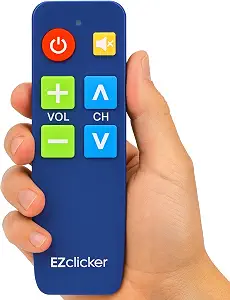 | Best Compact Pick | Color: Blue | Dimensions: 6 × 2 × 1 inches | Battery requirement: 2 AAA batteries | VIEW LATEST PRICE | See Our Full Breakdown |
| Large Button TV Remote for Seniors |  | Best for a Simple, Clear Layout | Compatibility: Most major TV brands | Button design: Extra-large, clearly marked buttons | Intended users: Seniors and people with low vision | VIEW LATEST PRICE | See Our Full Breakdown |
More Details on Our Top Picks
GE Big Button 2-Device Universal Remote Control
The GE Big Button 2-Device Universal Remote is a strong fit for someone who wants to manage a TV and one other compatible device without a crowded control pad. Its large, easy-to-read buttons, master volume control, and direct sub-channel access make common adjustments easier to find. Samsung TVs are preprogrammed, while automatic code search and direct entry provide setup options for other compatible equipment. Compared with the Big Button Universal TV Remote for Seniors, which is limited to a television, this GE model can also cover a soundbar or cable box. That added flexibility comes with a limit: it controls only two devices, and its two AA batteries are not included. I’d choose it for a modest living-room setup, but skip it if several boxes and players need control.
Pros:- Large buttons are easier to see and select
- Controls up to two compatible devices
- Automatic code search and direct code entry offer two setup paths
- Master volume control works across devices
Cons:- Two AA batteries are required and not included
- The two-device limit may not cover a more complex setup
Best for: Older adults or caregivers setting up a TV with one compatible soundbar, cable box, or satellite receiver
Not ideal for: Households that need one remote for three or more devices or want batteries included
- Device capacity:Up to 2 devices
- Compatible devices:TV, soundbar, cable box, satellite receiver, and other compatible devices
- Setup methods:Automatic code search or direct code entry
- Preprogrammed for:Samsung TVs
- Power:2 AA batteries, not included
- Finish:Brushed silver
- Features:Large buttons, master volume control, direct sub-channel access
Our verdict“Choose this GE when large buttons and control of a TV plus one other device matter more than support for a larger system.”
GE Big Button Universal Remote Control for Samsung TVs
For a Samsung TV owner who wants a straightforward remote and room for one additional device, this GE model combines large, readable buttons with an ergonomic shape. Automatic code search and direct code entry give caregivers a couple of ways to configure compatible equipment, and the listed device options include streaming players, cable boxes, satellite receivers, and soundbars. Its two-device capacity is the main boundary: compared with the Flipper Big-Button TV Remote for Seniors, it does not offer programming for up to 25 favorite channels, but it does provide broader setup methods and master volume control. The Samsung preset may simplify setup for some households, though the remote still depends on compatibility for any second device. Two AAA batteries are needed and are not included, so plan for that before installation.
Pros:- Large, easy-to-read buttons suit users with impaired vision
- Ergonomic design is intended for a comfortable grip
- Automatic search and direct code entry support setup
- Includes U.S.-based technical support
Cons:- Controls only two devices
- Two AAA batteries are not included
Best for: Samsung TV owners who want large controls and a simple way to add one compatible player, box, or soundbar
Not ideal for: Viewers who rely on many saved favorite channels or need to control more than two devices
- Compatibility:Samsung TVs, streaming media players, cable boxes, satellite receivers, and soundbars
- Device control limit:2 devices
- Power source:2 AAA batteries, not included
- Setup method:Automatic code search and direct code entry
- Button design:Large, easy-to-read buttons
- Design:Ergonomic
- Special features:Master volume control and U.S.-based technical support
Our verdict“Pick this GE for a Samsung-centered setup with one extra device and a preference for simple, large-button controls.”
LuckyStar A-TV2 Big Button Universal TV Remote Control
The LuckyStar A-TV2 is the lineup’s clearest choice for buyers whose television is from a brand other than Samsung. It is preconfigured for LG, Vizio, Sharp, Zenith, Panasonic, Philips, and RCA, with automatic search and code entry available for additional compatible TVs. The comfortable-grip design and big buttons keep the focus on basic television control. Compared with the GE Big Button 2-Device Universal Remote Control, the A-TV2 is a TV-focused option rather than a listed two-device controller, so it makes more sense when a single television is the priority. The tradeoff is uncertainty with newer TV models: the product information warns that some may not work. Batteries are also not included, although a one-year manufacturer warranty adds a defined support period.
Pros:- Preconfigured for several major TV brands
- Automatic search and code entry support additional compatible TVs
- Big buttons and comfortable-to-hold design
- Includes a one-year manufacturer warranty
Cons:- May not work with some newer TV models
- Batteries are not included
Best for: People replacing a remote for an older or established LG, Vizio, Sharp, Zenith, Panasonic, Philips, or RCA television
Not ideal for: Owners of newer or uncommon TV models who need confirmed compatibility, or anyone combining TV and cable-box control
- Model:A-TV2
- Compatible brands:LG, Vizio, Sharp, Zenith, Panasonic, Philips, RCA, and others
- Setup:Preconfigured, with automatic search and code entry supported
- Battery:Required; not included
- Warranty:1 year
- Button design:Big buttons
- Grip:Designed for a comfortable hold
Our verdict“Choose the LuckyStar when your TV brand is among its listed presets and you want a large-button replacement dedicated to television control.”
Big Button Universal TV Remote for Seniors
This remote keeps its job narrow: it controls a television, using extra-large tactile buttons for basic channel and volume adjustments. That pared-back purpose suits someone who finds multi-device controls confusing or difficult to press accurately. Its infrared connection has a stated maximum range of 10 meters, and the product is described as compatible with most major TV brands. Compared with the GE Big Button 2-Device Universal Remote Control, it gives up control of a second device and the GE’s master volume feature, but the simpler TV-only remit may be easier for a viewer who never uses cable-box controls from the remote. It does not support streaming devices, cable boxes, DVD players, or voice control, so it is a poor match for a setup where those functions are part of everyday viewing.
Pros:- Extra-large tactile buttons can make selections easier
- Simple layout focuses on television functions
- Listed as compatible with most major TV brands
- Infrared range is specified at up to 10 meters
Cons:- Controls only one device type: a television
- Does not support streaming devices, cable boxes, DVD players, or voice control
Best for: Seniors or viewers with limited dexterity or vision who use a television’s basic controls and want a simplified layout
Not ideal for: Cable or satellite subscribers who want one remote for the box too, or viewers who use streaming devices or voice control
- Compatible devices:Television
- Connectivity:Infrared
- Controller type:Button control
- Maximum range:10 meters
- Maximum supported devices:1
- Additional features:Ergonomic design and big buttons
- Button feedback:Tactile
Our verdict“Choose this model when television-only controls and extra-large tactile buttons are more useful than managing other devices.”
Flipper Big-Button TV Remote for Seniors
The Flipper stands apart for viewers who mainly watch broadcast or cable channels and want a shortcut to their regular lineup. It can control a TV and compatible cable or satellite box, while its large, tactile, color-coded buttons separate power, volume, channel, and mute functions. The ability to program up to 25 favorite channels is a meaningful advantage over the GE remotes in this batch, which focus on two-device control and master volume rather than a large favorite list. That convenience has a clear boundary: Flipper does not navigate streaming apps, so it will not replace a streamer’s own remote for app browsing. It also requires two AA batteries that are not included. I’d favor it for someone who repeatedly tunes to familiar channels, but not for a household centered on streaming menus.
Pros:- Large tactile buttons are color-coded by common function
- Controls a TV and compatible cable or satellite box
- Stores up to 25 favorite channels
- Covers basic power, volume, channel, and mute functions
Cons:- Cannot navigate streaming apps
- Requires two AA batteries, which are not included
Best for: Older adults who watch cable or satellite TV and want direct access to a curated set of familiar channels
Not ideal for: Streaming-first viewers who need app navigation or households that want controls for several kinds of devices beyond TV and cable or satellite
- Compatible devices:Major TV brands, cable and satellite boxes, compatible soundbars, and IR devices
- Controls:Power, volume, channels, and mute
- Favorite channels:Up to 25
- Streaming app navigation:Not supported
- Batteries:2 AA batteries, not included
- Button design:Large, tactile, color-coded buttons
Our verdict“Choose the Flipper if favorite cable channels are the main priority and streaming app control is unnecessary.”
EZclicker Big Button Universal TV Remote for Seniors, Orange
The 13 tactile buttons and oversized Enter button keep this remote focused on the controls many viewers use most. Its orange casing may also be easier to spot than the white GE BigEZ OneTouch, which adds backlighting and control for a second device but has a more involved layout. This EZclicker is a better fit when the goal is a compact, single-TV remote: infrared reaches up to 45 feet, and setup is described as simple for compatible televisions.
The limit is firm: it cannot control cable boxes or streaming sticks, so it will not simplify a setup where channel or app controls live on another device. Compatibility also depends on the TV model, and two AAA batteries must be supplied separately. I would choose it for someone who watches through a compatible TV and wants fewer buttons to sort through; households relying on a separate box should look at the GE BigEZ OneTouch instead.
Pros:- 13 large tactile buttons keep the control layout focused
- Extra-large Enter button is easier to locate by touch
- 45-foot maximum infrared range
- Compact, lightweight design with a bright orange finish
Cons:- Controls only one device and excludes cable boxes and streaming sticks
- Requires two AAA batteries, which are not included
- Compatibility depends on the specific TV model
Best for: Viewers who use one compatible television and want a compact remote with a small set of tactile controls.
Not ideal for: People who need to operate a cable box, satellite receiver, or streaming stick from the same remote.
- Connectivity:Infrared
- Supported devices:1 television
- Button quantity:13
- Button features:Large tactile buttons; extra-large Enter button
- Maximum range:45 feet
- Battery requirement:2 AAA batteries, not included
- Color:Orange
- Dimensions:Description: 7 x 2 x 1 inches; listed measurements: 7 x 2 x 7 inches
Our verdict“Choose this for a compatible TV-only setup where a compact layout matters more than controlling other devices.”
Big Button Universal TV Remote
For someone who finds programming a remote more confusing than using it, this model has a clear advantage: Samsung TVs require no programming or pairing. Its large tactile buttons and oversized Enter button keep the basic controls easy to find, while compatibility spans several major TV brands. Compared with the EZclicker Big Button Universal TV Remote for Seniors, Orange, it offers a specifically stated no-setup path for Samsung owners; the EZclicker instead provides a stated 45-foot range and a defined 13-button count.
That easy start is limited to Samsung. The supplied details do not promise programming-free setup for other brands, so owners of LG, Sony, or another listed TV may need to work through setup. It also does not operate cable boxes or streaming devices, leaving households with those setups needing another controller. I would pick it for a Samsung viewer who wants simple TV controls, but choose the GE BigEZ OneTouch if one remote needs to handle a second device.
Pros:- No programming or pairing required for Samsung TVs
- Large tactile buttons with an extra-large Enter button
- Supports many major television brands
- Includes a 90-day replacement warranty
Cons:- Does not control cable boxes or streaming devices
- No programming-free setup is specified for brands other than Samsung
- Battery type and operating range are not specified in the supplied product details
Best for: Samsung TV owners who want large tactile controls and a remote that needs no programming or pairing for that TV.
Not ideal for: Households that need one remote for a TV plus a cable box or streaming device, or buyers who expect effortless setup with a non-Samsung TV.
- Compatible brands:Samsung, LG, VIZIO, Sony, Hisense, Philips, Panasonic, Sharp, and more
- Button design:Large tactile buttons with an extra-large Enter button
- Samsung setup:No programming or pairing required
- Compatibility limits:Not compatible with streaming devices, cable boxes, or unrelated TV platforms
- Warranty:90-day replacement warranty
- Battery requirement:Batteries required; type and quantity not specified
Our verdict“Pick this for a Samsung TV user who wants a straightforward, large-button remote and does not need to control other devices.”
Big Button 4-in-1 Universal Waterproof TV Remote for Seniors
This is the most flexible pick here for a household that uses several kinds of entertainment equipment. Its stated 4-in-1 compatibility covers TVs, streaming boxes, soundbars, and DVD/VCR players, while the learning function can help configure controls for a particular setup. The color-coded large buttons make the main controls easier to distinguish, and a slide-cover can hide buttons that are not used. Compared with the single-device EZclicker Big Button Universal TV Remote for Seniors, Orange, it can serve a much broader system.
The added flexibility brings setup work: learning functions can require initial programming, which may be less comfortable for someone who wants a ready-to-use remote. Its plastic construction may also feel less substantial, and the supplied details do not give a button count, range, battery type, or specific device limits within each category. The waterproof design is a useful safeguard around drinks, but buyers should confirm that their exact devices are supported before choosing it over the simpler, TV-only options.
Pros:- Large color-coded buttons help distinguish controls
- Supports TVs, streaming boxes, soundbars, and DVD/VCR players
- Waterproof construction protects against accidental spills
- Slide-cover can conceal buttons that are not needed
Cons:- Learning function may require initial programming
- Plastic construction may feel less substantial
- Button count, range, and battery requirements are not specified
Best for: People with low vision or dexterity challenges who use a TV alongside compatible streaming, audio, or disc devices and want spill protection.
Not ideal for: Buyers who want a minimal TV-only remote with no initial learning or programming, or who need confirmed compatibility details for a specific device.
- Compatibility:TVs, streaming boxes, soundbars, DVD/VCR players, and DVB
- Device format:4-in-1 universal remote
- Button design:Large, color-coded buttons
- Setup feature:Learning function
- Button cover:Slide-cover hides unused buttons
- Water resistance:Waterproof construction
- Material:Plastic
Our verdict“Choose this when one large-button remote needs to cover several compatible devices and spill resistance is useful.”
Big Button TV Remote for Seniors
Among these five options, this remote fills the clearest gap for viewers who switch between a television and a cable or satellite box. Its large, color-coded tactile buttons are designed to make controls easier to locate, and it can operate both devices when they are compatible. That gives it a practical advantage over the EZclicker Big Button Universal TV Remote for Seniors, Orange and the Big Button Universal TV Remote, both of which exclude cable boxes. The GE BigEZ OneTouch can also control another device, but this model’s listed focus is directly on TV and cable or satellite use.
It relies on infrared line of sight, so the remote needs a clear path to the equipment. Some Xfinity setups may need a separate IR extender, adding another item to configure. The supplied details do not specify button count, range, battery type, or setup steps, so buyers should check compatibility with their provider and equipment before choosing it. I would favor it over a TV-only pick when the cable box is part of daily use.
Pros:- Can control a compatible TV and cable or satellite box
- Large color-coded tactile buttons aid visual and touch recognition
- Supports many major TV brands and providers
- Includes a 90-day replacement warranty
Cons:- Infrared operation requires a direct line of sight
- Some Xfinity setups may need a separate IR extender
- Button count, range, and battery requirements are not specified
Best for: Cable or satellite subscribers who want large, color-coded buttons to control a compatible television and receiver.
Not ideal for: People whose equipment is concealed behind furniture, or Xfinity users whose setup needs an IR extender they do not want to add.
- Compatibility:Major TV brands and compatible cable or satellite boxes
- Button design:Large, color-coded tactile buttons
- Connectivity:Infrared
- Line of sight:Required
- Warranty:90-day replacement
- Xfinity note:Some setups may require a separate IR extender
Our verdict“Choose this for a compatible TV-and-cable setup where color-coded large buttons matter more than hidden-device control.”
GE BigEZ OneTouch Big Button Universal TV Remote for Seniors, Easy to Use
The GE BigEZ OneTouch makes the strongest all-around case for households that need accessible controls across more than the TV. Its fully backlit, extra-large buttons aid visibility, while blue volume and orange channel buttons add visual separation. OneTouch setup is specified for Samsung, LG, Vizio, Sony, and Roku TVs; the AUX button can control a second device, such as a cable box, streaming player, or soundbar. Compared with the Big Button TV Remote for Seniors, it has the advantage of a stated two-device capacity and backlighting; that rival instead directly lists cable and satellite box compatibility.
It takes two AA batteries that are not included, and its 30-foot maximum range is shorter than the EZclicker’s stated 45 feet. Setup simplicity is clearest for the five named TV brands, while using AUX for another device may involve programming. The white, larger body may be easier to spot, though it may not suit someone who prefers a compact remote. For a visible, flexible layout, this is my most balanced pick.
Pros:- Fully backlit, extra-large buttons are easier to see in dim rooms
- Color-coded volume and channel buttons support quick recognition
- Controls a TV and one additional compatible device
- OneTouch setup for Samsung, LG, Vizio, Sony, and Roku TVs
Cons:- 30-foot maximum range is shorter than the EZclicker’s stated range
- Two AA batteries are required and not included
- AUX setup for a device other than a preset Roku box may require programming
Best for: Older adults or low-vision viewers who need backlit controls for a TV and one additional compatible entertainment device.
Not ideal for: People who want a compact remote, a longer stated range, or a setup requiring more than two controlled devices.
- Supported devices:Up to 2
- TV setup:OneTouch setup for Samsung, LG, Vizio, Sony, and Roku TVs
- Additional device:AUX button preset for Roku boxes; programmable for another compatible device
- Button features:Extra-large, fully backlit; blue volume and orange channel buttons
- Connectivity:Infrared
- Maximum range:30 feet
- Battery requirement:2 AA batteries, not included
- Color:White
- Weight:0.16 kg
Our verdict“Choose the GE BigEZ OneTouch for visible backlit controls and one-remote operation of a TV plus one compatible device.”
Philips BigEZ OneTouch Big Button Universal TV Remote, Easy to Use
The fully backlit keypad gives this Philips an edge for seniors who watch TV in a dim room or have trouble making out unlit keys. Its blue volume and orange channel buttons also make two frequent controls easier to distinguish at a glance. Compared with the Universal Big Button TV Remote Replacement for Samsung, VIZIO, LG, Sony, and Philips TVs, which uses keys that glow after exposure to indoor light, this model actively lights the keypad and offers one-touch setup for five named TV brands. The directional pad also supports basic streaming navigation, and the AUX button can control a second compatible device. The tradeoff is its two-device limit: it cannot replace a more expansive home theater remote, and its setup shortcut is specific to listed brands. Buyers should also note that it requires two AA batteries.
Pros:- Fully backlit keypad improves visibility in low light.
- One-touch programming covers five named TV brands.
- Distinct blue volume and orange channel buttons aid visual identification.
- Can control a TV plus one compatible AUX device.
Cons:- Supports a maximum of two devices.
- Requires two AA batteries.
- One-touch setup is limited to the listed TV brands.
Best for: Seniors with a Samsung, LG, Sony, Vizio, or Roku TV who need illuminated buttons and a simple setup in a dim viewing area.
Not ideal for: People who need one remote for several home theater components or whose TV brand is not among the named preset options.
- Compatible TV brands:Samsung, LG, Sony, Vizio, Roku
- Maximum supported devices:2
- Buttons:15
- Connectivity:Infrared
- Maximum range:30 feet
- Backlighting:Fully backlit keypad
- Battery requirement:2 AA batteries
- Color:Black
Our verdict“Choose this Philips if illuminated keys and quick setup for a supported TV matter more than controlling a large set of devices.”
Big Button Universal TV Remote for Seniors
This Betterqualityremote is aimed at households that want one straightforward controller for one television. Its large tactile buttons may help users who have trouble seeing small keys or pressing flat controls, while the one-device limit keeps the job simple. That makes it a more focused choice than the Philips BigEZ OneTouch, which can also handle a second compatible device and offers backlighting. This model instead lists a 20-meter infrared range and a one-year warranty, though neither expands what it can control: the description says it does not operate cable boxes or streaming devices. Programming uses button combinations, and the default setting is for Samsung TVs, so some buyers may need to change it. Choose it for basic television control; skip it if the TV is part of a multi-device setup.
Pros:- Large tactile buttons are designed for easier pressing and visibility.
- Supports televisions from several major brands.
- A 20-meter stated infrared range offers room for longer viewing distances.
- Includes a one-year warranty.
Cons:- Controls one television only.
- Does not work with cable boxes or streaming devices.
- Default programming is for Samsung TVs, so other users may need button-combination setup.
Best for: A senior who uses a compatible television by itself and benefits from tactile, oversized controls.
Not ideal for: Viewers who use a cable box, streaming player, or soundbar and want a single remote to operate those devices too.
- Brand:Betterqualityremote
- Compatible devices:Televisions
- Maximum supported devices:1
- Connectivity:Infrared
- Maximum range:20 meters
- Dimensions:8 × 0.7 × 10 inches
- Color:Black
- Warranty:1 year
Our verdict“Pick this model for tactile, basic control of one compatible TV, provided you do not need it to operate other devices.”
Universal Big Button TV Remote Replacement for Samsung, VIZIO, LG, Sony, and Philips TVs
For someone who wants to find buttons after the lights go out, this remote’s light-charged keys offer a simple aid without relying on an always-lit keypad. It also lists four shortcut buttons and compatibility with Samsung, VIZIO, LG, Sony, Philips, and other TVs. Compared with the Philips BigEZ OneTouch, its stated infrared range reaches 40 feet, but its keys glow only after exposure to indoor light; Philips instead has a fully backlit keypad for use in darkness. The remote may work without setup, and it retains memory when batteries are changed, although instructions may be needed to get all functions working. Battery type is not specified, and the after-sales support period is 90 days, so buyers should factor in some setup uncertainty.
Pros:- Large keys illuminate after exposure to indoor light.
- Lists compatibility with several major TV brands.
- Four shortcut buttons provide quick access to selected channels.
- Memory is retained when batteries are changed.
Cons:- Keys need prior light exposure and are not described as continuously backlit.
- Setup may be needed if some functions do not work initially.
- Battery type is unspecified, and listed after-sales support is 90 days.
Best for: A senior with a compatible TV who wants large keys that can be found in low light after the room has been illuminated.
Not ideal for: People who need buttons that remain lit in a dark room or want a clearly specified battery type and longer support period.
- Compatible brands:Samsung, VIZIO, LG, Sony, Philips, and more
- Shortcut buttons:4
- Control technology:Infrared
- Operating range:Up to 40 feet
- Response time:Less than 0.2 seconds
- Button durability:Tested for more than 150,000 clicks
- Key visibility:Illuminated after exposure to indoor light
- After-sales support:90 days
Our verdict“Choose it if glow-in-the-dark keys and shortcut buttons suit your routine, but favor the Philips BigEZ for active backlighting in a dark room.”
EZclicker TV Remote for Seniors, Extra Simple Big Button Remote (Blue)
The blue EZclicker is the compact option for someone who wants a small, uncomplicated remote dedicated to the TV. At 6 × 2 × 1 inches, it should be easier to store or carry than a larger handset, while its tactile buttons and simple hold-to-sync programming keep setup approachable. That simplicity has a firm boundary: it works with top-brand TVs only and excludes cable boxes, Roku, Firestick, and other streaming devices. Compared with the Philips BigEZ OneTouch, it has no stated backlighting or second-device control, but its compact size may suit a user who finds a larger remote awkward to handle. The two AAA batteries are not included, so the remote is not ready to use straight from the package.
Pros:- Compact dimensions make it easy to handle and store.
- Large tactile buttons support users with limited vision or dexterity.
- Simple button-hold programming avoids a complicated setup process.
- Blue color makes the remote visually distinct.
Cons:- Does not control cable boxes, Roku, Firestick, or other streaming devices.
- Two AAA batteries are not included.
- No backlighting is specified for low-light use.
Best for: A senior who prefers a small, lightweight remote and watches television without a cable box or streaming stick.
Not ideal for: People who want to control Roku, Firestick, a cable box, or another non-TV device from the same handset.
- Color:Blue
- Dimensions:6 × 2 × 1 inches
- Battery requirement:2 AAA batteries
- Batteries included:No
- Compatibility:Top-brand TVs only
- Excluded devices:Cable boxes, Firestick, Roku, and streaming devices
- Control type:Infrared universal TV remote
- Setup:Button-hold sequence
Our verdict“Choose the EZclicker if compact handling and TV-only simplicity matter more than backlighting or control of streaming devices.”
Large Button TV Remote for Seniors
This remote centers its case on extra-large, clearly marked buttons and an ergonomic grip, making it a straightforward option for seniors who want familiar TV controls without extra device functions. Its lightweight body may be easier to hold than a bulkier universal remote, but it is limited to television use. The Philips BigEZ OneTouch is a better fit for dim rooms because it has a backlit keypad and supports a second compatible device; this model instead emphasizes a clear layout and a grip-friendly body. It works with most major TV brands according to the supplied details, yet excludes niche brands, cable boxes, and DVD players. There is no voice control, either, so it best serves someone comfortable using physical buttons for everyday viewing.
Pros:- Extra-large, clearly marked buttons support easier viewing and pressing.
- Lightweight body and ergonomic grip are designed for comfortable handling.
- Works with most major TV brands.
- Simple layout keeps the focus on straightforward television control.
Cons:- Does not control cable boxes or DVD players.
- Niche TV brands are not supported.
- Voice control is not available.
Best for: A senior with a major-brand TV who wants clearly labeled physical controls and an easy-to-hold, lightweight remote.
Not ideal for: Viewers who use a cable box or DVD player, own a niche-brand TV, or depend on voice commands.
- Compatibility:Most major TV brands
- Button design:Extra-large, clearly marked buttons
- Intended users:Seniors and people with low vision
- Build:Lightweight body with ergonomic grip and sturdy construction
- Not compatible with:DVD players, cable boxes, and niche TV brands
- Voice control:Not supported
Our verdict“Pick this remote for clear, physical control of a major-brand TV if you do not need peripherals or voice features.”
How We Picked
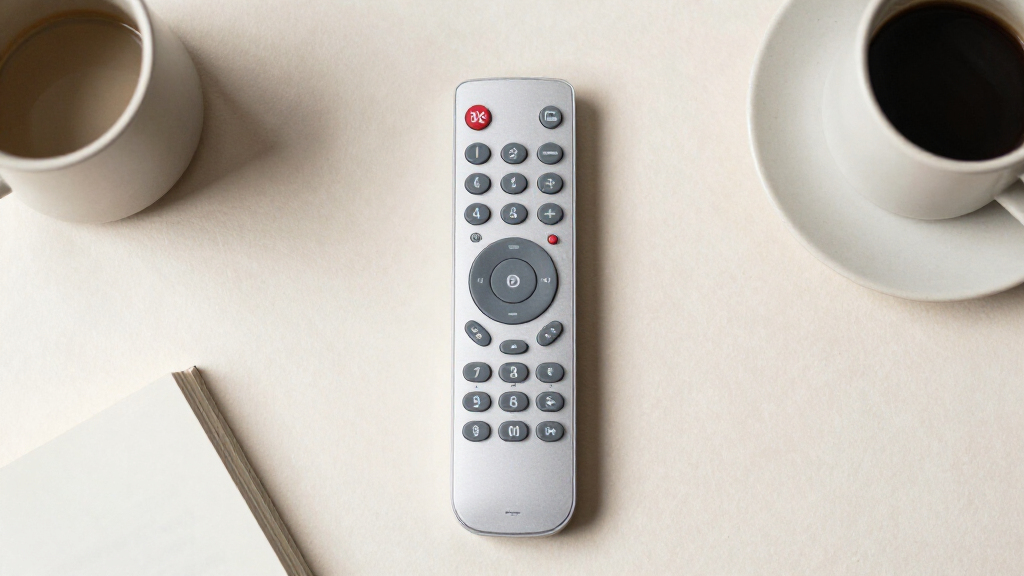
I ranked these remotes around the needs behind this search: buttons that are easy to see and press, controls that are simple to understand, and compatibility with the TV and other equipment the buyer actually uses. I gave more weight to clear senior-focused simplicity than to a long feature list, since extra controls can make the everyday task of changing channels or volume harder. I also considered whether a remote supports one device or several, and whether its design addresses practical needs such as visibility or water resistance.
The ordering reflects those tradeoffs: picks with a clearer role and stronger fit for common senior-use cases lead, while more generic or narrowly compatible options follow. Product names alone do not establish compatibility, setup steps, button size, or tactile differences, so buyers should verify those details against the listing and their equipment before choosing. When two options serve similar needs, the better fit depends on the user’s comfort with extra controls and the household’s device setup.
Factors to Consider When Choosing Large Button Remote Controls For Seniors
Before choosing a large-button remote, I would check how it will work in the room where it gets used. The right fit depends on eyesight and dexterity, the TV and connected devices, and whether setup will be handled by the user or someone else.
Match the controls to the person’s routine
Start with the actions the user performs every day: power, volume, channel changes, input selection, and perhaps playback. A remote with fewer buttons can make those tasks easier to locate, but it may omit a control the user relies on. Extra buttons can also create confusion if labels are small or similar functions sit close together. Write down the routine before comparing layouts, then check that each commonly used action has a clear, reachable button. A family member may value shortcuts that the primary user rarely needs. Prioritize familiarity and legibility over the highest button count.
Check compatibility across the whole setup
Remote compatibility can depend on the exact TV model and on whether the household uses a cable box, streaming device, soundbar, or other equipment. A listing that names a TV brand may not guarantee that every function works with every model. If the user switches inputs or controls a soundbar regularly, confirm those functions before buying. A TV-only remote can be easier to learn, while a multi-device option can reduce the number of remotes on the table. That consolidation helps only if the devices are supported and switching between them is understandable. Keep the original remote nearby during setup until the replacement has been checked.
Look beyond the words “large button”
Button size is only one part of visibility and ease of use. Contrast between the button, label, and remote body can matter in dim lighting, while clear spacing can help someone press one control without hitting another. Buyers should check product photos and specifications for label clarity, button spacing, and the distinction between frequently used controls. Color may make a remote easier to locate, but it does not tell you whether labels are readable. If possible, compare the layout at the distance and lighting where the remote will normally be used. A large button with a faint label may be less useful than a well-spaced control with strong contrast.
Plan for setup and future troubleshooting
Programming steps can be a larger obstacle than daily use, especially when the user has difficulty navigating menus or entering codes. Before buying, check whether setup requires a code search, a phone app, or help from another person. Ask who will handle setup and keep the instructions with the remote afterward. If the television or service provider changes, a universal remote may need to be programmed again. A replacement remote tied to a particular brand may be simpler in one setup but less flexible after an equipment change. Ease of initial setup and ease of reprogramming are separate questions.
Choose between simplicity and device consolidation
One remote for several devices sounds convenient, but every added device can introduce another mode, button, or setup step. For someone who only watches TV through one source, a basic layout may reduce mistakes. For a household that uses a TV and cable box, consolidation can reduce clutter if the remote makes device selection obvious. Consider how often the user changes equipment versus how often they need to find the right remote. Waterproofing may also matter in a kitchen or care setting, but it does not replace checking the control layout. Pay for extra functions only when they solve a task the user actually has.
Frequently Asked Questions
Will a large-button universal remote work with my parent’s exact TV?
It may, but the TV brand alone does not confirm that every function will work. Check the remote’s compatibility information against the exact TV model when possible, and verify whether it supports the needed functions, such as power, volume, and input selection. If the TV uses a cable box or streaming device, check compatibility with that equipment too. Keep the existing remote until the replacement has been programmed and tested. This avoids leaving the user without a working control if setup is incomplete.
Is a simpler TV-only remote better than a multi-device remote for a senior?
It depends on how many devices the user operates and how comfortable they are switching between them. A TV-only layout can make everyday controls easier to locate, especially for someone who rarely changes inputs. A multi-device remote can reduce clutter if the user regularly controls a TV and another component. Its benefit fades if device switching adds confusing steps or the second device is not compatible. I would match the remote to the user’s routine rather than choosing by device count alone.
How can I tell whether the buttons will be easy to see and press?
Look for photos that show the controls clearly, then check the spacing, label contrast, and size of the buttons used most often. Product descriptions may call buttons large without showing how distinct the labels are. Think about the user’s eyesight, hand steadiness, and the lighting in the room where the remote will be used. If those details are unclear, avoid assuming that a bright color or large overall remote means the controls will be easier to operate. A simple layout with clearly separated power, volume, and channel controls may be the more practical fit.
Should I program the remote before giving it to the user?
If setup requires entering codes or changing device modes, programming it beforehand can make the handoff easier. Confirm the remote controls the functions the user needs and that the chosen device mode is clear. Leave the instructions and any relevant setup details in a place a caregiver can find later. If the equipment changes, the remote may need to be programmed again. For a user who wants to manage setup independently, choose an option whose instructions and process they can comfortably follow.
When is a waterproof or multi-function remote worth choosing?
Water resistance may be useful if the remote is often used near drinks, in a kitchen, or in another setting where spills are plausible. A multi-function model can make sense when one controller can reliably replace several remotes the user needs each day. Both features add value only when they address a real need and do not make the controls harder to understand. Check what “waterproof” means in the product details, and confirm which devices and functions are supported. If the user only needs basic TV controls, a simpler layout may be easier to manage.
Conclusion
For the best overall fit, I would begin with the Flipper Big-Button TV Remote for Seniors for a senior-focused, simplified layout. The GE Big Button 2-Device is my best value in versatility when the user needs to control two compatible devices, while the GE BigEZ OneTouch is a strong choice for beginners who want a direct TV-control approach. For a more feature-rich setup, consider the 4-in-1 waterproof remote if its extra functions match the household’s needs. Buyers who prefer a particular TV brand should check the matching GE, Philips, or replacement options against the exact model. Confirm compatibility and button visibility before choosing; the best remote is the one the user can operate confidently in their own setup.
Fall Picks
fall essentials
As an affiliate, we earn on qualifying purchases.