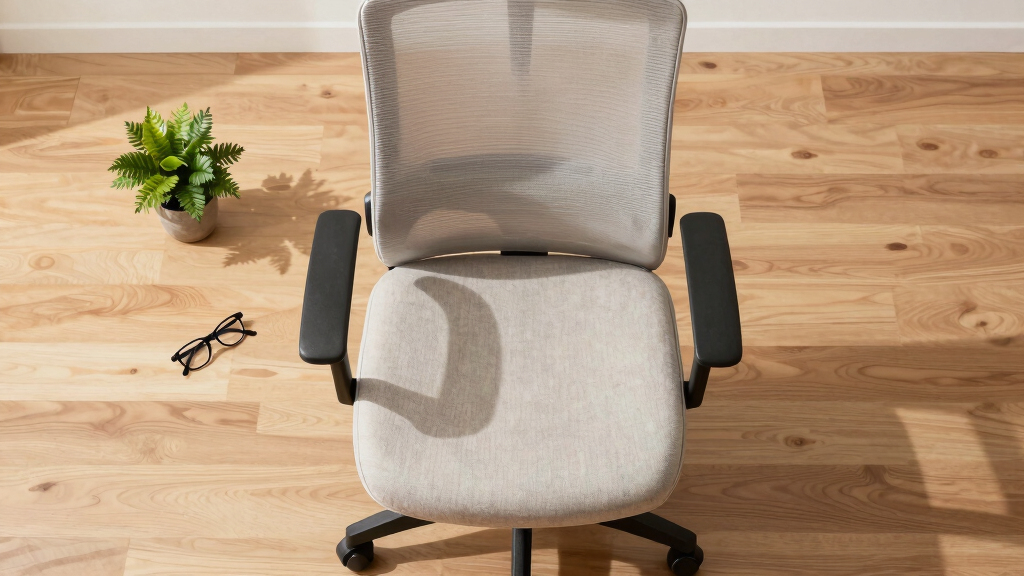

This guide explains how to choose and adjust an ergonomic office chair designed for seniors. It helps you find a chair that offers proper support, reduces discomfort, and promotes good posture. Suitable for caregivers, seniors, or family members shopping for ergonomic seating. Expect to spend about 30 to 45 minutes selecting, testing, and adjusting the chair to fit specific needs.

Turn quiet afternoons into listening time
- Thousands of audiobooks, podcasts and originals
- Listen on your phone, tablet or Echo — also offline
- Cancel anytime
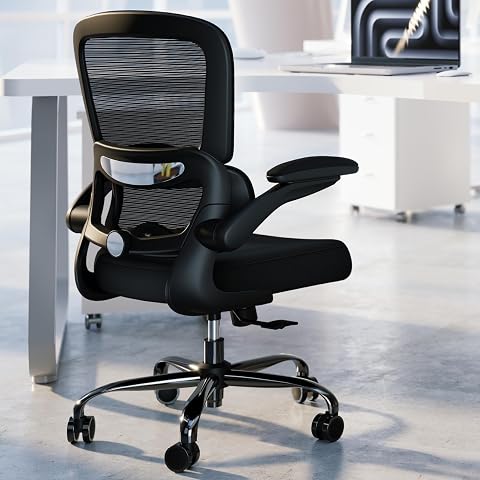
TRALT Office Chair – Ergonomic Mesh Desk Chair with Adjustable Lumbar Support, 360° Swivel, Black
- ✔ Seat Width: 19.7 inches
- ✔ Seat Depth: 17.3 inches
- ✔ Seat Height Range: 17.7 to 21.7 inches

Marsail Ergonomic Office Chair with Adjustable Lumbar Support, Mesh Back, and 3D Armrests
- ✔ Adjustable headrest: 2D
- ✔ Backrest recline: 90° to 120°
- ✔ Lumbar support adjustment: 1.18" forward/backward, 2.16" up/down

BestOffice Ergonomic Mesh Office Chair | Mid-Back Swivel Desk Chair | Dark Black
- ✔ Back Material: Ventilated mesh
- ✔ Lumbar Support: Yes
- ✔ Seat Height Range: 17.1"–20.3"
Difficulty: Beginner | Time: 30-45 minutes
What You’ll Need
Tools & Materials:
- Measuring tape
- Flashlight (optional)
- Notebook and pen for notes
Knowledge:
- Basic understanding of ergonomic principles
- Awareness of specific comfort needs (e.g., back support, height adjustments)
Prepare a space with good lighting and enough room to test chairs. Have the senior’s measurements and comfort preferences on hand. If possible, try chairs in person before purchasing.
TRALT Office Chair – Ergonomic Mesh Desk Chair with Adjustable Lumbar Support, 360° Swivel, Black
<p>The <strong>TRALT Office Chair</strong> stands out for its sturdy construction and versatile adjustability, especially with its lumbar support that relieves lower back pressure—crucial for seniors with back issues. Its breathable mesh back promotes airflow, reducing discomfort during extended sitting. Compared to the other options, it offers a higher weight capacity (330 lbs) and a metal-reinforced base for added stability. However, its lack of a headrest and armrest adjustability might limit comfort for some users. Overall, this chair balances durability and support, making it a solid choice for seniors seeking reliable ergonomic features.</p>
Pros:
- Adjustable lumbar support relieves lower back pain
- Breathable mesh back promotes airflow
- Heavy-duty metal-reinforced base supports up to 330 lbs
- Easy 15-minute assembly with clear instructions
Cons:
- No headrest for neck support
- Price around $150 may be high for some
- Lacks adjustable armrests
Best for: Seniors needing robust lumbar support and durability for long hours of sitting.
Not ideal for: Those seeking a headrest or adjustable armrests, or on a tight budget.
Bottom line: A durable, supportive chair ideal for seniors prioritizing lower back comfort and longevity.
“A durable, supportive chair ideal for seniors prioritizing lower back comfort and longevity.”
Marsail Ergonomic Office Chair with Adjustable Lumbar Support, Mesh Back, and 3D Armrests
<p>The <strong>Marsail Ergonomic Office Chair</strong> offers exceptional adjustability, making it suitable for seniors who want tailored support. Its adjustable lumbar support can be moved forward/backward and up/down, while the 2D headrest and flexible armrests allow for personalized positioning. The breathable mesh back and high-density foam seat support long hours comfortably. Compared to the TRALT, it provides more fine-tuned adjustments but can be complex to assemble due to its numerous components. Its size and multiple adjustments might be overwhelming for users with limited mobility or small spaces. Nonetheless, for those willing to invest time in setup, it offers unmatched customization.</p>
Pros:
- Highly adjustable for personalized comfort
- Breathable mesh back for airflow
- Supports up to 330 lbs durability
- Flexible armrests for various positions
Cons:
- Complex to assemble with multiple adjustable parts
- May be too large for small rooms
- Requires time to fine-tune adjustments
Best for: Seniors who value precise adjustments and personalized comfort.
Not ideal for: Those seeking a quick, straightforward setup or with limited space.
Bottom line: A highly customizable chair perfect for seniors who prioritize tailored support over simplicity.
“A highly customizable chair perfect for seniors who prioritize tailored support over simplicity.”
BestOffice Ergonomic Mesh Office Chair | Mid-Back Swivel Desk Chair | Dark Black
<p>The <strong>BestOffice Mesh Office Chair</strong> provides a straightforward, no-fuss ergonomic solution suitable for seniors preferring simplicity. Its breathable mesh back and lumbar support promote airflow and comfort, while the adjustable height and tilt tension allow for basic customization. Designed for ease of assembly, it can be set up in under 15 minutes, making it suitable for seniors who want quick comfort without complicated adjustments. However, the mid-back design may not offer full back support for those with significant back issues, and its maximum weight capacity of 250 lbs may be limiting for some users. This chair is best viewed as a value-oriented option for those on a budget or with modest ergonomic needs.</p>
Pros:
- Breathable mesh back keeps you cool
- Adjustable height and tilt tension
- Supports up to 250 lbs with durable materials
- Fast, simple assembly
Cons:
- Mid-back design may not support the entire back
- Limited color options (only dark black)
- Less robust for heavier users
Best for: Seniors seeking an easy-to-assemble, budget-friendly ergonomic chair.
Not ideal for: Those needing extensive back support or higher weight capacity.
Bottom line: An excellent entry-level ergonomic chair for seniors prioritizing ease of use and affordability.
“An excellent entry-level ergonomic chair for seniors prioritizing ease of use and affordability.”
As an Amazon Associate we earn from qualifying purchases.
Before You Start
Ensure the testing area is free of clutter for safe movement. Confirm the senior’s current seating issues and preferences to guide your selection. Be aware of any health conditions that may require specific support features, such as lumbar or neck support.
Step-by-Step Instructions
Step 1: Assess the senior’s ergonomic needs
Discuss with the senior their comfort issues, mobility limitations, and any specific support needs. Measure their height, arm length, and back length if possible. Write down these measurements and preferences.
Tip: Prioritize adjustable features like seat height, armrests, and lumbar support to accommodate changing needs.
Check: You have a clear list of the senior’s physical dimensions and support needs to guide your chair selection.
Step 2: Research suitable ergonomic office chairs for seniors
Identify chairs with adjustable seat height, lumbar support, armrest height, and tilt features. Read reviews focusing on comfort, support, and ease of adjustment for seniors.
Tip: Look for chairs with a sturdy base, easy-to-reach adjustment levers, and breathable materials.
Check: You have a shortlist of chairs rated well for senior comfort and ergonomic features.
Step 3: Test chairs in person or through virtual demonstrations
If possible, visit stores to sit in selected chairs, adjusting each to match the senior’s measurements. If shopping online, choose brands with generous return policies and detailed adjustment instructions.
Tip: Check if the chair adjusts smoothly and supports the back and arms adequately. Observe how easy it is for the senior to get in and out of the chair.
Check: The chair feels comfortable, easy to adjust, and supports proper posture during testing.
Step 4: Select a chair with proper fit and support
Choose the chair that best matches the senior’s measurements and comfort preferences. Confirm that the seat height allows feet to rest flat on the floor, knees at a 90-degree angle, and back fully supported.
Tip: Prioritize adjustable lumbar support and armrests that can be positioned to reduce shoulder strain.
Check: The chair fits well, and the senior can sit comfortably with feet flat and back supported.
Step 5: Set up the chair with correct adjustments
Adjust the seat height, backrest angle, lumbar support, and armrest height to suit the senior’s body. Ensure the backrest supports the natural curve of the spine.
Tip: Test the adjustments with the senior seated, making sure they can easily reach controls without strain.
Check: The senior can sit with feet flat, back supported, and arms resting comfortably on the armrests.
Step 6: Verify comfort and support during use
Have the senior sit in the chair for 10-15 minutes, performing typical activities. Observe if they experience discomfort, strain, or difficulty maintaining good posture.
Tip: Make further adjustments if needed to improve comfort and support during this trial period.
Check: The senior reports feeling comfortable, supported, and able to sit for extended periods without pain.
Common Mistakes to Avoid
- Choosing a chair that is too high or low — Always verify seat height by ensuring feet are flat on the floor and knees are at a 90-degree angle when seated.
- Ignoring adjustable features — Select chairs with multiple adjustable components to tailor support to the senior’s changing needs.
- Neglecting lumbar support — Ensure the chair provides firm, adjustable lumbar support that fits the natural curve of the lower back.
Troubleshooting
Problem: The senior cannot reach the armrests comfortably
Solution: Adjust the armrest height so they support the arms without causing shoulder elevation or strain.
Problem: Back pain persists despite adjustments
Solution: Verify that the lumbar support is properly positioned and providing adequate lower back support. Consider adding a cushion if necessary.
Problem: Chair feels unstable or wobbly
Solution: Check the base and casters for stability and tighten any loose screws or bolts.
What Success Looks Like
The senior can sit comfortably with feet flat on the floor, knees at a 90-degree angle, and back fully supported. They can sit for at least 30 minutes without discomfort or strain. The chair adjusts easily to their needs, and they can get in and out independently.
Next Steps
Regularly check the chair’s condition and make adjustments as needed. Encourage the senior to change positions periodically. When the chair shows signs of wear or no longer fits, repeat the selection process or seek professional ergonomic consultation.
Frequently Asked Questions
How do I know if a chair is truly ergonomic for seniors?
An ergonomic chair for seniors should have adjustable seat height, lumbar support, and armrests. It must fit their body dimensions, support natural posture, and be easy to operate.
Can I modify regular office chairs to fit senior needs?
Yes, adding lumbar cushions, footstools, or adjustable armrest pads can improve non-ergonomic chairs, but dedicated ergonomic chairs offer better support and ease of adjustment.
How often should the chair be replaced?
Replace the chair when it no longer provides proper support, shows signs of wear, or the senior reports persistent discomfort after adjustments.
Are there specific brands recommended for senior ergonomic chairs?
Brands like Steelcase, Herman Miller, Humanscale, and ergonomic-focused models from office supply stores often include features suited for seniors. Always verify adjustable features and reviews.
Halloween Picks
halloween
As an affiliate, we earn on qualifying purchases.