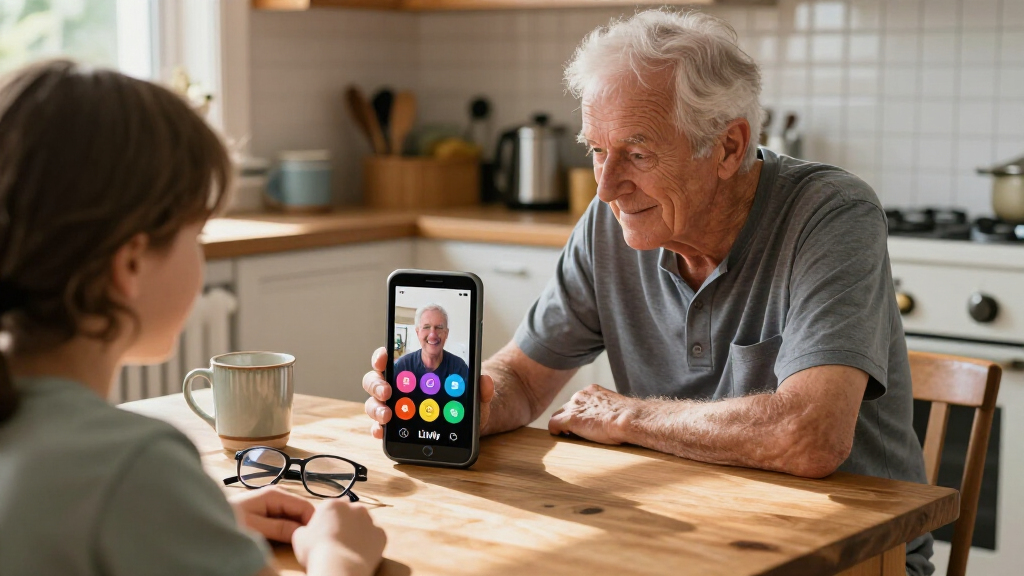

The Lively Jitterbug Smart4 is a senior-focused Android phone that pairs a large touchscreen and simplified menu with call captioning and an Urgent Response button. Its strongest case is making everyday smartphone tasks more approachable while adding ways to get help; its biggest drawback is that it works only with an activated Lively plan. It is worth considering for someone who wants a touchscreen phone and is comfortable using Lively service, but the carrier restriction makes it a poor fit for shoppers seeking a flexible, unlocked handset.

Get comfort and care essentials delivered free — and shop member deals
- Fast, free delivery on millions of items
- Access to Prime Big Deal Days deals on October 6–7
- Prime Video, Amazon Music and more included
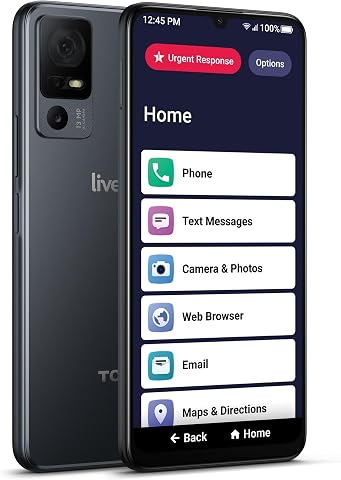
Lively Jitterbug Smart4 Smartphone for Seniors
- ✔ Operating system: Android 13
- ✔ RAM: 4 GB
- ✔ Processor: MediaTek Helio, 2.3 GHz
Why This Product Stands Out
The Smart4 stands out by treating ease of use and access to help as central parts of the phone rather than relying only on standard Android features. Its large screen and simplified menu are aimed at people who want calls, contacts, and familiar phone tasks to be easier to reach. Call captioning adds a practical accessibility benefit for conversations that are hard to follow by hearing alone.
That makes it a more focused option than a typical budget Android phone, but it does not make the hardware broadly premium. The HD-resolution screen, 4 GB of RAM, and 32 GB of storage point to a basic smartphone experience rather than a device built for demanding games, extensive media libraries, or long-term flexibility. Its category advantage is the senior-oriented experience and Lively features, not unusually strong specifications.
The service requirement is part of the product’s identity and its main buying constraint. A preinstalled SIM may simplify the initial setup, but the phone still needs an activated Lively plan and cannot move to another carrier. For buyers who want Lively’s phone and response services, this arrangement may be acceptable; for those who value carrier choice, an ordinary unlocked Android phone is a better starting point.
Key Features and What They Mean
The 6.75-inch touchscreen gives users more space to read text and tap controls, which can make routine tasks easier for someone who struggles with compact screens. That extra room may reduce missed taps and make menus more comfortable to use. Its 1280 x 720 resolution is sufficient for calls, messages, and browsing, but fine text and photos may look less sharp than they do on higher-resolution phones. Buyers who prioritize larger controls and readability over image detail are most likely to benefit.
The senior-friendly menu puts common functions in a guided layout, helping users find calls, contacts, and everyday tasks without sorting through as many choices as a conventional Android home screen. This can make independent use less intimidating for someone new to smartphones or who gets lost in complex menus. People already comfortable navigating Android may see less benefit from the custom layout.
Call captioning and Urgent Response address different needs. Real-time captions turn spoken words into text during calls, helping someone who has trouble hearing speech keep up with conversations and potentially communicate more confidently. The Urgent Response button provides a direct way to reach Lively’s assistance service, which may reassure users who want an additional route to seek help from their phone. These features matter most to buyers who expect to use them and are comfortable relying on Lively service.
The 5,000 mAh battery can reduce charging interruptions for someone who uses the phone throughout the day; listed talk time is up to 37 hours. That capacity may suit users who want the phone available for calls and assistance without frequent charging, though actual battery life varies with screen use, signal conditions, and calls. USB-C offers a familiar charging connection, while the included SIM can simplify getting started. Service still needs to be activated with Lively.
4 GB of RAM and 32 GB of storage support calls, messages, and a limited selection of everyday apps, making the phone adequate for users who mainly want communication and basic smartphone tasks. The limited storage can become a constraint for people who take many photos or download media, who may need to remove files or apps to make room. The 13 MP rear and 8 MP front cameras enable snapshots and video calls, but buyers who want detailed photography should look for a more camera-focused phone.
Performance and Real-World Use
For calls, messaging, video calls, and light app use, the Smart4’s 2.3 GHz MediaTek Helio processor and 4 GB of RAM provide a basic smartphone foundation. The 90 Hz refresh rate may make scrolling appear smoother, but it does not change the modest display resolution or turn this into a performance-focused device. Buyers should treat it as a phone for everyday communication rather than demanding multitasking or graphics-heavy apps.
The simplified menu and preinstalled SIM are intended to make setup and routine navigation less complicated. Still, service activation is a necessary step: a buyer must choose and activate a Lively plan, and the phone cannot be transferred to another carrier. That choice can matter as much day to day as the interface, especially for someone who already has a preferred provider or relies on a family member’s plan.
The large battery should help support longer use between charges, although real results depend on how the phone is used. The device has a 3.5 mm headphone jack, a useful option for people with wired headphones, but no stated water protection. Owners will need to take care around liquids, and the one-year parts-and-labor warranty does not change that everyday handling limitation.
Who Should Buy This
The Smart4 makes the most sense for an older adult who wants a large-screen touchscreen phone, prefers a simplified menu over a conventional Android layout, and would benefit from captions during calls or Lively’s Urgent Response service. It is also a fit for a family member helping someone choose a phone when those features matter more than carrier choice or advanced camera and storage capabilities. Before buying, confirm that the required Lively plan is acceptable and that its service meets the user’s location and communication needs.
Who Should Skip This
Skip the Smart4 if the intended user wants to keep a current carrier, compare plans freely, or use an unlocked device while traveling between networks. It is also a weak match for someone who wants a sharper display, more storage for photos and apps, or protection against water. A person who wants a simpler phone mainly for calls and does not need a touchscreen may prefer the LIVELY Jitterbug Flip3; someone who wants a conventional Android smartphone with broader hardware capability can compare options such as the Google Pixel 10a. For a home-first user seeking amplified calling rather than a mobile smartphone, the VTech SN5147 is a more relevant alternative.
Value for Money
The Smart4’s value depends on whether its accessibility and Lively-specific features solve a real need. The hardware is modest for a modern smartphone: 32 GB of storage and an HD display limit its appeal to buyers seeking general-purpose capability. Its preinstalled SIM helps with the initial process, but the required plan is an ongoing part of the decision, so compare the full service arrangement with alternatives before choosing. It can be worthwhile for someone who specifically wants the simplified interface, call captions, and Urgent Response access; if those features are not priorities, a standard Android phone or a simpler senior phone may offer better value and more choice.
Lively Jitterbug Smart4 Smartphone for Seniors
The Smart4 stands out by treating ease of use and access to help as central parts of the phone rather than relying only on standard Android features. Its large screen and simplified menu are aimed at people who want calls, contacts, and familiar phone tasks to be easier to reach.
Pros:
- The large 6.75-inch touchscreen gives text, menus, and other on-screen controls more room, which can help users who find compact phones difficult to read or tap.
- A simplified menu reduces the need to sort through a conventional Android home screen, making common tasks easier to locate for people who prefer a guided layout.
- Real-time call captioning displays spoken words as text during calls, which can help users follow conversations when hearing speech is difficult.
- The Urgent Response button adds a direct route to Lively’s response service for users who value an extra way to seek assistance from their phone.
- A 5,000 mAh battery and preinstalled SIM card make the phone more convenient to get started with and may reduce how often it needs charging, depending on use.
Cons:
- The phone is locked to Lively service, so buyers cannot use it with another carrier or keep a preferred plan from elsewhere.
- The 32 GB of storage leaves less room for apps, photos, and downloaded media than many current smartphones, especially if the user keeps files on the device.
- The 1280 x 720 display is large, but its resolution is modest for a 6.75-inch screen; fine text and photos may look less sharp than on more capable phones.
- It is not water resistant, so rain, spills, or an accidental drop into water could cause damage, and the stated specifications do not provide a weather-protection rating.
Best for: Older adults who want a large-screen smartphone with a simplified menu, call captioning, and Lively’s Urgent Response feature, and are willing to use Lively service.
Not ideal for: People who want to keep their current carrier, switch between carriers, or need a water-resistant phone.
Bottom line: The Lively Jitterbug Smart4 is worth buying when the intended user wants a more approachable touchscreen smartphone and will use Lively service for its call captioning and Urgent Response features.
Frequently Asked Questions
Can the Jitterbug Smart4 work with my current mobile carrier?
No. The Smart4 requires an activated Lively plan and is not compatible with other carriers. Check the available Lively service options before buying, particularly if the user wants to keep an existing number or plan.
Is the Jitterbug Smart4 suitable for someone who has trouble hearing phone calls?
It includes real-time call captioning, which displays spoken conversation as text and may help some users follow calls. Whether it meets a person’s needs depends on their hearing and preferred communication methods.
Is this a good smartphone for demanding apps or lots of photos?
It is better suited to basic smartphone use than demanding apps or a large media collection. The 4 GB of RAM and 32 GB of storage are modest, so users who install many apps or keep many photos on the device may find the space limiting.
Should I choose the Smart4 or the Jitterbug Flip3?
Choose the Smart4 if a large touchscreen, apps, and a simplified smartphone menu are priorities. The Flip3 is worth comparing for someone who prefers a simpler flip-phone format and mainly needs calls, rather than a touchscreen smartphone experience.
Can the Smart4 get wet?
The listed specifications say it is not water resistant. Keep it away from rain and spills, and consider a different device if water exposure is a likely part of daily use.
Final Thoughts
The Lively Jitterbug Smart4 is worth buying when the intended user wants a more approachable touchscreen smartphone and will use Lively service for its call captioning and Urgent Response features. Its large display, simplified menu, and substantial battery capacity support that focused role. The required carrier, modest storage, and lack of water resistance narrow its appeal. Choose it when the interface and Lively features are the reason for the purchase; skip it when flexibility, stronger hardware, or a phone built mainly for calls matters more.
Halloween Picks
halloween
As an affiliate, we earn on qualifying purchases.