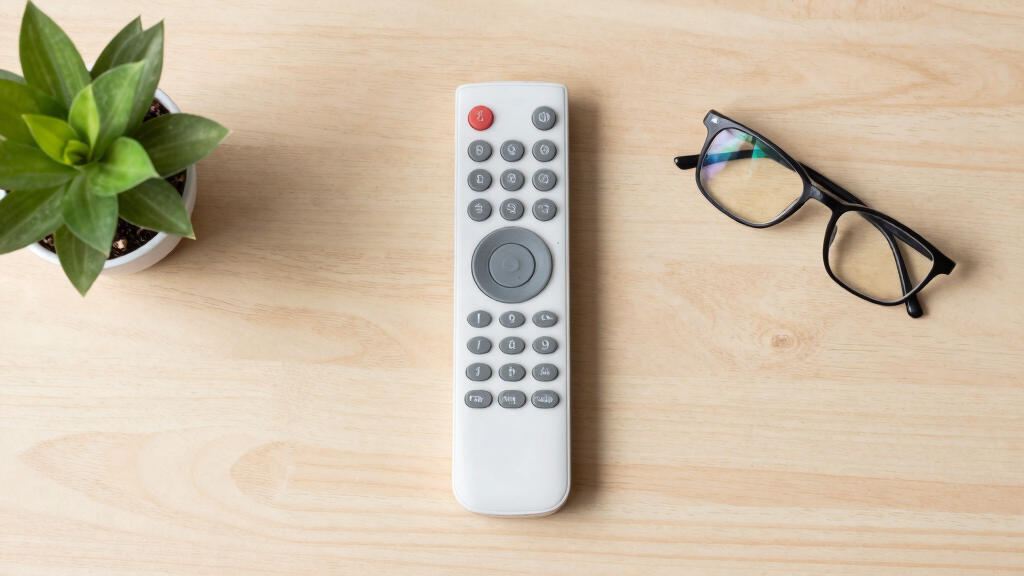

The best large-button senior remote controls make everyday TV use easier without adding confusing keys or complicated setup. I rank the GE BigEZ OneTouch as the best overall pick because its backlighting, two-device control, and broad compatibility create the strongest balance of visibility and flexibility. The Learning Big Button Universal Remote with Backlit is a better fit for customized control, while the blue EZclicker stands out for beginners who need a simpler layout. Buyers must weigh easy initial programming against long-term simplicity, along with universal compatibility against the certainty of a brand-specific replacement. Continue reading for the full breakdown of which design fits each user, television, and level of dexterity.
Complete the kit


Key Takeaways
- GE BigEZ OneTouch leads the ranking because it combines illuminated buttons with control for two devices, giving it broader everyday usefulness than the single-purpose options.
- Learning remotes offer the most customization, but they depend on access to a working original remote and usually require more caregiver involvement during setup.
- EZclicker color variants emphasize visibility and simplicity; buyers should compare their listed functions carefully instead of assuming a different color means different capabilities.
- The Samsung replacement model trades universal coverage for predictability, making it a stronger match for a confirmed Samsung TV than for a mixed-brand household.
- Dementia-oriented designs can be more useful than feature-rich models when accidental input and button overload are bigger problems than controlling multiple devices.
| Big Button Universal TV Remote for Seniors, Easy to Use |  | Best No-Setup Pick | Button type: Extra-large buttons | Compatible brands: Samsung, LG, VIZIO, Sony, Hisense, Philips, Panasonic, and Sharp | Programming required: No | VIEW LATEST PRICE | See Our Full Breakdown |
| EZclicker TV Remote for Seniors, Big Button Universal Remote (Blue) | 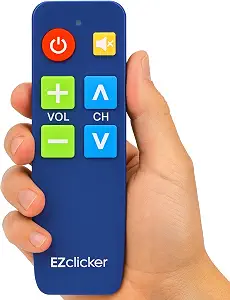 | Best Compact Pick | Button size: Large | Button feedback: Tactile | Dimensions: 6 x 2 x 1 inches | VIEW LATEST PRICE | See Our Full Breakdown |
| GE BigEZ OneTouch Big Button Universal TV Remote |  | Best Overall | Button style: Large and color-coded | Backlighting: Yes | Device capacity: 2 devices | VIEW LATEST PRICE | See Our Full Breakdown |
| Big Button Universal TV Remote for Seniors |  | Best for Bedtime Viewing | Button style: Large buttons | Button feedback: Tactile | Compatible brands: Samsung, LG, VIZIO, Sony, Hisense, Philips, Panasonic, and Sharp | VIEW LATEST PRICE | See Our Full Breakdown |
| Learning Big Button Universal TV Remote for Elderly with Backlit |  | Best Customizable Pick | Button size: Large | Backlighting: Yes | Learning function: Yes | VIEW LATEST PRICE | See Our Full Breakdown |
| Big Button Universal TV Remote for Seniors and Dementia |  | Best for Cable Households | Button Design: Large, color-coded tactile buttons | Core Controls: Power, channel, volume, and mute | Remote Type: Universal TV and cable remote | VIEW LATEST PRICE | See Our Full Breakdown |
| Samsung Replacement TV Remote for Samsung TVs – Big Button, Easy to Use |  | Best Samsung Replacement | Compatibility: Samsung TVs | Button Type: Large buttons | Control Layout: Simplified TV controls | VIEW LATEST PRICE | See Our Full Breakdown |
| Big Button Universal TV Remote for Seniors |  | Best for Basic TV Control | Button Size: Large | Button Feedback: Tactile | Compatibility: Major TV brands | VIEW LATEST PRICE | See Our Full Breakdown |
| EZclicker TV Remote for Seniors – Big Button Universal Remote (Orange) |  | Best Compact Pick | Color: Orange | Button Size: Large | Button Feedback: Tactile | VIEW LATEST PRICE | See Our Full Breakdown |
| Large Button Universal TV Remote Control for Seniors |  | Best Ergonomic Pick | Button Size: Large | Button Markings: Clearly marked | Compatibility: Most major TV brands | VIEW LATEST PRICE | See Our Full Breakdown |
| EZclicker Big Button Universal TV Remote (Orange) |  | Best High-Visibility Pick | Button type: Big buttons with tactile feedback | Compatibility: Major TV brands | Control scope: Television only | VIEW LATEST PRICE | See Our Full Breakdown |
| EZclicker TV Remote for Seniors, Big Button Universal Remote (Black) |  | Best Compact EZclicker | Button type: Big buttons | Feedback: Tactile | Compatibility: Major TV brands | VIEW LATEST PRICE | See Our Full Breakdown |
| Big Button Universal Remote for All TVs |  | Best Plug-and-Play Pick | Compatible device: Television | Connectivity: Infrared | Button quantity: 39 | VIEW LATEST PRICE | See Our Full Breakdown |
| EZclicker Big Button Universal TV Remote (Black) |  | Best for Extra-Large Buttons | Button size: Extra-large | Feedback: Tactile | Compatibility: Major TV brands | VIEW LATEST PRICE | See Our Full Breakdown |
| large-button senior remote control | Compatibility | Dimensions |
|---|---|---|
| Big Button Universal TV Remote | — | — |
| EZclicker TV Remote for Senior | Major TV brands | 6 x 2 x 1 inches |
| GE BigEZ OneTouch Big Button U | — | — |
| Big Button Universal TV Remote | — | — |
| Learning Big Button Universal | Hundreds of TV brands | — |
| Big Button Universal TV Remote | — | — |
| Samsung Replacement TV Remote | Samsung TVs | 7 x 2 x 1 inches |
| Big Button Universal TV Remote | Major TV brands | 7 x 2 x 1 inches |
| EZclicker TV Remote for Senior | Major TV brands | 6 x 2 x 1 inches |
| Large Button Universal TV Remo | Most major TV brands | — |
| EZclicker Big Button Universal | Major TV brands | 7 x 2 x 1 inches |
| EZclicker TV Remote for Senior | Major TV brands | 6 x 2 x 1 inches |
| Big Button Universal Remote fo | — | — |
| EZclicker Big Button Universal | Major TV brands | 7 x 2 x 1 inches |
More Details on Our Top Picks
Big Button Universal TV Remote for Seniors, Easy to Use
I rank this as the best no-setup choice because it removes programming from the handoff process. That makes it especially appealing when a caregiver wants a senior, visually impaired person, or dementia patient to control a television without working through pairing codes. The extra-large buttons should also require less visual precision and finger control than a standard remote. Compared with the EZclicker TV Remote for Seniors, this model skips the one-step programming process entirely; compared with the GE BigEZ OneTouch, it offers a much narrower feature set. I would choose it for straightforward television viewing, but its simplicity carries a firm limit: TV control only. Anyone who needs access to a cable box, streaming player, soundbar, or two-device setup will find the GE model far more capable.
Pros:- No programming removes a common setup barrier for seniors and caregivers
- Extra-large buttons support users with reduced vision or dexterity
- Works with a broad list of major television brands
- Limited control layout can reduce accidental input
Cons:- Cannot control streaming players or cable boxes
- TV-only operation may leave users managing a second remote
- Offers less flexibility than learning or two-device models
Best for: Caregivers setting up a basic television remote for a senior or dementia patient who needs large controls and no programming steps
Not ideal for: Households that watch through a cable box or separate streaming player, since this remote controls televisions only
- Button type:Extra-large buttons
- Compatible brands:Samsung, LG, VIZIO, Sony, Hisense, Philips, Panasonic, and Sharp
- Programming required:No
- Device type:Televisions
- Streaming-device support:No
- Cable-box support:No
- Target users:Seniors, elderly users, dementia patients, and visually impaired users
Our verdict“I recommend this model when immediate, uncomplicated TV control matters more than multi-device capability.”
EZclicker TV Remote for Seniors, Big Button Universal Remote (Blue)
The EZclicker TV Remote for Seniors takes the compact spot because its 6-by-2-inch body combines large controls with a lightweight format that should be easier to hold, carry, and locate beside a chair. Its tactile button feedback gives users a physical cue after each press, an advantage over the no-setup Big Button Universal TV Remote when touch confirmation matters. Programming is described as a single-step process, so I see it as a reasonable middle ground between that model’s instant operation and the more involved learning process of the Learning Big Button Universal TV Remote. The compromise is capability: this is still a TV-only remote, with no cable-box or streaming-device support. It also arrives without the two AAA batteries it needs, and even simple programming may require caregiver help during the initial setup.
Pros:- Compact, lightweight body should be easier for users with reduced grip strength to handle
- Large buttons improve visibility and targeting
- Tactile feedback confirms button presses by touch
- One-step programming keeps setup relatively short
Cons:- Does not operate streaming devices or cable boxes
- Two required AAA batteries are not included
- Initial programming may still call for caregiver assistance
Best for: Seniors with limited hand strength who want a lightweight TV remote with large, tactile controls
Not ideal for: Users who need one remote for a television plus a Roku, cable box, soundbar, or other external device
- Button size:Large
- Button feedback:Tactile
- Dimensions:6 x 2 x 1 inches
- Compatibility:Major TV brands
- Programming:One-step programming
- Streaming-device support:No
- Cable-box support:No
- Batteries:2 AAA, not included
Our verdict“I favor the blue EZclicker for buyers who value a light grip-friendly design but only need basic TV operation.”
GE BigEZ OneTouch Big Button Universal TV Remote
I place the GE BigEZ OneTouch first overall because it addresses more senior-viewing barriers than the TV-only models. Its large, color-coded controls improve visual separation, while backlit buttons remain readable when the room is dim. More important, it can operate two devices, including supported TVs, streaming players, and soundbars. That can replace a confusing pile of remotes rather than merely simplifying television controls. Compared with the no-setup Big Button Universal TV Remote, the GE asks more from the buyer during programming, but it delivers much broader control afterward. The Learning Big Button Universal TV Remote offers greater customization, yet it requires the original remote and may create a harder setup session. I see the GE as the best balance of visibility and versatility, though brand-specific presets and the missing AA batteries keep it from being effortless for every household.
Pros:- Large, backlit controls remain easier to identify in dim rooms
- Color coding helps users distinguish key functions
- Two-device support can reduce reliance on multiple remotes
- Supports selected TVs, streaming players, Roku TVs, and soundbars
Cons:- Programming a second device may be difficult for some seniors
- Preset device and brand support may not cover every setup
- Two required AA batteries are not included
Best for: Seniors who use a TV with a supported streaming player or soundbar and want two-device control with illuminated buttons
Not ideal for: Buyers who cannot complete any programming or whose equipment is not covered by the remote’s preset device options
- Button style:Large and color-coded
- Backlighting:Yes
- Device capacity:2 devices
- Compatible TV brands:Samsung, LG, Vizio, and Sony
- Other device support:Roku TV, streaming players, and soundbars
- Setup:Button-based programming
- Color:White
- Batteries:2 AA, not included
Our verdict“I rate the GE BigEZ highest for seniors who need large illuminated controls without giving up practical two-device operation.”
Big Button Universal TV Remote for Seniors
This model earns my bedtime-viewing role because its built-in sleep function adds a useful convenience absent from the otherwise similar no-setup Big Button Universal TV Remote. A senior can set the television to switch off without reaching for the remote again later, while large keys and tactile feedback make everyday commands easier to locate and confirm. Pairing requires holding Mute and Volume+, which is relatively short but still less immediate than a remote that arrives ready for use. Compared with the GE BigEZ OneTouch, this pick gives up backlighting and two-device control, so it is better suited to a plain television setup than a media system. I also view the 90-day warranty as modest rather than reassuring for long-term ownership. Cable-box and streaming-player users should expect to keep another remote nearby.
Pros:- Sleep function suits viewers who regularly fall asleep with the television on
- Large buttons require less precise targeting
- Tactile feedback helps confirm commands without relying only on sight
- Pairing uses a short two-button procedure
Cons:- Cannot replace cable-box or streaming-player remotes
- Lacks the backlit controls offered by the GE and learning models
- The 90-day warranty provides limited long-term coverage
Best for: Seniors who watch television in bed and want large tactile controls plus an automatic sleep function
Not ideal for: Streaming and cable households that need multi-device control or illuminated buttons for a dark bedroom
- Button style:Large buttons
- Button feedback:Tactile
- Compatible brands:Samsung, LG, VIZIO, Sony, Hisense, Philips, Panasonic, and Sharp
- Sleep function:Yes
- Programming method:Press and hold Mute and Volume+
- Device type:Televisions
- External-device support:No streaming devices or cable boxes
- Warranty:90 days
Our verdict“I would choose this remote for simple bedroom TV use when a sleep timer matters more than backlighting or device breadth.”
Learning Big Button Universal TV Remote for Elderly with Backlit
I give this model the customization role because its learning function can copy commands from an existing remote, letting a caregiver shape the controls around a user’s actual television habits. That flexibility, paired with large backlit keys, makes it more adaptable than the fixed TV-only Big Button Universal TV Remote and easier to see after dark than the EZclicker. Compatibility across hundreds of TV brands also improves the odds of finding a match. The downside is that this freedom shifts work into setup: the original remote must be available, and teaching commands may frustrate someone who wants an immediate replacement. The GE BigEZ OneTouch is a better fit when two-device control is the goal, while this model makes more sense for tailoring one senior-friendly interface. I rank it below the GE because customization depends on caregiver involvement, and batteries are not supplied.
Pros:- Learning function allows commands to be copied for a more tailored control set
- Large buttons reduce the precision needed for common inputs
- Backlighting improves visibility during evening viewing
- Compatibility covers hundreds of television brands
Cons:- Programming requires the original remote
- Learning individual commands may be too complex for some seniors
- Required batteries are not included
Best for: Caregivers who still have the original TV remote and want to create a customized, illuminated control layout for an older adult
Not ideal for: Seniors setting up a replacement alone or households that no longer have the original remote needed for learning
- Button size:Large
- Backlighting:Yes
- Learning function:Yes
- Compatibility:Hundreds of TV brands
- Programming source:Original remote required
- Included items:Remote control and user manual
- Batteries included:No
Our verdict“I recommend this pick when a caregiver can handle setup and customized backlit controls matter more than instant operation.”
Big Button Universal TV Remote for Seniors and Dementia
I rank the Big Button Universal TV Remote for Seniors and Dementia highest for households that still watch cable because it can operate TVs, cable boxes, and soundbars from one handset. Its color-coded tactile controls reduce visual and physical guesswork, while storage for up to 25 favorite channels can spare a user from entering long channel numbers. The Big Button Universal TV Remote for Seniors B0GVVNDY38 is easier to understand as a TV-only model, but it cannot replace a separate cable remote. That broader reach comes with added setup and the need to aim directly at each device. I would also skip this model for app-based viewing: streaming devices and voice control are unsupported. It earns its place by reducing remote clutter, not by serving modern smart-TV households.
Pros:- Large color-coded tactile buttons reduce visual and dexterity demands
- Controls compatible TVs, cable boxes, and soundbars
- Stores up to 25 favorite channels for faster access
- Replaces multiple IR remotes in traditional entertainment setups
Cons:- Does not control streaming devices or apps
- Direct line of sight is required for reliable operation
- Broader multi-device setup may be less straightforward than a TV-only replacement
Best for: Seniors with cable or satellite service who want one large-button remote for a TV, set-top box, and soundbar
Not ideal for: Viewers who mainly use streaming apps or need voice commands, since neither function is supported
- Button Design:Large, color-coded tactile buttons
- Core Controls:Power, channel, volume, and mute
- Remote Type:Universal TV and cable remote
- Compatible Device Types:IR TVs, cable boxes, and soundbars
- Named Compatibility:Xfinity, Spectrum, Samsung, LG, Vizio, TCL, Panasonic, and Insignia
- Favorite Channels:Up to 25 customizable channels
- Streaming Support:No
- Signal Requirement:Direct line of sight
- Power:2 AA batteries, not included
Our verdict“I recommend this model for cable-focused households that value fewer remotes and direct favorite-channel access over smart features.”
Samsung Replacement TV Remote for Samsung TVs – Big Button, Easy to Use
The Samsung Replacement TV Remote is my straightforward pick for a Samsung owner who wants to avoid programming codes altogether. Insert two AAA batteries and it is ready for use, a meaningful advantage when a caregiver needs a quick replacement with no setup. Its large buttons support users with reduced vision or hand control, while the compact body is less cumbersome than many oversized senior remotes. Compared with the Big Button Universal TV Remote for Seniors and Dementia, however, this model has a much narrower job: it controls Samsung TVs only, with no stated cable-box or soundbar support. That limitation makes it a poor household spare for mixed television brands. Batteries are also absent. I place it here because brand-specific simplicity can be more useful than universal compatibility when only one Samsung TV needs control.
Pros:- Works with Samsung TVs without programming
- Large buttons are easier to identify and press
- Compact, lightweight body supports comfortable handling
- Simple controls reduce distractions for users who need basic operation
Cons:- Limited to Samsung TVs rather than universal use
- No stated support for cable boxes, soundbars, or streaming players
- AAA batteries must be purchased separately
Best for: Samsung TV owners or caregivers who need a large-button replacement that works without programming
Not ideal for: Homes with multiple TV brands or external cable and audio devices, since compatibility is limited to Samsung televisions
- Compatibility:Samsung TVs
- Button Type:Large buttons
- Control Layout:Simplified TV controls
- Programming Required:No
- Dimensions:7 x 2 x 1 inches
- Form Factor:Compact and lightweight
- Battery Type:2 AAA batteries
- Batteries Included:No
Our verdict“I would choose this for a Samsung-only setup where immediate operation matters more than multi-device control.”
Big Button Universal TV Remote for Seniors
I see the Big Button Universal TV Remote for Seniors as the sensible middle ground for someone who needs broad TV-brand support without a crowded feature set. Its one-button programming process asks more of the buyer than the no-programming Samsung Replacement TV Remote, yet it works across major brands rather than locking the household to Samsung. Large controls with tactile feedback help a user confirm each press by feel, which can reduce repeated inputs. The tradeoff is strict TV-only operation: unlike the Big Button Universal TV Remote for Seniors and Dementia, it cannot consolidate a cable box or streaming player. Two AAA batteries are also sold separately. I rank it as a basic universal choice because the simple layout and wider brand coverage suit a replacement TV remote, while buyers with several entertainment devices will outgrow it quickly.
Pros:- Large buttons require less visual precision
- Tactile feedback helps users recognize completed presses
- One-button programming keeps setup relatively simple
- Supports major TV brands rather than one manufacturer
Cons:- Cannot control cable boxes or streaming devices
- Limited to television functions
- AAA batteries are not included
Best for: Seniors with a conventional TV from a major brand who want large tactile buttons and minimal programming
Not ideal for: Cable subscribers or streaming-device users who want one remote to operate their entire entertainment setup
- Button Size:Large
- Button Feedback:Tactile
- Compatibility:Major TV brands
- Cable Box Support:No
- Streaming Device Support:No
- Programming:One-button process
- Dimensions:7 x 2 x 1 inches
- Power:2 AAA batteries, not included
Our verdict“I recommend this as a simple universal TV replacement for buyers who do not need cable, audio, or streaming control.”
EZclicker TV Remote for Seniors – Big Button Universal Remote (Orange)
The EZclicker TV Remote for Seniors earns my compact pick because its 6-inch body is an inch shorter than both the Samsung Replacement TV Remote and the Big Button Universal TV Remote for Seniors B0GVVNDY38. That difference can make the handset easier to hold, store, and spot, while the orange housing provides stronger visual contrast than a conventional dark remote. Large tactile buttons and one-step programming keep its basic TV controls approachable across major brands. Its small format does not bring wider device coverage, though. Like the B0GVVNDY38 model, it excludes cable boxes and streaming devices, so a user may still juggle multiple remotes. Batteries are not supplied either. I favor this version for portability and visibility, but the larger multi-device model makes more sense when reducing remote clutter is the main goal.
Pros:- Six-inch body is compact and easy to handle
- Orange color can make the remote easier to locate
- Large tactile buttons support low-vision and limited-dexterity users
- One-step programming works with major TV brands
Cons:- Does not support cable boxes or streaming devices
- TV-only scope means other remotes may still be needed
- AAA batteries are not included
Best for: Seniors who want a short, lightweight remote with a bright orange body that is easier to locate
Not ideal for: Households wanting cable-box or streaming-player control, since this model operates compatible televisions only
- Color:Orange
- Button Size:Large
- Button Feedback:Tactile
- Compatibility:Major TV brands
- Programming:One-step process
- Unsupported Devices:Streaming devices and cable boxes
- Dimensions:6 x 2 x 1 inches
- Power:2 AAA batteries, not included
Our verdict“I would pick this for someone who values a visible, compact handset and needs control of only a television.”
Large Button Universal TV Remote Control for Seniors
I assign the Large Button Universal TV Remote Control for Seniors the ergonomic role because its lightweight shape and sturdy construction emphasize comfortable everyday handling rather than extra functions. The clearly marked, oversized controls can help low-vision users identify common commands, while compatibility with most major TV brands makes it more flexible than the Samsung Replacement TV Remote. It also appears better suited to repeated handling than the smaller EZclicker TV Remote for Seniors, which prioritizes portability. Buyers pay for that physical simplicity with a basic feature set: the supplied data lists no favorite-channel customization, multi-device control, or rich smart-TV functions. Those omissions matter for anyone who regularly opens apps or manages several components. I rank it as the comfort-focused choice for straightforward television viewing, not as the most capable universal remote in the lineup.
Pros:- Large, clearly marked buttons support easier visual identification
- Ergonomic lightweight design can reduce handling strain
- Works with most major television brands
- Sturdy construction suits frequent daily use
Cons:- Limited support for advanced smart-TV functions
- No stated favorite-channel or button customization
- No stated cable-box, soundbar, or streaming-device compatibility
Best for: Seniors with low vision or reduced hand comfort who want a lightweight, durable remote for routine TV commands
Not ideal for: Smart-TV power users who rely on app shortcuts, customization, or control of several entertainment devices
- Button Size:Large
- Button Markings:Clearly marked
- Compatibility:Most major TV brands
- Design:Ergonomic and lightweight
- Construction:Sturdy
- Intended Users:Seniors and low-vision users
- Smart-TV Features:Limited advanced functionality
Our verdict“I recommend this for buyers who place grip comfort, readable controls, and durability ahead of smart or multi-device features.”
EZclicker Big Button Universal TV Remote (Orange)
I rank the EZclicker Big Button Universal TV Remote (Orange) as the strongest visibility-focused choice in this group. Its bright orange casing should be easier to locate on a dark sofa, crowded table, or bedside surface than either black EZclicker model. It shares the seven-inch body and tactile controls of the EZclicker Big Button Universal TV Remote (Black), so the main advantage is visibility rather than broader functionality. The oversized, responsive buttons also reduce the precision needed from users with limited dexterity. Setup still requires programming, unlike the Big Button Universal Remote for All TVs. It also controls only a television—no cable box or streaming player. I place it highest for users who frequently misplace dark remotes, but below plug-and-play choices when minimal setup matters more than color.
Pros:- Bright orange casing is easier to locate than the black alternatives
- Large buttons reduce the precision required for common TV commands
- Tactile feedback helps confirm presses without relying only on sight
- Supports major television brands
Cons:- Requires programming before use
- Cannot control cable boxes or streaming devices
- AAA batteries must be purchased separately
Best for: Seniors with reduced vision who often lose dark-colored remotes among furniture, bedding, or other devices
Not ideal for: Households that watch through a cable box or streaming player, since this remote controls only compatible televisions
- Button type:Big buttons with tactile feedback
- Compatibility:Major TV brands
- Control scope:Television only
- Unsupported devices:Cable boxes and streaming devices
- Dimensions:7 x 2 x 1 inches
- Battery requirement:2 AAA batteries
- Batteries included:No
- Color:Orange
Our verdict“I recommend this version when finding the remote easily is a bigger concern than controlling several entertainment devices.”
EZclicker TV Remote for Seniors, Big Button Universal Remote (Black)
I give the EZclicker TV Remote for Seniors (Black) the compact role because its six-inch body is one inch shorter than the orange EZclicker and the other seven-inch black version. That smaller reach between controls may suit someone with limited hand movement or a preference for a less cumbersome remote. It still provides large buttons and tactile feedback, retaining the senior-friendly qualities that matter most. Compared with the orange EZclicker, though, its black casing is easier to overlook on dark furniture. It also needs programming, while the Big Button Universal Remote for All TVs is presented as ready to operate after batteries are inserted. Like the other EZclickers, it cannot replace cable-box or streaming controls. I rank it for comfortable handling, with device limitations keeping it from broader household use.
Pros:- Six-inch body is more compact than the seven-inch EZclicker alternatives
- Large buttons are easier to target than standard remote keys
- Tactile feedback gives users physical confirmation of each press
- Simple programming supports major TV brands
Cons:- Black finish may be difficult to locate on dark furniture
- Does not operate cable boxes or streaming devices
- Requires separately purchased AAA batteries
Best for: Seniors with limited hand movement who want a shorter, lightweight remote for basic television commands
Not ideal for: People with low vision who need a brightly colored remote that stands out against dark furniture
- Button type:Big buttons
- Feedback:Tactile
- Compatibility:Major TV brands
- Control scope:Television only
- Unsupported devices:Cable boxes and streaming devices
- Dimensions:6 x 2 x 1 inches
- Battery requirement:2 AAA batteries
- Batteries included:No
Our verdict“I would choose this model for a senior who values a shorter grip and needs only straightforward TV control.”
Big Button Universal Remote for All TVs
I place the Big Button Universal Remote for All TVs first for setup simplicity because it is presented as working once two AAA batteries are inserted. That no-programming design is a meaningful advantage over all three EZclicker models, especially when a caregiver cannot remain nearby to enter codes or troubleshoot setup. Its infrared signal reaches up to 10 meters, providing more than enough distance for most living rooms. The tradeoff is a busier 39-button layout, which may feel less approachable than a heavily simplified remote for someone with dementia or severe vision loss. It also controls only one television and cannot operate a cable box or streaming device. I favor it for independent setup, but the orange EZclicker remains easier to find, while the compact black EZclicker may be more manageable in smaller hands.
Pros:- No programming is required before basic use
- Large tactile buttons support users with reduced dexterity or vision
- 10-meter infrared range suits most living rooms
- Broad television-brand positioning simplifies replacement shopping
Cons:- Thirty-nine buttons may be too busy for users needing minimal controls
- Controls only one device at a time
- Does not support cable boxes or streaming devices
Best for: Seniors or caregivers who want a large-button TV remote that avoids code entry and other programming steps
Not ideal for: Users with cognitive impairment who may find a 39-button layout confusing or households needing multi-device control
- Compatible device:Television
- Connectivity:Infrared
- Button quantity:39
- Button feedback:Tactile
- Maximum range:10 meters
- Battery requirement:2 AAA alkaline batteries
- Programming:Not required
- Device capacity:One device
- Return coverage:30-day return guarantee
Our verdict“I recommend this remote when avoiding setup is the priority and a 39-button layout will not overwhelm the user.”
EZclicker Big Button Universal TV Remote (Black)
I assign the EZclicker Big Button Universal TV Remote (Black) the button-size role because its controls are described specifically as extra-large, making it the clearest choice here for someone who struggles to isolate standard keys. Its seven-inch body provides more gripping surface than the six-inch EZclicker TV Remote for Seniors, although buyers with smaller hands may prefer that shorter model. Compared with the orange EZclicker of the same dimensions, this version is more discreet but also harder to spot on dark upholstery. Programming is described as simple, yet it still adds a setup step that the Big Button Universal Remote for All TVs avoids. It is also strictly a television remote: Fire TV Stick, Roku, cable-box, and other streaming control remain outside its scope. I rank it for button accessibility, not entertainment-system versatility.
Pros:- Extra-large buttons are easier to identify and press
- Tactile feedback reduces dependence on visual confirmation
- Seven-inch body offers a substantial gripping area
- Simple programming works with major TV brands
Cons:- Black casing provides little visual contrast on dark surfaces
- Cannot control Roku, Fire TV Stick, cable boxes, or other streaming devices
- Batteries are not supplied
Best for: Seniors with pronounced dexterity or vision limitations who need extra-large keys and a full-length grip
Not ideal for: Streaming-first households or users who frequently lose black remotes against dark chairs and sofas
- Button size:Extra-large
- Feedback:Tactile
- Compatibility:Major TV brands
- Control scope:Television only
- Unsupported devices:Cable boxes, Fire TV Stick, and Roku
- Dimensions:7 x 2 x 1 inches
- Battery requirement:2 AAA batteries
- Batteries included:No
- Color:Black
Our verdict“I would pick this remote for extra-large controls and a longer grip, provided television-only operation is enough.”
How We Picked
I ranked these remotes around the needs implied by the category rather than the number of advertised functions. The main criteria were large, high-contrast controls, functional clarity, television and device compatibility, and the difficulty of the setup method. I also looked at whether extra keys genuinely help or simply increase the chance of accidental presses. Backlighting received added weight because large labels alone may not solve visibility problems in a dim room.
The highest positions went to models that balance easy daily operation with enough flexibility to replace the household remote reliably. Simpler models moved ahead when their reduced layouts offered a clear benefit for beginners, limited dexterity, or cognitive impairment. Brand-specific and learning models ranked by fit: each can outperform a universal model for the right buyer, but each has a narrower use case. I treated repeated EZclicker listings and color choices as variants to compare carefully, not automatic reasons to award separate performance advantages. Price value was judged through useful simplicity, while premium value depended on backlighting or programmable control that could improve everyday access.
| large-button senior remote control | Compatibility |
|---|---|
| Big Button Universal TV Remote | — |
| EZclicker TV Remote for Senior | Major TV brands |
| GE BigEZ OneTouch Big Button U | — |
| Big Button Universal TV Remote | — |
| Learning Big Button Universal | Hundreds of TV brands |
| Big Button Universal TV Remote | — |
| Samsung Replacement TV Remote | Samsung TVs |
| Big Button Universal TV Remote | Major TV brands |
| EZclicker TV Remote for Senior | Major TV brands |
| Large Button Universal TV Remo | Most major TV brands |
| EZclicker Big Button Universal | Major TV brands |
| EZclicker TV Remote for Senior | Major TV brands |
| Big Button Universal Remote fo | — |
| EZclicker Big Button Universal | Major TV brands |
Factors to Consider When Choosing Large-button Senior Remote Controls
I would choose a senior remote by working backward from the user’s hardest daily task. Reading labels, pressing buttons accurately, and recovering from mistakes matter more than a long compatibility list that will never be used. The right design may be a stripped-down remote, a programmable model, or a direct replacement depending on who will set it up and which devices must remain accessible.
Match the Button Layout to the User
Button size is only one part of usability. I also look for clear spacing, strong label contrast, and a layout that separates volume, channels, power, and input controls. A remote with twenty large buttons may still be harder to operate than one with eight well-spaced keys. For users with tremors or reduced fine-motor control, raised button edges can help prevent neighboring keys from being pressed together. People with memory loss may benefit from fewer functions, even if that means a caregiver must handle settings with another remote. I would avoid paying for extra device controls unless the user can identify and operate them confidently.
Choose Between Code-Based and Learning Setup
Code-based universal remotes use stored manufacturer commands, which can make setup fairly quick when the television brand is supported. A learning remote copies commands from the original controller, allowing a caregiver to create a more tailored layout. That flexibility comes with a catch: the original remote must still work, and its infrared signal must be copied correctly. Code-based models can also leave certain television functions unavailable when only basic commands match. I favor learning control for unusual equipment or a customized button set, but code programming is usually easier when the goal is simply power, volume, and channels. Before buying, I would check whether setup can be locked so accidental presses do not erase the programming.
Verify the Television and Device Type
The word universal does not mean every remote controls every product. I would confirm the exact television brand and model, especially for Roku TVs, streaming boxes, cable receivers, and soundbars. A remote may support a Roku-branded television while lacking commands for a separate Roku streaming player. Likewise, a Samsung replacement can be easier to pair with a Samsung TV but offers little value if the household changes brands later. Buyers controlling both a television and another device should seek a two-device design with an obvious selector that will not confuse the user. When only one TV needs basic control, single-device simplicity is often the safer choice.
Prioritize Visibility Beyond Large Print
Large labels help during the day, but contrast and lighting determine how readable a remote remains at night. Backlit buttons are useful in dim rooms, though illumination may shorten battery life and add another control to understand. Bright housing colors can make a misplaced remote easier to spot against furniture, which gives the blue and orange variants a practical advantage over black in some rooms. I would also check whether frequently used keys have distinct shapes or tactile markers that can be recognized without reading. Glossy surfaces may create glare, while low-contrast gray lettering can undermine an otherwise large layout. A buyer with reduced vision should prioritize contrast and tactile cues ahead of decorative styling.
Plan for Mistakes, Batteries, and Caregiver Support
A senior-friendly remote should remain manageable after the initial programming is complete. I prefer models with a protected battery compartment and programming that survives routine battery replacement. Input and device-selection keys deserve special attention because one accidental press can make the television appear broken. If the user often changes settings by mistake, a remote with fewer exposed controls may save more frustration than a feature-heavy model. Caregivers should keep setup codes or programming instructions nearby and label the original remote rather than discarding it. I would also choose familiar battery sizes and establish a simple backup plan for reprogramming.
Frequently Asked Questions
Will a universal senior remote work with a smart TV?
Many universal senior remotes can handle a smart TV’s basic infrared commands, including power, volume, mute, and channel changes. They may not reproduce app shortcuts, voice search, pointer controls, Bluetooth functions, or full menu access. I would keep the original smart remote available for account setup and advanced settings. If streaming apps are the main way the user watches television, check for navigation and home buttons rather than focusing only on brand compatibility. A simple universal model works best when the user mainly needs everyday viewing controls.
Is a learning remote better than a preprogrammed universal remote?
A learning model is better when the user needs a custom set of copied commands or owns equipment that code-based remotes handle poorly. A preprogrammed universal remote is usually faster to configure when its code library already supports the television. Learning requires a functioning original controller and careful alignment during programming, so it may not suit someone setting up the remote alone. I favor learning capability when a caregiver can prepare and verify the layout. For independent setup, brand-code programming or a direct replacement remote is often less demanding.
How many buttons should a remote for someone with dementia have?
There is no single correct number, but the best layout includes only the functions that person uses confidently. For many viewers, power, volume, mute, and channel controls cover the daily routine. Input, menu, and device buttons can create confusing states that are difficult to reverse without help. I would choose a dementia-oriented remote when accidental presses happen more often than requests for advanced features. A caregiver can keep the original controller separately for settings and troubleshooting.
Do backlit buttons justify paying more?
Backlighting can justify a higher price when the television is often watched in a dim bedroom or living room. It improves low-light label visibility, but it does not fix cramped spacing, weak contrast, or an overly busy layout. Some users may also have trouble finding the button that activates the light. I would prioritize large, distinct controls before paying extra for illumination. When two remotes have similarly simple layouts, a backlit model is the more useful choice for evening viewing.
Should I buy a Samsung replacement or a universal remote?
I would choose the Samsung replacement when the household has a compatible Samsung TV and wants the simplest brand-specific match. A universal model makes more sense when the remote may need to control another brand, a streaming player, or more than one device. Replacement models can still omit advanced functions found on the original controller, so the exact model listing matters. Universal options add flexibility but may require code entry and may only reproduce basic commands. The decision comes down to compatibility certainty versus future flexibility.
Conclusion
For most buyers, I recommend the GE BigEZ OneTouch as the best overall because its backlighting, broad compatibility, and two-device control provide the most balanced package. The Big Button Universal TV Remote for Seniors, Easy to Use, Compatible with Most Brands is my value pick for shoppers who want straightforward universal control without paying for specialized programming. Beginners should start with the blue EZclicker, whose simple positioning and easy-to-spot color suit basic daily use. Buyers seeking more customization should choose the Learning Big Button Universal Remote with Backlit as the premium-style option, provided a caregiver can handle the setup. The Samsung replacement is the better specific-needs choice for a confirmed Samsung television, while the dementia-focused model is better for users who become confused by extra controls. I would base the final choice on the user’s ability to recover from an accidental press, not on which remote advertises the longest feature list.