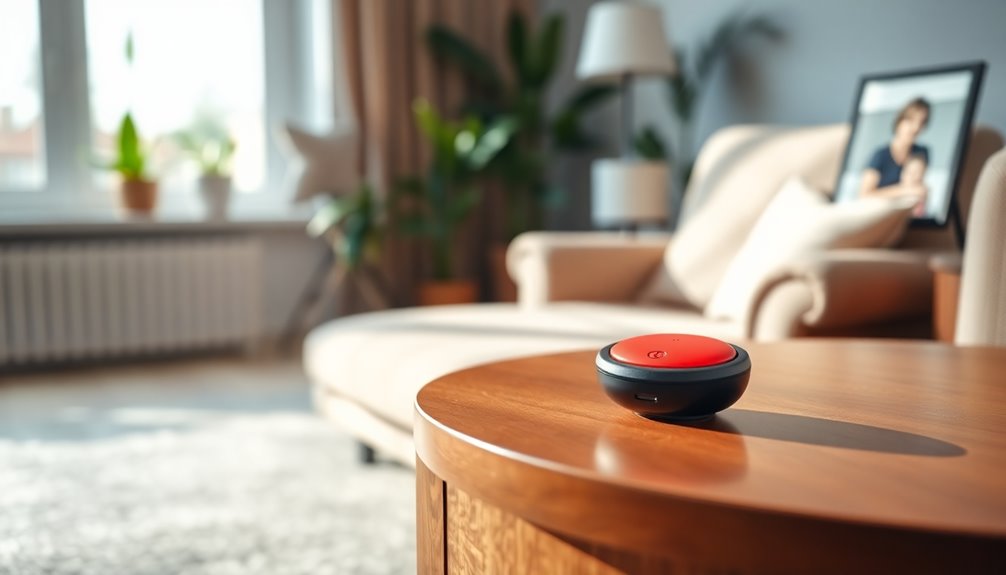
An emergency button for an older adult can alert a nearby caregiver at home or connect the wearer to help while away, depending on the system. My best overall pick is the CallToU Caregiver Pager with 2 Wireless Call Buttons and 2 Receivers, which gives caregivers more than one way to hear an alert around the home. For mobile coverage, the SecuLife Medical Alert Pendant adds GPS and two-way calling, while the CallToU Wi-Fi Caregiver Call Button is a standout for alerts that need to reach beyond a local receiver. The main tradeoffs are coverage, whether someone must be nearby to respond, and how much setup the system requires. Read on for the full comparison and recommendations by need.

Give the gift of listening to someone you love
- Choose a 1-, 3-, 6- or 12-month membership
- They pick the audiobooks they love
- Easy to send by email
Complete the kit


Key Takeaways
- The two-button, two-receiver CallToU setup is my best overall home pick because it can alert caregivers in more than one place and offers multiple call points.
- SecuLife is the lineup’s mobile-focused option: GPS and two-way calling address a different need from home-only pagers, though buyers should check its service and setup requirements.
- Wi-Fi models are distinct from basic pager kits because they can extend alerts beyond a nearby receiver, but they depend on a working network and compatible setup.
- Most of the lineup centers on in-home caregiver alerts; a button and receiver do not by themselves connect the older adult to emergency services.
- Button placement and caregiver response matter as much as range claims: a wearable or reachable call point is useful only if the wearer can press it and someone receives the alert.
| CallToU Caregiver Pager with 2 Wireless Call Buttons and 2 Receivers |  | Best for Multiple Rooms | Model: CC01 2-2 | Included: 2 call buttons and 2 receivers | Range: 500+ feet in open areas | VIEW ON AMAZON | See Our Full Breakdown |
| CallToU Caregiver Pager with Call Button, 1 Receiver and 1 Button, Black |  | Best for Simple Setup | Model: CC01BL | Included: 1 plug-in receiver and 1 call button | Connectivity: Local wireless; no Wi-Fi, app, phone line, or subscription | VIEW ON AMAZON | See Our Full Breakdown |
| SecuLife Medical Alert Pendant with Fall Detection, GPS Tracking, and Two-Way Calling |  | Best for Alerts Away from Home | Connectivity: 4G LTE cellular | Functions: Fall alerts, GPS tracking, geofencing, SOS calling, and two-way calling | Battery capacity: 1000 mAh | VIEW ON AMAZON | See Our Full Breakdown |
| SYNLETT Caregiver Pager with 2 Wireless Call Buttons |  | Best Portable Receiver | Model: D091G1 | Included: 2 call buttons and 1 receiver | Power: Battery-powered | VIEW ON AMAZON | See Our Full Breakdown |
| Wireless Caregiver Pager with Call Button and Receiver |  | Best for Long-Range Claims | Included: 1 receiver and 1 call button | Wireless range: Up to 1,500 feet | Ringtones: 58 | VIEW ON AMAZON | See Our Full Breakdown |
| CallToU Caregiver Pager Wireless Alert System for Seniors and Patients |  | Best for Caregiver Communication | Receivers: 2 | Call buttons: 2 | Walkie talkies: 2 | VIEW ON AMAZON | See Our Full Breakdown |
| CallToU Wi-Fi Caregiver Call Button Emergency Alert System for Seniors |  | Best for Shared App Alerts | Model: TY02BL | Included buttons: 2 call buttons and 1 wrist button | Receiver: 1 | VIEW ON AMAZON | See Our Full Breakdown |
| Caregiver Wireless Emergency Pager with SOS Alert for Seniors – 38 Melodies, 1000+ Feet Range, 1 Receiver + 1 Transmitter |  | Best for Large Outdoor Coverage | Range: 1000+ feet outdoors; 165 feet indoors | Melodies: 38 | Receiver power: 100–240 V AC | VIEW ON AMAZON | See Our Full Breakdown |
| CallToU Wireless Caregiver Pager Call Button Medical Alert System |  | Best for Multi-Room Receiver Coverage | Receivers: 3 | Call buttons: 2 | Range: 500+ feet | VIEW ON AMAZON | See Our Full Breakdown |
| CallToU Wi-Fi Caregiver Pager with Call Button, Watch Button, and Receiver |  | Best for Wearable App Alerts | Model: TY01WH-US | Included components: 1 call button, 1 watch button, 1 receiver | Wireless range: 328 feet (100 m) | VIEW ON AMAZON | See Our Full Breakdown |
| Daytech Caregiver Pager Call Button for Elderly and Seniors, Wireless Medical Alert System with Portable Receiver |  | Best for Simple Home Use | Wireless range: 100 ft / 30 m | Water resistance: Call button is splash proof; pager is not waterproof | Included components: Call button, pager receiver, neck strap | VIEW ON AMAZON | See Our Full Breakdown |
| CallToU Wireless Caregiver Pager Alert Button for Seniors and Patients |  | Best for Multiple Caregivers | Call buttons: 3 | Receivers: 3 | Wireless range: 500+ ft | VIEW ON AMAZON | See Our Full Breakdown |
| CallToU Wireless Caregiver Pager with Call Button |  | Best Single-Button Pick | Included components: 1 receiver and 1 call button | Wireless range: 500+ ft in open areas | Ringtones: 55 | VIEW ON AMAZON | See Our Full Breakdown |
| CallToU Elderly Monitoring Call Button Wireless Caregiver Pager with Light and Buzzer Alarm, 2 Portable Transmitters, 1 Receiver |  | Best for Two Alert Points | Transmitters: 2 portable transmitters | Receivers: 1 | Wireless range: 500+ ft | VIEW ON AMAZON | See Our Full Breakdown |
| emergency button for elderly | Wireless range |
|---|---|
| CallToU Caregiver Pager with 2 | — |
| CallToU Caregiver Pager with C | — |
| SecuLife Medical Alert Pendant | — |
| SYNLETT Caregiver Pager with 2 | Up to 500 feet in open areas |
| Wireless Caregiver Pager with | Up to 1,500 feet |
| CallToU Caregiver Pager Wirele | — |
| CallToU Wi-Fi Caregiver Call B | — |
| Caregiver Wireless Emergency P | — |
| CallToU Wireless Caregiver Pag | — |
| CallToU Wi-Fi Caregiver Pager | 328 feet (100 m) |
| Daytech Caregiver Pager Call B | 100 ft / 30 m |
| CallToU Wireless Caregiver Pag | 500+ ft |
| CallToU Wireless Caregiver Pag | 500+ ft in open areas |
| CallToU Elderly Monitoring Cal | 500+ ft |
More Details on Our Top Picks
CallToU Caregiver Pager with 2 Wireless Call Buttons and 2 Receivers
This set makes the most sense when a caregiver needs to hear alerts in more than one place or a senior needs buttons in separate rooms. Two call buttons and two plug-in receivers give it a wider household setup than the single-receiver CallToU CC01BL. Its stated 500+ foot open-area range can help across a large property, though walls and other indoor conditions can reduce that reach. The 55 tones and adjustable volume up to 110 dB offer flexibility for different rooms and hearing needs. The tradeoff is that receivers need outlets, so this is less convenient for a caregiver who moves around than the battery-powered, belt-clip SYNLETT pager. I’d choose it for a home where fixed alert points matter more than receiver portability.
Pros:- Two buttons and two receivers support alerts across separate rooms.
- 55 ringtone options and five volume levels provide alert customization.
- Rated for a 500+ foot range in open areas.
- Buttons and receivers are described as waterproof and dustproof.
Cons:- Both receivers need electrical outlets, limiting placement and portability.
- The stated range is for open areas and may be shorter indoors.
- It provides a local caregiver alert rather than cellular or GPS-based emergency contact.
Best for: Households that want call buttons in multiple rooms and alerts from two outlet-powered receivers.
Not ideal for: Caregivers who need to carry the receiver around or users who need a system that contacts help beyond the home.
- Model:CC01 2-2
- Included:2 call buttons and 2 receivers
- Range:500+ feet in open areas
- Ringtones:55 options
- Volume:5 levels, 0–110 dB
- Power:Battery-powered buttons; receivers plug into outlets
- Water and dust resistance:Described as waterproof and dustproof
- Warranty:1 year
Our verdict“Choose this set if you want two call points and two fixed receivers around the home.”
CallToU Caregiver Pager with Call Button, 1 Receiver and 1 Button, Black
For a household that needs one straightforward way to call a nearby caregiver, the pre-paired button and plug-in receiver keep setup simple: press once, and the receiver sounds or flashes. No Wi-Fi, app, phone line, or subscription is required, which makes this a more self-contained home alert than the cellular SecuLife pendant. Its 55 tones, five volume levels, and flashing alerts let families tailor the signal, and the button can be worn or mounted. The single button and receiver make it less suited to covering several rooms than the CallToU CC01 2-2 set. Its 500-foot figure applies to open areas, and the IP55 button is water-resistant rather than suitable for immersion or steam. I’d pick it for a one-person, one-room setup.
Pros:- Pre-paired button and receiver allow a simple one-press setup.
- Works locally without Wi-Fi, an app, phone line, or subscription.
- Offers sound and flashing LED alerts with adjustable volume.
- Can be expanded with compatible buttons or receivers.
Cons:- Includes only one call button and one receiver.
- The 500-foot maximum is measured in open areas; indoor range varies.
- The button is water-resistant but should not be immersed or exposed to steam.
Best for: Families who want a pre-paired, one-button alert for a senior and caregiver in the same home.
Not ideal for: Households needing several alert locations, wearable GPS coverage, or a button for shower use.
- Model:CC01BL
- Included:1 plug-in receiver and 1 call button
- Connectivity:Local wireless; no Wi-Fi, app, phone line, or subscription
- Range:Up to 500 feet in open areas
- Ringtones:55
- Volume:5 levels, up to 110 dB
- Button water resistance:IP55
- Button battery:12V 23A; estimated up to 6 months at 10 calls per day
Our verdict“Choose this for a simple local alert when one button and one plug-in receiver cover the household’s needs.”
SecuLife Medical Alert Pendant with Fall Detection, GPS Tracking, and Two-Way Calling
The SecuLife pendant serves a different need from the plug-in CallToU and SYNLETT pagers: it is designed to reach preselected contacts when the wearer is away from a receiver, with 4G LTE, GPS, and two-way calling. Fall detection and geofencing add context that a local call button cannot provide, while the IP67 rating suits wearers who want a water-resistant wearable. These features depend on a monthly subscription, and the source data gives conflicting battery estimates: up to six days in the description and five days in the specifications. That means regular charging is part of the routine. Unlike the simpler household pagers, this has a display and more connected functions to manage. I’d consider it for someone who spends time alone outside the home and has a contact plan for alerts.
Pros:- GPS tracking and geofencing support location-aware alerts.
- Fall alerts can notify preselected contacts.
- Two-way calling allows the wearer and contacts to speak.
- IP67 waterproof rating supports use around water.
Cons:- Requires a monthly subscription.
- Battery life is listed inconsistently as five days and up to six days.
- More features and charging needs make it less simple than a local pager.
Best for: Older adults who leave home independently and want GPS location, two-way contact, and fall alerts sent to chosen contacts.
Not ideal for: People seeking a no-subscription household button or anyone unlikely to keep a rechargeable wearable charged.
- Connectivity:4G LTE cellular
- Functions:Fall alerts, GPS tracking, geofencing, SOS calling, and two-way calling
- Battery capacity:1000 mAh
- Battery life:Listed as 5 days in specifications and up to 6 days in description
- Water resistance:IP67 waterproof
- Subscription:Monthly subscription required
- Compatibility:Android and iOS smartphones
- Included items:Charging cable, SIM card, and user manual
Our verdict“Choose this connected pendant when alerts and location support are needed beyond the home.”
SYNLETT Caregiver Pager with 2 Wireless Call Buttons
The SYNLETT stands out for caregivers who need to carry the alert receiver between rooms or keep it close while doing chores. Its portable, belt-clip receiver is a practical contrast with the outlet-powered receivers in the CallToU CC01 2-2 bundle. Two buttons let a senior call from separate locations, and each can be wall-mounted or worn on its lanyard. The receiver offers a chime or continuous alarm at a stated 90 dB, giving caregivers a choice between a gentler prompt and a persistent signal. The tradeoff is a simpler alert setup: it lists no tone library or flashing-alert feature like the single-button CallToU CC01BL, and it relies on batteries. Its 500-foot range is an open-area figure, so I’d favor it for portability within a home rather than guaranteed coverage across walls.
Pros:- Two call buttons allow alerts from separate locations.
- Receiver has a belt clip for carrying around the home.
- Chime and continuous alarm modes suit different alert preferences.
- Buttons can be worn with lanyards or wall-mounted.
Cons:- Requires batteries for the receiver and call buttons.
- The 500-foot range applies to open areas and can vary indoors.
- The listed 90 dB alert and two modes offer fewer specified sound choices than CallToU models.
Best for: Caregivers who move around the home and want a portable receiver with two call points.
Not ideal for: Buyers who want a plug-in receiver in multiple rooms, many ringtone choices, or a connected alert service.
- Model:D091G1
- Included:2 call buttons and 1 receiver
- Power:Battery-powered
- Batteries:4 AA batteries included; call buttons use 12V batteries
- Alert volume:90 dB
- Alert modes:Chime and continuous alarm
- Wireless range:Up to 500 feet in open areas
- Receiver:Belt clip; 3.24 × 1.3 × 2.53 inches
Our verdict“Choose the SYNLETT if a caregiver’s main need is carrying the receiver while staying reachable around the home.”
Wireless Caregiver Pager with Call Button and Receiver
Among the local pagers here, this STECHRO set makes the boldest range claim: up to 1,500 feet, compared with 500 feet for the CallToU CC01BL and SYNLETT. That extra stated reach may appeal to a caregiver in a large property, but it is still a specification rather than a guarantee through indoor walls. The single button and receiver keep the system straightforward, while 58 ringtones and volume up to 120 dB give more alert customization than the SYNLETT’s two listed modes. That ceiling may be too loud for shared or quiet spaces. IP55 water and dust resistance adds practical protection, and expansion to multiple buttons and receivers can grow the setup. I’d choose it when range and expandability lead the decision; buyers needing mobile GPS or two-way contact should look to the SecuLife pendant instead.
Pros:- States a wireless range of up to 1,500 feet.
- 58 ringtone options and five volume levels provide alert flexibility.
- Can expand to up to 30 call buttons and multiple receivers.
- IP55 rating and a two-year manufacturer warranty are specified.
Cons:- The range figure does not establish performance through walls or indoors.
- Maximum volume of 120 dB may be excessive in some settings.
- Battery-powered operation requires battery maintenance.
Best for: Caregivers in larger homes or properties who want a local pager with a high stated range and room to add call points.
Not ideal for: People who need verified indoor coverage, a quieter alert environment, or contact outside the local receiver system.
- Included:1 receiver and 1 call button
- Wireless range:Up to 1,500 feet
- Ringtones:58
- Volume:5 levels, up to 120 dB
- Water and dust resistance:IP55
- Power:Battery-powered; lithium battery description
- Operating temperature:-4°F to 140°F
- Expansion:Up to 30 call buttons and multiple receivers
- Warranty:2 years
Our verdict“Choose this pager when a long stated range and expandable local coverage matter more than cellular contact.”
CallToU Caregiver Pager Wireless Alert System for Seniors and Patients
This set stands apart from basic alert pagers by including two walkie talkies alongside two call buttons and two receivers. That gives a caregiver and resident a way to communicate after an alert, while the CallToU Wireless Caregiver Pager Call Button Medical Alert System (B077VMC89R) focuses on broader receiver coverage with three receivers. The stated 500-foot open-area range can help when someone is outside, though the recommended indoor range is under 300 feet and walls can shorten it. Waterproof, dustproof components suit varied locations, and adjustable volume up to 110 dB plus 55 ringtones make alerts adaptable. The tradeoff is a more involved set of separate components, and receivers need outlets, which limits where alerts can be heard.
Pros:- Includes two walkie talkies for communication after an alert
- Two call buttons and two receivers support multiple locations
- Waterproof and dustproof components suit indoor and outdoor use
- Five volume levels up to 110 dB and 55 ringtones allow alert customization
Cons:- Indoor range is recommended below 300 feet and can drop with obstacles
- Receivers require outlets, limiting placement
- Separate components cannot be paired directly
Best for: Households where a caregiver wants walkie-talkie communication and alerts across indoor and outdoor areas
Not ideal for: People who need a receiver they can place anywhere without an outlet or a simple one-button setup
- Receivers:2
- Call buttons:2
- Walkie talkies:2
- Range:500 feet open area; recommended under 300 feet indoors
- Volume:5 levels, up to 110 dB
- Ringtones:55
- Waterproof and dustproof:Yes
Our verdict“Choose this set if walkie-talkie communication and outdoor reach matter more than a compact, outlet-free receiver setup.”
CallToU Wi-Fi Caregiver Call Button Emergency Alert System for Seniors
For families who may not be near the receiver, this model adds free app notifications and shared alerts to a traditional audible alarm with flashing lights. Compared with the CallToU Caregiver Pager with Call Button, Watch Button, and Receiver (B0F29BPB7H), it includes two call buttons and one wrist button, giving more places to trigger an alert. The receiver connects through 2.4 GHz Wi-Fi, while the buttons use 433 MHz and have a stated range of up to 328 feet. That combination can help relatives receive alerts remotely, but it depends on compatible Wi-Fi and smartphones or tablets. Phone and text notifications cost extra through a subscription, so buyers seeking those channels should account for that ongoing requirement.
Pros:- Free app notifications can be shared with family members
- Includes two call buttons and a wrist button
- Receiver combines audible alerts with flashing lights
- Five volume levels and 20 ringtones offer alert choices
Cons:- Wi-Fi connection supports 2.4 GHz only
- Phone and text alerts require a paid subscription
- Remote app alerts depend on Wi-Fi and a compatible smart device
Best for: Families with 2.4 GHz Wi-Fi who want multiple relatives to receive free app alerts when away from the receiver
Not ideal for: Households using only 5 GHz Wi-Fi or buyers who require phone or text alerts without a subscription
- Model:TY02BL
- Included buttons:2 call buttons and 1 wrist button
- Receiver:1
- Wireless frequency:433 MHz
- Maximum range:328 feet (100 m)
- Wi-Fi:2.4 GHz only
- Ringtones and volume:20 ringtones; 5 volume levels
- Dimensions:2 × 2 × 2 inches
Our verdict“Pick this model if shared app alerts and three ways to summon help are useful and your home has 2.4 GHz Wi-Fi.”
Caregiver Wireless Emergency Pager with SOS Alert for Seniors – 38 Melodies, 1000+ Feet Range, 1 Receiver + 1 Transmitter
The standout here is its claimed 1000-plus-foot outdoor range, which exceeds the 500-foot open-area claim for the CallToU Caregiver Pager Wireless Alert System for Seniors and Patients (B0921HH5Q9). That reach could suit a property where a caregiver may be far from the receiver, while the plug-in setup avoids app configuration and subscription fees. The supplied transmitter is portable, and 38 melodies let users choose a recognizable alert. Its stated indoor range is 165 feet, however, so the headline reach says little about performance through walls. The listing also gives no volume adjustment, which makes it less adaptable than CallToU’s models with five volume levels. Buyers should be comfortable replacing the transmitter battery as needed.
Pros:- Stated outdoor range exceeds 1000 feet
- Plug-in receiver offers a simple setup without app configuration
- 38 melodies provide a choice of alert sounds
- No subscription fee is required
Cons:- Indoor range is stated at 165 feet and may vary with obstacles
- Transmitter uses a replaceable 23A 12V battery
- No volume adjustment is specified
Best for: People in large homes or properties who need a straightforward alert system with long stated outdoor reach
Not ideal for: Buyers needing adjustable volume, app alerts, or dependable coverage across a complex indoor layout
- Range:1000+ feet outdoors; 165 feet indoors
- Melodies:38
- Receiver power:100–240 V AC
- Transmitter battery:23A 12V
- Transmitter weight:98 g
- Standby power consumption:0.25 W
Our verdict“Choose this pager for simple alerts over a large outdoor area if its limited stated indoor reach and fixed alert volume suit your home.”
CallToU Wireless Caregiver Pager Call Button Medical Alert System
With three receivers and two call buttons, this set is designed for households that want alerts audible in several areas. It offers more receiver coverage out of the box than the CallToU Caregiver Pager Wireless Alert System for Seniors and Patients (B0921HH5Q9), which includes two receivers plus walkie talkies. The tradeoff is that this model does not list those walkie talkies, so it serves notification coverage rather than follow-up conversation. Its stated 500-plus-foot range, waterproof and dustproof design, and five volume levels make it a flexible household pager. The product data does not specify battery life or replacement details, and receivers need outlets, so placement and upkeep deserve attention before choosing it.
Pros:- Three receivers help spread alerts across multiple rooms
- Two call buttons support more than one alert location
- Stated wireless range is over 500 feet
- Waterproof and dustproof design with adjustable volume and ringtones
Cons:- Receivers require outlet access
- Battery life and replacement details are not specified
- No walkie talkies are listed for caregiver follow-up
Best for: Families who want call alerts audible from three receiver locations around the home
Not ideal for: Caregivers who need two-way communication or receivers that can be placed without access to outlets
- Receivers:3
- Call buttons:2
- Range:500+ feet
- Waterproof:Yes
- Dustproof:Yes
- Ringtone options:55
- Volume levels:5
Our verdict“Choose this set when hearing an alert in several rooms matters more than having walkie-talkie communication.”
CallToU Wi-Fi Caregiver Pager with Call Button, Watch Button, and Receiver
This compact set pairs a watch button with a call button, so an older adult can summon help from a wearable or a fixed location. Its receiver adds sound and flashing lights, while free app alerts can reach shared family members; compared with the CallToU Wi-Fi Caregiver Call Button Emergency Alert System for Seniors (B0G3WLV6QG), it includes one call button rather than two. That makes this model a simpler fit for a single resident with two ways to call. The 328-foot stated range and five volume levels support everyday home use, but app functions depend on 2.4 GHz Wi-Fi. Phone or text alerts require a subscription, and the listed one-year warranty is shorter than the lifetime warranty listed for B0G3WLV6QG.
Pros:- Includes both a call button and a watch button
- Free app alerts support shared notifications
- Receiver uses audible alarms and flashing lights
- Five volume levels and 20 ringtones
Cons:- Supports 2.4 GHz Wi-Fi only
- Phone and text alerts require a paid subscription
- One call button gives fewer fixed alert locations than B0G3WLV6QG
Best for: A single older adult who wants a wearable call option plus app alerts shared with family
Not ideal for: Households needing several fixed call-button locations, 5 GHz Wi-Fi support, or free phone and text alerts
- Model:TY01WH-US
- Included components:1 call button, 1 watch button, 1 receiver
- Wireless range:328 feet (100 m)
- Wireless technology:433 MHz
- Wi-Fi compatibility:2.4 GHz only
- Ringtones and volume:20 ringtones; 5 volume levels
- Power and batteries:Battery powered; 2 AAA batteries included
- Warranty:1 year manufacturer warranty
Our verdict“Choose this model for one resident who prefers a wearable alert button and shared app notifications over multiple fixed call points.”
Daytech Caregiver Pager Call Button for Elderly and Seniors, Wireless Medical Alert System with Portable Receiver
The Daytech is a straightforward choice for a senior who needs a nearby caregiver to hear a call for help at home. Its single button and portable pager keep the setup focused, while the stated 100-foot range suits smaller living spaces better than the longer-range CallToU systems in this lineup. The button is splash proof, but the pager is not waterproof, so this setup is a poor fit for shower monitoring. Adjustable volume and 20 ringtones let a caregiver choose an alert that is easier to hear, though the options are fewer than the 55 tones on the CallToU single-button pager. Pairing is required, and one receiver limits how many caregivers can hear an alert without adding equipment. I’d choose it for uncomplicated room-to-room help, not whole-property coverage.
Pros:- Simple call button and portable pager are easy to understand
- Stated 100-foot range supports use across a smaller home
- Adjustable volume and 20 ringtone choices
- Includes a neck strap for carrying the button
Cons:- Pager is not waterproof, and the button is only splash proof
- Pairing and setup may be difficult for some users
- One receiver per button limits caregiver coverage
Best for: Families who want one easy-to-press alert button and a portable receiver for a senior in a smaller home
Not ideal for: Households needing shower alerts, several caregivers to receive the same call, or coverage beyond the stated 100 feet
- Wireless range:100 ft / 30 m
- Water resistance:Call button is splash proof; pager is not waterproof
- Included components:Call button, pager receiver, neck strap
- Ringtone options:20 selectable ringtones
- Settings:Adjustable settings
- Intended settings:Home or care facility
Our verdict“Choose the Daytech for a simple alert setup in a smaller home where one caregiver can carry the pager.”
CallToU Wireless Caregiver Pager Alert Button for Seniors and Patients
With three call buttons and three receivers, this CallToU set is the clearest fit when alerts need to reach several caregivers or be placed in multiple rooms. Its stated 500-plus-foot range offers more flexibility than the Daytech pager’s 100-foot coverage, and the waterproof, dustproof design suits areas where a splash-proof button and non-waterproof pager would be limiting. Five volume levels, reaching 110 dB, and 55 ringtone choices give caregivers room to set an audible alert for their surroundings. The tradeoff is that each receiver needs an electrical outlet, which can restrict where alerts are heard. The set also has a fixed three-button, three-receiver configuration; unlike a one-button option such as the CallToU B078BQKT23, it provides more coverage but may be more equipment than a single user needs.
Pros:- Three call buttons and three receivers support multiple rooms and caregivers
- Stated range exceeds 500 feet
- Waterproof and dustproof design
- Five volume levels up to 110 dB and 55 ringtone options
Cons:- Receivers require electrical outlets
- The set is limited to three buttons and three receivers
Best for: Families or small care teams who need alert buttons in several locations and multiple receivers for caregivers
Not ideal for: People who need a wearable or self-powered receiver, or a single-button kit with less equipment
- Call buttons:3
- Receivers:3
- Wireless range:500+ ft
- Volume:5 levels, up to 110 dB
- Ringtones:55 options
- Waterproof:Yes
- Dustproof:Yes
- Receiver use:Portable receiver can be carried or worn around the neck
Our verdict“Pick this set when several caregivers need to hear alerts from multiple call points around a home or care space.”
CallToU Wireless Caregiver Pager with Call Button
This CallToU kit keeps the alert chain compact: one waterproof call button signals one plug-in receiver. That makes it a better match for a single senior and one monitoring area than the three-button, three-receiver CallToU B07H29R7JD set, which brings more coverage but also more equipment. The stated 500-plus-foot range is for open areas, so walls and the layout of a home may reduce practical coverage. The button can be worn as a pendant or mounted nearby, giving a senior a choice of how to keep it within reach. Its 55 ringtones and five volume levels, up to 110 dB, provide alert customization, but the receiver must stay near an outlet and only one is included. I’d skip it when multiple caregivers need separate receivers.
Pros:- Button can be worn as a pendant or mounted
- Stated open-area range exceeds 500 feet
- 55 ringtones and five volume levels up to 110 dB
- Waterproof and dustproof design
Cons:- Receiver must be plugged into an outlet
- Only one receiver and one call button are included
Best for: A household monitoring one senior with one caregiver who can place the receiver near an outlet
Not ideal for: Care teams needing several receivers or households that cannot place an alert receiver near a power outlet
- Included components:1 receiver and 1 call button
- Wireless range:500+ ft in open areas
- Ringtones:55
- Volume levels:5, up to 110 dB
- Waterproof and dustproof:Yes
- Receiver power:Plug-in
- Call button battery:1 12V alkaline battery
- Item weight:6.3 ounces
- Color:White
Our verdict“Choose this compact kit for one senior and one nearby caregiver who want a wearable or mountable alert button.”
CallToU Elderly Monitoring Call Button Wireless Caregiver Pager with Light and Buzzer Alarm, 2 Portable Transmitters, 1 Receiver
Two transmitters make this CallToU useful when one senior needs a call button in two places, such as beside a bed and in a living area. That gives it an edge over the single-button CallToU B078BQKT23 for multiple alert points, while its one receiver means it does not offer the multi-caregiver coverage of the three-receiver B07H29R7JD kit. The stated 500-plus-foot range and waterproof, dustproof design support flexible placement, though the range is described only as a maximum and the product is not presented as a large-property solution. The receiver still needs an outlet, so it cannot be placed wherever a caregiver happens to be. Two included 12V batteries get the transmitters started, but they will need replacement over time. This is a practical middle ground for a home with two likely calling locations.
Pros:- Two transmitters provide call points in separate locations
- Stated wireless range exceeds 500 feet
- Waterproof and dustproof design
- Includes two 12V batteries
Cons:- Receiver must be plugged into an outlet
- One receiver may not alert caregivers in separate locations
- Transmitters need battery replacement over time
Best for: Caregivers who want two call buttons for one senior across a home while monitoring alerts from one receiver
Not ideal for: Large properties or care teams that need several receivers in different locations
- Transmitters:2 portable transmitters
- Receivers:1
- Wireless range:500+ ft
- Waterproof and dustproof:Yes
- Batteries:2 x 12V batteries included
- Product dimensions:3.94 x 3.94 x 3.94 inches
- Item weight:7 ounces
Our verdict“Choose this kit when one senior needs two call buttons and a caregiver can monitor a single receiver.”

How We Picked
I ranked these products around the job implied by emergency button for elderly: getting a call for help noticed and acted on. I weighed the alert path, number and portability of buttons and receivers, stated connectivity, and whether the system is designed for use only at home or also while out. I also considered setup demands and practical limitations, including dependence on a caregiver, local receiver, Wi-Fi, or mobile service. Where the product details provided do not establish a feature or service requirement, I avoid treating it as guaranteed.
The ranking favors systems that give households a clear, usable alert route and enough flexibility to suit common home layouts. The two-button, two-receiver CallToU kit leads for shared home coverage; the SecuLife pendant earns a distinct place for mobile communication; and Wi-Fi kits follow for households that need network-based reach. Simpler one-button pagers can still be the better fit for a single caregiver or compact room, but their narrower alert setup puts them lower for broader needs. Similar CallToU listings are differentiated by the specific configuration named, rather than brand alone.
Factors to Consider When Choosing Emergency Button For Elderly
Before choosing a model, decide what should happen after the button is pressed. That answer determines whether a local pager is enough or whether the older adult needs a mobile alert service, and it can prevent a mismatch that product names alone may not make obvious.
Decide Who Must Receive the Alert
Map the response chain: who hears the signal, where they are, and what they can do next. A home pager can notify a caregiver nearby, but it does not automatically summon emergency services or reach family members across town. If the older adult is often alone, ask whether the system connects to a monitoring service or supports two-way communication, and confirm any enrollment or service requirements. Households with multiple caregivers may need alerts to reach more than one room or person. The common mistake is buying a button for its label without checking who actually receives the call.
Match Coverage to the Home and Daily Routine
Consider the places where help might be needed: bedroom, bathroom, garden, garage, or beyond the front door. Range claims are generally measured under particular conditions, so walls, floors, and interference can reduce real-world reach. Think about whether the wearer moves between floors and whether a receiver can stay plugged in where someone will hear it. For outings, a local receiver is not a substitute for a mobile alert path. A practical plan is to identify likely call locations and test the signal from each before relying on it.
Choose a Button the Person Can Reach and Use
A call point only helps when it is accessible and easy to activate for the intended user. Consider grip strength, vision, hearing, dexterity, and whether the person will keep a wearable button on during daily activities. A fixed button near a bed can complement a wearable, but it cannot cover every room or a fall away from that location. Caregivers should agree on where buttons will be placed and how the wearer will practice using them. Avoid assuming that a device will be worn consistently just because it is included in the box.
Check Network, Power, and Ongoing Requirements
Wi-Fi and mobile-connected products can extend an alert’s reach, but they introduce dependencies beyond a basic receiver. Confirm that the home network is reliable in the areas where the button will be used and check what happens during an internet or power outage. For mobile pendants, verify cellular coverage, any service plan, charging routine, and who maintains the device. A simpler radio pager may avoid some network setup yet provide a more limited alert path. Write down who will check batteries and charging so the system remains ready after installation.
Treat Fall Detection as a Support, Not a Guarantee
Automatic fall detection can add a route to help when a person cannot press a button, but no sensor can identify every fall or every emergency correctly. Ask how the device signals a suspected fall, whether the wearer can cancel a false alarm, and who is contacted. Manual calling remains important, so check that the person can activate the button deliberately. Consider the person’s mobility and typical environment when deciding whether the added feature addresses a real gap. Do not rely on automatic detection as the only way to request help.
Plan the Caregiver Response Before Installation
Set a simple household protocol: who responds first, how they acknowledge the alert, and what happens if they are unavailable. More receivers or alert destinations can improve the chance that someone notices a call, but they do not replace an agreed response plan. If several people share care, make sure each knows how the alert sounds and what action to take. Test the full path, including the button, receiver or app, and caregiver handoff. This catches practical gaps, such as a muted receiver or a phone notification no one is watching.
Frequently Asked Questions
Will a caregiver pager call emergency services when the button is pressed?
Most basic caregiver pager kits in this roundup are designed to alert a paired receiver, so a nearby caregiver must hear the signal and decide what to do. They should not be treated as a direct emergency-service connection unless the specific product and service say so. If the older adult may be alone without someone able to respond, look for a monitored or two-way communication option and verify how it works. Make the response plan clear to both the wearer and caregivers. The distinction between notifying a household and contacting responders is one of the most important buying checks.
Is a home pager enough if my parent sometimes goes out alone?
A local home pager generally helps only when the wearer and receiver are within the system’s working range. For outings, a mobile pendant such as the SecuLife option is more relevant because its listing includes GPS and two-way calling. Check mobile coverage, service terms, battery routine, and who will answer before relying on it away from home. Some households may use a home pager for routine needs and a separate mobile device for outings. Choose based on where help is needed, rather than expecting one setup to cover every situation.
Should I choose a Wi-Fi call button or a pager with a local receiver?
A local receiver is a straightforward choice when a caregiver stays nearby and can hear an in-home alert. Wi-Fi models may suit households that need an alert to travel beyond the receiver, but they rely on a working network and require compatible setup. Check whether the alert reaches a phone, what notifications look like, and what happens during internet or power loss. A Wi-Fi label alone does not tell you who will respond or whether the system contacts a monitoring service. Choose the simplest alert path that reaches the person responsible for help.
How many call buttons and receivers should a household have?
Start with the number of places where the older adult may need to call and the locations where caregivers spend time. Multiple buttons can make it easier to reach an alert point in different rooms, while extra receivers can help caregivers hear it from separate areas. A single button and receiver may be enough for a compact home with one nearby caregiver. More hardware adds setup and battery checks, so add pieces to solve a real coverage gap. Walk through the home and identify those gaps before choosing a kit configuration.
Does fall detection mean the wearer does not need to press the button?
No. Fall detection can provide an additional alert route, but it may miss some falls or signal when no urgent help is needed. The wearer should still have a reachable manual call option and know how to use it. Ask how suspected falls are handled, who receives the alert, and whether the wearer can speak with someone through the device. Consider mobility, comfort, and charging habits when deciding whether a pendant will be used regularly. Treat automatic detection as backup support, not a replacement for a response plan.
Conclusion
For most households seeking an in-home setup with several call points, I recommend the CallToU kit with two buttons and two receivers as the best overall pick. The best value depends on how much coverage you need: a simpler one-button pager can make sense for a single caregiver and a small area, while the SYNLETT two-button pager offers another multi-button home configuration. Beginners may find a basic local-receiver pager easier to set up, provided someone is always close enough to respond. For a premium-style mobile need, the SecuLife pendant is the standout for GPS and two-way calling; for Wi-Fi-based alerts, compare the two CallToU Wi-Fi configurations and confirm network and service details. Choose the system that reaches the right responder where the older adult spends time, then test the whole alert path with everyone involved.