When choosing webcams for streaming, clarity, reliability, and features like autofocus or auto framing matter most. The Logitech Brio 101 stands out as the overall top pick for its excellent 1080p quality and versatile compatibility. For higher resolutions, the EMEET NOVA 4K Webcam offers stunning Ultra HD footage, while the Insta360 Link 2C excels with auto framing and HDR. The main tradeoffs involve balancing resolution, frame rate, ease of use, and price. Keep reading to see how these options compare and find your perfect fit.
Complete the kit



Key Takeaways
- Higher resolution webcams like the EMEET NOVA 4K and Insta360 Link 2C deliver sharper images but often come with higher prices and more complex features.
- Auto framing and AI-powered tracking are game-changers for streamers who want a hands-free setup, as seen in the EMEET PIXY and Insta360 Link 2C.
- Build quality and ease of setup vary widely; plug-and-play models like the NexiGo N60 are great for beginners, whereas more advanced cams may require additional configuration.
- Audio quality matters—many top models include dual or noise-canceling microphones, but some budget options still lack decent sound capture.
- Price ranges from budget-friendly to premium; your choice depends on your streaming quality needs and whether extra features justify the cost.
| EMEET C960 1080P Webcam with Microphone, 2 Mics, 90° FOV, USB Plug & Play for Video Calls | 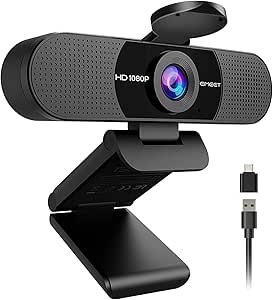 | Best Overall for Versatile Home and Office Streaming | Resolution: 1920x1080p | Lens Type: Wide Angle | Field of View: 90° | VIEW ON AMAZON | See Our Full Breakdown |
| EMEET NOVA 4K Webcam for PC, Ultra HD, PDAF Autofocus, Dual Microphones, 73° FOV, Auto Light Correction, Privacy Cover, USB-A |  | Best for High-Resolution Professional Streaming | Resolution: 4K (defaults to 1080P) | Frame Rate: 30FPS | Sensor: CMOS | VIEW ON AMAZON | See Our Full Breakdown |
| Logitech Brio 101 Full HD 1080p Webcam for Streaming and Meetings – Black |  | Best for Environmentally Conscious Users and Basic Streaming | Resolution: 1080p Full HD | Auto-Light Correction: Yes | Privacy Shutter: Yes | VIEW ON AMAZON | See Our Full Breakdown |
| EMEET PIXY Dual-Camera AI-Powered 4K PTZ Webcam with AI Tracking and Autofocus |  | Best for Dynamic, AI-Driven Live Streaming | Sensor Type: SONY 1/2.55” | Features: AI Tracking, PTZ, Gesture Control | Connectivity Technology: USB 2.0 C-C | VIEW ON AMAZON | See Our Full Breakdown |
| Acer A640 4K Webcam for PC with Sony Sensor, Autofocus, AI Noise Canceling Mic, 2K/1080P/60fps, USB-C Adapter, Privacy Shutter |  | Best for High-Resolution, Professional-Grade Streaming | Sensor: Sony 1/2.8-inch | Resolution: 4K at 30fps, 2K/1080p at 60fps | Autofocus: PDAF | VIEW ON AMAZON | See Our Full Breakdown |
| OBSBOT Meet SE 1080P 100FPS Webcam for PC, AI Framing Streaming Camera, Space Grey |  | Best for High-Fidelity Streaming and AI Integration | Sensor: 1/2.8″ Stacked CMOS | Frame Rates: 1080P@100FPS, 60FPS, 720P@150FPS | Color: Space Grey | VIEW ON AMAZON | See Our Full Breakdown |
| Insta360 Link 2C 4K Webcam for PC/Mac with Auto Framing and HDR |  | Best for Versatile 4K Quality with Creative Modes | Sensor: 1/2″ | Resolution: 4K | HDR: Yes | VIEW ON AMAZON | See Our Full Breakdown |
| NexiGo N60 1080P Webcam with Microphone, Privacy Cover, and Plug and Play Compatibility |  | Best for Budget-Conscious Users Needing Reliable Video | Resolution: 1920 x 1080 at 30fps | Lens: 3.6mm glass lens | Microphone: Built-in noise-canceling | VIEW ON AMAZON | See Our Full Breakdown |
| Logitech MX Brio Ultra HD 4K Webcam – Graphite |  | Best for Professional-Grade 4K Streaming and Collaboration | Resolution: 4K at 30fps | Sensor: Large pixels (70% bigger) | Microphones: Dual beamforming noise-reducing | VIEW ON AMAZON | See Our Full Breakdown |
| Logitech 4K Webcam |  | Best for Ultra-High-Resolution Streaming on a Budget | Resolution: 4K HD | Zoom: 5x | Field of View: 90°, 78°, 65° | VIEW ON AMAZON | See Our Full Breakdown |
| Logitech C922 Pro Stream Webcam 1080P for HD Video Streaming & Recording |  | Best Overall for Versatile Streaming and Recording | Resolution: 1080P | Microphone: Built-in stereo microphone | Compatibility: Windows 7/8/10, Mac OS 10.10+, Android 5.0+, Chrome OS | VIEW ON AMAZON | See Our Full Breakdown |
| EMEET C60E Dual-Camera 4K Webcam for Streaming, Wide-Angle & Telephoto, Max 11X Hybrid Zoom, PDAF Autofocus, Remote Control, RGB Lighting, 2 Mics |  | Best for Versatile Multi-Angle Streaming and Creative Control | Sensor Type: CMOS | Resolution: 4K | Features: 2 Mics, RGB Lighting, Remote Control, Dual Cameras | VIEW ON AMAZON | See Our Full Breakdown |
| EMEET S600 4K Webcam for Streaming, Sony 1/2.55” Sensor, PDAF Autofocus, 1080P@60FPS, Noise Reduction Mics, Privacy Cover, 73° FOV |  | Best for High-Quality Clarity with Autofocus and Noise Reduction | Sensor: Sony 1/2.55” | Resolution: 4K at 30FPS, 1080P at 60FPS | Autofocus: PDAF | VIEW ON AMAZON | See Our Full Breakdown |
| AOC 4K Webcam for PC, Streaming Computer Camera with Noise-Canceling Mic, 90° FOV, Privacy Cover, Plug & Play, Compatible with Zoom/Skype/FaceTime, Includes USB C-A Adapter |  | Best for Wide-Angle, High-Resolution Streaming with Easy Setup | Resolution: 4K Ultra HD | Field of View: 90° | Connectivity: USB-C & USB-A | VIEW ON AMAZON | See Our Full Breakdown |
| 4K Webcam with Microphone for PC & Streaming |  | Best for Affordable 4K Streaming with Autofocus and Low-Light Correction | Resolution: 4K at 30fps / 1080p at 60fps | Sensor: 1/2.5″ CMOS | Aperture: f/1.78 | VIEW ON AMAZON | See Our Full Breakdown |
| webcams for streaming | Resolution |
|---|---|
| EMEET C960 1080P Webcam with M | 1920x1080p |
| EMEET NOVA 4K Webcam for PC | 4K (defaults to 1080P) |
| Logitech Brio 101 Full HD 1080 | 1080p Full HD |
| EMEET PIXY Dual-Camera AI-Powe | — |
| Acer A640 4K Webcam for PC wit | 4K at 30fps, 2K/1080p at 60fps |
| OBSBOT Meet SE 1080P 100FPS We | — |
| Insta360 Link 2C 4K Webcam for | 4K |
| NexiGo N60 1080P Webcam with M | 1920 x 1080 at 30fps |
| Logitech MX Brio Ultra HD 4K W | 4K at 30fps |
| Logitech 4K Webcam | 4K HD |
| Logitech C922 Pro Stream Webca | 1080P |
| EMEET C60E Dual-Camera 4K Webc | 4K |
| EMEET S600 4K Webcam for Strea | 4K at 30FPS, 1080P at 60FPS |
| AOC 4K Webcam for PC | 4K Ultra HD |
| 4K Webcam with Microphone for | 4K at 30fps / 1080p at 60fps |
More Details on Our Top Picks
EMEET C960 1080P Webcam with Microphone, 2 Mics, 90° FOV, USB Plug & Play for Video Calls
This webcam stands out for delivering sharp 1080p video with a wide 90° field of view, making it a strong choice for both professional work and casual streaming. Its built-in omnidirectional microphones ensure clear audio, which is essential for engaging live streams. Unlike the Logitech Brio 101, which focuses more on high-end features, the C960 emphasizes ease of use and affordability, though it lacks advanced zoom or facial tracking. The automatic light correction helps maintain good image quality in varied lighting conditions, but it still performs best with decent ambient lighting. Its plug-and-play USB setup offers broad compatibility, but it doesn’t support Windows Hello facial recognition, unlike some higher-end models. Overall, this webcam is ideal for users needing reliable, straightforward streaming without complex features, but it isn’t suited for high-security or very low-light environments.
Pros:- Sharp 1080p video with a wide 90° viewing angle
- Built-in omnidirectional microphones for clear audio
- Automatic light correction improves image quality in various lighting conditions
- Plug-and-play USB connectivity with broad OS compatibility
Cons:- Lacks Windows Hello facial recognition support
- Requires good lighting for optimal video quality
- Limited to Windows, macOS, and Android TV; not compatible with some streaming platforms
Best for: Streamers and remote workers seeking a dependable, easy-to-set-up webcam for daily video calls and casual streaming.
Not ideal for: Content creators who require advanced auto framing, facial tracking, or 4K resolution for professional production.
- Resolution:1920x1080p
- Lens Type:Wide Angle
- Field of View:90°
- Focus:Fixed focus (11.8–118.1 inches)
- Microphones:2 omnidirectional microphones
- Connectivity:USB Type-A & A-to-C adapter
Our verdict“This webcam suits users who want a reliable, versatile option for everyday streaming and video calls without extra frills.”
EMEET NOVA 4K Webcam for PC, Ultra HD, PDAF Autofocus, Dual Microphones, 73° FOV, Auto Light Correction, Privacy Cover, USB-A
The EMEET NOVA 4K webcam excels at delivering crisp, detailed video in 4K resolution, making it ideal for professional presentations or high-quality streaming. Its PDAF autofocus ensures sharp images even during movement, outperforming the fixed-focus EMEET C960. The dual microphones provide better audio clarity than basic single-mic setups, and the adjustable stand with 360° rotation offers flexible mounting options. However, unlike the Logitech Brio, which supports multiple platform integrations, the NOVA defaults to 1080p unless software is used to access full 4K, adding a slight setup barrier. Its privacy cover adds security, but the lack of wireless connectivity limits mobility. This pick makes the most sense for users who prioritize ultra-high definition visuals and precise autofocus over plug-and-play simplicity, but it may require more setup effort.
Pros:- Stunning 4K video quality with 30FPS for sharp, detailed streams
- PDAF autofocus maintains clarity during movement
- Dual microphones improve audio quality over single-mic models
- Flexible, 360° adjustable stand with privacy cover
Cons:- Video defaults to 1080p unless software is used to enable 4K
- Requires software to access full 4K capabilities, complicating quick setups
- No wireless or Wi-Fi options for increased mobility
Best for: Content creators and professionals needing exceptional image detail and autofocus for streaming, online teaching, or virtual conferences.
Not ideal for: Casual users or streamers who prefer simple plug-and-play webcams with minimal setup and lower resolution needs.
- Resolution:4K (defaults to 1080P)
- Frame Rate:30FPS
- Sensor:CMOS
- Field of View:73°
- Autofocus:PDAF
- Microphones:Dual omni-directional
Our verdict“Best suited for users who need top-tier image quality and autofocus for professional-grade streaming, willing to handle a slightly more involved setup process.”
Logitech Brio 101 Full HD 1080p Webcam for Streaming and Meetings – Black
The Logitech Brio 101 offers dependable 1080p video with auto-light correction, making it a solid choice for everyday streaming and video conferencing. Its privacy shutter adds a security layer, and its plug-and-play setup is straightforward across most platforms. Compared with the EMEET C960, the Brio 101 emphasizes environmental sustainability by using 77% recycled plastic, appealing to eco-minded buyers. However, it lacks higher resolutions like 4K or dual microphones, limiting its appeal for users seeking ultra-high-definition content or richer audio. Its basic zoom and framing controls are software-dependent, which may pose a barrier for quick adjustments. This webcam is best for users who prioritize ease of use, security, and eco-friendliness over advanced features or professional-grade quality.
Pros:- Reliable 1080p video with auto-light correction
- Privacy shutter for security and peace of mind
- Easy setup with broad compatibility
- Made with 77% recycled plastic for sustainability
Cons:- No 4K or ultra-high-definition option
- Limited zoom and framing adjustments without software
- Basic microphone features without noise cancellation
Best for: Remote workers and casual streamers prioritizing simplicity, security, and eco-friendly materials in their setup.
Not ideal for: High-end content creators or professional streamers who require 4K resolution and advanced audio features for production quality.
- Resolution:1080p Full HD
- Auto-Light Correction:Yes
- Privacy Shutter:Yes
- Built-In Microphone:Yes
- Connection:USB-A
- Material:77% recycled plastic
Our verdict“Ideal for users who want a straightforward, secure webcam with decent quality and eco-conscious design for everyday streaming and meetings.”
EMEET PIXY Dual-Camera AI-Powered 4K PTZ Webcam with AI Tracking and Autofocus
The EMEET PIXY stands out for its innovative dual-camera setup with AI-powered tracking, delivering smooth, professional-quality video that adapts to movement. Its fast PDAF and AI autofocus keep subjects sharp during live streams or online teaching, surpassing static models like the C960 or Brio in dynamic environments. The 3-mic array captures clear, noise-reduced audio, making it well-suited for interactive sessions. However, it’s incompatible with Windows Hello facial recognition and depends on Windows 10+ or macOS 10.14+, which could limit ease of use for some. While it offers advanced features like gesture control and presets, the complexity might be unnecessary for basic streamers. This model is perfect for streamers or educators who want AI-driven automation and versatile camera angles for engaging content, but it’s overkill for simple calls.
Pros:- Dual-camera system with AI tracking for dynamic framing
- Fast PDAF autofocus ensures sharp images during movement
- Gesture control and preset options add convenience during live streams
- Built-in 3-mic array provides clear, noise-canceling audio
Cons:- Incompatible with Windows Hello facial recognition
- Requires Windows 10+ or macOS 10.14+ for full functionality
- More complex setup and configuration than basic webcams
Best for: Content creators, educators, and streamers needing advanced AI tracking and multiple camera angles for engaging, professional livestreams.
Not ideal for: Casual users or those seeking a straightforward webcam without AI features or pan-tilt controls, as setup is more involved.
- Sensor Type:SONY 1/2.55”
- Features:AI Tracking, PTZ, Gesture Control
- Connectivity Technology:USB 2.0 C-C
- Viewing Angle:73°
- Maximum FHD Pixels:Not specified
- Microphone:3 Mic Array
Our verdict“Best suited for streamers and educators who want AI-enhanced automation and multiple perspectives for professional-quality broadcasts, accepting a steeper setup curve.”
Acer A640 4K Webcam for PC with Sony Sensor, Autofocus, AI Noise Canceling Mic, 2K/1080P/60fps, USB-C Adapter, Privacy Shutter
The Acer A640 offers a compelling combination of 4K video clarity and fast autofocus, making it ideal for content creators and professionals who demand top image quality. Its Sony sensor ensures vibrant detail, and the AI noise-canceling microphone enhances audio clarity even in noisy environments. Compared to the NOVA, which defaults to 1080p, the A640’s true 4K capability delivers sharper visuals for high-end streaming or recording. Its support for multiple resolutions, including 2K and 1080p at 60fps, provides flexibility for various platforms. However, it requires a USB-C adapter for some devices, which could be a minor inconvenience. Its automatic low-light correction helps, but performance in very dim settings might still fall short of dedicated studio setups. Overall, this webcam is best for users wanting professional-level quality in a straightforward, plug-and-play package.
Pros:- High-quality 4K resolution with vibrant detail
- Fast phase detection autofocus for sharp images
- AI noise-canceling microphone enhances audio clarity
- Supports multiple resolutions including 2K/1080p at 60fps
Cons:- Requires USB-C adapter for some devices
- Limited information on performance in extreme low-light conditions
- Higher price point compared to standard 1080p webcams
Best for: Professional streamers, remote workers, and content creators needing high-resolution output with reliable autofocus and noise reduction.
Not ideal for: Casual users or those with older laptops without USB-C ports, as they may face compatibility issues or need extra adapters.
- Sensor:Sony 1/2.8-inch
- Resolution:4K at 30fps, 2K/1080p at 60fps
- Autofocus:PDAF
- Microphone:AI Noise Canceling Mic
- Connectivity:USB-C (with adapter)
Our verdict“Best for users who want professional-grade 4K streaming with reliable autofocus and audio in a simple, high-quality package, willing to handle compatibility considerations.”
OBSBOT Meet SE 1080P 100FPS Webcam for PC, AI Framing Streaming Camera, Space Grey
The OBSBOT Meet SE stands out for its incredible 1080P at 100FPS, delivering exceptionally smooth video that is ideal for fast-paced content like gaming or lively streams. Its AI-powered framing and gesture control simplify setup and operation, making it a strong choice for creators who want intelligent focus on themselves or groups. Compared to the Logitech Brio, which offers 4K resolution but at lower frame rates, the Meet SE prioritizes ultra-smooth motion, though it requires OBSBOT’s software for full functionality, which could add complexity. Its excellent low-light performance ensures reliable quality even in dim environments. The main tradeoff is limited color options and the need for proprietary software to unlock all features, which might be a barrier for some users. This webcam is perfect for streamers who need high fps and AI features for dynamic content, but less so for those prioritizing native 4K resolution or plug-and-play simplicity.Pros:- High frame rate delivers ultra-smooth video at 100FPS
- AI framing automatically keeps subjects centered
- Gesture control for hands-free operation
- Excellent low-light performance
Cons:- Requires OBSBOT software for full feature access
- Limited to Space Grey color, no customization
Best for: Streamers and content creators focusing on fluid motion and AI-driven framing in varied lighting conditions.
Not ideal for: Users who prefer a simple, no-software setup or need native 4K resolution for professional productions.
- Sensor:1/2.8″ Stacked CMOS
- Frame Rates:1080P@100FPS, 60FPS, 720P@150FPS
- Color:Space Grey
- Connectivity:USB-C
- Features:AI Framing, Gesture Control, Beauty Mode, HDR, Dynamic Color Range
Our verdict“This webcam is ideal for streamers who prioritize high frame rates and AI features over native 4K resolution.”
Insta360 Link 2C 4K Webcam for PC/Mac with Auto Framing and HDR
The Insta360 Link 2C provides a robust 4K video experience, making it a prime choice for creators who need crisp visuals with HDR support. Its AI auto framing and gesture control elevate the user experience, especially for streamers who switch between gaming, professional work, and creative projects. Unlike the Logitech MX Brio, which offers adjustable white balance and lighting but only up to 1080p, the Link 2C’s 4K resolution and modes like DeskView set it apart. However, it’s incompatible with ARM-based Windows systems and currently lacks Windows Hello support, limiting its use in some environments. This webcam is best suited for users seeking high-resolution, flexible modes, and AI-driven features, but less so for those on Windows systems with ARM chips or seeking seamless Windows Hello integration.Pros:- Sharp 4K video with HDR enhances visual quality
- Auto framing and gesture control for flexible content creation
- Specialized modes like DeskView and Whiteboard for creative use
- AI noise-canceling microphone improves audio clarity
Cons:- Not compatible with ARM-based Windows systems
- Limited support for Windows Hello Face Recognition
Best for: Content creators and streamers who want high-resolution, versatile modes, and AI features for professional or creative use.
Not ideal for: Users with ARM-based Windows devices or those requiring Windows Hello Face Recognition.
- Sensor:1/2″
- Resolution:4K
- HDR:Yes
- Auto Framing:Yes
- AI Noise-Canceling Mic:Yes
- Modes:DeskView, Whiteboard
Our verdict“This webcam is best for users who prioritize 4K resolution and creative modes over broad OS compatibility.”
NexiGo N60 1080P Webcam with Microphone, Privacy Cover, and Plug and Play Compatibility
The NexiGo N60 offers solid 1080P video quality with a built-in noise-canceling microphone, making it a reliable choice for everyday streaming and video calls. Its broad compatibility and plug-and-play design appeal to users seeking hassle-free setup across multiple OS platforms. Compared to the Logitech C922, which offers similar resolution but with more advanced autofocus and lighting adjustments, the N60’s simplicity is a plus for beginners but may lack some finesse in image quality. Its privacy cover adds a security layer, yet it doesn’t feature advanced AI or auto-framing, limiting its appeal for high-end streaming. This webcam works well for casual streamers and remote workers who want dependable quality without complexity but isn’t suited for professional or high-motion content.Pros:- Reliable 1080P video with clear image quality
- Built-in noise-canceling microphone improves audio
- Plug-and-play compatibility across diverse OS
- Privacy cover enhances security
Cons:- Limited to 1080P, not suitable for 4K needs
- No advanced auto-framing or AI features
Best for: Casual streamers and remote workers seeking dependable HD video with easy setup.
Not ideal for: Power users or professional streamers who need advanced autofocus, auto framing, or 4K resolution.
- Resolution:1920 x 1080 at 30fps
- Lens:3.6mm glass lens
- Microphone:Built-in noise-canceling
- Compatibility:USB 2.0/3.0, Windows, Mac, Linux, Android
- Privacy Cover:Yes
Our verdict“This webcam is a practical choice for users who need straightforward, dependable HD streaming without extra fuss.”
Logitech MX Brio Ultra HD 4K Webcam – Graphite
The Logitech MX Brio excels with its 4K resolution and AI-enhanced image quality, making it ideal for professional streaming and video conferencing. Its adjustable white balance, lighting controls, and dual noise-reducing microphones provide a polished experience, especially compared to less feature-rich webcams like the Logitech C922. However, its high price and complex setup can be barriers for casual users or beginners. The requirement of USB-C, sometimes needing adapters for older ports, adds to the setup considerations. This camera is best suited for professionals or serious streamers who want top-tier image quality and customizable controls, but it may be overkill for casual or occasional streamers.Pros:- Ultra HD 4K resolution with AI image enhancements
- Adjustable white balance and lighting controls
- Dual noise-reducing microphones for clear audio
- Privacy cover for security
Cons:- High price point may be prohibitive
- Setup complexity can challenge beginners
Best for: Professionals and serious streamers seeking high-quality 4K video with advanced controls and AI enhancements.
Not ideal for: Budget-conscious users or beginners who prefer simple plug-and-play solutions without extensive setup.
- Resolution:4K at 30fps
- Sensor:Large pixels (70% bigger)
- Microphones:Dual beamforming noise-reducing
- Compatibility:Windows, macOS, Chrome OS, Linux
- Features:Show Mode, AI-enhanced image, adjustable lighting, privacy cover
Our verdict“This webcam is best for users who need premium 4K quality and advanced customization for professional or high-end streaming.”
Logitech 4K Webcam
The Logitech 4K Webcam offers impressive 4K resolution, making it appealing for those who want ultra-sharp images without investing in high-end equipment. Its 5x zoom and multiple field of view options add versatility, especially compared to the older Logitech C922, which only offers 1080P. However, as a discontinued product, it faces limited support and availability, which could be a concern for long-term use. Its setup is straightforward, but some users may find the configuration options overwhelming or unnecessary for casual streaming. This webcam is suited for professionals or hobbyists who prioritize maximum resolution and zoom flexibility but are comfortable with a product that may be harder to find and support.Pros:- Exceptional 4K resolution for sharp, detailed images
- 5x HD zoom for framing flexibility
- Multiple preset FOV options
- Auto light adjustment and noise-canceling microphones
Cons:- Discontinued, limited support options
- Setup may be complex for some users
Best for: Users aiming for ultra-high-resolution streams with zoom flexibility, willing to handle a potentially limited product lifecycle.
Not ideal for: Casual users or those seeking the latest model with full support and compatibility.
- Resolution:4K HD
- Zoom:5x
- Field of View:90°, 78°, 65°
- Frame Rate:Up to 90 fps
- Privacy Shade:Yes
Our verdict“This webcam is ideal for those who need high-resolution, zoom, and flexibility, accepting potential support limitations due to its discontinued status.”
Logitech C922 Pro Stream Webcam 1080P for HD Video Streaming & Recording
The Logitech C922 stands out for delivering reliable 1080P HD video quality with excellent low-light performance, making it suitable for professional streamers and content creators. Its compatibility across multiple operating systems, coupled with a built-in stereo microphone, ensures clear audio and seamless integration into most streaming setups. Compared to the Logitech Brio 101, it offers comparable resolution but at a more accessible price point, though the Brio’s 4K capabilities provide sharper detail if higher resolution is needed. The C922’s main tradeoff is that being a renewed product might limit warranty coverage, and some users may find it requires additional software to unlock full features. This pick is ideal for streamers who want dependable HD quality without the complexity of higher-end webcams.
Pros:- High-definition 1080P video quality with smooth streaming
- Excellent performance in low-light conditions
- Broad OS compatibility including Windows, Mac, Android, and Chrome OS
- Built-in stereo microphone for clear audio
Cons:- Renewed product may have limited warranty coverage
- Requires compatible software for accessing advanced features
Best for: Content creators and streamers needing reliable 1080P HD video with good low-light performance.
Not ideal for: Professional videographers who require 4K resolution and advanced features, since this model is optimized for streaming rather than cinematic quality.
- Resolution:1080P
- Microphone:Built-in stereo microphone
- Compatibility:Windows 7/8/10, Mac OS 10.10+, Android 5.0+, Chrome OS
- Use:Streaming, recording, video calls
Our verdict“A dependable choice for streamers seeking solid HD quality and compatibility across platforms.”
EMEET C60E Dual-Camera 4K Webcam for Streaming, Wide-Angle & Telephoto, Max 11X Hybrid Zoom, PDAF Autofocus, Remote Control, RGB Lighting, 2 Mics
The EMEET C60E excels in offering dual-camera views with 4K resolution, providing a flexible tool for streamers who want both wide-angle and telephoto perspectives. Its smart control via remote and software allows for quick adjustments, making it suitable for professional presentations or dynamic content. The RGB lighting adds an aesthetic touch, setting it apart from simpler webcams like the AOC 4K Webcam. However, its zoom feature does not support 4K or 60FPS modes, which limits some high-speed streaming needs, and it’s incompatible with Chrome OS. The limited water resistance isn’t a concern for most indoor streaming setups but could matter in specific environments. This webcam is ideal for creators who value multi-angle content and aesthetic customization.
Pros:- Dual-camera setup offers versatile wide-angle and telephoto views
- Remote control and software for flexible adjustments
- Vibrant RGB lighting enhances visual appeal
- Clear audio with dual microphones
Cons:- Zoom isn’t supported in 4K/60FPS modes
- Incompatibility with Chrome OS limits use outside Windows and Mac
Best for: Streamers and professionals wanting multi-view content with easy control options.
Not ideal for: Casual users or those needing high-speed 4K video at 60FPS, due to zoom and mode limitations.
- Sensor Type:CMOS
- Resolution:4K
- Features:2 Mics, RGB Lighting, Remote Control, Dual Cameras
- Viewing Angle:73 degrees
Our verdict“Best suited for streamers who prioritize multi-view content and aesthetic features over ultra-high-speed modes.”
EMEET S600 4K Webcam for Streaming, Sony 1/2.55” Sensor, PDAF Autofocus, 1080P@60FPS, Noise Reduction Mics, Privacy Cover, 73° FOV
The EMEET S600 offers a compelling mix of 4K resolution and fast 1080P 60FPS streaming, powered by a Sony sensor that ensures crisp visuals. Its PDAF autofocus keeps images sharp, while noise-reduction microphones improve audio clarity, making it suitable for gaming, professional streaming, or content creation. Compared to the Logitech C922, which emphasizes affordability and broad compatibility, the S600 leans toward higher image quality and advanced autofocus but at the expense of some software customization. Its fixed FOV at 4K can limit framing flexibility, and some features depend on software settings. This webcam makes sense for users prioritizing high resolution and autofocus in their streams, especially when clarity is paramount.
Pros:- Crisp 4K video quality with detailed clarity
- PDAF autofocus for consistently sharp images
- Effective noise-canceling microphones
- Easy plug-and-play setup with broad OS support
Cons:- Video resolution can depend on software settings
- Fixed FOV at 4K limits framing options
- Some features require software customization
Best for: Streamers and content creators demanding sharp 4K visuals with fast autofocus and noise reduction.
Not ideal for: Users with limited hardware resources or seeking flexible FOV options, due to fixed 4K framing.
- Sensor:Sony 1/2.55”
- Resolution:4K at 30FPS, 1080P at 60FPS
- Autofocus:PDAF
- Microphones:Noise reduction, dual microphones
- Field of View:73°
Our verdict“Ideal for streamers prioritizing high-resolution, autofocus, and clear audio in a straightforward setup.”
AOC 4K Webcam for PC, Streaming Computer Camera with Noise-Canceling Mic, 90° FOV, Privacy Cover, Plug & Play, Compatible with Zoom/Skype/FaceTime, Includes USB C-A Adapter
The AOC 4K Webcam offers high-resolution ultra HD video combined with a broad 90° field of view, making it a strong choice for professional or group streaming. Its plug-and-play setup with USB-C and USB-A compatibility simplifies integration into various systems. The included privacy cover adds security, and the noise-canceling microphone improves audio quality. Unlike the EMEET S600, which emphasizes resolution and autofocus, the AOC focuses on wide framing and ease of use. However, it lacks advanced image stabilization or built-in lighting, which could limit performance in less controlled environments. This webcam suits users who want a straightforward, high-res, wide-angle camera for meetings and streaming without complex features.
Pros:- High-resolution 4K video quality for professional clarity
- Wide 90° FOV for group streaming or multiple participants
- Includes privacy cover for security
- Universal USB-C and USB-A compatibility
Cons:- No built-in lighting or advanced stabilization features
- Limited portability due to USB connection dependence
Best for: Professionals and educators needing wide-angle, high-resolution video for group calls and streaming.
Not ideal for: Streamers requiring advanced stabilization or low-light performance, as this model lacks those features.
- Resolution:4K Ultra HD
- Field of View:90°
- Connectivity:USB-C & USB-A
- Microphone:Noise-canceling
Our verdict“Best for users who need wide-angle, high-res video with straightforward setup for professional or group streaming.”
4K Webcam with Microphone for PC & Streaming
The 4K Webcam with Microphone offers a versatile solution for streamers who want high-quality video with minimal fuss. Its autofocus and low-light correction help produce clear images even in less ideal environments. Dual noise-canceling microphones enhance audio clarity, making it suitable for both casual and professional streaming. Compared to the EMEET S600, which emphasizes high-end sensor and autofocus, this model balances resolution with affordability and simple setup. The main drawback is that it requires a USB-A port, which might be inconvenient for users with newer USB-C-only systems, and some may find the hardware demanding for 4K streaming on lower-end PCs. It’s a compelling choice for those wanting crisp 4K visuals without extensive customization.
Pros:- High-quality 4K video with good low-light performance
- Fast autofocus and smart light correction
- Dual noise-canceling microphones for clear audio
- Flexible mounting options and easy setup
Cons:- Requires USB-A port, may need adapters
- 4K streaming can be demanding on hardware
- Price is not specified, which might influence decision
Best for: Streamers seeking high-resolution 4K video with autofocus and noise-canceling audio on a flexible, easy-to-use platform.
Not ideal for: Users with only USB-C ports or lower-spec hardware that may struggle with 4K streaming demands.
- Resolution:4K at 30fps / 1080p at 60fps
- Sensor:1/2.5″ CMOS
- Aperture:f/1.78
- Field of View:80 degrees
- Microphones:Dual noise-canceling
Our verdict“Perfect for streamers wanting sharp 4K visuals with autofocus and noise reduction in a straightforward package.”

How We Picked
To create this list, I evaluated webcams based on performance, build quality, ease of installation, and value for streaming. Priority was given to image clarity, frame rate, and autofocus capabilities, as these directly impact streaming quality. Compatibility with common streaming platforms like Twitch, YouTube, and Zoom was also considered. Additionally, I looked at user feedback for reliability and ease of use, especially for those new to streaming. The ranking reflects a balance between high-end features and affordability, ensuring options suit various skill levels and budgets.
Factors to Consider When Choosing Webcams For Streaming
Choosing the right webcam for streaming involves more than just resolution. Several factors influence how well a camera performs in real-world scenarios, from setup simplicity to additional features like auto framing. Considering these aspects helps avoid common pitfalls, such as overpaying for unnecessary features or selecting a model incompatible with your system. Here are key considerations to keep in mind when selecting a webcam for your streaming needs.
Resolution and Frame Rate
Higher resolution webcams, like 4K models, provide sharper images, especially useful for professional streams or recordings. However, they require more processing power and higher bandwidth. Frame rate is equally important; 60fps delivers smoother motion, essential for fast-paced gaming or lively chat sessions. Balance your needs with your system’s capabilities, as higher specs demand better hardware and internet speeds.
Auto Focus and Auto Framing
Auto focus ensures your camera keeps you sharp even if you move around, while auto framing or AI tracking keeps you centered automatically. These features are especially valuable for streamers who switch scenes or move during their content. However, they often come at a higher cost and can sometimes produce jittery results if not implemented well. Consider your activity level and budget when prioritizing these features.
Build Quality and Ease of Use
Streamers who prefer quick, straightforward setups should look for plug-and-play models with sturdy mounts and simple interfaces. More advanced cameras might offer extensive controls or customizable settings but can be intimidating for beginners. Durability and reliable connectivity also matter—poorly built webcams may fail during a live session, disrupting your stream.
Audio Features
Many webcams include built-in microphones, but their quality varies. For clear audio, look for models with noise-canceling or dual microphones. Some streamers prefer separate audio setups, but integrated mics offer convenience. Remember, good sound quality is often just as important as video clarity for engaging your audience.
Price and Value
Premium webcams with 4K resolution and AI features come at a higher price but can significantly improve stream quality. Budget options might suffice for casual streaming or video calls, but compromise on features like autofocus or low-light performance. Consider your streaming frequency, content quality expectations, and budget to find the best value without overspending on unnecessary extras.
Frequently Asked Questions
Do I need a 4K webcam for streaming?
Not necessarily. While 4K webcams provide sharper images, they also require more bandwidth, powerful hardware, and may not be fully utilized if your streaming platform or internet connection can’t support it. 1080p at 60fps is often sufficient for most streamers, providing a good balance between quality and performance. Consider your specific needs, like professional recording versus casual streaming, before opting for 4K.
Is auto framing necessary for a beginner streamer?
Auto framing can be a helpful feature for those new to streaming, as it keeps you centered without manual adjustments. However, it isn’t essential, especially if you’re comfortable with manual camera positioning. Some auto framing systems can be jumpy or misinterpret scenes, so weigh the convenience against potential distractions or setup complexity. It’s a nice-to-have but not a must for starting out.
Can I use a regular webcam for live streaming?
Yes, many standard webcams are suitable for live streaming, especially models with 1080p resolution and good autofocus. The key is to match your webcam’s capabilities with your streaming goals—casual streaming may not need high-end features, but professional-grade content benefits from 4K resolution and advanced autofocus. Also, ensure your computer and internet connection can handle the higher data demands of better webcams.
How important is low-light performance in a streaming webcam?
Low-light performance significantly impacts image quality, especially if you stream in dimly lit environments or during night sessions. Cameras with HDR or better sensors handle varying lighting conditions more effectively, maintaining clarity and color accuracy. Poor low-light performance can result in grainy images, reducing viewer engagement. Investing in a webcam with good low-light capabilities can elevate your overall stream quality.
Should I prioritize resolution or frame rate?
Both matter, but the importance depends on your content type. For fast-motion activities, such as gaming or sports, a higher frame rate (like 60fps) is more noticeable and smoother. For static or professional content, resolution may take precedence to ensure sharpness. Ideally, choose a webcam that offers a balance—such as 1080p at 60fps—to deliver both clarity and fluid motion for most streaming scenarios.
Conclusion
For casual streamers or beginners, models like the NexiGo N60 or Logitech C922 offer simplicity and good quality at accessible prices. Those seeking a step up for professional or high-quality content should consider the Logitech Brio 101 or AOC 4K Webcam, which deliver sharp images and robust features. Content creators focusing on auto framing and AI tracking may find the Insta360 Link 2C or EMEET PIXY perfect, despite higher costs. Budget-conscious streamers should prioritize ease of use and reliability, while serious broadcasters might invest in premium 4K options with advanced features for the best results.